

Perowin.com is a fraudulent website operating a fake prize and notification abuse scam. The site has no legitimate product or service – its function is to present visitors with fabricated prize winning notifications, collect push notification permissions under the pretense of prize claim steps, and harvest personal and financial data from users who attempt to claim prizes that do not exist. The “勝つ” naming convention shared with similar scam domains is intentional: it primes visitors to expect a prize before the page content loads, increasing the likelihood they will interact with the deceptive prompts the site presents. Perowin.com is not safe. Any data entered on the site, any notification permission granted, and any subscription or verification step completed represents a loss with no corresponding prize delivery.
Sites in this category operate within organized 詐欺 networks that use shared infrastructure – リダイレクトチェーン, push notification abuse platforms, and data collection forms – across multiple domains simultaneously. Perowin.com is one node in such a network. The same infrastructure that routes visitors to Perowin.com operates companion domains with similar naming and identical scam mechanics, and the notification permissions collected are shared or sold across the network, resulting in spam from multiple domains after any interaction with Perowin.com.

| 名前 | Perowin.com |
| 脅威の種類 | 偽賞品詐欺 / プッシュ通知ハイジャッカー / データ収集サイト |
| 検出名 | Adware.PushNotifications.Perowin, PUA:Win32/FakePrize, BrowserModifier:Win32/NotifAbuse |
| 症状 | Fake prize or winning notification page displayed claiming the visitor has won a gift card, cash reward, or device; push notification permission prompt presented as part of the prize claim process; persistent desktop notification spam from Perowin.com following any permission grant; personal information or payment card details requested to ‘claim’ a prize that does not exist; browser redirected to Perowin.com during advertising interactions on other sites |
| 配布方法 | Redirect chains from advertising on adult platforms, 海賊版サイト, フリーウェアポータル; pop-up advertising and interstitial redirects triggering automatically during page loads on low-quality content sites; adware installed through software bundling generating redirect traffic to Perowin.com; push notification spam from other scam domains linking to Perowin.com as a landing page |
| 取り外し時間 | その周り 15 分 |
| 除去ツール | システムがマルウェアの影響を受けているかどうかを確認する
* 無料のリムーバーを使用すると, 48時間の待機期間があります, 見つかった結果に対する1つの修正と削除. SpyHunterのEULA, プライバシーポリシー, と 無料リムーバーに関する詳細情報. |
How Did Perowin.com Appear in My Browser?
Perowin.com reaches users through advertising and redirect infrastructure rather than direct navigation:
- アダルトサイトでの広告からチェーンをリダイレクトする, 海賊版プラットフォーム, フリーウェアポータル – advertising on these properties routes through multi-hop redirect chains with Perowin.com appearing as a landing page. The redirect can trigger automatically when certain page elements load, without any user interaction with advertising content.
- Pop-up and interstitial advertising – pop-up windows and full-page interstitial ads opened on low-quality content sites can load Perowin.com as the destination.
- アドウェアがリダイレクトトラフィックを生成する – browser-modifying software installed through free software bundles can inject Perowin.com redirects into browsing sessions on unrelated sites.
- Push notification spam linking to Perowin.com – notifications from other scam domains in the same network link to Perowin.com as a prize landing page, bringing existing victims of related scams to the site.
What Does Perowin.com Do?
The harmful activity associated with Perowin.com follows the standard fake prize scam pattern:
- Fake prize notification with personalized framing – the page presents a fabricated prize winning notification, often incorporating the visitor’s approximate location, ブラウザの詳細, or visit count to create a false impression of legitimacy. No prize exists and no one has been selected for anything.
- Push notification permission harvesting under prize framing – the notification permission dialog is presented as a required step to claim the prize or receive prize notifications, collecting browser notification consent for ongoing spam delivery. Granting permission does not advance any prize claim.
- Personal data collection through fake claim forms – visitors who proceed through the prize claim flow are presented with forms requesting name, 住所, Eメール, and in some configurations payment card details for a “送料” また “verification charge” that generates fraudulent billing.
- Subscription trap enrollment – some prize claim flows on sites in this category enroll visitors in recurring subscription charges framed as optional competition entry fees.
- Ongoing spam from collected notification permissions – permission granted to Perowin.com enables continuous desktop notification spam promoting further scam pages and prize fraud operations.
How to Remove Perowin.com?
ステップ 1: Revoke the notification permission from your browser
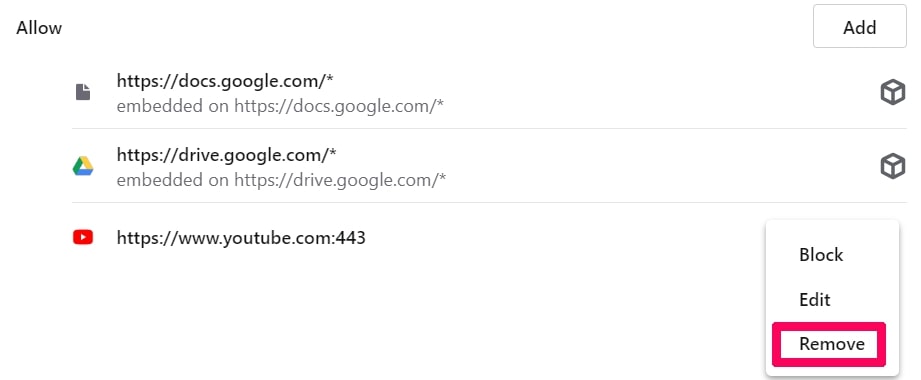
- クロム: 設定 – プライバシーとセキュリティ – サイト設定 – 通知. Find Perowin.com in the Allow list, 三点メニューをクリック, 削除またはブロックを選択.
- Firefox: 設定 – プライバシーとセキュリティ – 権限 – 通知 – 設定. Find Perowin.com, ブロックに変更, 「変更を保存」をクリックしてください。.
- 角: 設定 – クッキーとサイトの権限 – 通知. Find the entry in Allow and click Remove.
- Android Chrome: クロム – 設定 – サイト設定 – 通知 – locate and block Perowin.com.
ステップ 2: Check for fraudulent charges
If any form was completed on Perowin.com requesting payment details, review your card statement immediately for unauthorized charges and contact your card issuer to dispute them and request a new card number.
ステップ 3: リダイレクトを生成するアドウェアをスキャンします
フルシステムスキャンを実行する スパイハンター to detect and remove any adware responsible for routing the browser to Perowin.com and to identify any other potentially unwanted software installed as part of the same distribution campaign.

Ventsislav Krastev
Ventsislavは、SensorsTechForumのサイバーセキュリティの専門家です。 2015. 彼は研究してきました, カバー, 最新のマルウェア感染に加えて、ソフトウェアと最新の技術開発のテストとレビューで被害者を支援します. マーケティングも卒業した, Ventsislavは、ゲームチェンジャーとなるサイバーセキュリティの新しいシフトとイノベーションを学ぶことに情熱を注いでいます. バリューチェーン管理を学んだ後, システムアプリケーションのネットワーク管理とコンピュータ管理, 彼はサイバーセキュリティ業界で彼の本当の呼びかけを見つけ、オンラインの安全性とセキュリティに向けたすべてのユーザーの教育を強く信じています.
フォローしてください:
- ウィンドウズ
- Mac OS X
- グーグルクローム
- Mozilla Firefox
- マイクロソフトエッジ
- サファリ
- インターネットエクスプローラ
- プッシュポップアップを停止します
How to Remove Perowin.com from Windows.
ステップ 1: Scan for Perowin.com with SpyHunter Anti-Malware Tool
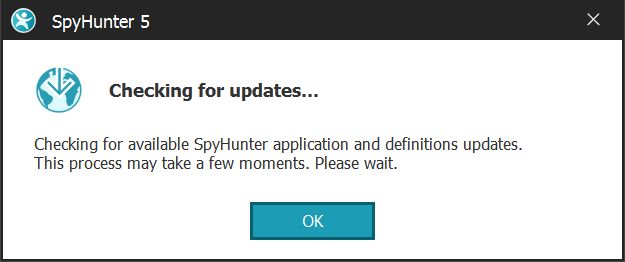
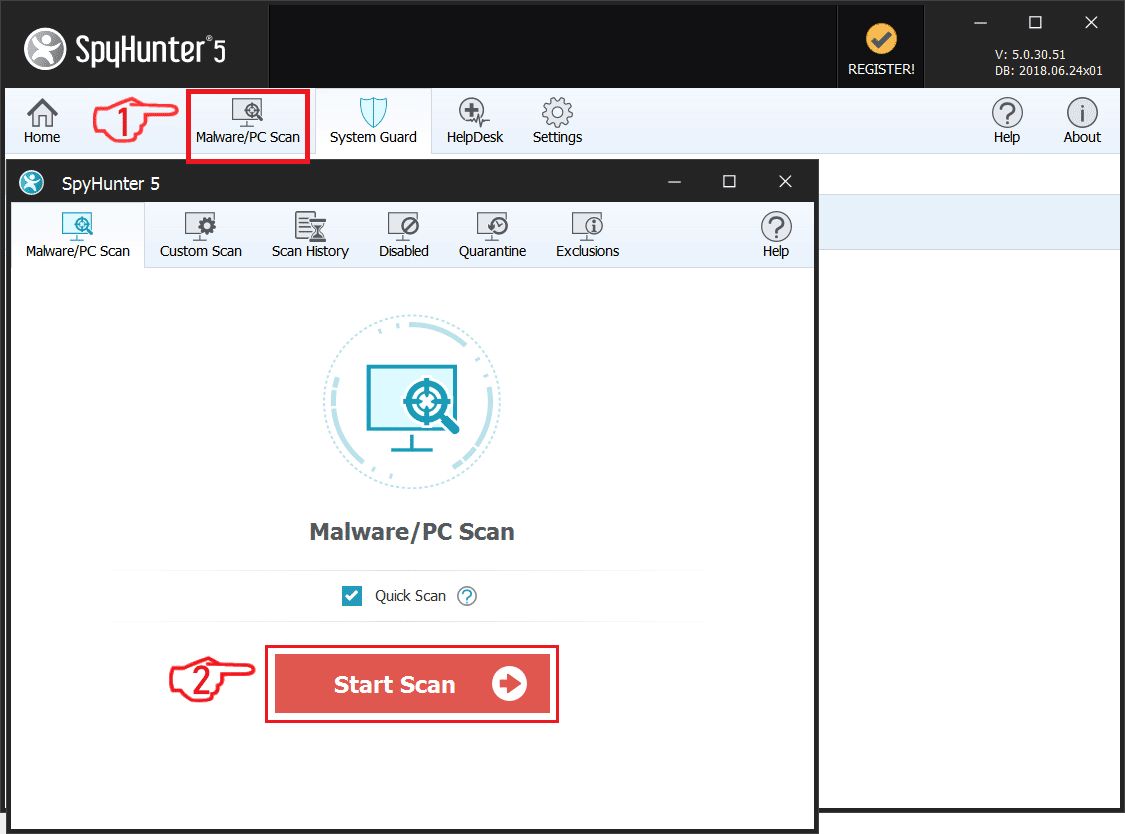
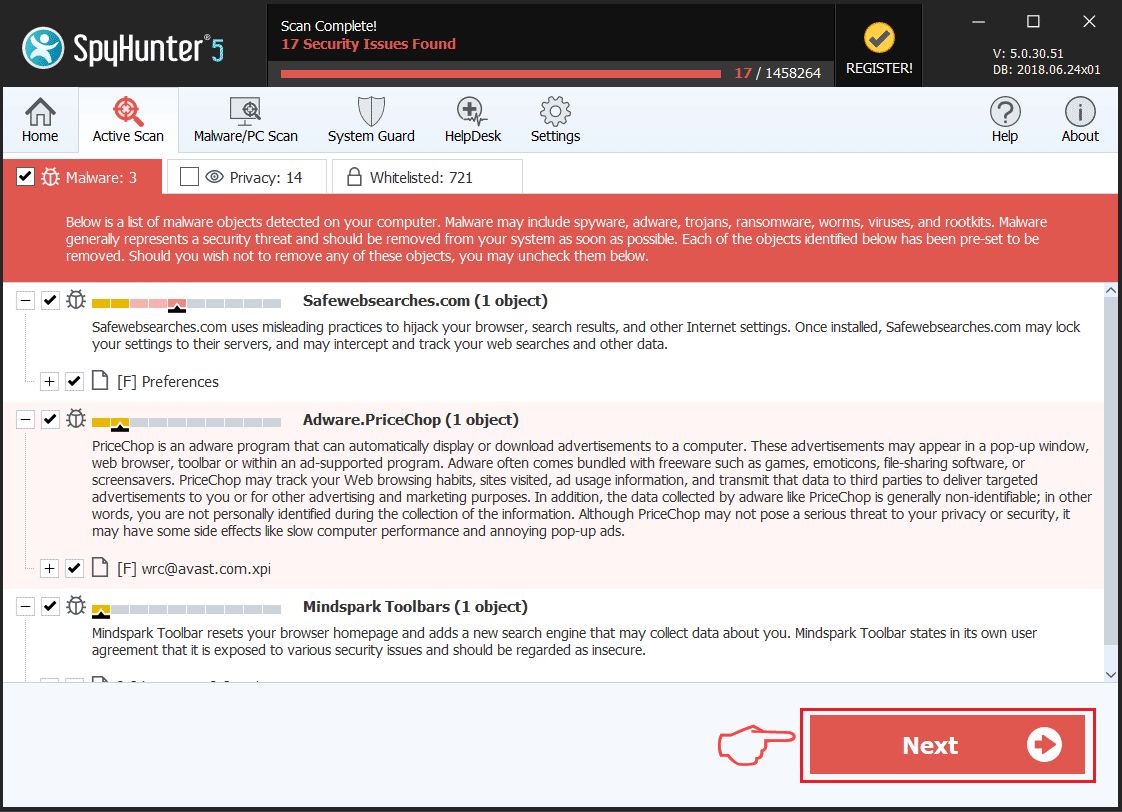
ステップ 2: PC をセーフ モードで起動する
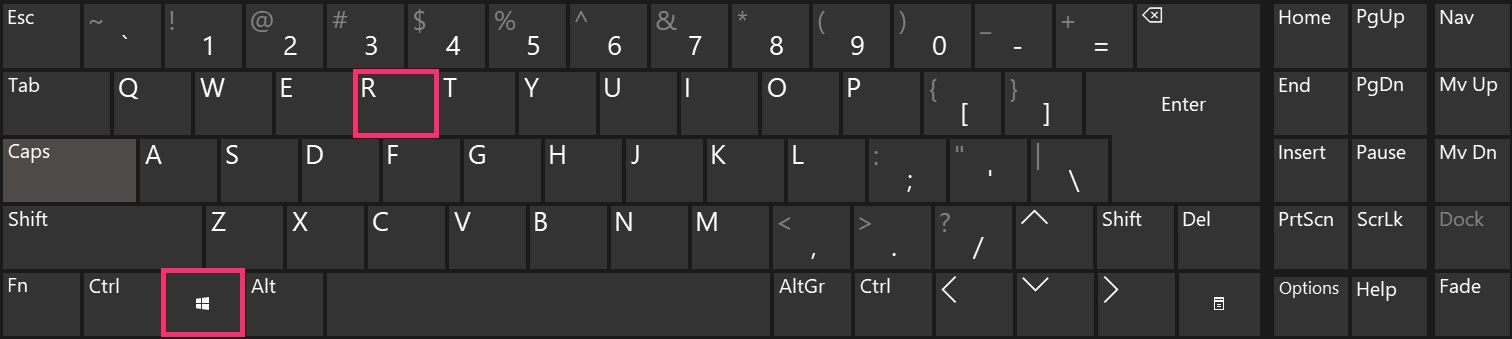
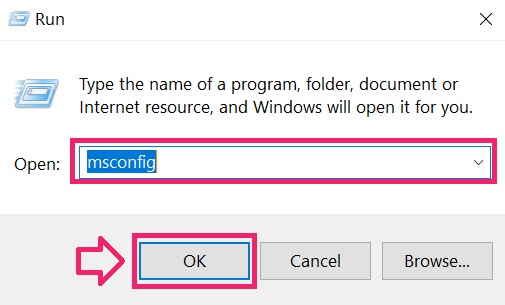
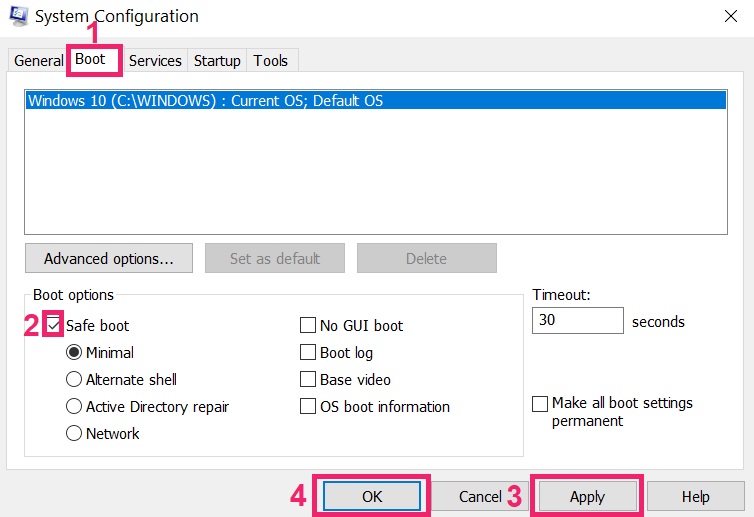
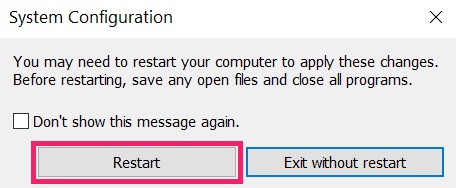
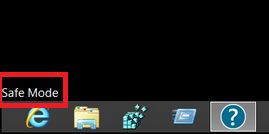
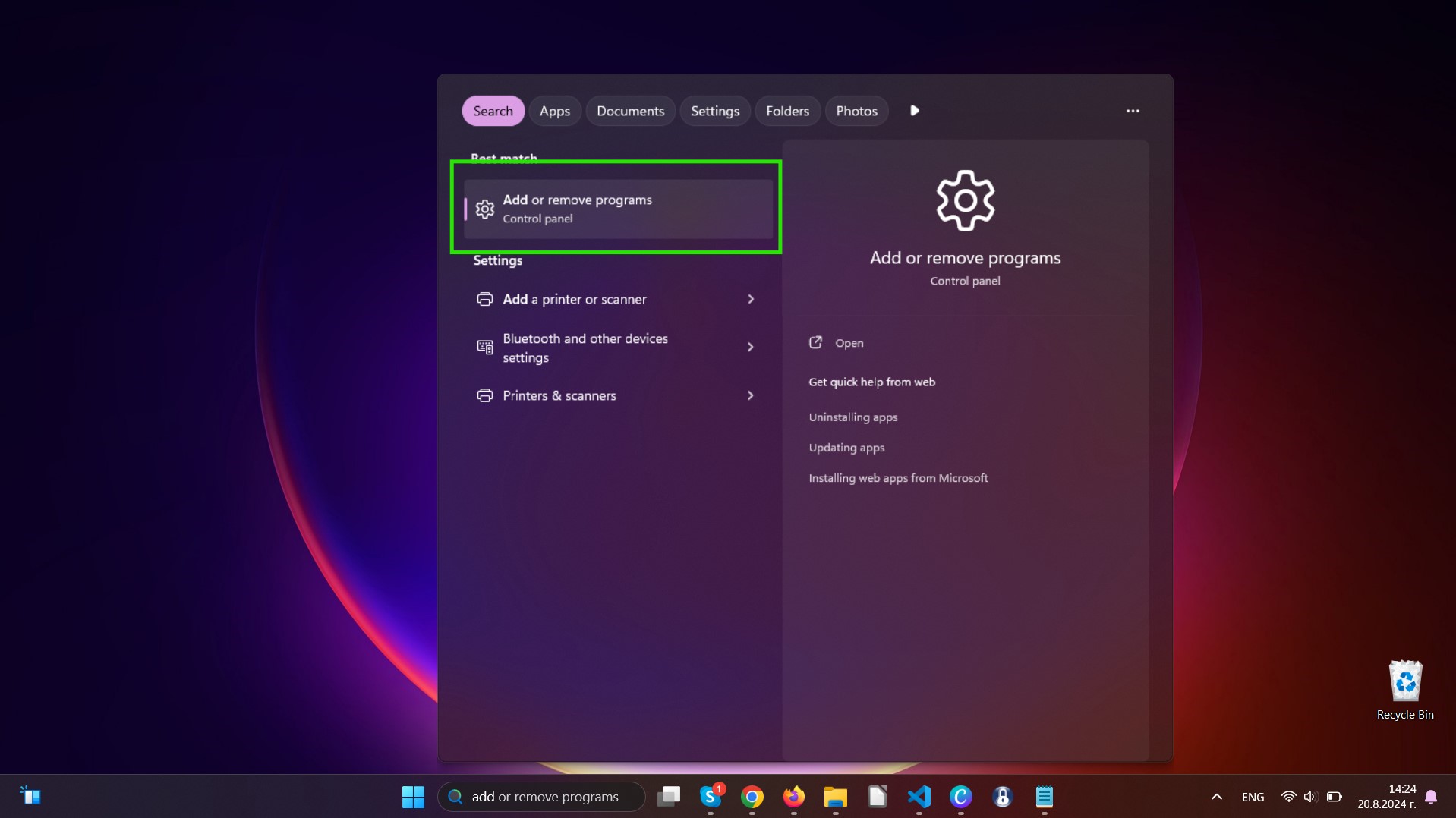
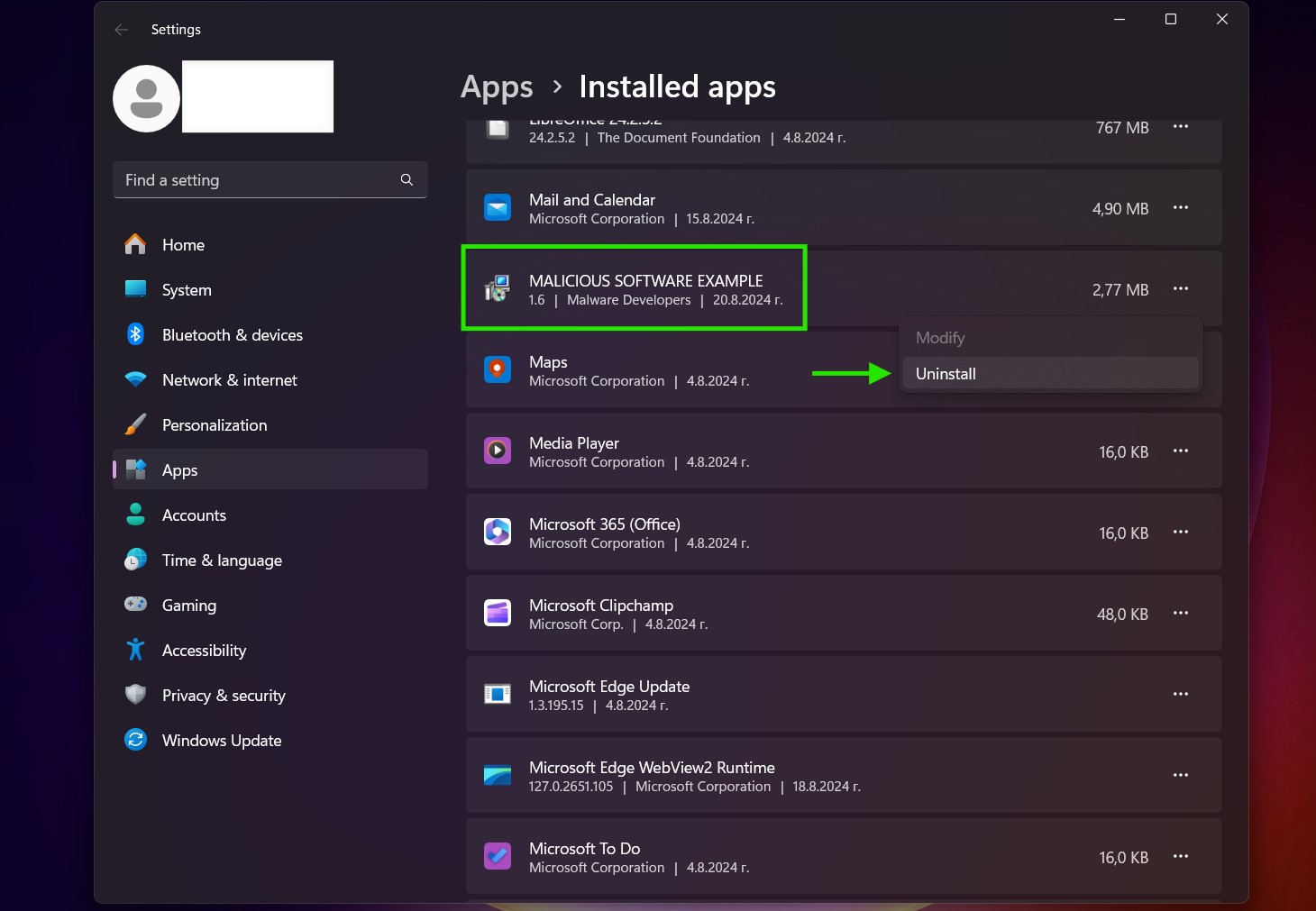
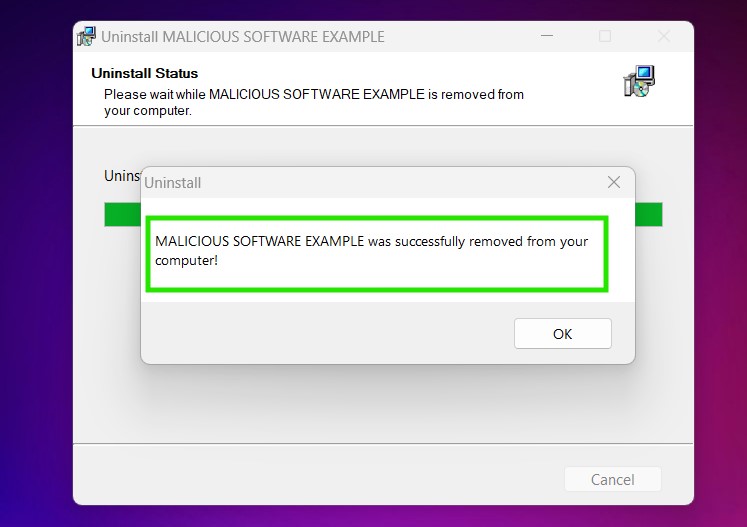
ステップ 3: Uninstall Perowin.com and related software from Windows
Windows のアンインストール手順 11
Windows のアンインストール手順 10 および旧バージョン
これは、ほとんどのプログラムをアンインストールできるはずのいくつかの簡単な手順の方法です。. Windowsを使用しているかどうかに関係なく 10, 8, 7, VistaまたはXP, それらのステップは仕事を成し遂げます. プログラムまたはそのフォルダをごみ箱にドラッグすると、 非常に悪い決断. あなたがそれをするなら, プログラムの断片が残されています, そしてそれはあなたのPCの不安定な仕事につながる可能性があります, ファイルタイプの関連付けやその他の不快なアクティビティに関するエラー. コンピュータからプログラムを削除する適切な方法は、それをアンインストールすることです. それをするために:
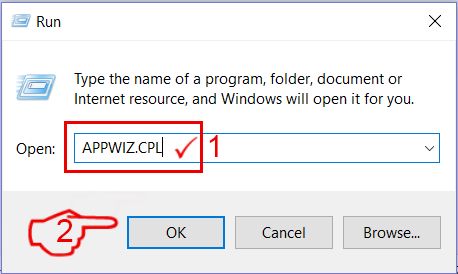
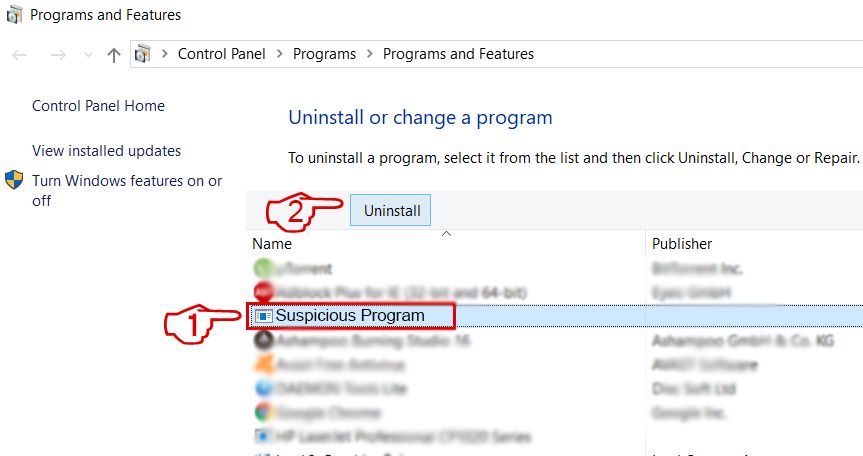 上記の手順に従うと、ほとんどのプログラムが正常にアンインストールされます.
ステップ 4: すべてのレジストリをクリーンアップ, Created by Perowin.com on Your PC.
通常対象となるWindowsマシンのレジストリは次のとおりです。:
- HKEY_LOCAL_MACHINE Software Microsoft Windows CurrentVersion Run
- HKEY_CURRENT_USER Software Microsoft Windows CurrentVersion Run
- HKEY_LOCAL_MACHINE Software Microsoft Windows CurrentVersion RunOnce
- HKEY_CURRENT_USER Software Microsoft Windows CurrentVersion RunOnce
これらにアクセスするには、Windowsレジストリエディタを開き、値を削除します。, created by Perowin.com there. これは、以下の手順に従うことで発生する可能性があります:
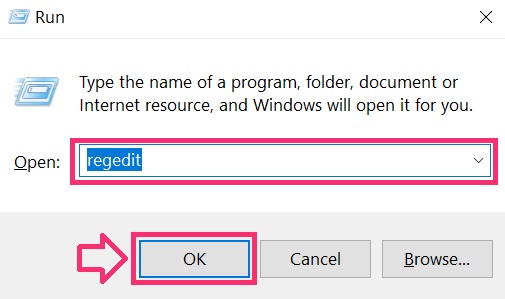
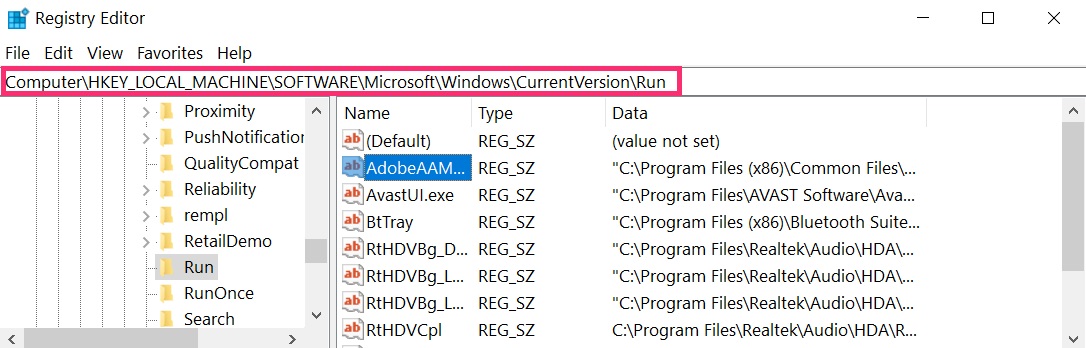
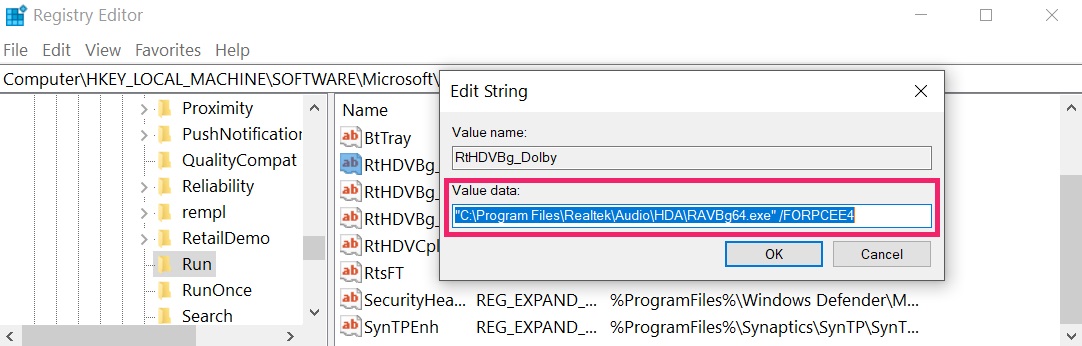 ヒント: ウイルスによって作成された値を見つけるには, あなたはそれを右クリックしてクリックすることができます "変更" 実行するように設定されているファイルを確認する. これがウイルスファイルの場所である場合, 値を削除します.
Video Removal Guide for Perowin.com (ウィンドウズ).
Get rid of Perowin.com from Mac OS X.
ステップ 1: Uninstall Perowin.com and remove related files and objects
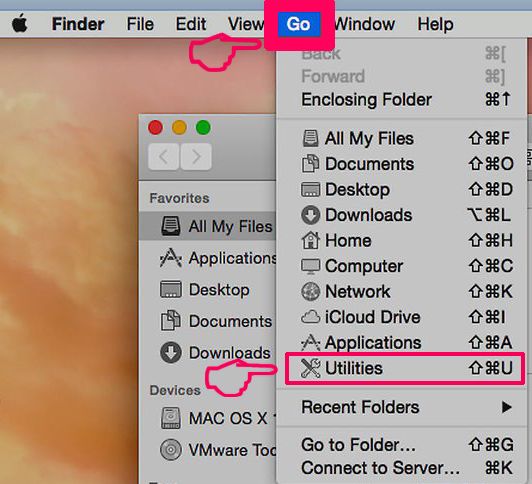
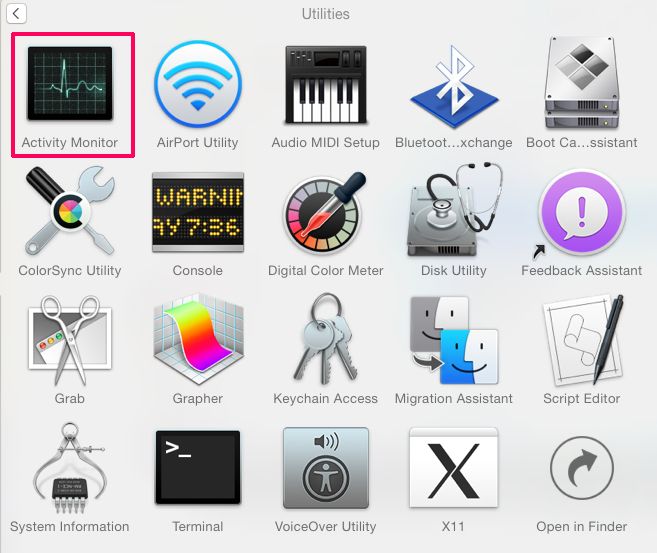
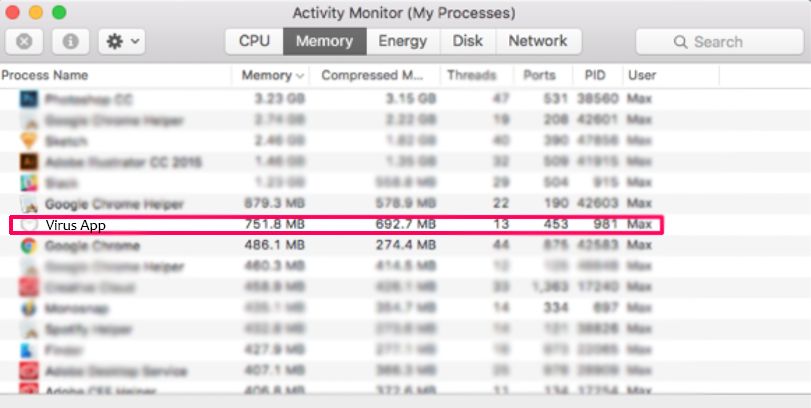
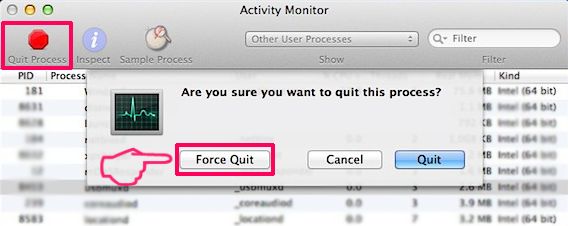
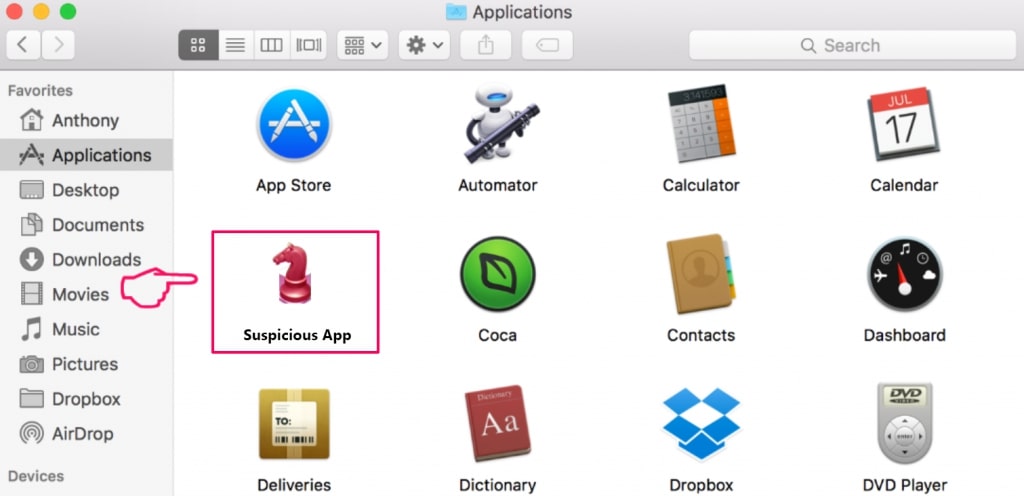
Macには、ログイン時に自動的に起動するアイテムのリストが表示されます. Look for any suspicious apps identical or similar to Perowin.com. 自動的に実行を停止するアプリをチェックしてから、マイナスを選択します (「「-「「) それを隠すためのアイコン.
- に移動 ファインダ.
- 検索バーに、削除するアプリの名前を入力します.
- 検索バーの上にある2つのドロップダウンメニューを次のように変更します 「システムファイル」 と 「含まれています」 削除するアプリケーションに関連付けられているすべてのファイルを表示できるようにします. 一部のファイルはアプリに関連していない可能性があることに注意してください。削除するファイルには十分注意してください。.
- すべてのファイルが関連している場合, を保持します ⌘+A それらを選択してからそれらを駆動するためのボタン "ごみ".
In case you cannot remove Perowin.com via ステップ 1 その上:
アプリケーションまたは上記の他の場所でウイルスファイルおよびオブジェクトが見つからない場合, Macのライブラリで手動でそれらを探すことができます. しかし、これを行う前に, 以下の免責事項をお読みください:
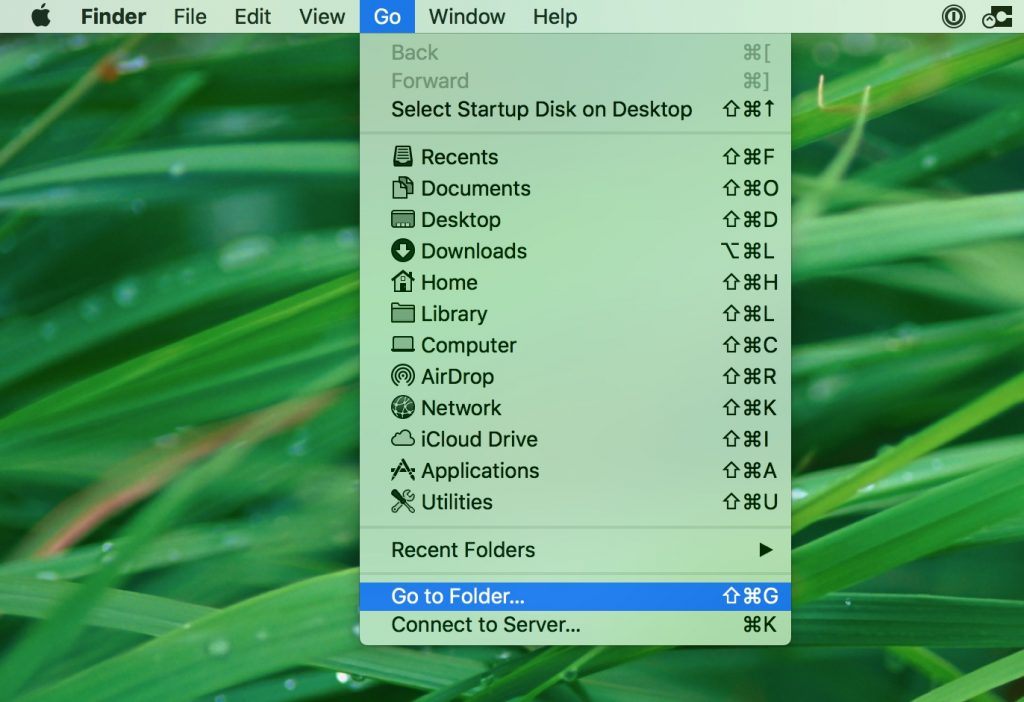
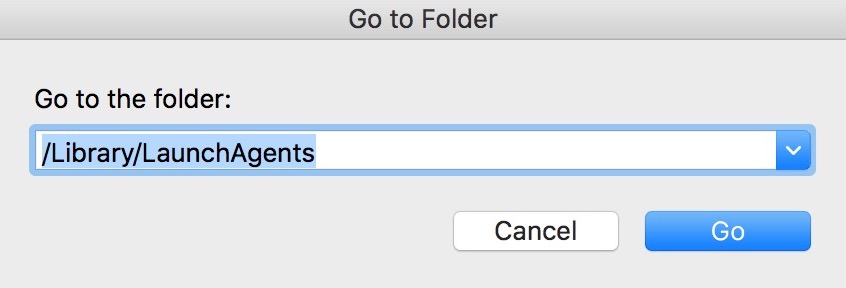
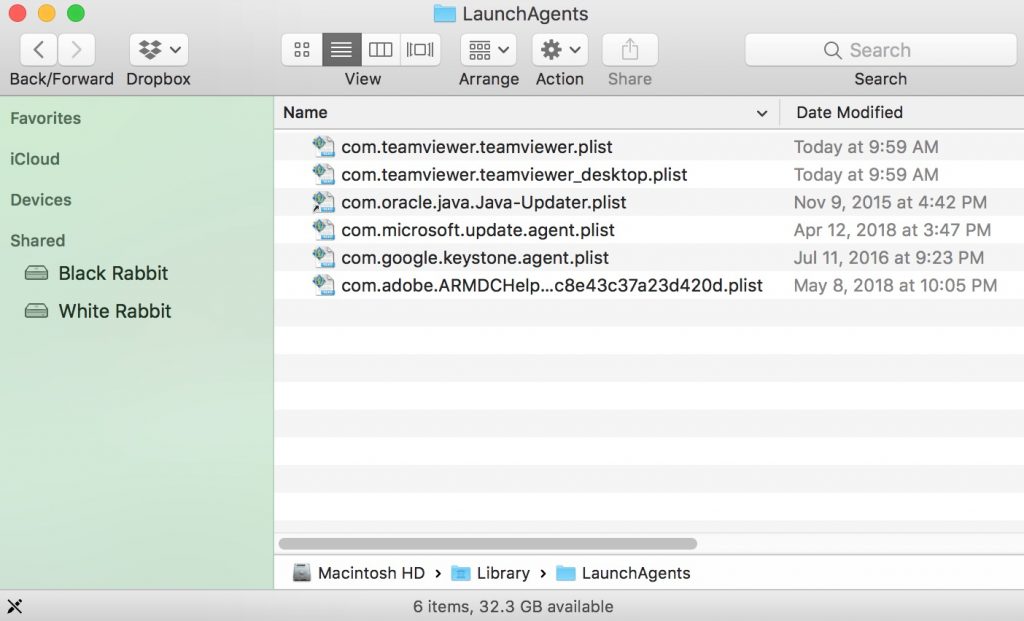
次の他の人と同じ手順を繰り返すことができます としょうかん ディレクトリ:
→ 〜/ Library / LaunchAgents
/Library / LaunchDaemons
ヒント: 〜 わざとそこにあります, それはより多くのLaunchAgentにつながるからです.
ステップ 2: Scan for and remove Perowin.com files from your Mac
When you are facing problems on your Mac as a result of unwanted scripts and programs such as Perowin.com, 脅威を排除するための推奨される方法は、マルウェア対策プログラムを使用することです。. SpyHunter for Macは、Macのセキュリティを向上させ、将来的に保護する他のモジュールとともに、高度なセキュリティ機能を提供します.
Video Removal Guide for Perowin.com (マック)
Remove Perowin.com from Google Chrome.
ステップ 1: Google Chromeを起動し、ドロップメニューを開きます
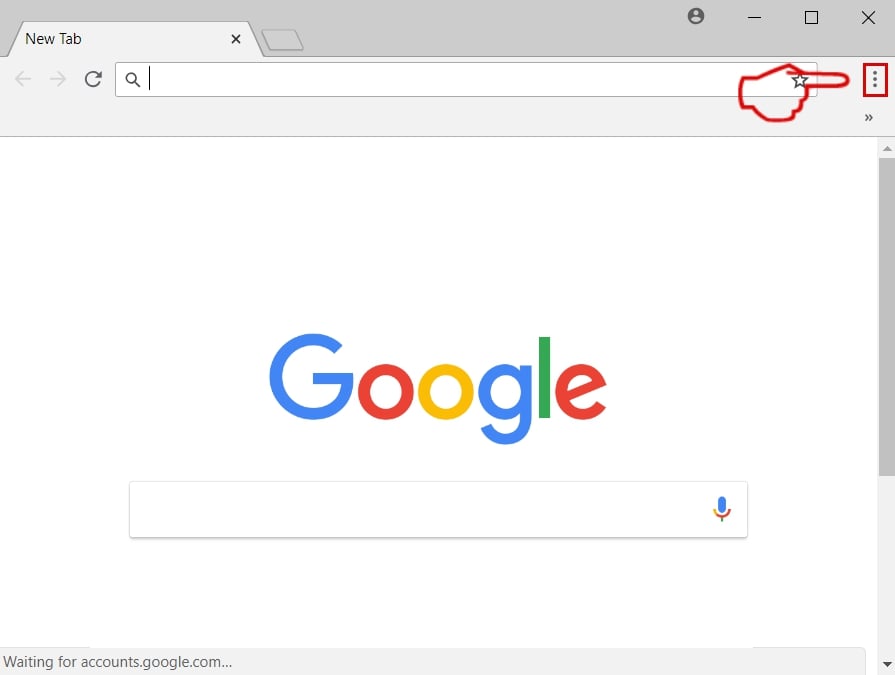
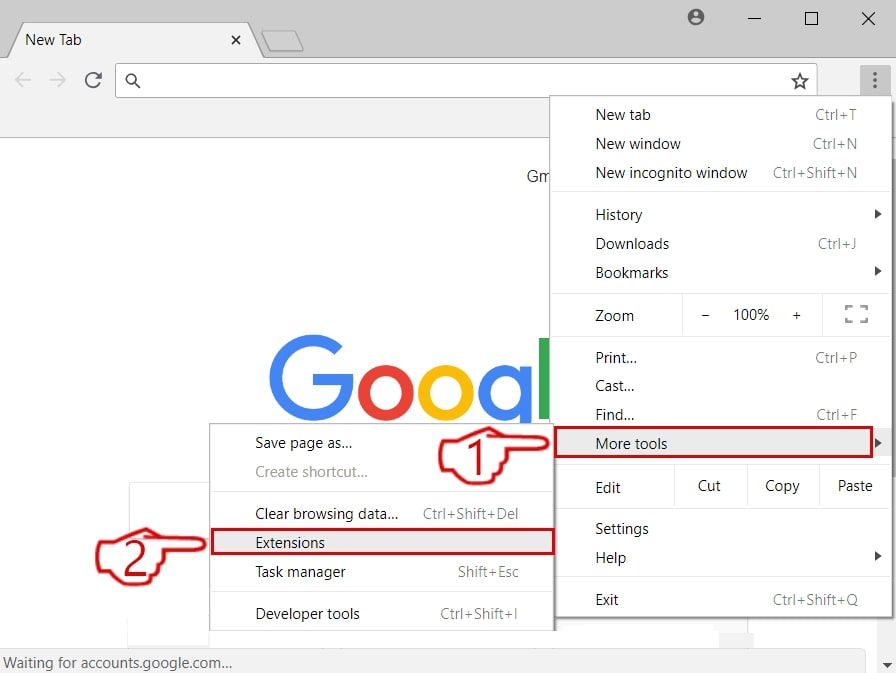
ステップ 2: カーソルを上に移動します "ツール" 次に、拡張メニューから選択します "拡張機能"
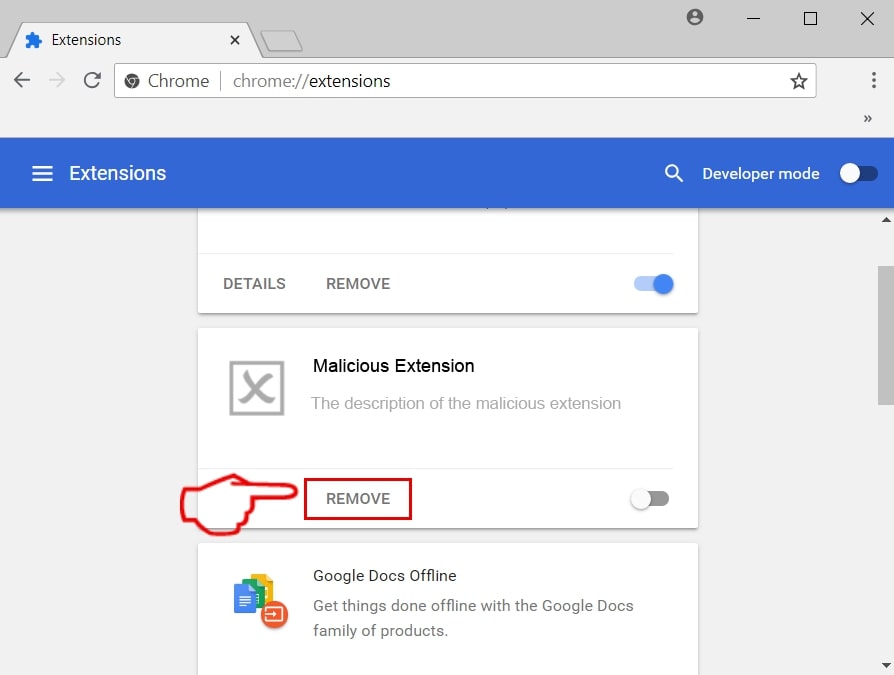
ステップ 3: 開店から "拡張機能" メニューで不要な拡張子を見つけてクリックします "削除する" ボタン.
ステップ 4: 拡張機能が削除された後, 赤から閉じてGoogleChromeを再起動します "バツ" 右上隅にあるボタンをクリックして、もう一度開始します.
Erase Perowin.com from Mozilla Firefox.
ステップ 1: MozillaFirefoxを起動します. メニューウィンドウを開く:
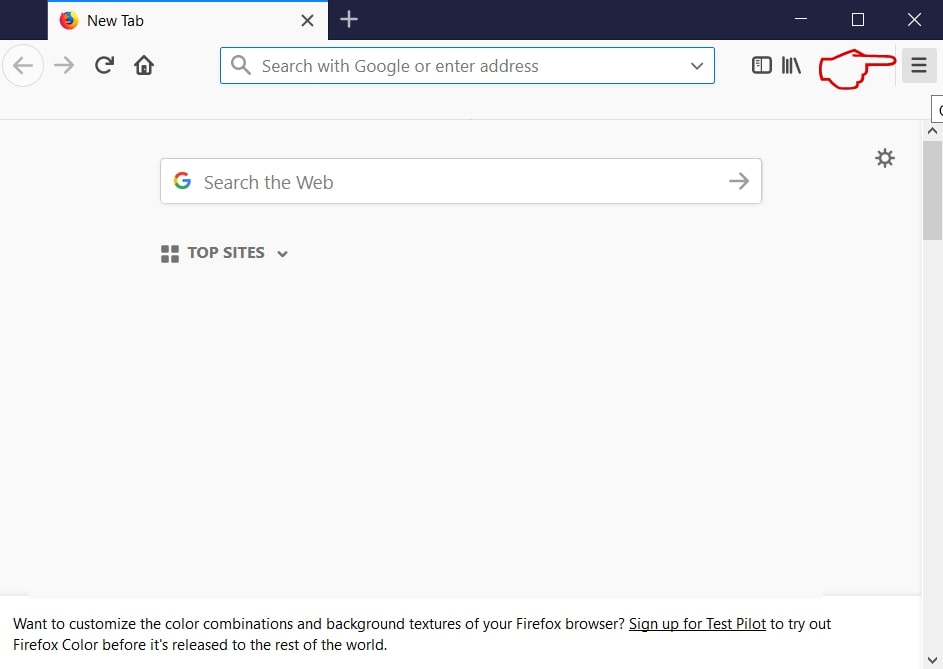
ステップ 2: を選択 "アドオン" メニューからのアイコン.
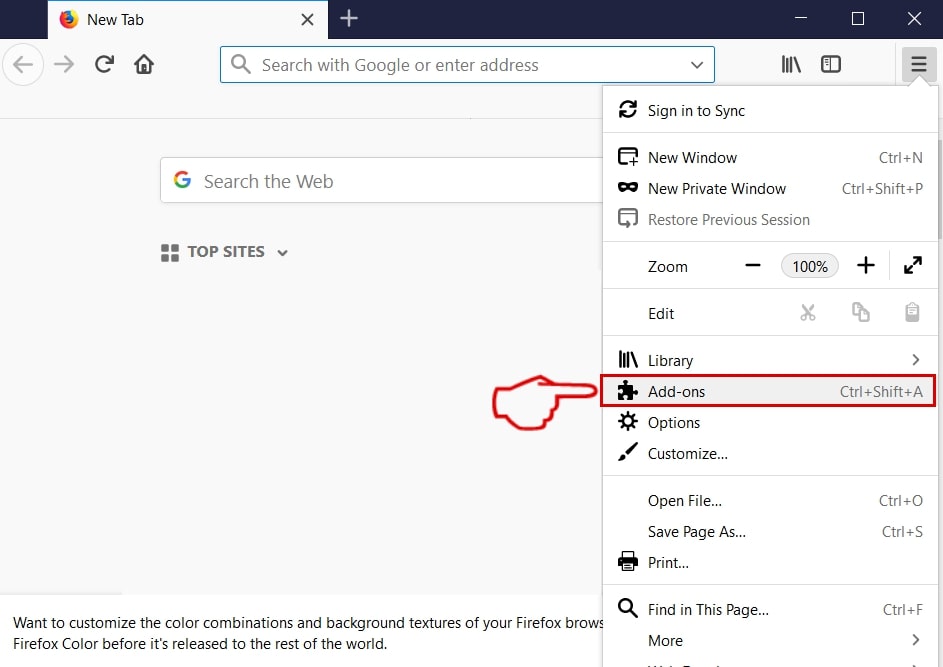
ステップ 3: 不要な拡張子を選択してクリックします "削除する"

ステップ 4: 拡張機能が削除された後, 赤から閉じてMozillaFirefoxを再起動します "バツ" 右上隅にあるボタンをクリックして、もう一度開始します.
Uninstall Perowin.com from Microsoft Edge.
ステップ 1: Edgeブラウザを起動します.
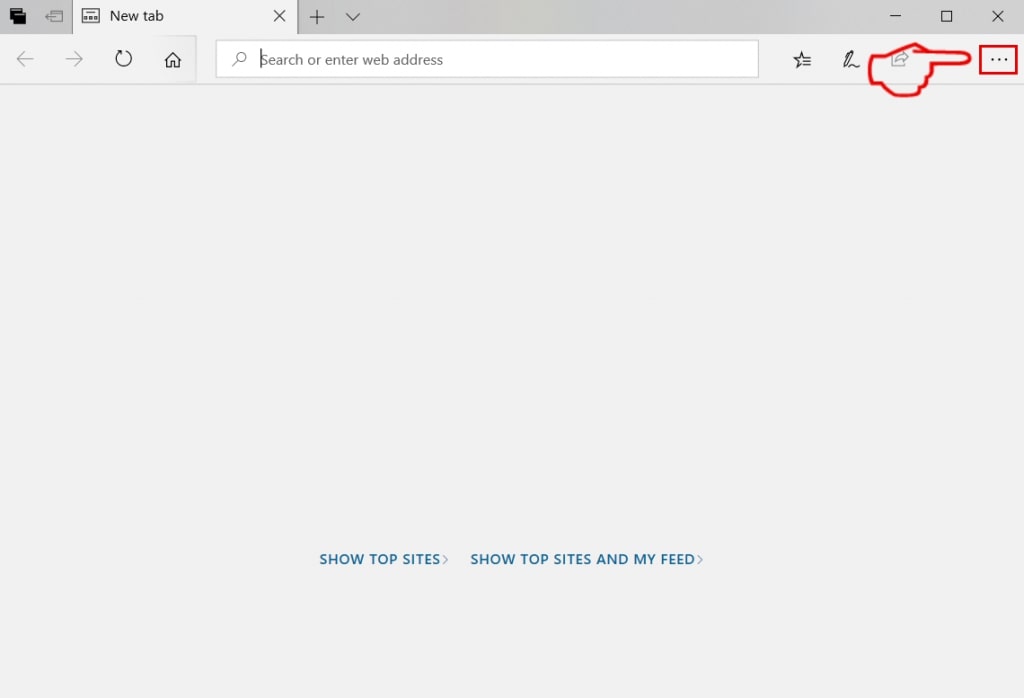
ステップ 2: 右上隅のアイコンをクリックして、ドロップメニューを開きます.
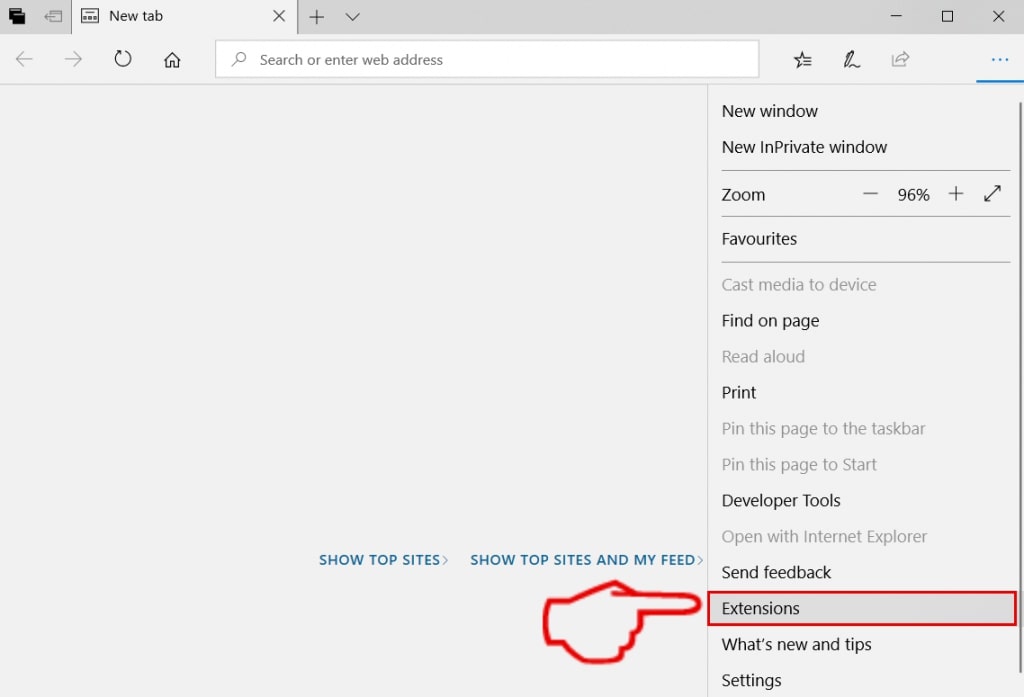
ステップ 3: ドロップメニューから選択します "拡張機能".
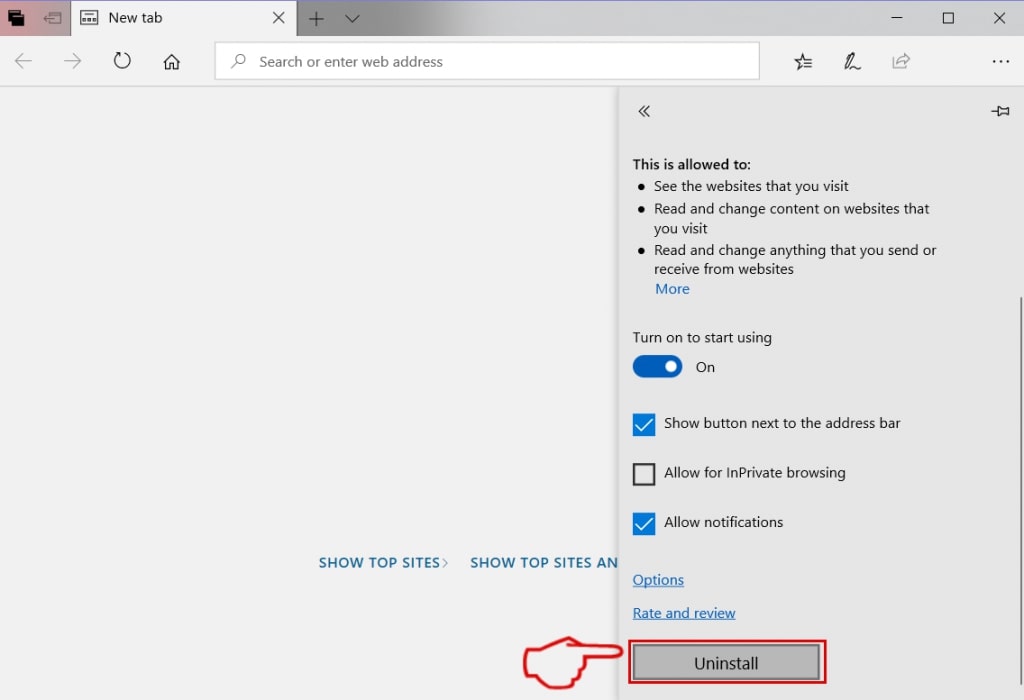
ステップ 4: 削除したい悪意のある拡張機能の疑いを選択し、歯車のアイコンをクリックします.
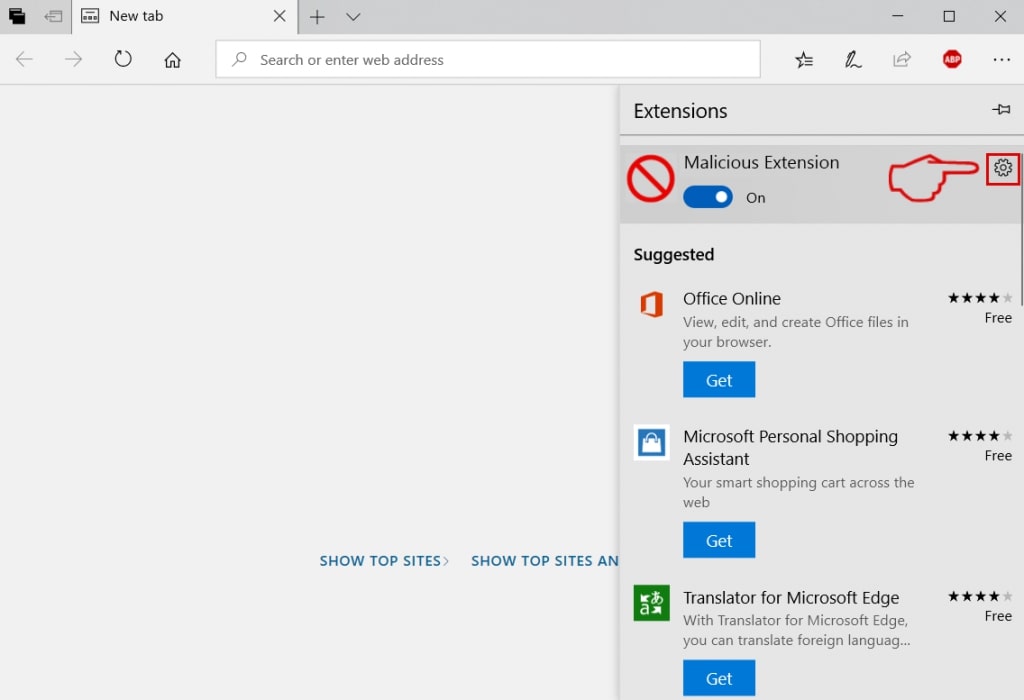
ステップ 5: 下にスクロールして[アンインストール]をクリックして、悪意のある拡張機能を削除します.
Remove Perowin.com from Safari
ステップ 1: Safariアプリを起動します.
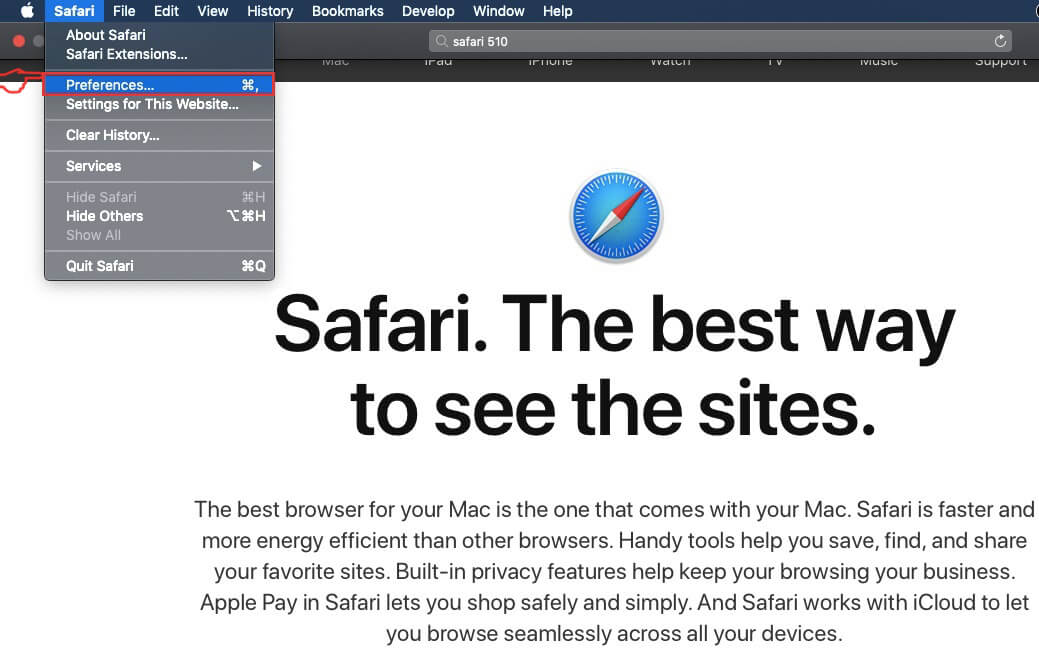
ステップ 2: マウスカーソルを画面の上部に置いた後, Safariテキストをクリックして、ドロップダウンメニューを開きます.
ステップ 3: メニューから, クリック "環境設定".
ステップ 4: その後, [拡張機能]タブを選択します.

ステップ 5: 削除する拡張機能を1回クリックします.
ステップ 6: [アンインストール]をクリックします.
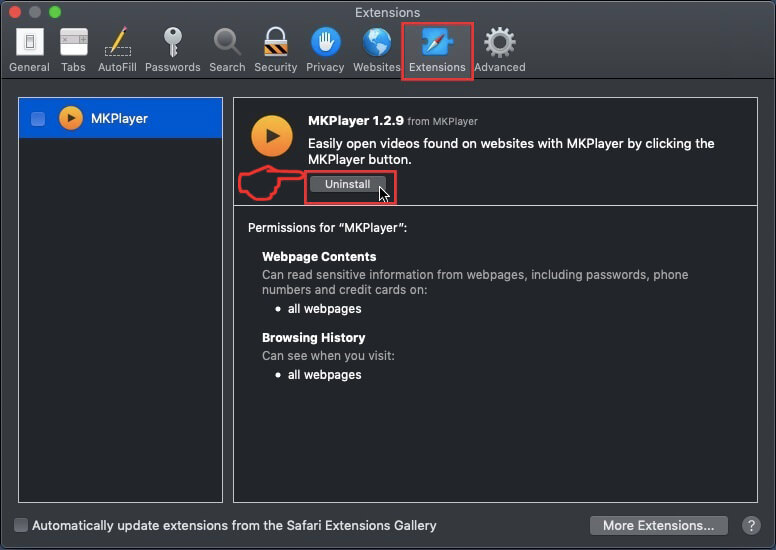
アンインストールの確認を求めるポップアップウィンドウが表示されます 拡張子. 選択する 'アンインストール' また, and the Perowin.com will be removed.
Eliminate Perowin.com from Internet Explorer.
ステップ 1: InternetExplorerを起動します.
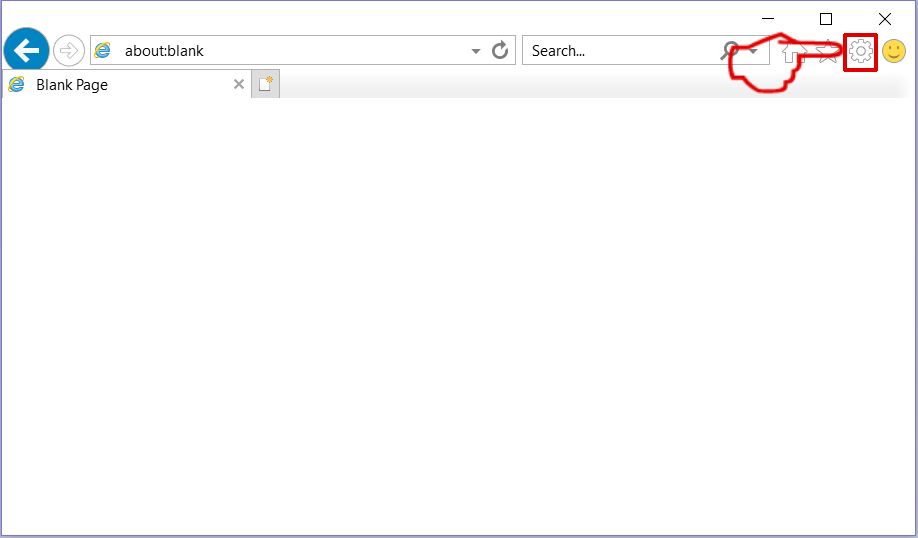
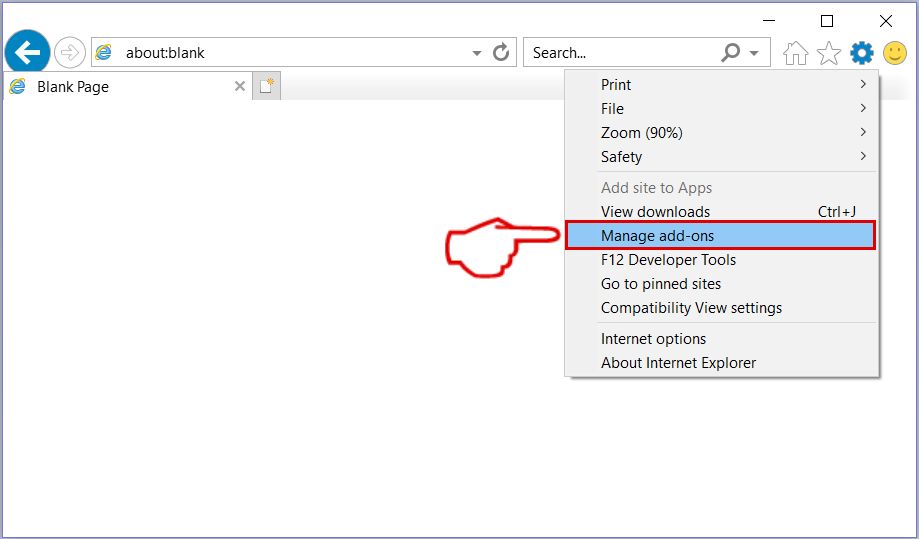
ステップ 2: 「ツール」というラベルの付いた歯車アイコンをクリックしてドロップメニューを開き、「アドオンの管理」を選択します
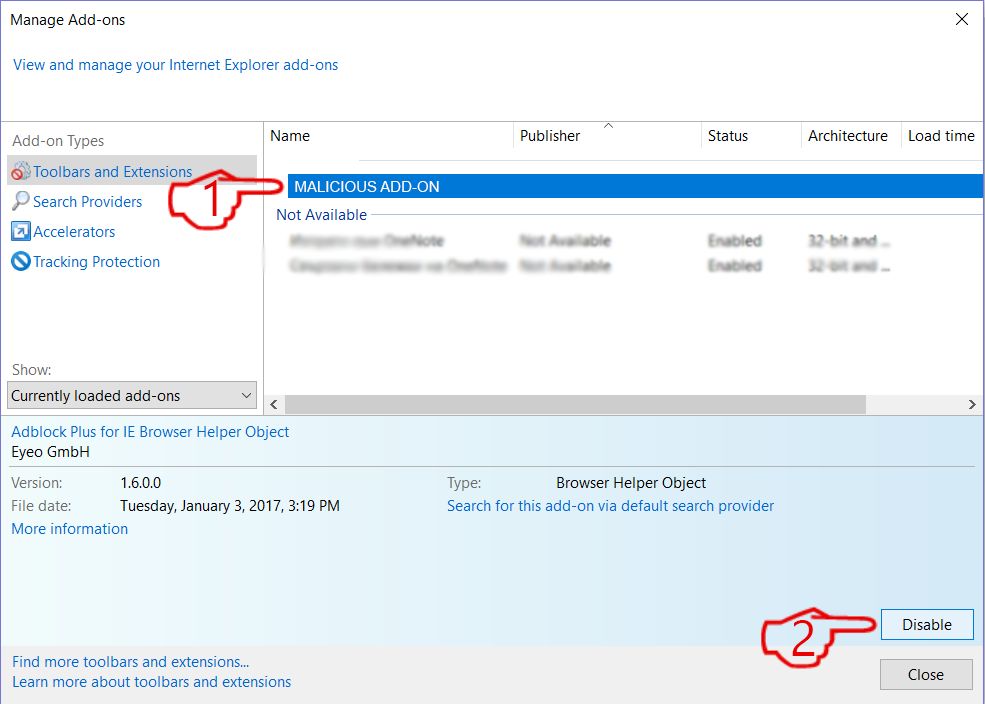
ステップ 3: [アドオンの管理]ウィンドウで.
ステップ 4: 削除する拡張子を選択し、[無効にする]をクリックします. 選択した拡張機能を無効にしようとしていることを通知するポップアップウィンドウが表示されます, さらにいくつかのアドオンも無効になっている可能性があります. すべてのチェックボックスをオンのままにします, [無効にする]をクリックします.
ステップ 5: 不要な拡張子が削除された後, 右上隅にある赤い「X」ボタンからInternetExplorerを閉じて再起動し、再起動します.
ブラウザからプッシュ通知を削除する
GoogleChromeからのプッシュ通知をオフにする
GoogleChromeブラウザからのプッシュ通知を無効にするには, 以下の手順に従ってください:
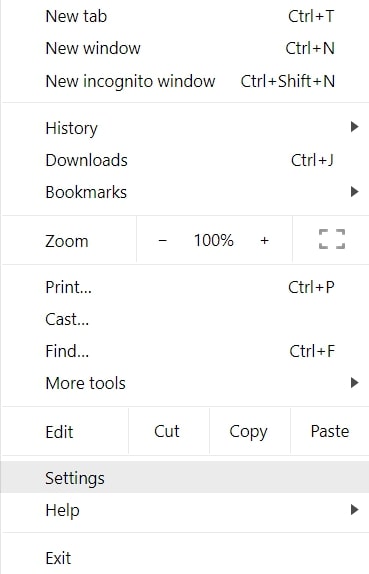
ステップ 1: に移動 設定 Chromeで.
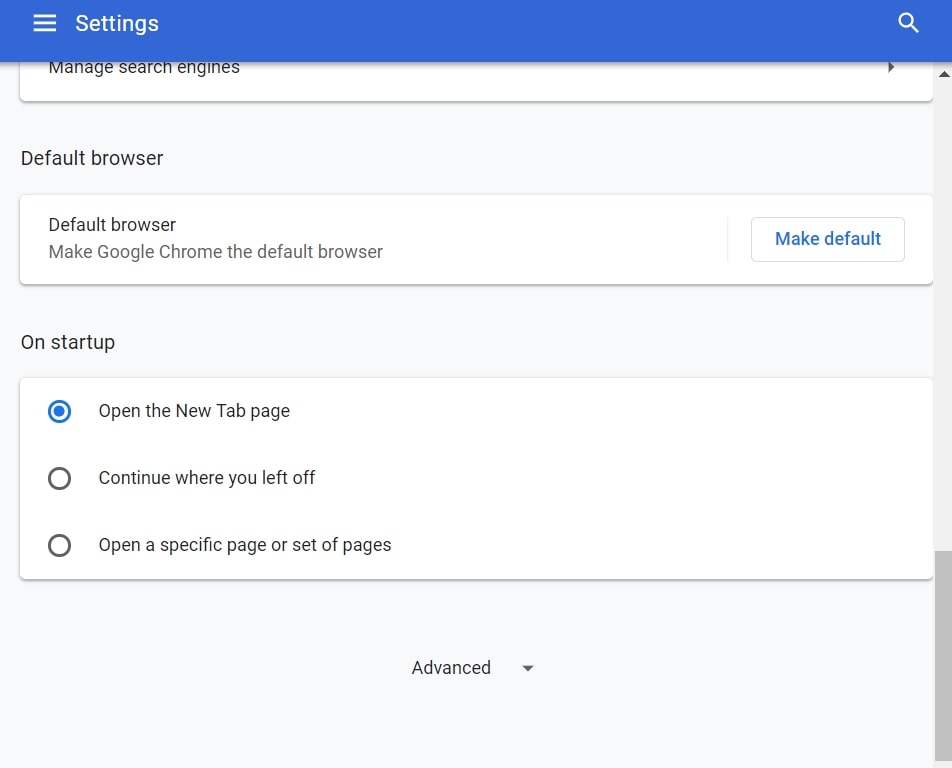
ステップ 2: 設定で, 選択する "高度な設定」:
ステップ 3: クリック "コンテンツ設定」:
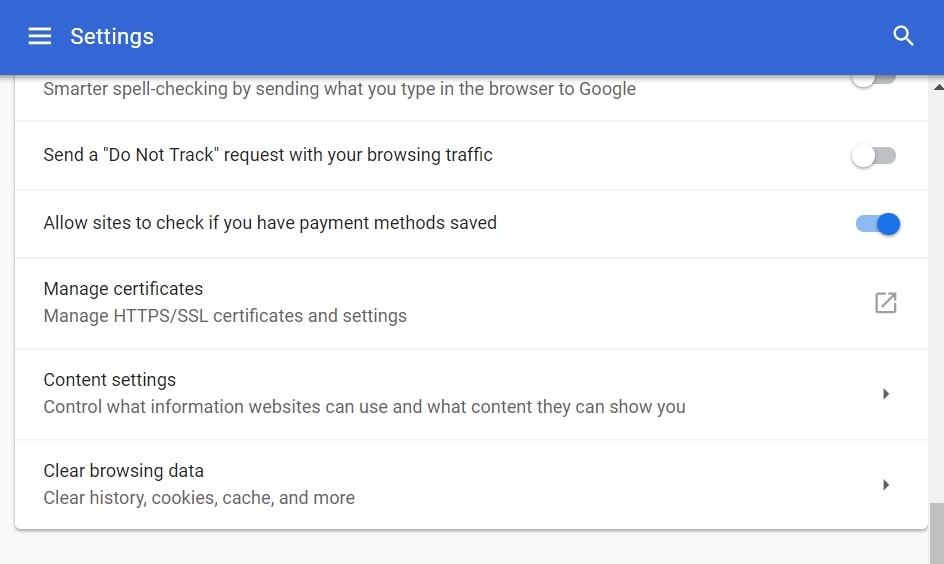
ステップ 4: 開ける "通知」:
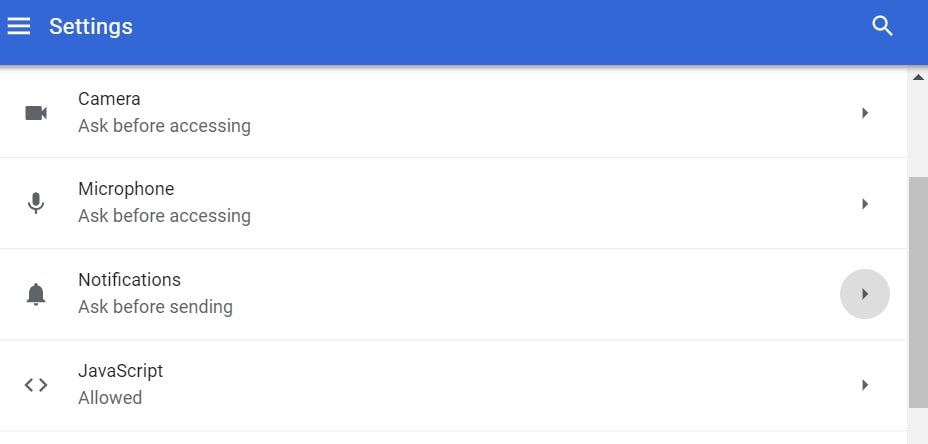
ステップ 5: 3つのドットをクリックして、[ブロック]を選択します, オプションの編集または削除:

Firefoxでプッシュ通知を削除する
ステップ 1: Firefoxのオプションに移動します.
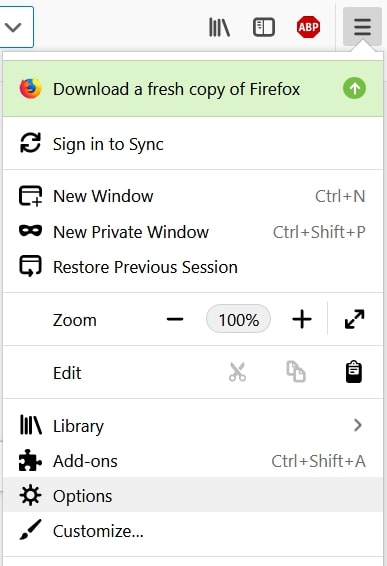
ステップ 2: 設定に移動", 検索バーに「通知」と入力して、 "設定":
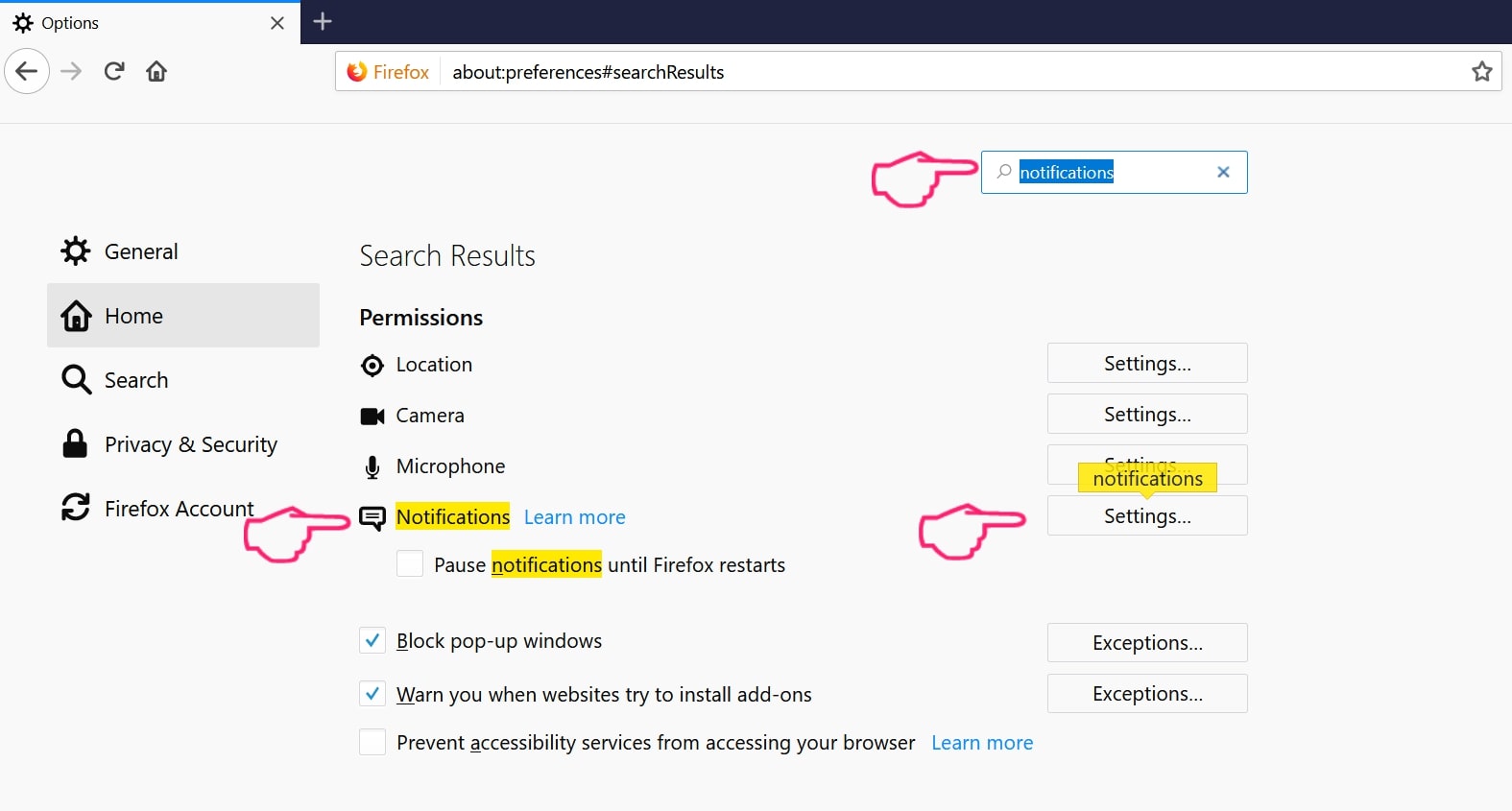
ステップ 3: 通知を削除したいサイトで[削除]をクリックし、[変更を保存]をクリックします
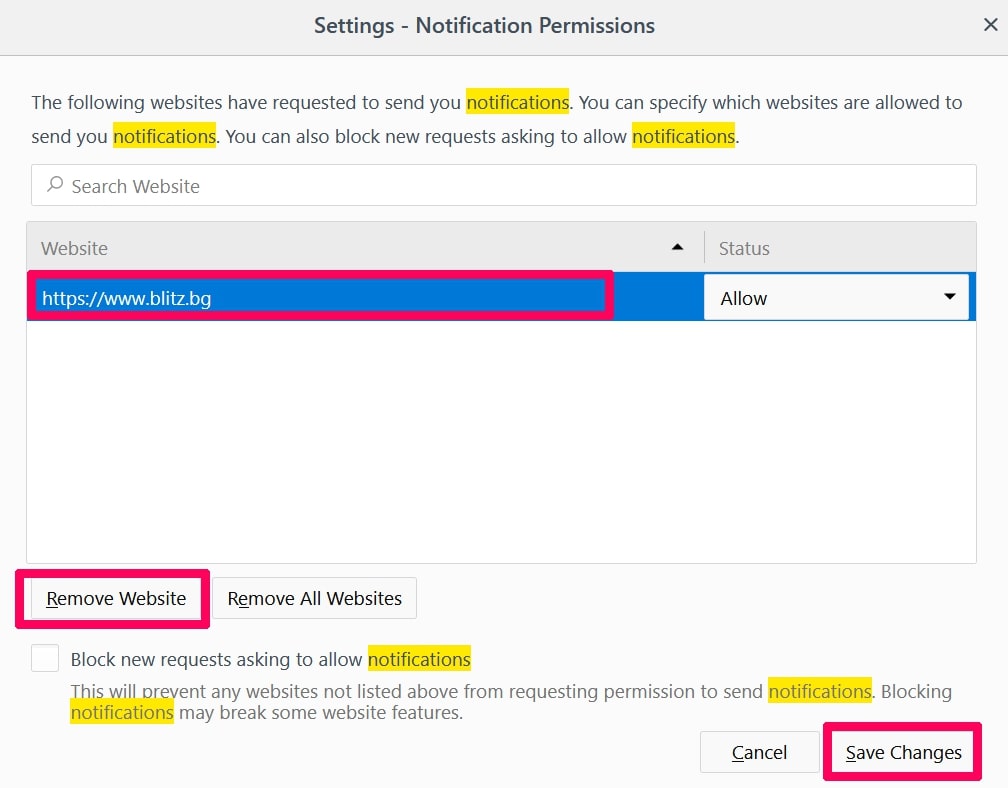
Operaでプッシュ通知を停止する
ステップ 1: Operaで, 押す ALT + P 設定に移動します.
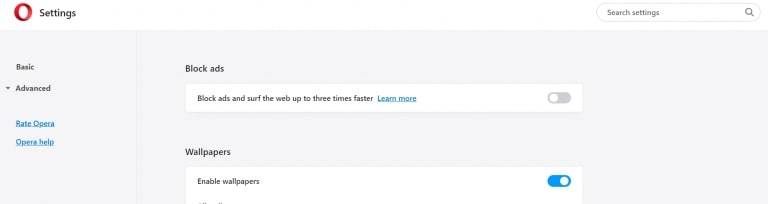
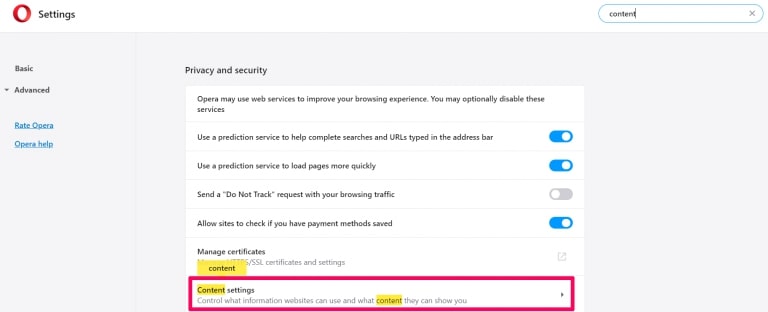
ステップ 2: 検索の設定で, 「コンテンツ」と入力してコンテンツ設定に移動します.
ステップ 3: オープン通知:
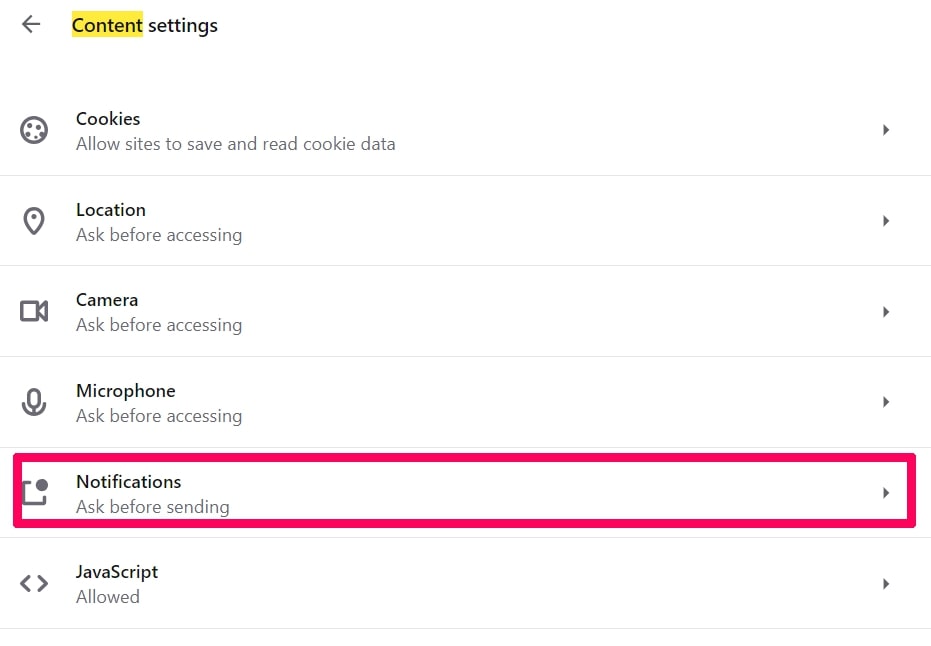
ステップ 4: GoogleChromeで行ったのと同じことを行います (以下に説明します):
Safariでプッシュ通知を排除する
ステップ 1: Safariの設定を開く.
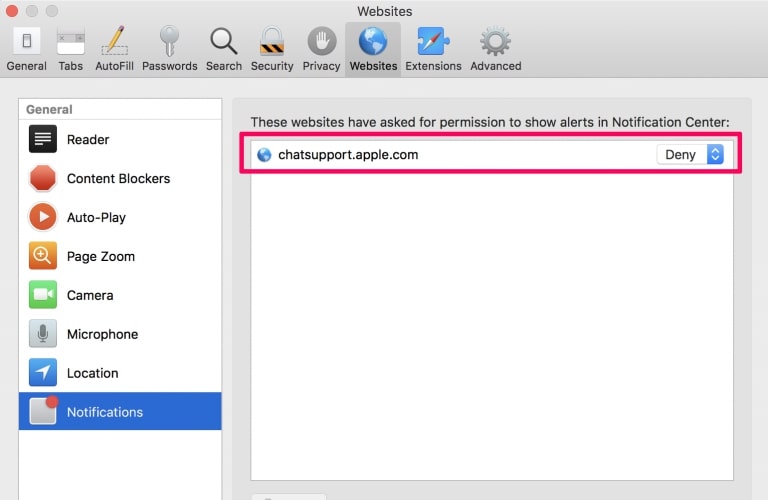
ステップ 2: プッシュポップアップが消えた場所からドメインを選択し、に変更します "拒否" から "許可する".
Perowin.com-FAQ
What Is Perowin.com?
The Perowin.com threat is adware or ブラウザリダイレクトウイルス.
コンピューターの速度が大幅に低下し、広告が表示される場合があります. 主なアイデアは、情報が盗まれたり、デバイスに表示される広告が増える可能性があることです。.
このような不要なアプリの作成者は、クリック課金制を利用して、コンピューターにリスクの高い、または資金を生み出す可能性のあるさまざまな種類のWebサイトにアクセスさせます。. これが、広告に表示されるWebサイトの種類を気にしない理由です。. これにより、不要なソフトウェアがOSにとって間接的に危険になります.
What Are the Symptoms of Perowin.com?
この特定の脅威と一般的に不要なアプリがアクティブな場合に探すべきいくつかの症状があります:
症状 #1: 一般的に、コンピュータの速度が低下し、パフォーマンスが低下する可能性があります.
症状 #2: ツールバーがあります, 追加したことを覚えていないWebブラウザ上のアドオンまたは拡張機能.
症状 #3: すべてのタイプの広告が表示されます, 広告でサポートされている検索結果のように, ランダムに表示されるポップアップとリダイレクト.
症状 #4: Macにインストールされたアプリが自動的に実行されているのがわかりますが、それらをインストールしたことを覚えていません。.
症状 #5: タスクマネージャーで疑わしいプロセスが実行されているのがわかります.
これらの症状が1つ以上見られる場合, その後、セキュリティの専門家は、コンピュータのウイルスをチェックすることを推奨しています.
不要なプログラムの種類?
ほとんどのマルウェア研究者とサイバーセキュリティ専門家によると, 現在デバイスに影響を与える可能性のある脅威は次のとおりです。 不正なウイルス対策ソフトウェア, アドウェア, ブラウザハイジャッカー, クリッカー, 偽のオプティマイザーとあらゆる形式の PUP.
私が持っている場合はどうすればよいですか "ウイルス" like Perowin.com?
いくつかの簡単なアクションで. 何よりもまず, これらの手順に従うことが不可欠です:
ステップ 1: 安全なコンピューターを探す 別のネットワークに接続します, Macが感染したものではありません.
ステップ 2: すべてのパスワードを変更する, メールパスワードから.
ステップ 3: 有効 二要素認証 重要なアカウントを保護するため.
ステップ 4: 銀行に電話して クレジットカードの詳細を変更する (シークレットコード, 等) オンライン ショッピング用にクレジット カードを保存した場合、またはカードを使用してオンライン アクティビティを行った場合.
ステップ 5: 必ず ISPに電話する (インターネットプロバイダーまたはキャリア) IPアドレスを変更するように依頼します.
ステップ 6: あなたの Wi-Fiパスワード.
ステップ 7: (オプション): ネットワークに接続されているすべてのデバイスでウイルスをスキャンし、影響を受けている場合はこれらの手順を繰り返してください。.
ステップ 8: マルウェア対策をインストールする お持ちのすべてのデバイスでリアルタイム保護を備えたソフトウェア.
ステップ 9: 何も知らないサイトからソフトウェアをダウンロードしないようにし、近づかないようにしてください 評判の低いウェブサイト 一般に.
これらの推奨事項に従う場合, ネットワークとすべてのデバイスは、脅威や情報を侵害するソフトウェアに対して大幅に安全になり、将来的にもウイルスに感染せずに保護されます。.
How Does Perowin.com Work?
インストールしたら, Perowin.com can データを収集します を使用して トラッカー. このデータはあなたのウェブ閲覧習慣に関するものです, アクセスしたウェブサイトや使用した検索用語など. その後、広告であなたをターゲットにしたり、あなたの情報を第三者に販売したりするために使用されます。.
Perowin.com can also 他の悪意のあるソフトウェアをコンピュータにダウンロードする, ウイルスやスパイウェアなど, 個人情報を盗んだり、危険な広告を表示したりするために使用される可能性があります, ウイルスサイトや詐欺サイトにリダイレクトされる可能性があります.
Is Perowin.com Malware?
真実は、PUP (アドウェア, ブラウザハイジャッカー) ウイルスではありません, しかし、同じように危険かもしれません マルウェア Web サイトや詐欺ページが表示され、リダイレクトされる可能性があるため.
多くのセキュリティ専門家は、望ましくない可能性のあるプログラムをマルウェアとして分類しています. これは、PUP が引き起こす望ましくない影響のためです。, 煩わしい広告の表示や、ユーザーの認識や同意なしにユーザー データを収集するなど.
About the Perowin.com Research
SensorsTechForum.comで公開するコンテンツ, this Perowin.com how-to removal guide included, 広範な研究の結果です, あなたが特定のものを取り除くのを助けるためのハードワークと私たちのチームの献身, アドウェア関連の問題, ブラウザとコンピュータシステムを復元します.
How did we conduct the research on Perowin.com?
私たちの研究は独立した調査に基づいていることに注意してください. 私たちは独立したセキュリティ研究者と連絡を取り合っています, そのおかげで、最新のマルウェアに関する最新情報を毎日受け取ることができます, アドウェア, およびブラウザハイジャッカーの定義.
さらに, the research behind the Perowin.com threat is backed with VirusTotal.
このオンラインの脅威をよりよく理解するために, 知識のある詳細を提供する以下の記事を参照してください.