

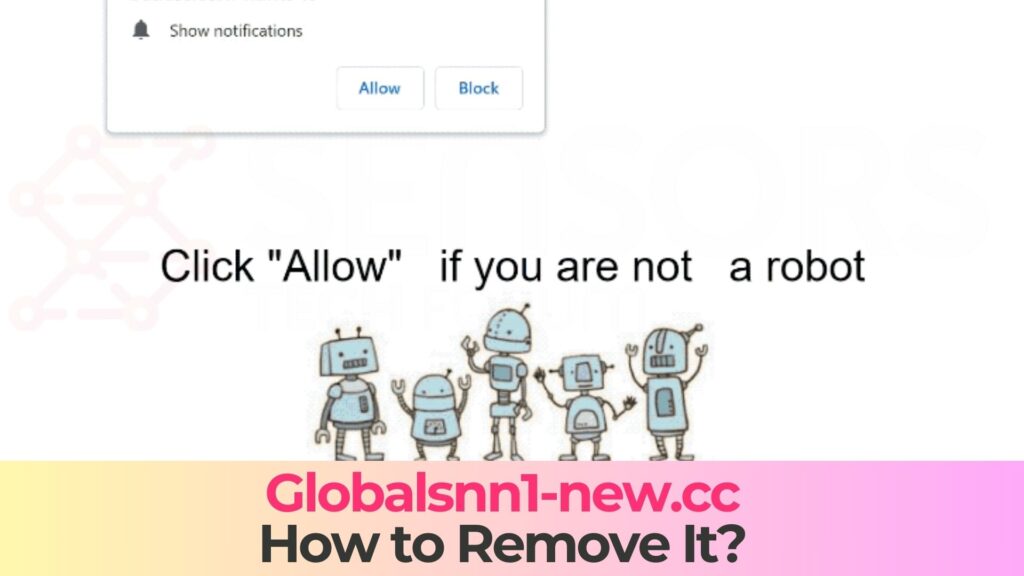
If you suddenly start seeing endless Globalsnn1-new.cc pop-ups, strange “robot checks”, or warnings telling you to allow notifications, your browser has already been dragged into a dangerous advertising scheme. This kind of behavior is typical for malicious push-notification and redirect campaigns that can trick you into visiting shady pages, installing unwanted software, or even downloading malware. Read this Globalsnn1-new.cc Pop-ups Virus – Removal Guide [Fix] to understand what this threat is, how it ended up on your device, what risks it poses, and how to remove it so you can browse without constant spam.
What Is Globalsnn1-new.cc Pop-ups Virus?
The so-called Globalsnn1-new.cc pop-ups virus is not a single file-based infection, but a combination of a rogue website and, in many cases, adware or potentially unwanted programs (PUPs) that abuse your browser’s notification system. The domain Globalsnn1-new.cc is typically used to display misleading content, aggressive ads, and deceptive prompts that push you to click “Allow” in a notification request or interact with bogus warnings and fake captchas.
Once you grant permission or interact with the page, Globalsnn1-new.cc gains the ability to send a continuous stream of notifications directly to your desktop, browser, or mobile device. These messages often:
- Promote fake software updates, codecs, or driver packages that can be bundled with malware.
- Show fabricated security alerts claiming your device is infected or critically vulnerable.
- Advertise scam pages, subscription traps, phishing sites, and other risky content.
Globalsnn1-new.cc Short Overview
| Type | Browser Hijacker, Redirect, PUA |
| Short Description | A suspicious website and rogue search engine that hijacks your browsers and causes redirects. |
| Symptoms | Unwanted pop-ups may start appearing while you are browsing the web. A browser hijacker may be downloaded without your knowledge. |
| Removal Time | Approximately 15 minutes for a full-system scan |
| Removal Tool |
See If Your System Has Been Affected by malware
Download
Malware Removal Tool
|
Because of this behavior, Globalsnn1-new.cc is usually classified as a notification spam source and is frequently linked to browser hijacking. In many cases, adware on the system repeatedly opens the domain in new tabs, or uses built-in Windows components such as mshta.exe to load remote content in hidden windows. This is why the pop-ups tend to reappear even if you are not actively surfing the web.
Scareware Techniques and Social Engineering
Globalsnn1-new.cc relies heavily on social engineering – it tries to manipulate you into taking actions that benefit the operators behind the campaign. Typical tricks include:
- Fake robot CAPTCHAs that say “Click Allow to prove you’re not a robot” or “Press Allow to continue”.
- Video or file “gates” claiming you must allow notifications to watch a clip or start a download.
- Alerts disguised as system or antivirus messages that push you to “activate protection”, “install an update”, or “fix detected issues”.
There is no real verification or protection behind these messages. The only goal is to make you hit the Allow button and subscribe to Globalsnn1-new.cc notifications so the site can keep pushing ads, fraud pages, and potentially dangerous content to your device.
How Did I Get Globalsnn1-new.cc Pop-ups Virus?
Very few users land on Globalsnn1-new.cc deliberately by typing the address. In most situations, they get redirected to the site from another page or are pushed there by unwanted software already installed on their system. Identifying how you were exposed helps you prevent similar issues in the future.
1. Malicious Ads and Redirect Chains
A common scenario involves clicking an aggressive ad, banner, or pop-under on a low-trust page. These advertisements often appear on:
- Streaming sites hosting pirated movies, live sports, or TV series.
- Free download portals, crack / keygen blogs, and torrent indexes.
- Websites covered with multiple “Download” and “Play now” buttons around fake content.
Once clicked, the ad can send your browser through several redirect URLs before finally loading Globalsnn1-new.cc. By the time the site appears, it already displays notification prompts or fake “human verification” messages designed to make you accept notifications.
2. Adware and Potentially Unwanted Programs (PUPs)
In other cases, adware or PUPs installed on your computer are responsible for the Globalsnn1-new.cc spam. Such unwanted programs can:
- Inject banners, pop-ups, and extra scripts into otherwise legitimate pages.
- Open new browser windows or tabs in the background that automatically load Globalsnn1-new.cc.
- Call system components like
mshta.exeto fetch remote content, leading to blank windows or unexpected redirects.
These PUPs often arrive bundled with free software installers, fake system optimizers, dubious browser extensions, or counterfeit security tools. Installation wizards may hide them behind “Advanced” or “Custom” options which many users never inspect.
3. Misleading Prompts and Fake Captchas
Sometimes the problem starts with a seemingly harmless browser prompt. You might see a page that imitates a normal CAPTCHA or file download check with messages like:
- “Click Allow to verify you’re not a robot.”
- “Press Allow to start your download.”
- “Allow notifications to confirm you are human.”
None of that is actually needed for regular browsing. By confirming the prompt, you are not validating your identity – you are giving Globalsnn1-new.cc permission to send push notifications. Once that permission is stored in the browser, the site can keep spamming you even if the original tab is closed and you are visiting completely different pages.
What Does Globalsnn1-new.cc Pop-ups Virus Do?
After Globalsnn1-new.cc gains a foothold through notification access or adware, it begins to interfere with your browsing and can indirectly expose you to much more severe threats. While the domain itself might not drop an executable directly on your machine, it acts as a traffic launcher and infection gateway.
1. Persistent Pop-ups and Notification Flood
The most obvious symptom of the Globalsnn1-new.cc issue is a constant stream of pop-ups and notifications. Depending on your browser and operating system, these can appear:
- In the bottom corner of the desktop (Windows notification center).
- On top of other windows or applications as small notification cards.
- In the notification shade of your mobile device, even when you are not actively using the browser.
The content is usually noisy and sensational – fake security alerts, fake prize messages, countdown timers, or aggressive “update now” banners. Because these are legitimate notifications approved by a user action, standard built-in pop-up blockers usually do not stop them.
2. Redirects to Scam and Malware-Hosting Pages
Globalsnn1-new.cc rarely displays anything useful. Its notifications and pop-ups typically contain links that lead to:
- Fake antivirus or “PC repair” pages that push rogue software and scareware.
- Phishing sites that request login credentials, banking data, or personal information.
- Malicious download portals offering trojanized installers, cracked programs, or fake browser updates.
By clicking these notifications, you are effectively jumping deeper into a malicious advertising network. Even if you avoid downloading anything, simply visiting certain pages can expose you to drive-by attacks or trick you into handing over sensitive data.
3. Browser Hijacking and Configuration Changes
If Globalsnn1-new.cc is part of a broader hijacker campaign, you may notice additional unwanted changes, such as:
- Your homepage or new tab page set to unknown search or news portals loaded with ads.
- Your default search engine silently swapped for a provider that injects sponsored links and questionable results.
- Extra banners, in-text ads, pop-unders, and overlays appearing even on otherwise legitimate websites.
These modifications increase your exposure to malicious content and make it more likely that you will be redirected back into the Globalsnn1-new.cc ecosystem or similar scam networks.
4. Tracking, Profiling, and Data Collection
Advertising and scam networks behind domains like Globalsnn1-new.cc often track users to improve targeting and monetization. The scripts and adware may collect:
- Browsing history and search queries.
- Clicked ads, visited pages, and time spent on particular sites.
- Technical details such as browser version, language, IP-based location, and device type.
While some level of tracking is common in online advertising, the problem here is the lack of transparency and the malicious context. Data gathered in this way can be resold, used for personalized phishing campaigns, or combined with other leaks to build a more complete profile of you without consent.
How to Remove Globalsnn1-new.cc Pop-ups Virus
To get rid of Globalsnn1-new.cc pop-ups and prevent future redirects, you need to tackle the issue on two levels: disable notification permissions in your browsers, and remove any adware or PUPs that may be generating the traffic. The steps below provide a general strategy that you can follow alongside the more detailed removal instructions placed underneath this article.
Step 1 – Revoke Globalsnn1-new.cc Notification Permissions
Start by removing the site’s ability to send notifications in every browser you use:
- Open your browser’s Settings or Preferences.
- Go to Privacy & Security or Site Settings (wording may vary by browser).
- Find the Notifications or Permissions section.
- Locate Globalsnn1-new.cc in the list of allowed sites and change it to Block or fully remove it.
Once this is done, the domain will no longer be allowed to push new messages, even if a malicious tab opens in the background.
Step 2 – Close Suspicious Tabs and Pop-ups Safely
If you currently see a tab or window with Globalsnn1-new.cc loaded:
- Close it using the tab’s X button instead of interacting with on-page buttons or pop-ups.
- If the site shows confirmation dialogs when you try to exit, close the entire browser from the taskbar or via Task Manager.
- On mobile devices, force-close the browser app from the recent apps overview if the tab refuses to close normally.
Do not click “Allow”, “Confirm”, “Download”, or any similar controls within the malicious page, as they can re-enable notifications or trigger downloads and new redirects.
Step 3 – Remove Adware and Suspicious Programs
Next, check your system for software that might be repeatedly opening Globalsnn1-new.cc or injecting its scripts:
- On Windows, open the list of installed programs and uninstall unknown toolbars, “browser helpers”, “search assistants”, or recent apps you do not recognize.
- On macOS, review the Applications folder and drag dubious optimization tools, cleaners, or converters to the Trash.
- In each browser, visit the Extensions or Add-ons page and remove suspicious entries, especially those offering coupons, deals, video downloads, or “enhanced search”.
These components are often responsible for injecting additional scripts, ads, and redirects that feed traffic to Globalsnn1-new.cc and other malicious domains.
Step 4 – Reset Browser Settings to Default
If you notice that your homepage, new tab, or search engine have been changed, or that unwanted extensions keep coming back, performing a browser reset can save time:
- A reset typically restores default homepage and search settings.
- It disables all extensions and clears cached data, while usually keeping bookmarks and saved passwords (depending on the browser’s design).
- After the reset, you can re-enable only the extensions you trust and manually set your preferred homepage and search provider.
This helps eliminate hidden or persistent hijacker modifications that might be difficult to track down manually.
Step 5 – Scan the System with Reputable Anti-Malware Software
Because Globalsnn1-new.cc is commonly associated with adware bundles and other threats, running a comprehensive malware scan is strongly recommended:
- Install or update a trusted anti-malware/antivirus solution with current definitions.
- Run a full system scan of your main drive, not just a quick or partial scan.
- Follow the tool’s recommendations to quarantine or delete detected adware, PUPs, and malicious files.
For added assurance, you can use a second, reputable security tool as a “second opinion” scanner. This increases the chance of catching any remaining components related to the Globalsnn1-new.cc pop-ups.
Step 6 – Harden Your Browser and Avoid Similar Traps
Once you have cleaned your system, you can reduce the risk of similar notification scams by:
- Setting your browser’s notification rules to “Ask before allowing” and granting access only to sites you fully trust.
- Avoiding pirated-content sites, crack/keygen portals, and pages overloaded with deceptive ads.
- Keeping your browser, operating system, and security software up to date with the latest patches.
These steps make it harder for Globalsnn1-new.cc clones and other malicious domains to trick you into enabling their notification spam in the future.
What Should You Do?
If your browser is bombarded with Globalsnn1-new.cc pop-ups, fake robot captchas, or scare tactics pushing you to allow notifications or install suspicious updates, you are dealing with a malicious notification and redirect scheme. Even if you have not clicked on anything yet, every additional pop-up is another chance to be lured into phishing pages, scam offers, or malware downloads.
Do not ignore these symptoms or try to simply “live with” the spam. Instead, follow the step-by-step removal instructions right below this article. They will help you revoke Globalsnn1-new.cc notification permissions, uninstall adware and dubious extensions, reset your browser configuration, and thoroughly scan your system with reputable anti-malware tools. Once the cleanup is complete, tighten your browser’s notification settings and be vigilant about any future prompts asking you to click “Allow”.
The sooner you stop Globalsnn1-new.cc and secure your system, the lower the risk of stolen data, compromised accounts, or a full blown malware infection. Scroll down and start the removal and protection procedure now.

Ventsislav Krastev
Ventsislav is a cybersecurity expert at SensorsTechForum since 2015. He has been researching, covering, helping victims with the latest malware infections plus testing and reviewing software and the newest tech developments. Having graduated Marketing as well, Ventsislav also has passion for learning new shifts and innovations in cybersecurity that become game changers. After studying Value Chain Management, Network Administration and Computer Administration of System Applications, he found his true calling within the cybersecrurity industry and is a strong believer in the education of every user towards online safety and security.
Follow Me: