

Happy Ransomware is a dangerous crypto-malware threat associated with the notorious MedusaLocker ransomware family. If your files have suddenly become inaccessible and now carry the .happy11 extension, your system has likely been compromised by this Trojan horse infection. Victims typically discover a ransom note demanding payment in Bitcoin in exchange for a decryption tool. Read this article to find out what Happy Ransomware is, how it may have infected your computer, what it does to your data, and how you can remove it and attempt to restore your files.
What is Happy Ransomware [.happy11 Files]?
Happy Ransomware is a file-encrypting Trojan that belongs to the MedusaLocker ransomware family. MedusaLocker variants are known for their strong encryption algorithms, corporate targeting campaigns, and double-extortion tactics. Once executed on a compromised machine, Happy Ransomware initiates a stealthy encryption process that locks valuable user data and appends the .happy11 file extension to affected files.
For example, a file named document.docx will be renamed to document.docx.happy11, making it inaccessible without a valid decryption key. The encryption process typically uses a combination of AES and RSA cryptographic algorithms, ensuring that brute-force decryption attempts are practically impossible.
After encryption is complete, the malware drops a ransom note in affected directories and may also change the desktop wallpaper. The ransom message usually instructs victims to contact the attackers via email and warns against renaming files or using third-party recovery tools.
Happy Summary
| Name | Happy Ransomware |
| File Extension | .happy11 |
| Type | Ransomware, Cryptovirus |
| Short Description | The ransomware encrypts files on your computer system and demands a ransom to be paid to allegedly recover them. |
| Symptoms | The MedusaLocker ransomware will encrypt your files by appending the .RS extension to them. |
| Distribution Method | Spam Emails, Email Attachments |
| Detection Tool |
See If Your System Has Been Affected by malware
Download
Malware Removal Tool
|
Ransom Note Message
The ransom note associated with Happy Ransomware generally contains a message similar to the following:
YOUR PERSONAL ID:
All your important files have been encrypted!
Your files are safe and can only be decrypted with our private key.
To recover your files, you need to purchase the decryption tool.
Send your Personal ID to our email and we will send you instructions.
Do not rename encrypted files.
Do not try to decrypt your data using third party software, it may cause permanent data loss.
We can decrypt one file for free as proof.
Payment must be made in Bitcoin.
Failure to contact us within 72 hours may result in permanent data loss.
The attackers typically demand payment in Bitcoin to ensure anonymity. However, paying the ransom does not guarantee that victims will receive a working decryption key.
How Did I Get It?
Happy Ransomware is distributed through multiple infection vectors, most of which rely on social engineering and exploitation techniques. As a Trojan horse, it often disguises itself as a legitimate file or application to trick users into executing it.
One of the primary distribution methods includes phishing email campaigns. Victims may receive emails containing malicious attachments disguised as invoices, shipping confirmations, or urgent business documents. Once opened, embedded macros or exploit scripts download and execute the ransomware payload.
Other common infection methods include:
- Malicious email attachments containing weaponized Microsoft Office documents or PDF files.
- Fake software updates and cracked software installers downloaded from untrusted websites.
- Exploit kits targeting unpatched vulnerabilities in outdated operating systems or applications.
- Remote Desktop Protocol (RDP) brute-force attacks against weak credentials.
- Secondary payload delivery via existing Trojan infections.
In enterprise environments, MedusaLocker variants are often deployed manually after attackers gain unauthorized access to the network. Cybercriminals may conduct reconnaissance, escalate privileges, disable security tools, and then execute the ransomware to maximize impact.
What Does It Do?
Once active, Happy Ransomware performs a series of malicious operations designed to ensure successful encryption and persistence. It may begin by scanning local drives, removable media, and network shares for target file types. Commonly targeted files include documents, images, archives, databases, backups, and virtual machine files.
System files necessary for Windows operation are typically excluded to maintain basic functionality and ensure the victim can read the ransom instructions.
Encryption Process
The encryption mechanism is the core component of Happy Ransomware. It may:
- Generate a unique victim ID.
- Encrypt files using AES symmetric encryption.
- Secure the AES key with an RSA public key controlled by attackers.
- Append the .happy11 extension to encrypted files.
- Delete shadow volume copies to prevent easy restoration.
By deleting Windows Shadow Copies using system commands, the ransomware attempts to eliminate built-in recovery options. It may also disable backup services and terminate security-related processes to avoid detection.
Additional Malicious Activities
Beyond file encryption, Happy Ransomware may engage in additional malicious behaviors, particularly if deployed in a corporate environment. Some MedusaLocker variants implement double-extortion tactics, meaning they exfiltrate sensitive data before encryption. Attackers then threaten to publish stolen data if the ransom is not paid.
Potential consequences include:
- Permanent loss of critical personal or business data.
- Exposure of confidential corporate documents.
- Operational downtime and financial losses.
- Regulatory penalties if sensitive customer data is leaked.
The psychological pressure applied by ransom deadlines and threats of data leakage is designed to coerce victims into paying quickly.
How to Remove It
Removing Happy Ransomware requires immediate isolation of the infected system from the network to prevent lateral movement. Because this threat is part of the MedusaLocker family, it may establish persistence mechanisms within the Windows Registry, scheduled tasks, or startup entries.
A comprehensive system scan with advanced anti-malware software is strongly recommended to detect and eliminate malicious executables, registry modifications, and any additional payloads dropped during the attack. Manual removal attempts without technical expertise may result in incomplete cleanup.
It is important to understand that removing the ransomware will not automatically decrypt encrypted files. File restoration depends on available backups, shadow copies (if not deleted), or potential future decryptor releases from cybersecurity researchers.
Victims are generally advised not to pay the ransom. Paying cybercriminals funds further criminal operations and does not guarantee file recovery. In some cases, attackers cease communication after receiving payment.
What should you do?
If your files have been encrypted with the .happy11 extension, you must act quickly to contain the infection. Disconnect the affected system from the internet and any shared networks to prevent further spread. Avoid renaming encrypted files or attempting unofficial decryption tools that may cause irreversible corruption.
We strongly recommend scanning your system with a reputable anti-malware solution to remove all traces of Happy Ransomware. After ensuring the infection has been eliminated, explore safe recovery options such as secure backups or professional data recovery assistance.
Cybersecurity preparedness is essential to prevent future ransomware attacks. Maintain offline backups, apply security patches promptly, use strong authentication credentials, and implement reliable endpoint protection. Follow the detailed removal instructions provided below to eliminate Happy Ransomware and secure your system against further compromise.

Ventsislav Krastev
Ventsislav is a cybersecurity expert at SensorsTechForum since 2015. He has been researching, covering, helping victims with the latest malware infections plus testing and reviewing software and the newest tech developments. Having graduated Marketing as well, Ventsislav also has passion for learning new shifts and innovations in cybersecurity that become game changers. After studying Value Chain Management, Network Administration and Computer Administration of System Applications, he found his true calling within the cybersecrurity industry and is a strong believer in the education of every user towards online safety and security.
Follow Me:
- Step 1
- Step 2
- Step 3
- Step 4
- Step 5
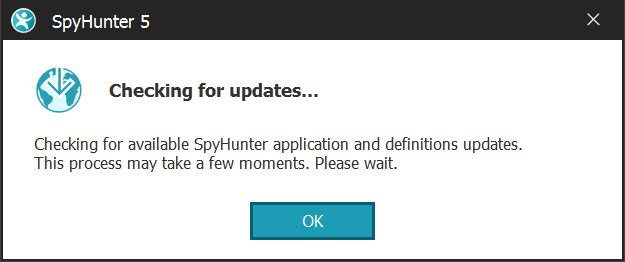
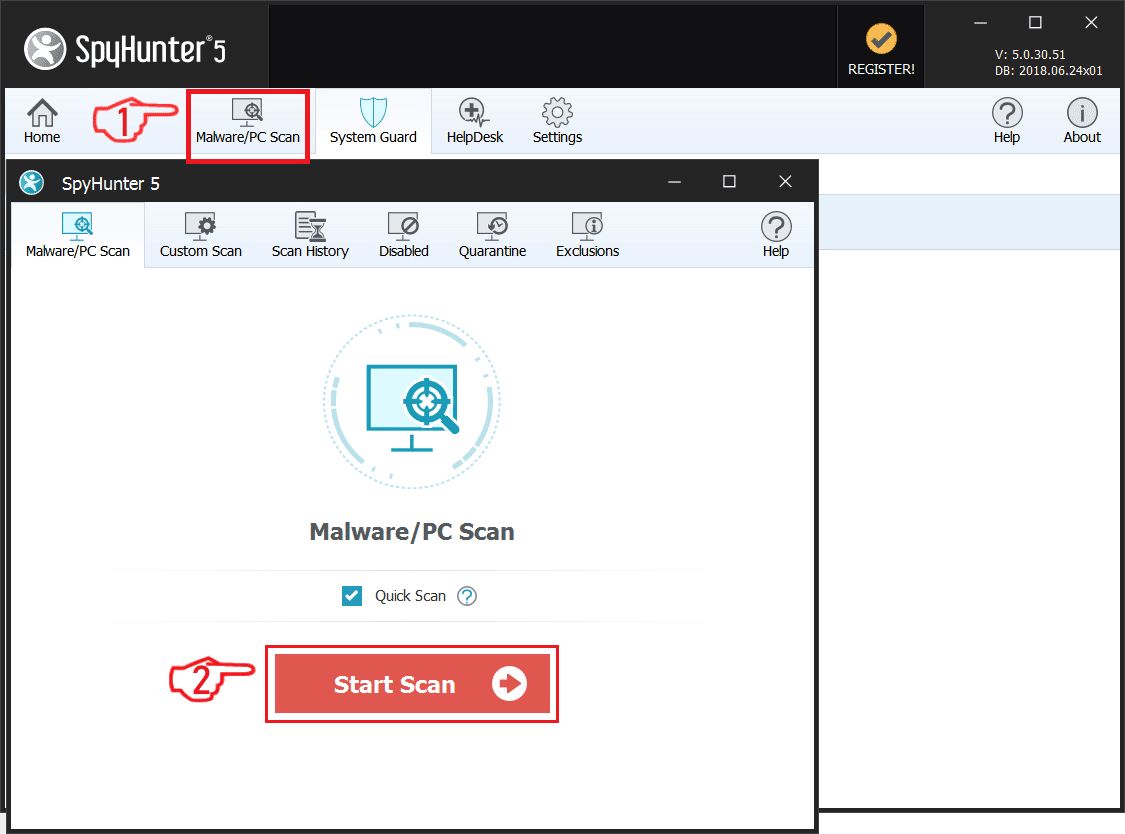
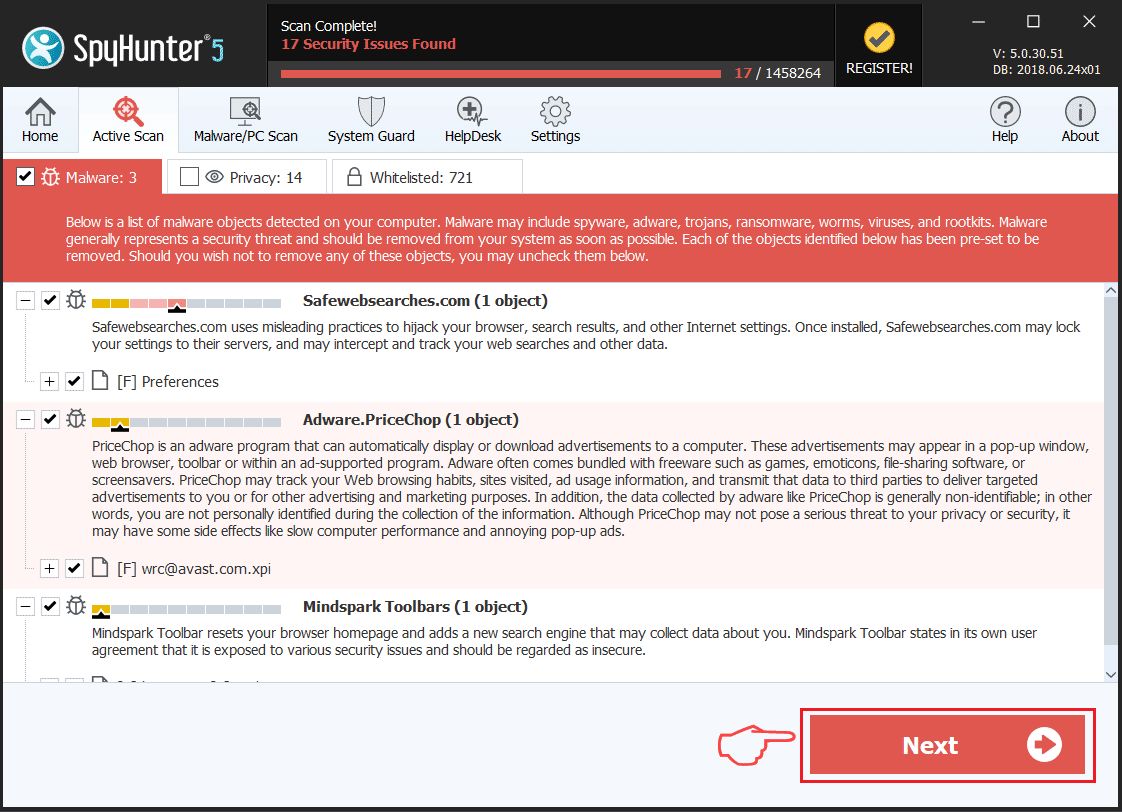
Step 1: Scan for Happy Ransomware with SpyHunter Anti-Malware Tool
Ransomware Automatic Removal - Video Guide
Step 2: Uninstall Happy Ransomware and related malware from Windows
Here is a method in few easy steps that should be able to uninstall most programs. No matter if you are using Windows 10, 8, 7, Vista or XP, those steps will get the job done. Dragging the program or its folder to the recycle bin can be a very bad decision. If you do that, bits and pieces of the program are left behind, and that can lead to unstable work of your PC, errors with the file type associations and other unpleasant activities. The proper way to get a program off your computer is to Uninstall it. To do that:
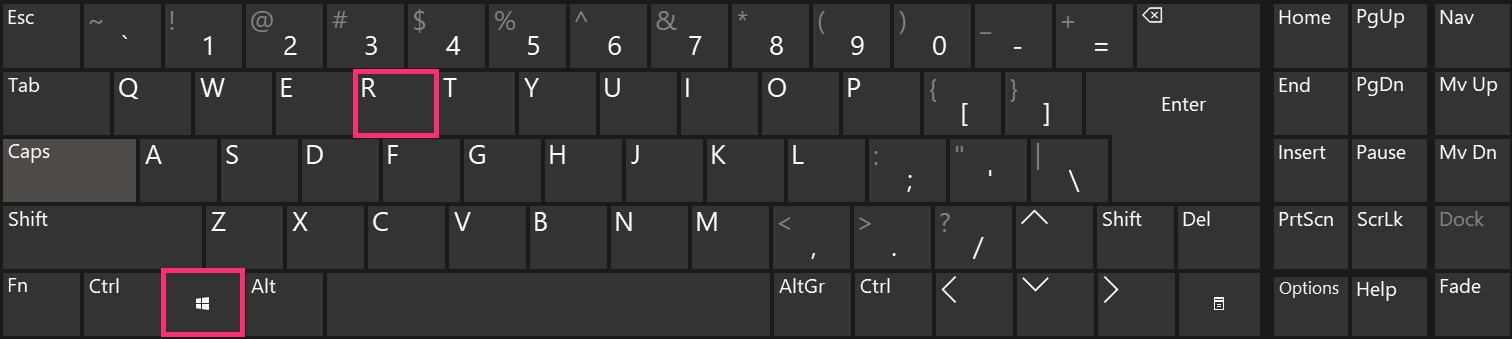
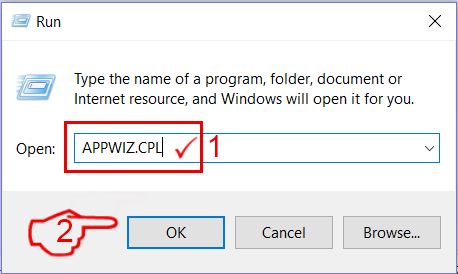
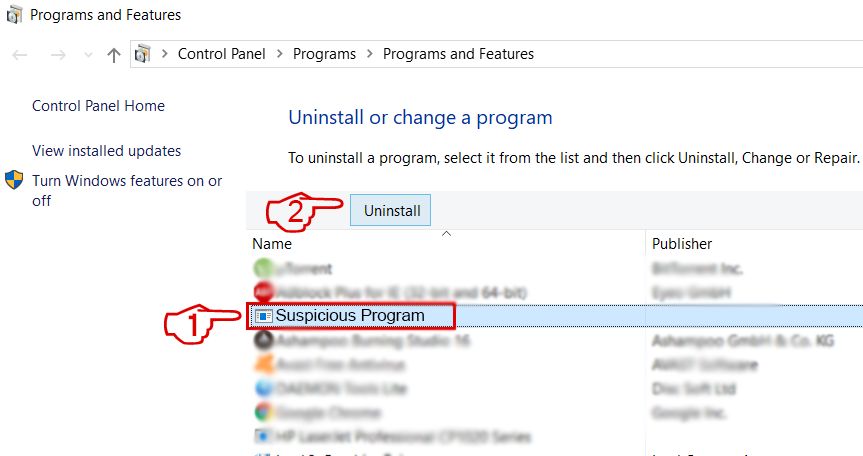 Follow the instructions above and you will successfully delete most unwanted and malicious programs.
Step 3: Clean any registries, created by Happy Ransomware on your computer.
The usually targeted registries of Windows machines are the following:
- HKEY_LOCAL_MACHINE\Software\Microsoft\Windows\CurrentVersion\Run
- HKEY_CURRENT_USER\Software\Microsoft\Windows\CurrentVersion\Run
- HKEY_LOCAL_MACHINE\Software\Microsoft\Windows\CurrentVersion\RunOnce
- HKEY_CURRENT_USER\Software\Microsoft\Windows\CurrentVersion\RunOnce
You can access them by opening the Windows registry editor and deleting any values, created by Happy Ransomware there. This can happen by following the steps underneath:
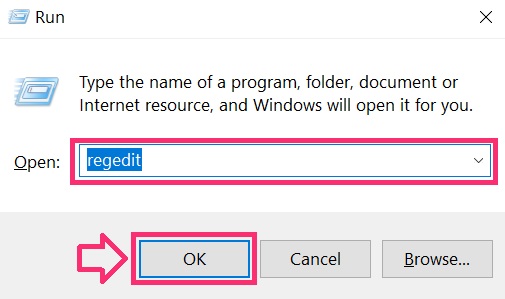
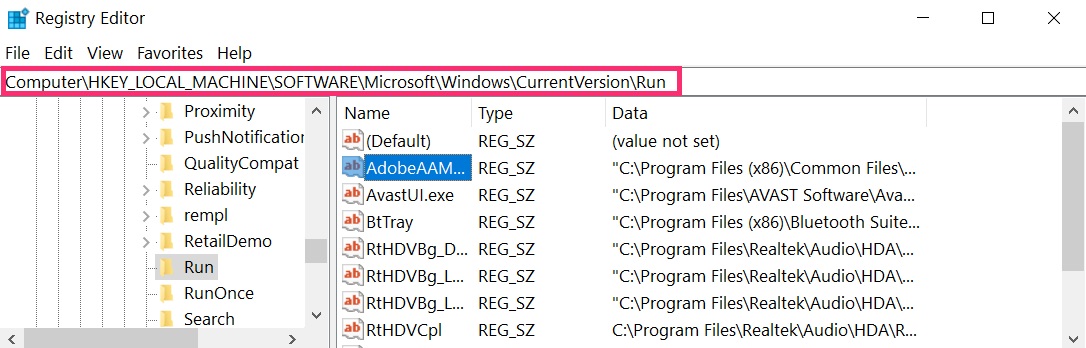
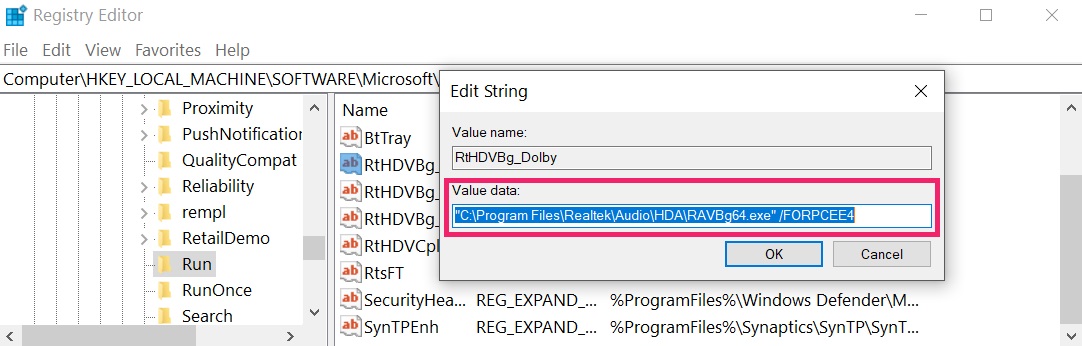 Tip: To find a virus-created value, you can right-click on it and click "Modify" to see which file it is set to run. If this is the virus file location, remove the value.
Before starting "Step 4", please boot back into Normal mode, in case you are currently in Safe Mode.
This will enable you to install and use SpyHunter 5 successfully.
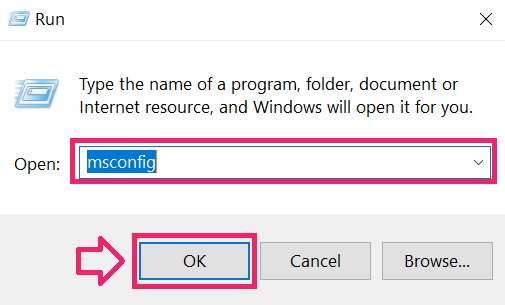
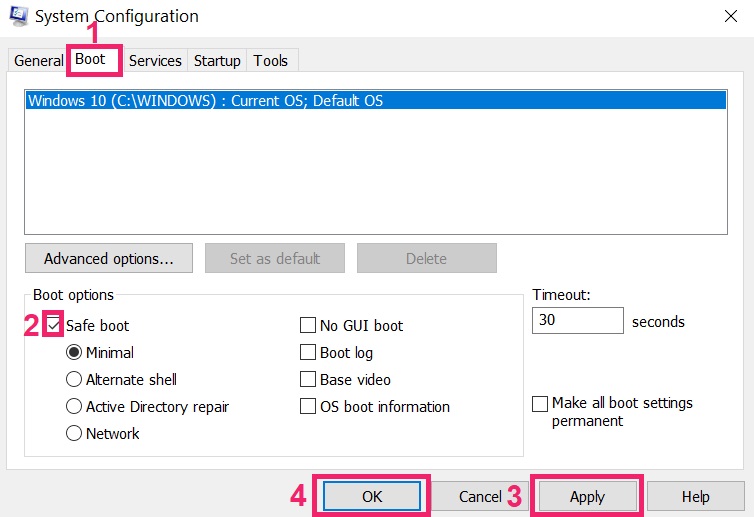
Step 4: Boot Your PC In Safe Mode to isolate and remove Happy Ransomware
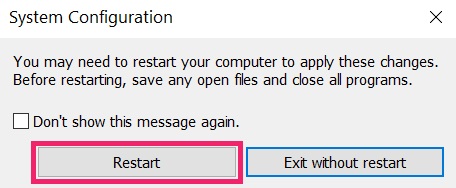
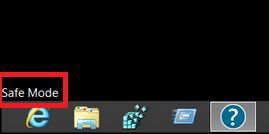
Step 5: Try to Restore Files Encrypted by Happy Ransomware.
Method 1: Use STOP Decrypter by Emsisoft.
Not all variants of this ransomware can be decrypted for free, but we have added the decryptor used by researchers that is often updated with the variants which become eventually decrypted. You can try and decrypt your files using the instructions below, but if they do not work, then unfortunately your variant of the ransomware virus is not decryptable.
Follow the instructions below to use the Emsisoft decrypter and decrypt your files for free. You can download the Emsisoft decryption tool linked here and then follow the steps provided below:
1 Right-click on the decrypter and click on Run as Administrator as shown below:
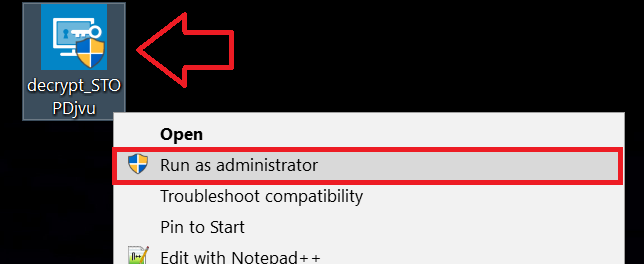
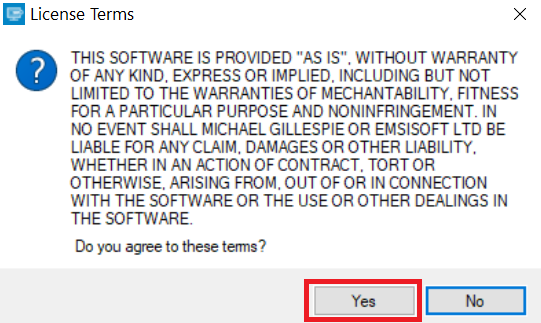
2. Agree with the license terms:
3. Click on "Add Folder" and then add the folders where you want files decrypted as shown underneath:
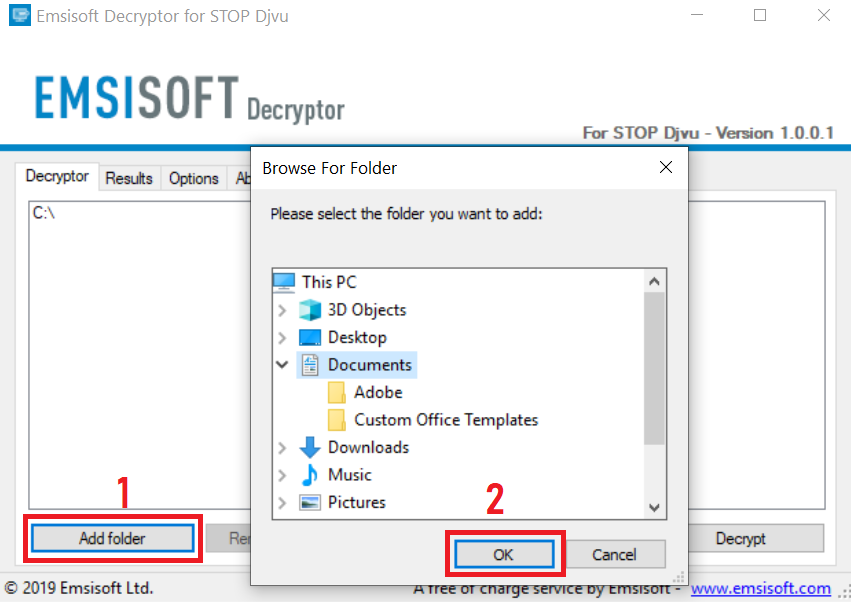
4. Click on "Decrypt" and wait for your files to be decoded.
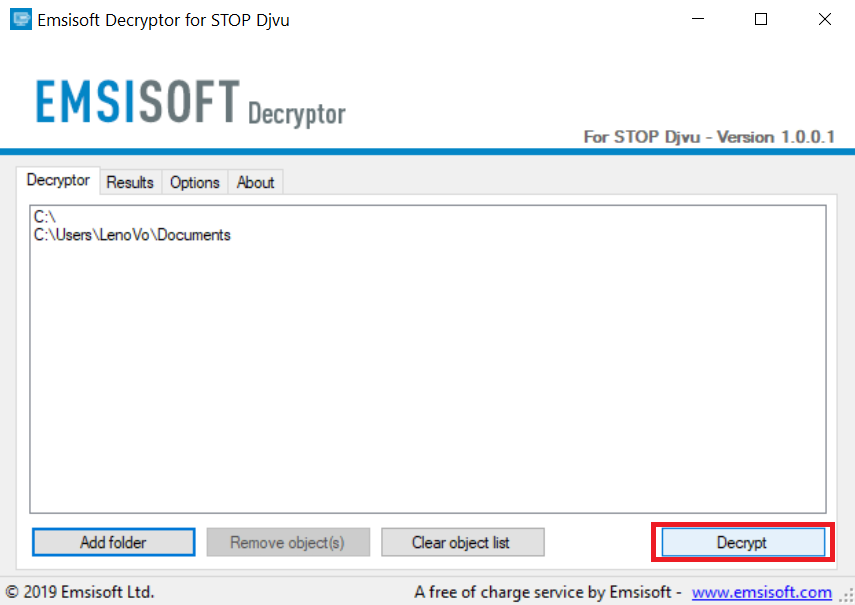
Note: Credit for the decryptor goes to Emsisoft researchers who have made the breakthrough with this virus.
Method 2: Use data recovery software
Ransomware infections and Happy Ransomware aim to encrypt your files using an encryption algorithm which may be very difficult to decrypt. This is why we have suggested a data recovery method that may help you go around direct decryption and try to restore your files. Bear in mind that this method may not be 100% effective but may also help you a little or a lot in different situations.
Simply click on the link and on the website menus on the top, choose Data Recovery - Data Recovery Wizard for Windows or Mac (depending on your OS), and then download and run the tool.
Happy Ransomware-FAQ
What is Happy Ransomware Ransomware?
Happy Ransomware is a ransomware infection - the malicious software that enters your computer silently and blocks either access to the computer itself or encrypt your files.
Many ransomware viruses use sophisticated encryption algorithms to make your files inaccessible. The goal of ransomware infections is to demand that you pay a ransom payment to get access to your files back.
What Does Happy Ransomware Ransomware Do?
Ransomware in general is a malicious software that is designed to block access to your computer or files until a ransom is paid.
Ransomware viruses can also damage your system, corrupt data and delete files, resulting in the permanent loss of important files.
How Does Happy Ransomware Infect?
Via several ways.Happy Ransomware Ransomware infects computers by being sent via phishing emails, containing virus attachment. This attachment is usually masked as an important document, like an invoice, bank document or even a plane ticket and it looks very convincing to users.
Another way you may become a victim of Happy Ransomware is if you download a fake installer, crack or patch from a low reputation website or if you click on a virus link. Many users report getting a ransomware infection by downloading torrents.
How to Open .Happy Ransomware files?
You can't without a decryptor. At this point, the .Happy Ransomware files are encrypted. You can only open them once they are decrypted using a specific decryption key for the particular algorithm.
What to Do If a Decryptor Does Not Work?
Do not panic, and backup the files. If a decryptor did not decrypt your .Happy Ransomware files successfully, then do not despair, because this virus is still new.
Can I Restore ".Happy Ransomware" Files?
Yes, sometimes files can be restored. We have suggested several file recovery methods that could work if you want to restore .Happy Ransomware files.
These methods are in no way 100% guaranteed that you will be able to get your files back. But if you have a backup, your chances of success are much greater.
How To Get Rid of Happy Ransomware Virus?
The safest way and the most efficient one for the removal of this ransomware infection is the use a professional anti-malware program.
It will scan for and locate Happy Ransomware ransomware and then remove it without causing any additional harm to your important .Happy Ransomware files.
Can I Report Ransomware to Authorities?
In case your computer got infected with a ransomware infection, you can report it to the local Police departments. It can help authorities worldwide track and determine the perpetrators behind the virus that has infected your computer.
Below, we have prepared a list with government websites, where you can file a report in case you are a victim of a cybercrime:
Cyber-security authorities, responsible for handling ransomware attack reports in different regions all over the world:
Germany - Offizielles Portal der deutschen Polizei
United States - IC3 Internet Crime Complaint Centre
United Kingdom - Action Fraud Police
France - Ministère de l'Intérieur
Italy - Polizia Di Stato
Spain - Policía Nacional
Netherlands - Politie
Poland - Policja
Portugal - Polícia Judiciária
Greece - Cyber Crime Unit (Hellenic Police)
India - Mumbai Police - CyberCrime Investigation Cell
Australia - Australian High Tech Crime Center
Reports may be responded to in different timeframes, depending on your local authorities.
Can You Stop Ransomware from Encrypting Your Files?
Yes, you can prevent ransomware. The best way to do this is to ensure your computer system is updated with the latest security patches, use a reputable anti-malware program and firewall, backup your important files frequently, and avoid clicking on malicious links or downloading unknown files.
Can Happy Ransomware Ransomware Steal Your Data?
Yes, in most cases ransomware will steal your information. It is a form of malware that steals data from a user's computer, encrypts it, and then demands a ransom in order to decrypt it.
In many cases, the malware authors or attackers will threaten to delete the data or publish it online unless the ransom is paid.
Can Ransomware Infect WiFi?
Yes, ransomware can infect WiFi networks, as malicious actors can use it to gain control of the network, steal confidential data, and lock out users. If a ransomware attack is successful, it could lead to a loss of service and/or data, and in some cases, financial losses.
Should I Pay Ransomware?
No, you should not pay ransomware extortionists. Paying them only encourages criminals and does not guarantee that the files or data will be restored. The better approach is to have a secure backup of important data and be vigilant about security in the first place.
What Happens If I Don't Pay Ransom?
If you don't pay the ransom, the hackers may still have access to your computer, data, or files and may continue to threaten to expose or delete them, or even use them to commit cybercrimes. In some cases, they may even continue to demand additional ransom payments.
Can a Ransomware Attack Be Detected?
Yes, ransomware can be detected. Anti-malware software and other advanced security tools can detect ransomware and alert the user when it is present on a machine.
It is important to stay up-to-date on the latest security measures and to keep security software updated to ensure ransomware can be detected and prevented.
Do Ransomware Criminals Get Caught?
Yes, ransomware criminals do get caught. Law enforcement agencies, such as the FBI, Interpol and others have been successful in tracking down and prosecuting ransomware criminals in the US and other countries. As ransomware threats continue to increase, so does the enforcement activity.
About the Happy Ransomware Research
The content we publish on SensorsTechForum.com, this Happy Ransomware how-to removal guide included, is the outcome of extensive research, hard work and our team’s devotion to help you remove the specific malware and restore your encrypted files.
How did we conduct the research on this ransomware?
Our research is based on an independent investigation. We are in contact with independent security researchers, and as such, we receive daily updates on the latest malware and ransomware definitions.
Furthermore, the research behind the Happy Ransomware ransomware threat is backed with VirusTotal and the NoMoreRansom project.
To better understand the ransomware threat, please refer to the following articles which provide knowledgeable details.
As a site that has been dedicated to providing free removal instructions for ransomware and malware since 2014, SensorsTechForum’s recommendation is to only pay attention to trustworthy sources.
How to recognize trustworthy sources:
- Always check "About Us" web page.
- Profile of the content creator.
- Make sure that real people are behind the site and not fake names and profiles.
- Verify Facebook, LinkedIn and Twitter personal profiles.