

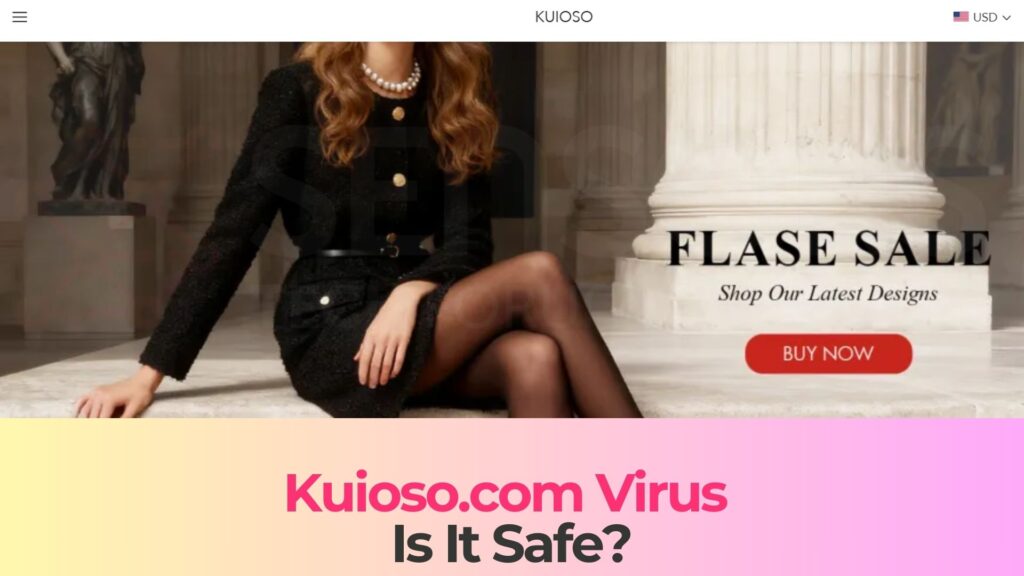
Kuioso.com Virus Pop-ups is a term used to describe a suspicious and potentially malicious website that masquerades as a legitimate online store. If you have encountered unexpected pop-ups, redirects to Kuioso.com, or suspicious purchase offers that seem too good to be true, your system or browser may have been exposed to a scam platform or potentially unwanted program. Read this article to find out what Kuioso.com Virus Pop-ups is, how it may have appeared on your device, what risks it poses to your personal and financial information, and how you can remove any associated threats effectively.
What is Kuioso.com Virus Pop-ups?
Kuioso.com is promoted as an online shopping platform, but multiple indicators suggest that it may function as a fake e-commerce website designed to scam users. Websites of this type often imitate legitimate online retailers by displaying attractive discounts, limited-time offers, and trending products at unusually low prices. However, their primary objective is not to deliver goods but to harvest sensitive information or distribute malware.
The term “Kuioso.com Virus Pop-ups” is commonly used because users frequently report intrusive advertisements, aggressive redirect behavior, and suspicious pop-up messages associated with this domain. In many cases, these pop-ups may originate from adware or a browser hijacker installed on the affected system. The site itself may also deploy malicious scripts designed to manipulate browser notifications or prompt users to enable push notifications.
Fake online stores like Kuioso.com typically lack transparency. They may provide vague company information, copied product images, fabricated customer reviews, and unclear refund policies. These red flags strongly suggest that the website is not a legitimate retailer but rather a social engineering platform intended to exploit unsuspecting visitors.
Short Overview
| Type | Fake shopping website, Browser Hijacker, Redirect, PUP |
| Short Description | A suspicious website and rogue search engine that hijacks your browsers and causes redirects. |
| Symptoms | Unwanted pop-ups may start appearing while you are browsing the web. A browser hijacker may be downloaded without your knowledge. |
| Removal Time | Approximately 15 minutes for a full-system scan |
| Removal Tool |
See If Your System Has Been Affected by malware
Download
Malware Removal Tool
|
Technical and Behavioral Indicators
Kuioso.com Virus Pop-ups and related browser issues may demonstrate the following behaviors:
- Frequent redirects to Kuioso.com without user consent.
- Pop-up ads promoting unrealistic discounts or flash sales.
- Requests to enable browser push notifications to “track orders” or “verify you are not a robot.”
- Collection of payment card details, email addresses, and phone numbers.
- Suspicious checkout pages lacking secure payment verification mechanisms.
These characteristics align with common online shopping scams and adware-driven redirect campaigns.
How Did I Get It?
There are several ways users may encounter Kuioso.com Virus Pop-ups. In many cases, exposure begins with adware installed on the system. Adware is often distributed through software bundling, where free applications include additional components hidden within default installation settings. If users select “Quick” or “Express” setup options, they may unknowingly authorize extra software installations.
Another common infection vector involves malicious advertising networks. Clicking on deceptive banner ads, fake “You’ve won a prize” messages, or misleading download buttons can redirect users to scam domains like Kuioso.com. These redirects may also be triggered by compromised websites running malicious JavaScript code.
Spam campaigns also play a significant role. Users may receive phishing emails advertising exclusive deals and linking directly to Kuioso.com. These emails often create urgency, encouraging recipients to act quickly before the “offer expires.”
- Bundled freeware installers containing ad-supported components.
- Malvertising campaigns injecting redirect scripts into legitimate websites.
- Phishing emails with fake promotional offers.
- Social media ads promoting suspicious discount stores.
- Compromised browser extensions that manipulate traffic.
Once interaction occurs, users may be prompted to enter personal details, shipping information, and payment credentials. In some cases, clicking certain elements on the site may trigger background downloads or expose the system to exploit kits.
What Does It Do?
The primary objective of Kuioso.com appears to be financial fraud and data harvesting. Unlike legitimate e-commerce platforms, fake stores often do not intend to fulfill orders. Instead, they collect payment information, charge victims, and either deliver counterfeit products or nothing at all.
However, the risks extend beyond financial loss. Kuioso.com Virus Pop-ups may be associated with malicious scripts designed to compromise system integrity. For example, enabling browser notifications can allow the site to push persistent spam advertisements directly to the desktop, even when the browser is closed.
Information Harvesting
Users who interact with Kuioso.com may unknowingly provide sensitive information such as:
- Full name and home address.
- Email address and phone number.
- Credit or debit card numbers.
- Card verification values (CVV).
- Account login credentials reused across platforms.
This information can be exploited for identity theft, fraudulent transactions, or sold on underground marketplaces.
Malware Exposure Risks
Fake online stores may also serve as gateways to additional cyber threats. Clicking certain pop-ups or download prompts could redirect users to pages distributing:
- Trojans designed to establish remote access.
- Ransomware payloads encrypting personal files.
- Spyware monitoring keystrokes and browser activity.
- Cryptocurrency miners abusing system resources.
Furthermore, persistent pop-up campaigns can degrade browser performance, consume bandwidth, and create system instability. Some variants may modify browser settings, inject tracking cookies, and alter DNS configurations to maintain control over web traffic.
Because fake stores rely heavily on social engineering, they often use psychological manipulation techniques such as scarcity tactics, countdown timers, and fake customer testimonials. These elements are specifically designed to override user caution and encourage impulsive purchases.
How to Remove It
Removing Kuioso.com Virus Pop-ups requires addressing both potential adware infections and any compromised browser configurations. Simply closing the suspicious website is not sufficient if malicious components remain active in the system.
A thorough inspection of installed applications, browser extensions, and startup entries is necessary to identify unauthorized additions. Security experts recommend scanning the entire operating system using reputable anti-malware software capable of detecting adware, browser hijackers, and potentially unwanted programs.
It is also important to review browser notification settings. If Kuioso.com has been granted permission to send push notifications, those permissions must be revoked to prevent continued spam messages. Clearing cookies and cached data may further eliminate tracking elements left behind by the site.
Why Immediate Action Is Critical
Ignoring Kuioso.com Virus Pop-ups can lead to ongoing financial risk and identity exposure. The longer malicious scripts or adware remain active, the greater the chance of additional compromise. Victims who have entered payment information should monitor bank statements closely and consider contacting their financial institution to prevent unauthorized transactions.
- Financial fraud and unauthorized card charges.
- Identity theft using stolen personal data.
- Continued exposure to malware-laced advertisements.
- Persistent browser performance issues.
Taking swift action minimizes damage and restores system integrity. Maintaining updated operating systems, browsers, and security software significantly reduces the likelihood of encountering similar threats in the future.
What should you do?
If you have encountered Kuioso.com Virus Pop-ups or suspect that you have interacted with this fake online store, it is crucial to act immediately. Avoid entering any further personal or payment information and discontinue all interaction with the website.
We strongly recommend performing a complete system scan using a trusted anti-malware solution to detect and remove any adware or malicious components associated with Kuioso.com. Additionally, review your browser settings, revoke suspicious notification permissions, and monitor your financial accounts for unusual activity.
By responding quickly and following the removal guidance provided below, you can protect your personal information, prevent financial loss, and restore your device’s security. Do not delay—take action now to eliminate Kuioso.com Virus Pop-ups and safeguard your online safety.

Ventsislav Krastev
Ventsislav is a cybersecurity expert at SensorsTechForum since 2015. He has been researching, covering, helping victims with the latest malware infections plus testing and reviewing software and the newest tech developments. Having graduated Marketing as well, Ventsislav also has passion for learning new shifts and innovations in cybersecurity that become game changers. After studying Value Chain Management, Network Administration and Computer Administration of System Applications, he found his true calling within the cybersecrurity industry and is a strong believer in the education of every user towards online safety and security.
Follow Me: