

What is Trojan.MacOS.Adload.QV Malware?
Read this article to find out how Trojan.MacOS.Adload.QV operates, why it is considered a dangerous Mac threat, and what you can do to protect your system from long-term damage. This malware belongs to the infamous Adload trojan family, a long-running Mac-focused threat group that specializes in adware delivery, browser manipulation, and data harvesting activities.
Trojan.MacOS.Adload.QV is a malicious program designed specifically to target macOS users by abusing legitimate system features, user trust, and software distribution mechanisms. While it often presents itself as a harmless utility, browser extension, or software update, its real purpose is to inject aggressive advertising content and redirect victims to third-party or potentially malicious websites.
What makes this malware particularly dangerous is its modular trojan-like behavior. Once installed, it may download additional components that expand its functionality, allowing it to persist, evade detection, and continuously monetize the infected system through intrusive advertisements and traffic redirection schemes.
Trojan.MacOS.Adload.QV Details
| Type | Adware / Potentially Unwanted Application / Mac Virus |
| Removal Time | Less than 15 minutes |
| Removal Tool |
See If Your System Has Been Affected by malware
Malware Removal Tool
Malware Removal Tool
|
How Did I Get Trojan.MacOS.Adload.QV?
Trojan.MacOS.Adload.QV typically spreads through deceptive distribution techniques that exploit social engineering rather than technical vulnerabilities. In most cases, users unknowingly install the threat themselves while attempting to download free software or updates from untrusted sources.
The most common infection vectors include:
- Bundled installers that include hidden malicious components
- Fake Adobe Flash Player or browser update pop-ups
- Deceptive download portals offering cracked or pirated software
- Malicious advertisements redirecting to fake installer pages
Once the user launches the installer, Trojan.MacOS.Adload.QV silently deploys itself into system directories. It may abuse macOS permission prompts to gain extended access, making the infection appear legitimate. Many victims only realize something is wrong after noticing excessive ads or browser behavior changes.
Because this malware relies heavily on user interaction, traditional macOS security features may not immediately flag it as suspicious. This allows the infection to remain undetected for extended periods while continuing its malicious activity in the background.
What Does Trojan.MacOS.Adload.QV Do?
After successful installation, Trojan.MacOS.Adload.QV begins executing a series of background processes designed to manipulate the user’s browsing environment and collect potentially sensitive data. Its primary goal is monetization through aggressive advertising and traffic redirection.
Some of the most commonly observed behaviors include:
- Injecting ads into visited websites
- Redirecting browser searches to unknown or suspicious domains
- Installing unwanted browser extensions without consent
- Changing default homepage and search engine settings
In addition to adware activity, this trojan may also engage in information harvesting. It can monitor browsing habits, search queries, IP addresses, and system-related metadata. In more advanced cases, collected data may be transmitted to remote servers controlled by the attackers, increasing the risk of privacy violations.
Trojan.MacOS.Adload.QV is also known for its persistence mechanisms. It may create launch agents, daemons, or configuration profiles that allow it to automatically start with the operating system. Even if users manually remove visible components, hidden files may reintroduce the infection upon reboot.
Another concerning aspect is its ability to download additional payloads. This means an initial Adload infection can act as a gateway for more severe threats, including spyware, credential stealers, or even ransomware variants targeting macOS systems.
How to Remove Trojan.MacOS.Adload.QV
Removing Trojan.MacOS.Adload.QV requires thorough system inspection and elimination of all related components. Because this malware embeds itself deeply within macOS directories and browser configurations, incomplete removal may lead to reinfection.
Successful cleanup involves identifying malicious launch agents, removing rogue configuration profiles, restoring browser settings, and deleting all associated files. Users should also review installed applications and browser extensions for unfamiliar or suspicious entries.
It is important to understand that Adload-based trojans evolve frequently. New variants may use different filenames, folder locations, or persistence methods, making manual detection increasingly difficult for non-technical users.
After removal, affected users should secure their system by avoiding untrusted download sources, keeping macOS and browsers up to date, and paying close attention to permission requests during software installations.
What should you do?
If you believe your Mac has been infected with Trojan.MacOS.Adload.QV, immediate action is strongly recommended. Leaving the threat active on your system may expose you to continuous privacy risks, intrusive advertising, and additional malware infections.
Follow the removal guide provided below this article to completely eliminate Trojan.MacOS.Adload.QV from your Mac and restore your system’s security. Acting promptly will help prevent further damage and ensure your personal data remains protected.

Ventsislav Krastev
Ventsislav is a cybersecurity expert at SensorsTechForum since 2015. He has been researching, covering, helping victims with the latest malware infections plus testing and reviewing software and the newest tech developments. Having graduated Marketing as well, Ventsislav also has passion for learning new shifts and innovations in cybersecurity that become game changers. After studying Value Chain Management, Network Administration and Computer Administration of System Applications, he found his true calling within the cybersecrurity industry and is a strong believer in the education of every user towards online safety and security.
Follow Me:
Steps to Prepare Before Removal:
Before starting to follow the steps below, be advised that you should first do the following preparations:
- Backup your files in case the worst happens.
- Make sure to have a device with these instructions on standy.
- Arm yourself with patience.
- 1. Scan for Mac Malware
- 2. Uninstall Risky Apps
- 3. Clean Your Browsers
Step 1: Scan for and remove Trojan.MacOS.Adload.QV files from your Mac
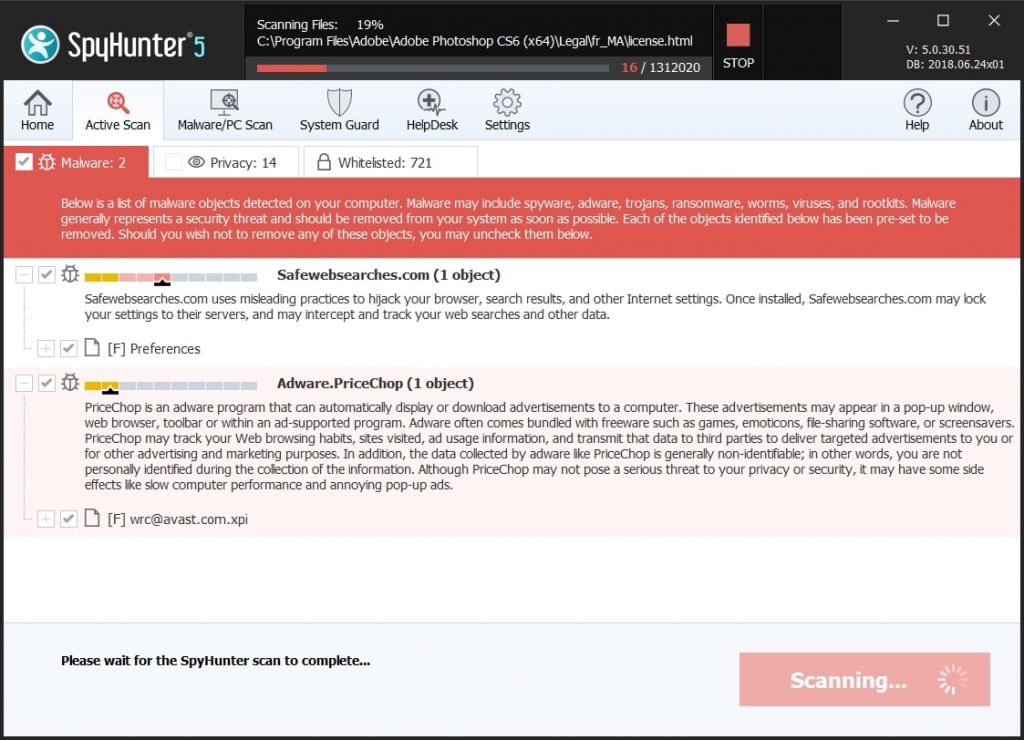
When you are facing problems on your Mac as a result of unwanted scripts and programs such as Trojan.MacOS.Adload.QV, the recommended way of eliminating the threat is by using an anti-malware program. SpyHunter for Mac offers advanced security features along with other modules that will improve your Mac’s security and protect it in the future.
Quick and Easy Mac Malware Video Removal Guide
Bonus Step: How to Make Your Mac Run Faster?
Mac machines maintain probably the fastest operating system out there. Still, Macs do become slow and sluggish sometimes. The video guide below examines all of the possible problems that may lead to your Mac being slower than usual as well as all of the steps that can help you to speed up your Mac.
Step 2: Uninstall Trojan.MacOS.Adload.QV and remove related files and objects
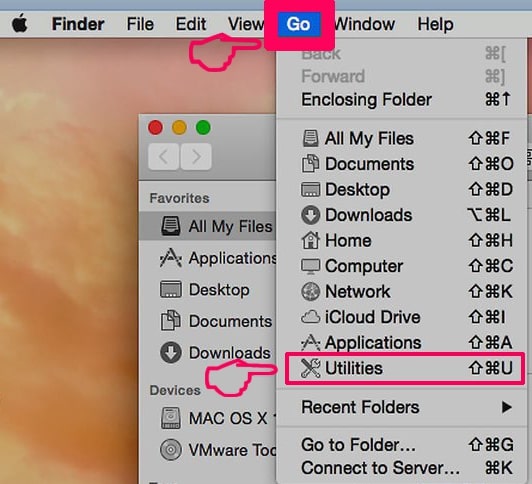
1. Hit the ⇧+⌘+U keys to open Utilities. Another way is to click on “Go” and then click “Utilities”, like the image below shows:
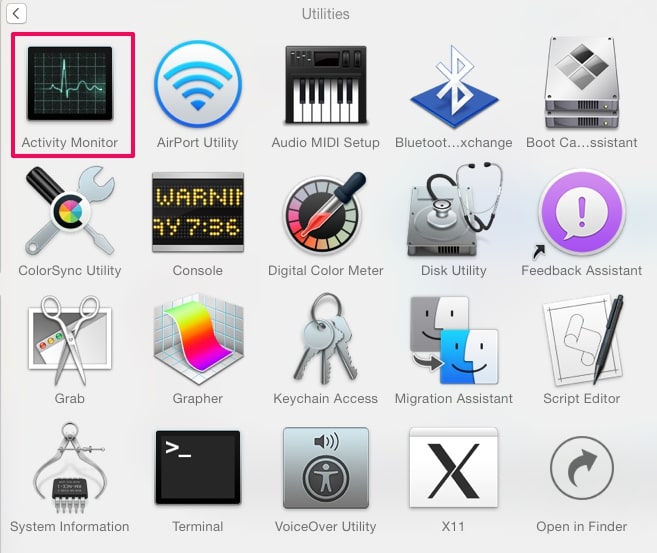
2. Find Activity Monitor and double-click it:
3. In the Activity Monitor look for any suspicious processes, belonging or related to Trojan.MacOS.Adload.QV:
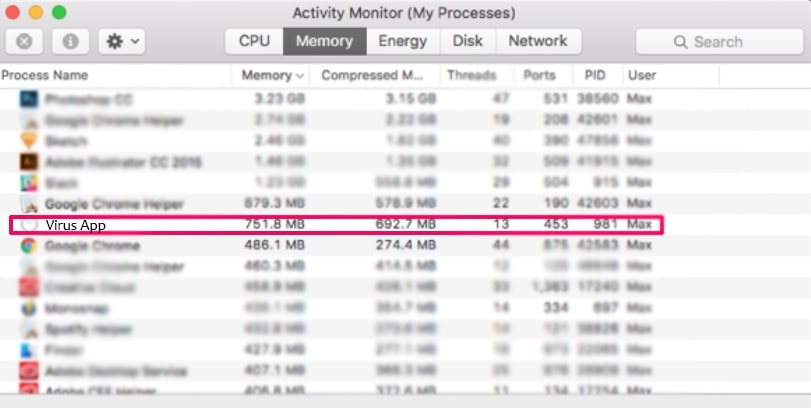
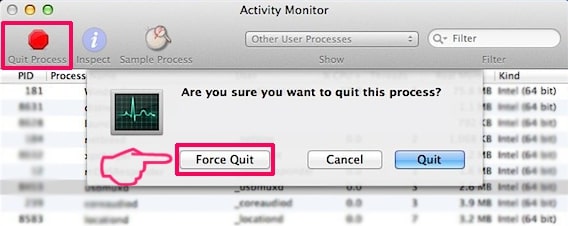
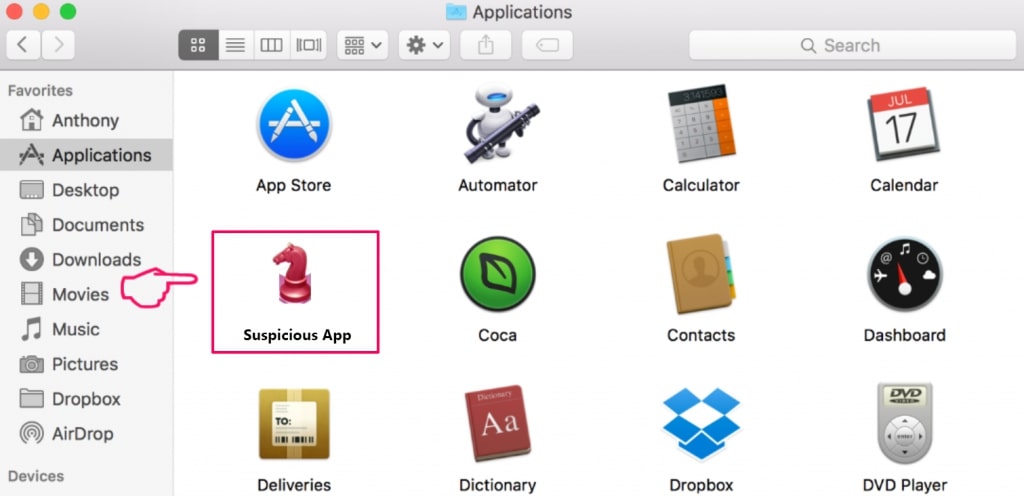
4. Click on the "Go" button again, but this time select Applications. Another way is with the ⇧+⌘+A buttons.
5. In the Applications menu, look for any suspicious app or an app with a name, similar or identical to Trojan.MacOS.Adload.QV. If you find it, right-click on the app and select “Move to Trash”.
6. Select Accounts, after which click on the Login Items preference. Your Mac will then show you a list of items that start automatically when you log in. Look for any suspicious apps identical or similar to Trojan.MacOS.Adload.QV. Check the app you want to stop from running automatically and then select on the Minus (“-“) icon to hide it.
7. Remove any leftover files that might be related to this threat manually by following the sub-steps below:
- Go to Finder.
- In the search bar type the name of the app that you want to remove.
- Above the search bar change the two drop down menus to “System Files” and “Are Included” so that you can see all of the files associated with the application you want to remove. Bear in mind that some of the files may not be related to the app so be very careful which files you delete.
- If all of the files are related, hold the ⌘+A buttons to select them and then drive them to “Trash”.
In case you cannot remove Trojan.MacOS.Adload.QV via Step 1 above:
In case you cannot find the virus files and objects in your Applications or other places we have shown above, you can manually look for them in the Libraries of your Mac. But before doing this, please read the disclaimer below:
1. Click on "Go" and Then "Go to Folder" as shown underneath:
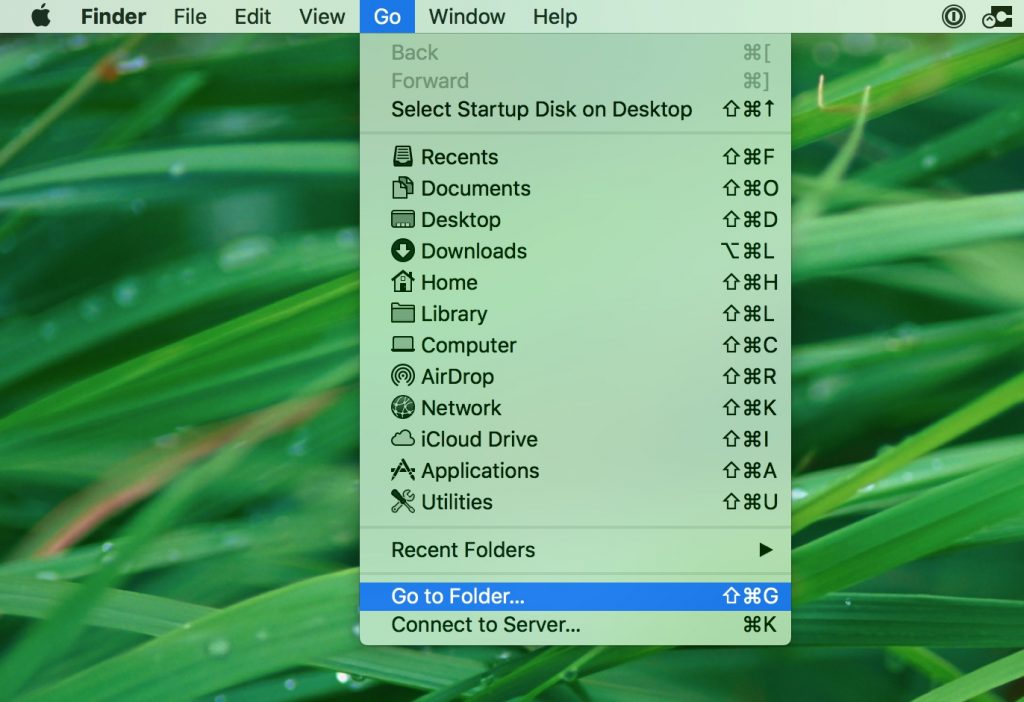
2. Type in "/Library/LauchAgents/" and click Ok:
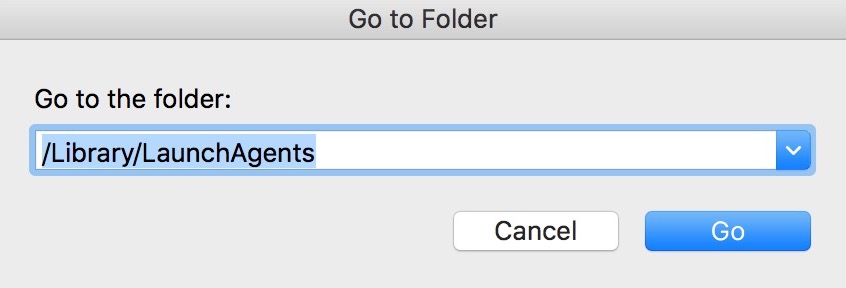
3. Delete all of the virus files that have similar or the same name as Trojan.MacOS.Adload.QV. If you believe there is no such file, do not delete anything.
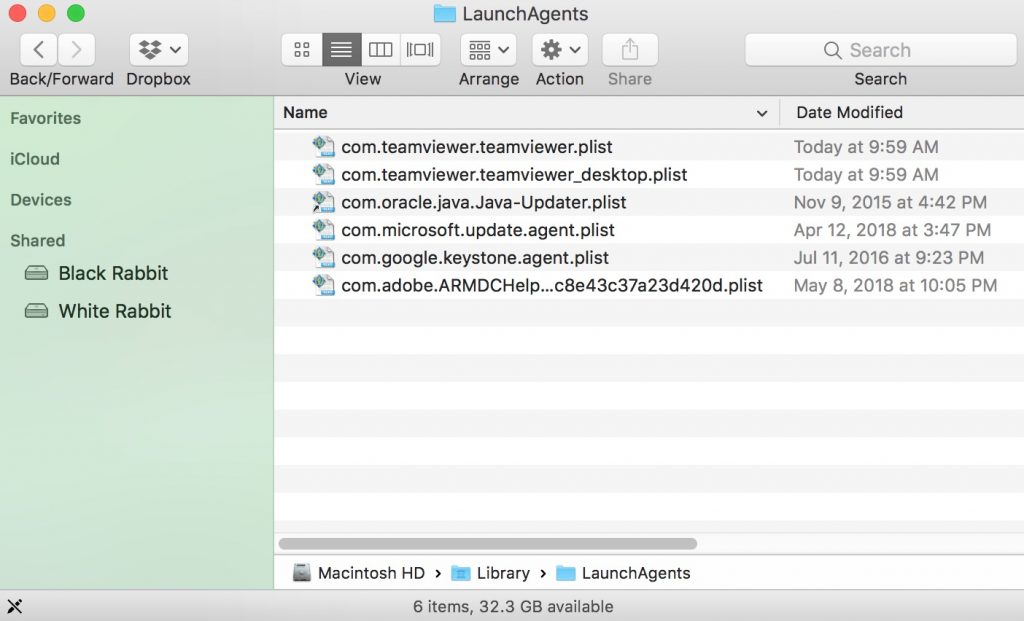
You can repeat the same procedure with the following other Library directories:
→ ~/Library/LaunchAgents
/Library/LaunchDaemons
Tip: ~ is there on purpose, because it leads to more LaunchAgents.
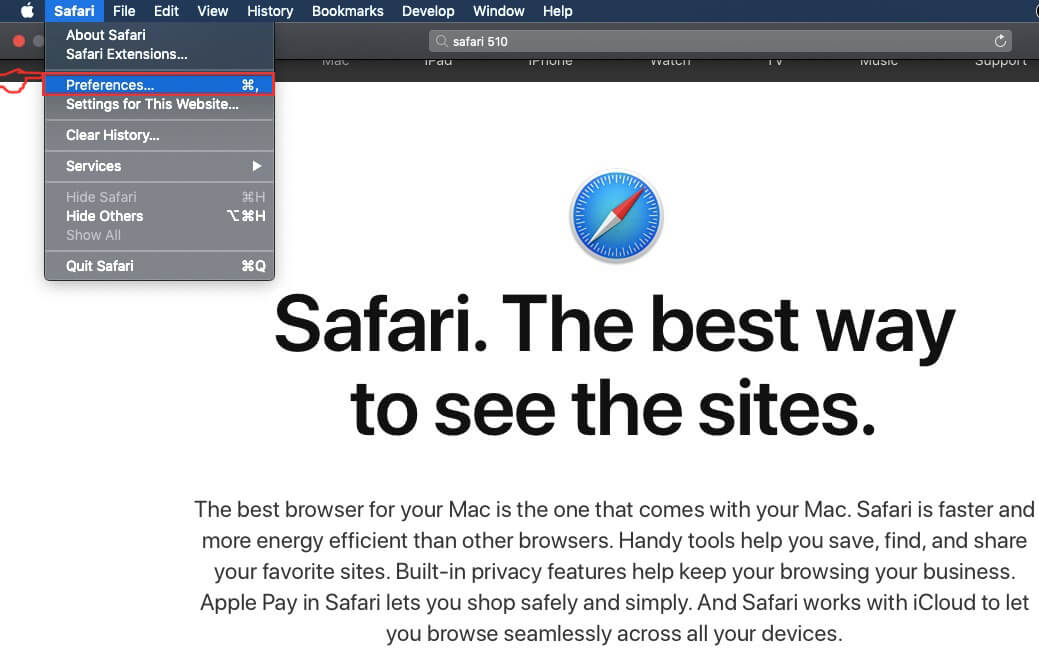
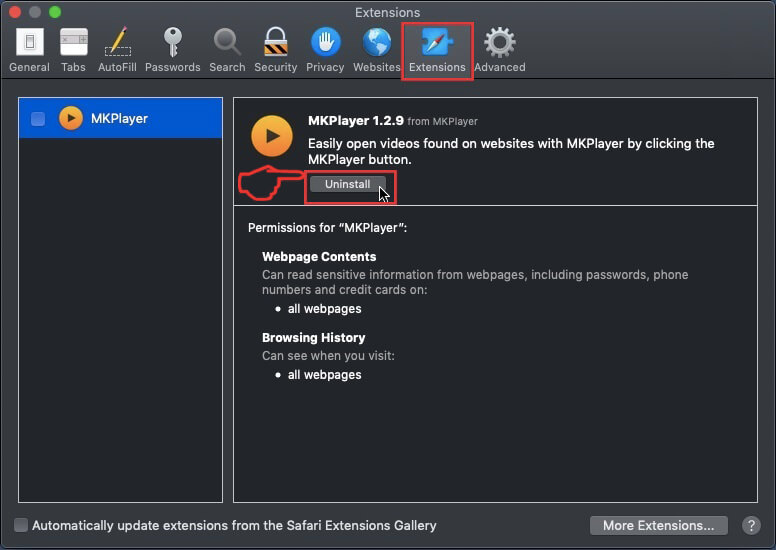
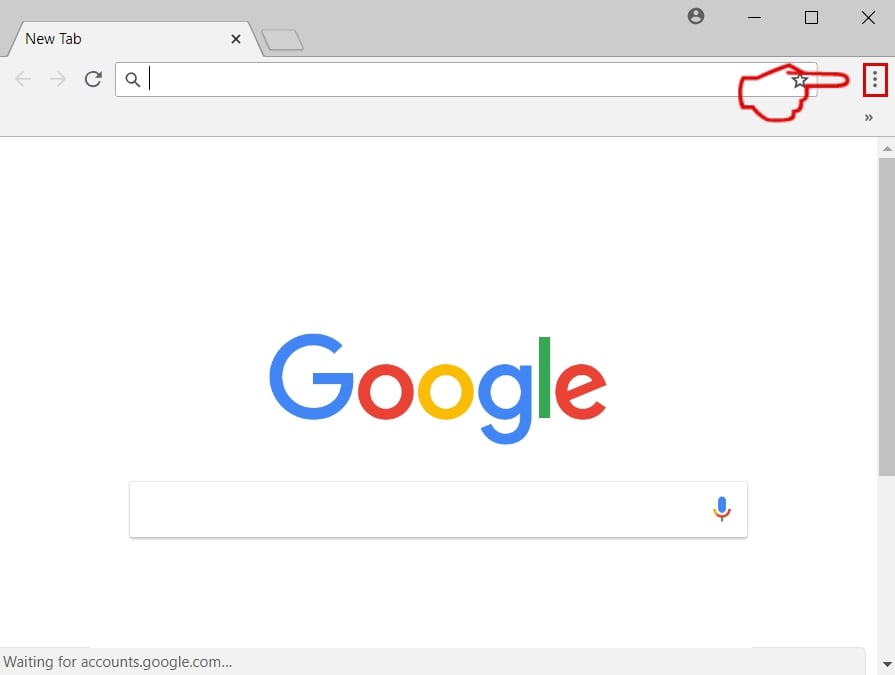
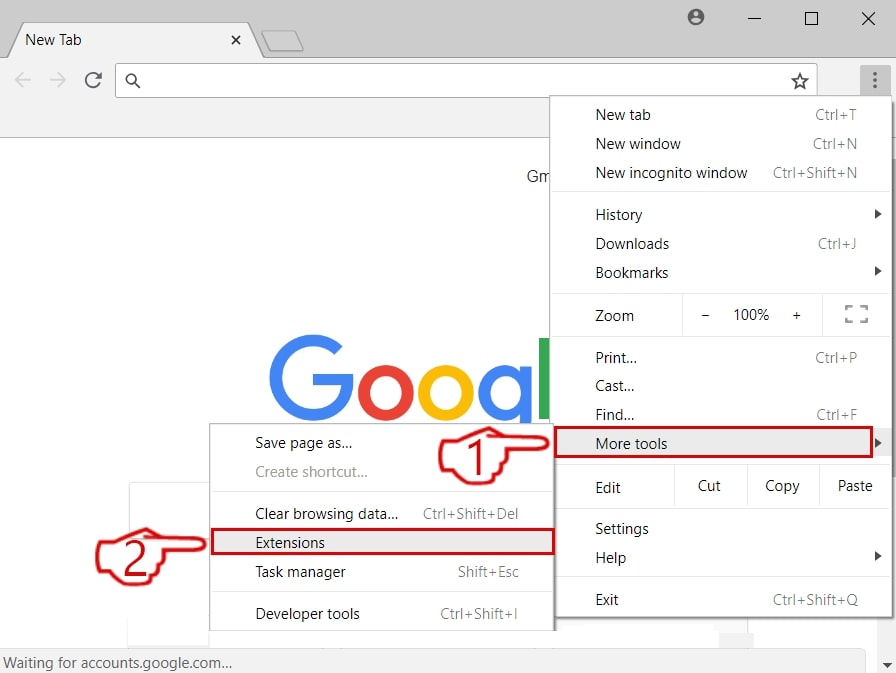
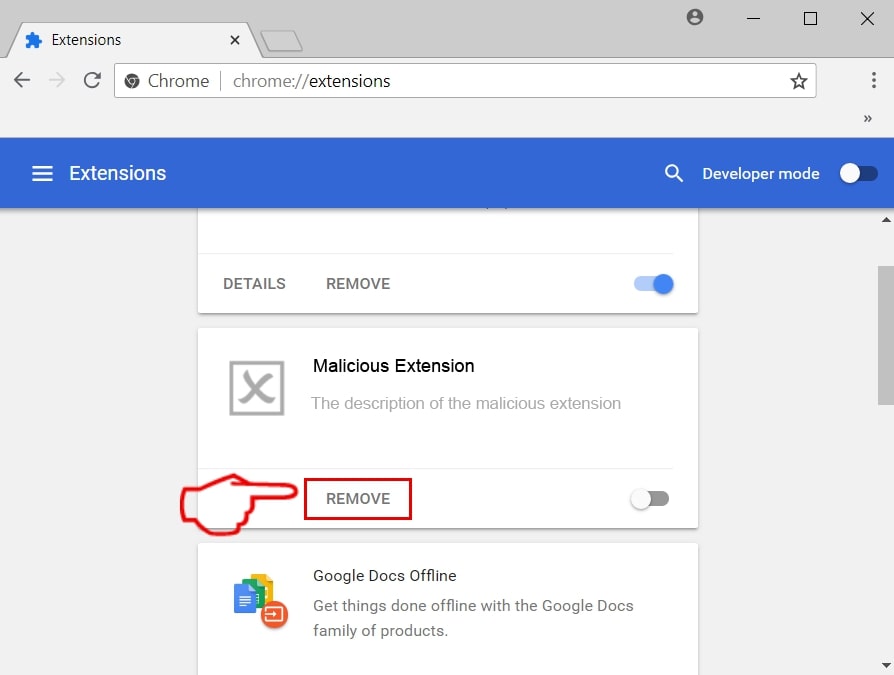
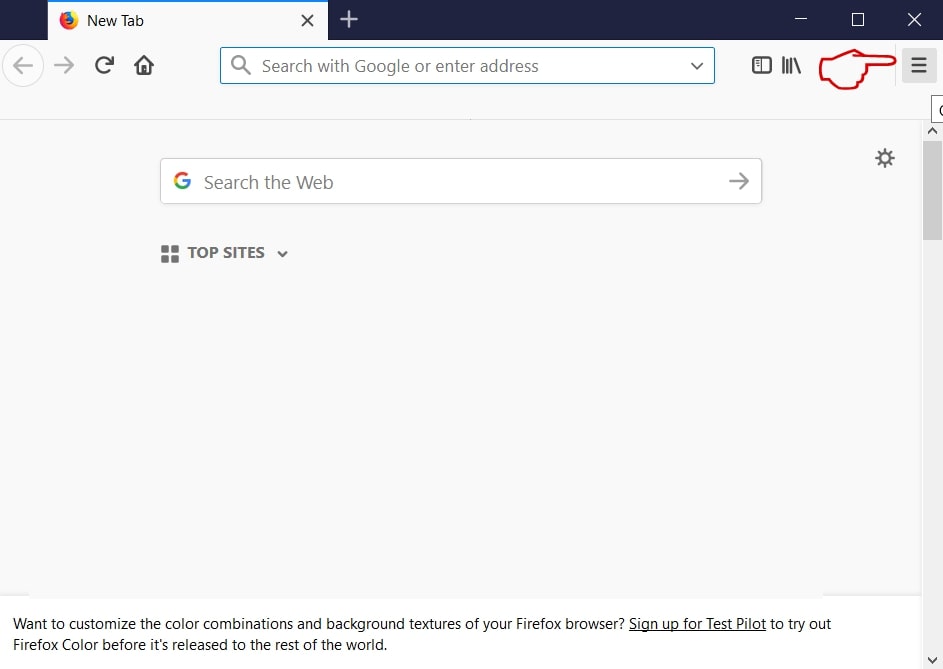
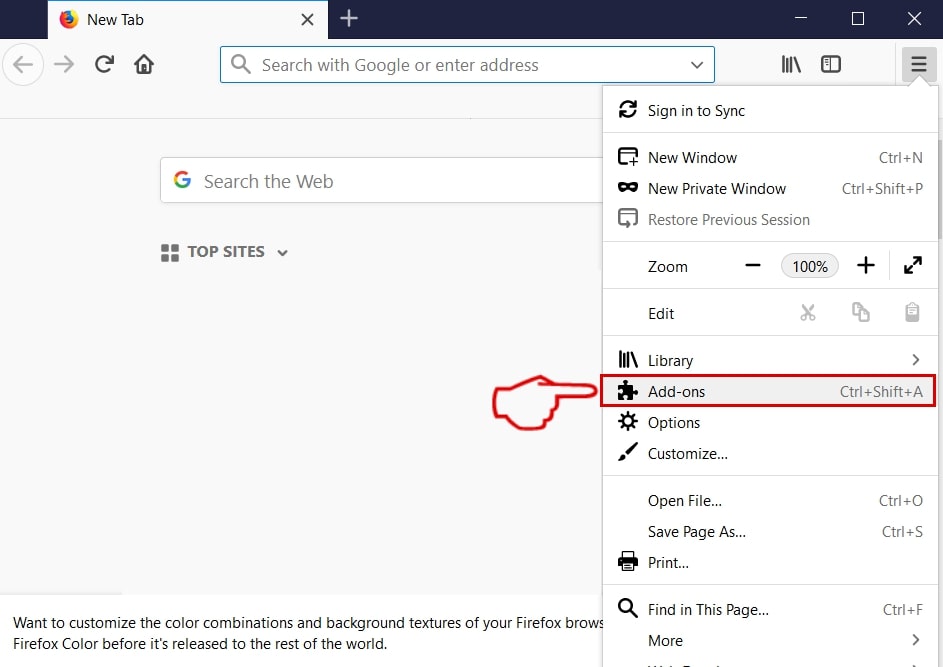
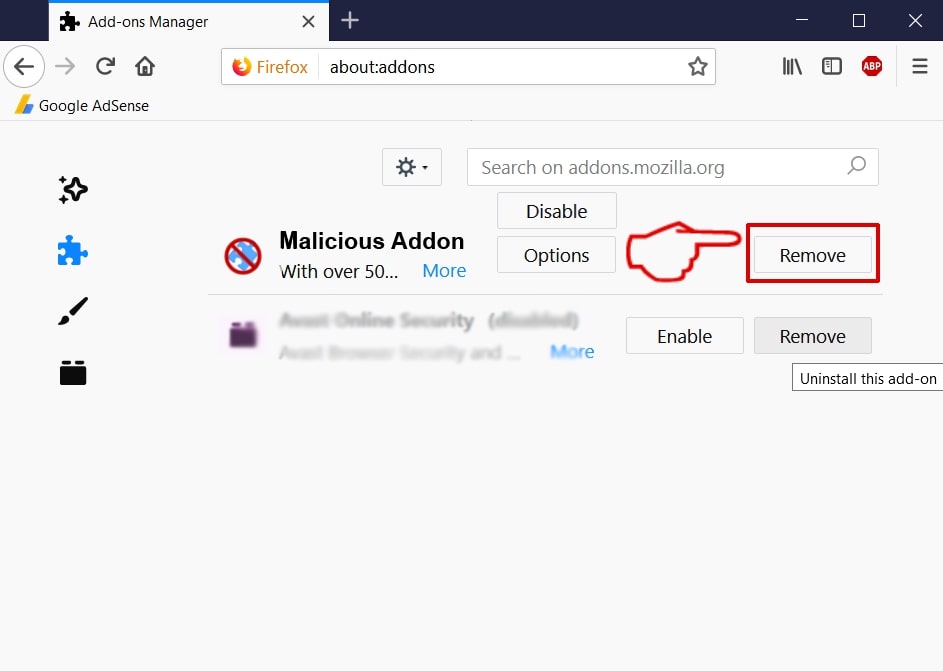
Step 3: Remove Trojan.MacOS.Adload.QV – related extensions from Safari / Chrome / Firefox

Trojan.MacOS.Adload.QV-FAQ
What is Trojan.MacOS.Adload.QV on your Mac?
The Trojan.MacOS.Adload.QV threat is probably a potentially unwanted app. There is also a chance it could be related to Mac malware. If so, such apps tend to slow your Mac down significantly and display advertisements. They could also use cookies and other trackers to obtain browsing information from the installed web browsers on your Mac.
Can Macs Get Viruses?
Yes. As much as any other device, Apple computers do get malware. Apple devices may not be a frequent target by malware authors, but rest assured that almost all of the Apple devices can become infected with a threat.
What Types of Mac Threats Are There?
According to most malware researchers and cyber-security experts, the types of threats that can currently infect your Mac can be rogue antivirus programs, adware or hijackers (PUPs), Trojan horses, ransomware and crypto-miner malware.
What To Do If I Have a Mac Virus, Like Trojan.MacOS.Adload.QV?
Do not panic! You can easily get rid of most Mac threats by firstly isolating them and then removing them. One recommended way to do that is by using a reputable malware removal software that can take care of the removal automatically for you.
There are many Mac anti-malware apps out there that you can choose from. SpyHunter for Mac is one of the reccomended Mac anti-malware apps, that can scan for free and detect any viruses. This saves time for manual removal that you would otherwise have to do.
How to Secure My Data from Trojan.MacOS.Adload.QV?
With few simple actions. First and foremost, it is imperative that you follow these steps:
Step 1: Find a safe computer and connect it to another network, not the one that your Mac was infected in.
Step 2: Change all of your passwords, starting from your e-mail passwords.
Step 3: Enable two-factor authentication for protection of your important accounts.
Step 4: Call your bank to change your credit card details (secret code, etc.) if you have saved your credit card for online shopping or have done online activiites with your card.
Step 5: Make sure to call your ISP (Internet provider or carrier) and ask them to change your IP address.
Step 6: Change your Wi-Fi password.
Step 7: (Optional): Make sure to scan all of the devices connected to your network for viruses and repeat these steps for them if they are affected.
Step 8: Install anti-malware software with real-time protection on every device you have.
Step 9: Try not to download software from sites you know nothing about and stay away from low-reputation websites in general.
If you follow these reccomendations, your network and Apple devices will become significantly more safe against any threats or information invasive software and be virus free and protected in the future too.
More tips you can find on our MacOS Virus section, where you can also ask any questions and comment about your Mac problems.
About the Trojan.MacOS.Adload.QV Research
The content we publish on SensorsTechForum.com, this Trojan.MacOS.Adload.QV how-to removal guide included, is the outcome of extensive research, hard work and our team’s devotion to help you remove the specific macOS issue.
How did we conduct the research on Trojan.MacOS.Adload.QV?
Please note that our research is based on an independent investigation. We are in contact with independent security researchers, thanks to which we receive daily updates on the latest malware definitions, including the various types of Mac threats, especially adware and potentially unwanted apps (PUAs).
Furthermore, the research behind the Trojan.MacOS.Adload.QV threat is backed with VirusTotal.
To better understand the threat posed by Mac malware, please refer to the following articles which provide knowledgeable details.