

Beasttrials.com presents itself as a modern crypto gaming platform, but that alone does not make it safe. Many scam websites now copy the look and language of legitimate gambling and finance platforms in order to appear trustworthy from the first visit. Read this article to find out what Beasttrials.com is, what warning signs have been observed around it, how users may end up on the site, what risks it may expose them to, and what you should keep in mind if you have already interacted with it.
What is Beasttrials.com?
Beasttrials.com is a website promoted as a cryptocurrency-based online gaming or casino platform. At first glance, it may appear polished, fast, and professionally designed, which is exactly why many users pause before deciding whether it is legitimate. Sites in this category often attempt to build instant credibility by using buzzwords such as decentralized, blockchain-based, transparent, provably fair, instant payouts, and large welcome bonuses. However, a convincing interface is not proof of legitimacy.

Beasttrials.com Short Overview
| Type | Fake crypto casino scam, Browser Hijacker, Redirect, PUP |
| Short Description | A suspicious website that steals data and causes redirects. |
| Symptoms | Unwanted pop-ups may start appearing while you are browsing the web. A browser hijacker may be downloaded without your knowledge. |
| Removal Time | Approximately 15 minutes for a full-system scan |
| Removal Tool |
See If Your System Has Been Affected by malware
Download
Malware Removal Tool
|
When evaluating whether a website like Beasttrials.com is safe, it is important to separate appearance from verification. A real and trustworthy online gambling platform usually provides transparent corporate details, licensing information, regulatory coverage, responsible gambling policies, clear terms, privacy documentation, identity verification procedures where legally required, and a support structure that can be independently checked. Suspicious platforms, by contrast, tend to focus heavily on emotional triggers such as urgency, oversized bonus promises, social proof, and easy winnings while offering very little verifiable business transparency.
Why users are suspicious of Beasttrials.com
Beasttrials.com fits a pattern that has become increasingly common in online fraud campaigns. Rather than delivering classic malware immediately, sites like this can function as financial lures. Their goal is often to get victims to deposit cryptocurrency, trust a fake account balance, and continue paying when withdrawal problems begin. In many scam cases, the platform does not need to infect the device to cause harm. The damage comes from financial loss, exposed personal data, browser notifications, phishing redirects, and the psychological manipulation used to keep the victim engaged.
Another important point is that newly created domains frequently deserve closer inspection. While a new domain is not automatically malicious, threat actors often rely on recently registered websites because they can quickly launch a campaign, collect deposits or credentials, and then abandon the domain once complaints begin to appear. In practice, short domain age, low trust history, anonymous ownership, and aggressive promotional language can form a high-risk combination.
Common red flags connected with scam-check reviews
Users performing a scam check on Beasttrials.com should look at multiple indicators together instead of relying on one signal alone. A valid HTTPS certificate, for example, only shows that traffic can be encrypted. It does not prove that the operator is honest. Many fraudulent websites use SSL certificates because they are easy to obtain and help the page look more legitimate to inexperienced visitors.
The most commonly discussed red flags in cases like Beasttrials.com include:
- Recently registered domain with little or no established reputation.
- Hidden or unclear ownership and missing corporate transparency.
- Very large bonus offers that appear unrealistic for a real gambling platform.
- Claims of easy winnings, instant cashouts, or unusually favorable odds.
- Weak or missing licensing, policy, and compliance information.
- Pressure to deposit cryptocurrency quickly.
- Withdrawal barriers that appear only after funds are sent.
- Celebrity references, endorsements, or user statistics that cannot be independently verified.
How Did I Get It…
In the context of Beasttrials.com, the phrase “How did I get it?” usually does not mean a traditional malware infection. More often, it means “How did I end up on this website?” or “How did I get pulled into this scam funnel?” That distinction matters because scam exposure often begins through advertising, social engineering, and misleading referral traffic rather than an executable file.
Users may land on Beasttrials.com after seeing a post on social media, a direct message, a pop-up ad, a fake success video, or a recommendation from an account that appears to belong to an influencer, streamer, or celebrity. Fraud campaigns often recycle the same tactics across multiple domains. They use hype, visual proof, testimonial-style content, and countdown timers to make the platform look popular and urgent. In many cases, a victim is encouraged to sign up quickly to “claim” a bonus or enter a promo code before it expires.
Typical traffic sources used by suspicious websites
Scam operators rarely rely on random discovery alone. They often push traffic through channels that create artificial trust or curiosity. Beasttrials.com may be encountered through misleading promotions that make the site seem safer than it is.
Common distribution methods may include:
- Sponsored posts or ads promising free crypto, giveaway access, or bonus balances.
- Short-form videos showing fake winnings or staged withdrawals.
- Messages on Telegram, Discord, X, Facebook, or other social platforms.
- Compromised websites that redirect visitors to gambling or prize pages.
- Spam emails that promote limited-time rewards or exclusive registration codes.
- Browser push notification abuse that repeatedly pushes the same domain.
- Phishing pages that imitate news coverage or influencer recommendations.
Some users also arrive after searching for terms related to free crypto casinos, no-KYC betting, or promo-based gambling. Fraudulent platforms target those search patterns because they know the visitor may already be looking for fast rewards and fewer barriers. This creates a situation where the scam feels aligned with what the user hoped to find, making the deception more effective.
It is also worth noting that a scam website can be part of a broader threat chain. A user might first encounter a fake ad, then a landing page, then a registration portal, and finally a deposit screen. In more aggressive campaigns, the site may additionally request notification permissions, wallet connections, or personal details that can later be reused for phishing or account takeover attempts elsewhere.
What Does It Do…
The biggest risk associated with Beasttrials.com appears to be financial and data-related rather than purely technical. A suspicious crypto gambling website can be designed to simulate legitimate activity while steering the victim toward repeated deposits. The user may be shown a dashboard, game interface, bonus balance, transaction history, and even apparent wins. However, none of these visible elements necessarily prove that real, withdrawable funds exist behind the interface.
In many scam scenarios, the website is structured to create a false sense of progress. A victim signs up, sees a bonus, starts “winning,” and becomes convinced that a withdrawal is possible. The fraud usually intensifies when the user attempts to cash out. At that point, the site may introduce hidden conditions, account verification demands, tax claims, processing fees, liquidity checks, wallet activation fees, or other excuses requiring yet another payment. Once the victim pays again, a new obstacle appears.
Potential impact on victims
The danger of websites like Beasttrials.com is not limited to one outcome. Even if the user avoids the largest financial loss, there may still be damage involving personal information, wallet metadata, device exposure, or future targeting by related scams.
Possible consequences include:
- Direct loss of cryptocurrency deposits.
- Exposure of email addresses, usernames, phone numbers, or wallet details.
- Repeated phishing attempts after registration or contact.
- Pressure to pay fake withdrawal, verification, or tax fees.
- Subscription to push notifications that promote further scams.
- Trust exploitation through fake balances and fabricated winnings.
- Reuse of collected data in follow-up fraud campaigns or recovery scams.
There is also a secondary risk that should not be ignored. Once someone has lost money to one scam, they may later be contacted by another fraudster claiming they can recover the lost funds. This is known as a recovery scam. The victim is told that the crypto can be traced, unlocked, or reclaimed for a service fee. In reality, this often leads to another round of theft.
Can Beasttrials.com infect your device?
At the time of a typical scam check, the strongest concern around Beasttrials.com is the possibility of online fraud rather than a confirmed malware payload. That said, users should never assume a suspicious site is technically harmless. A risky domain can still deliver malicious advertisements, redirect chains, fake verification prompts, wallet-connection traps, phishing forms, or scripts that attempt to manipulate the browser environment.
If you interacted with the site, clicked pop-ups, downloaded anything, or approved notification requests, then the risk profile becomes broader. Even when a scam begins as a fake casino or investment portal, it can branch into credential theft, browser hijacking symptoms, deceptive extensions, and further malicious content depending on the attacker’s infrastructure.
How to Remove It
Because Beasttrials.com is a website rather than a standard malware family, removal is less about uninstalling one specific threat and more about cutting off every point of exposure. If you visited the site, registered an account, connected a wallet, or deposited funds, your response should focus on browser hygiene, account protection, payment containment, and device inspection.
Start by treating the situation as both a scam exposure and a possible security incident. Close the site and do not send additional cryptocurrency, even if the page claims you need to pay a fee to unlock your funds. Do not trust chat agents, popup notices, or support messages connected with the platform. If browser notifications were allowed, revoke them. If you downloaded files or installed extensions after visiting the site, review them carefully and remove anything suspicious. A full system scan with reputable security software is also a sensible precaution, especially if redirects, pop-ups, or unexpected changes appeared afterward.
Security actions that make sense after interacting with the site
Even when there is no confirmed malware infection, it is still wise to reduce every obvious risk surface. The goal is to block follow-up attacks and stop fraud operators from reusing the access or information they already obtained.
Useful post-exposure actions include:
- Clear browser data related to the session, including cookies and site permissions.
- Remove notification permissions granted to unknown or suspicious domains.
- Review browser extensions for recently added items you do not recognize.
- Change passwords for accounts that share the same email or login habits.
- Enable multi-factor authentication where possible.
- Monitor crypto wallets, exchange accounts, and email inboxes for suspicious activity.
- Preserve transaction IDs, wallet addresses, screenshots, and chat logs as evidence.
- Be extremely cautious of anyone promising fund recovery for an upfront payment.
If you entered financial information anywhere during the process, you should monitor the related accounts closely. If you connected a wallet to any questionable interface, review token approvals and access permissions using trusted tools and consider migrating assets if you suspect compromise. If you used the same password elsewhere, changing it becomes even more important because scam operators frequently test stolen credentials on other services.
From a defensive standpoint, Beasttrials.com should be approached as a high-risk website until independently verified otherwise through strong, transparent evidence. In security work, uncertainty combined with financial pressure is already a serious warning sign. A platform that makes it easy to deposit but difficult to verify ownership, licensing, or withdrawals does not deserve blind trust.
What should you do?
If you are asking whether Beasttrials.com is safe, the prudent answer is to stay away from it unless you can independently confirm legitimate ownership, regulation, and payout integrity through highly reliable sources. Do not let a polished design, a bonus banner, or a supposed winning balance override basic security judgment. If you have already interacted with the site, stop engaging with it, secure your browser and accounts, keep all evidence, and follow the removal and protection recommendations placed beneath this article. Acting quickly can reduce both technical risk and financial damage.

Ventsislav Krastev
Ventsislav is a cybersecurity expert at SensorsTechForum since 2015. He has been researching, covering, helping victims with the latest malware infections plus testing and reviewing software and the newest tech developments. Having graduated Marketing as well, Ventsislav also has passion for learning new shifts and innovations in cybersecurity that become game changers. After studying Value Chain Management, Network Administration and Computer Administration of System Applications, he found his true calling within the cybersecrurity industry and is a strong believer in the education of every user towards online safety and security.
Follow Me:
- Windows
- Mac OS X
- Google Chrome
- Mozilla Firefox
- Microsoft Edge
- Safari
- Internet Explorer
- Stop Push Pop-ups
How to Remove Beasttrials.com from Windows.
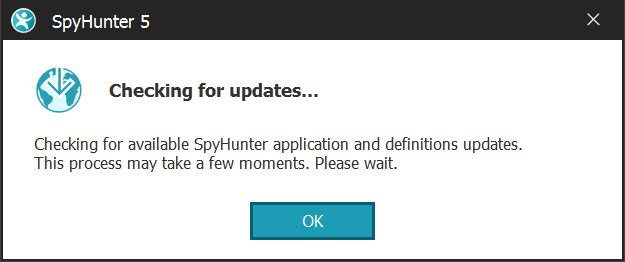
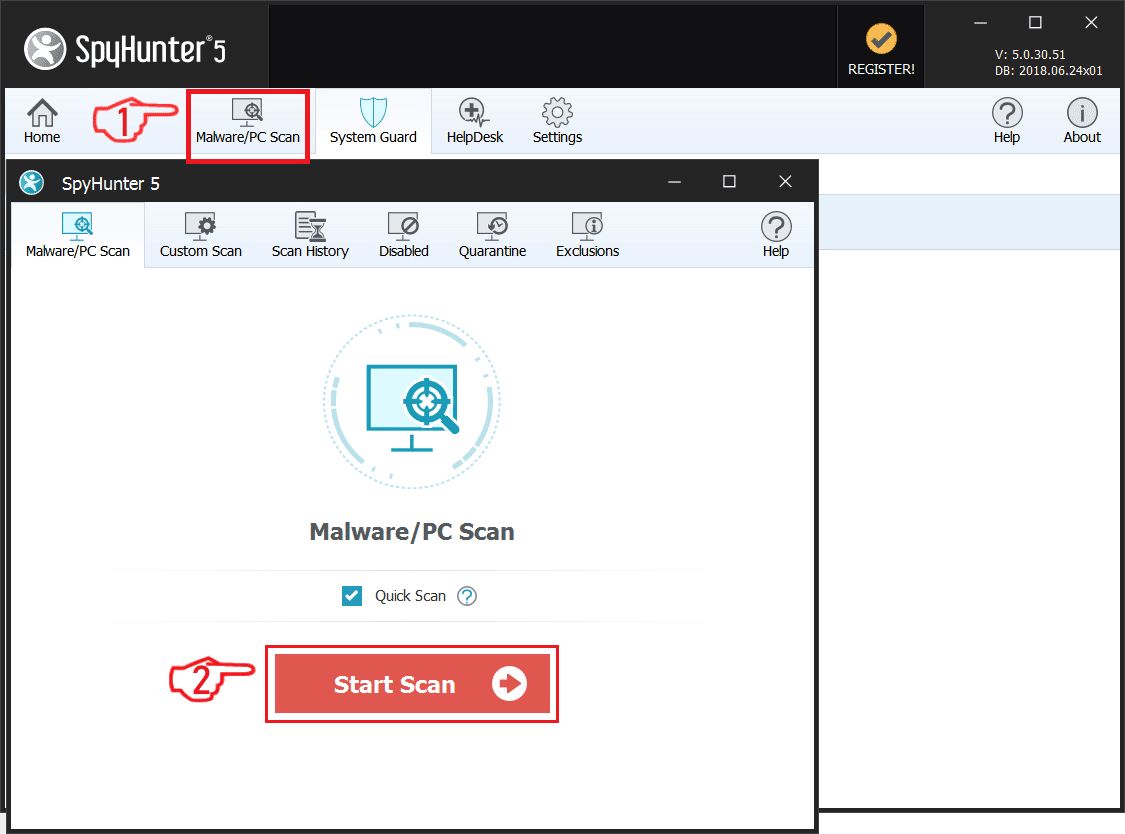
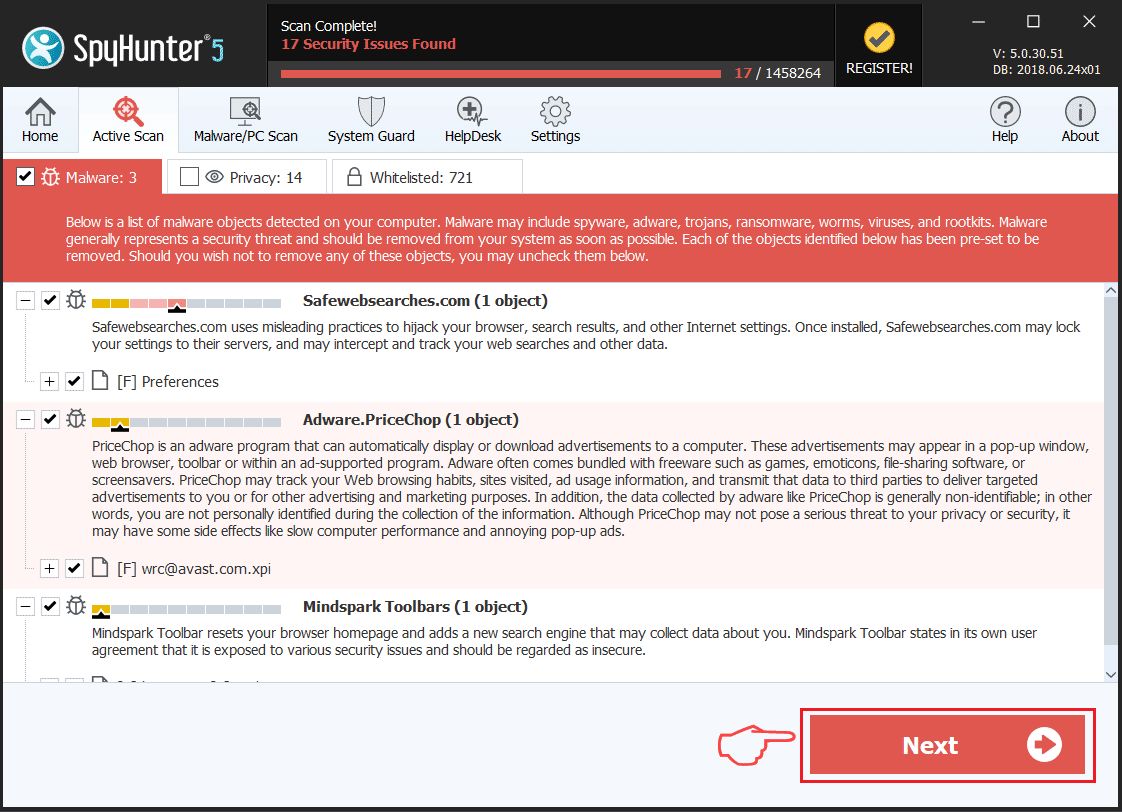
Step 1: Scan for Beasttrials.com with SpyHunter Anti-Malware Tool
Step 2: Boot Your PC In Safe Mode
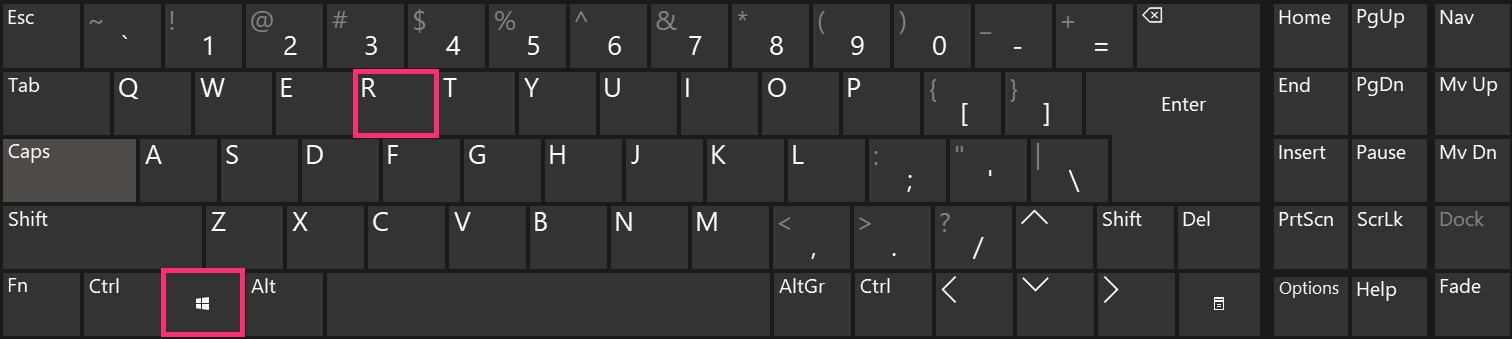
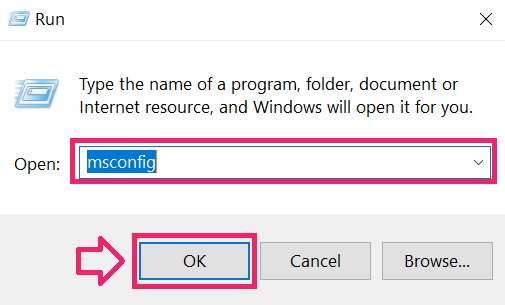
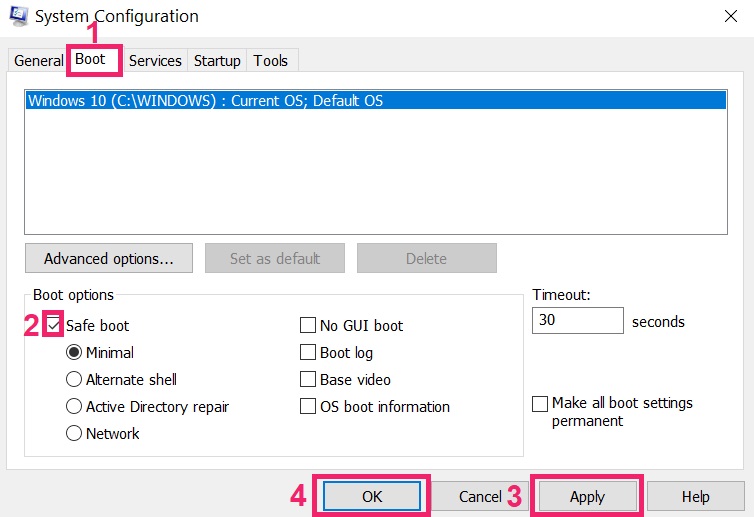
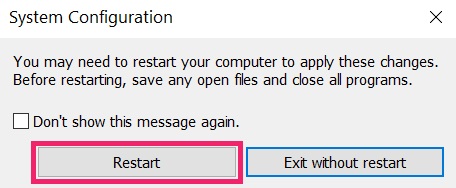
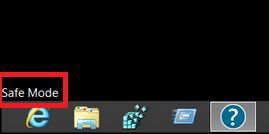
Step 3: Uninstall Beasttrials.com and related software from Windows
Uninstall Steps for Windows 11
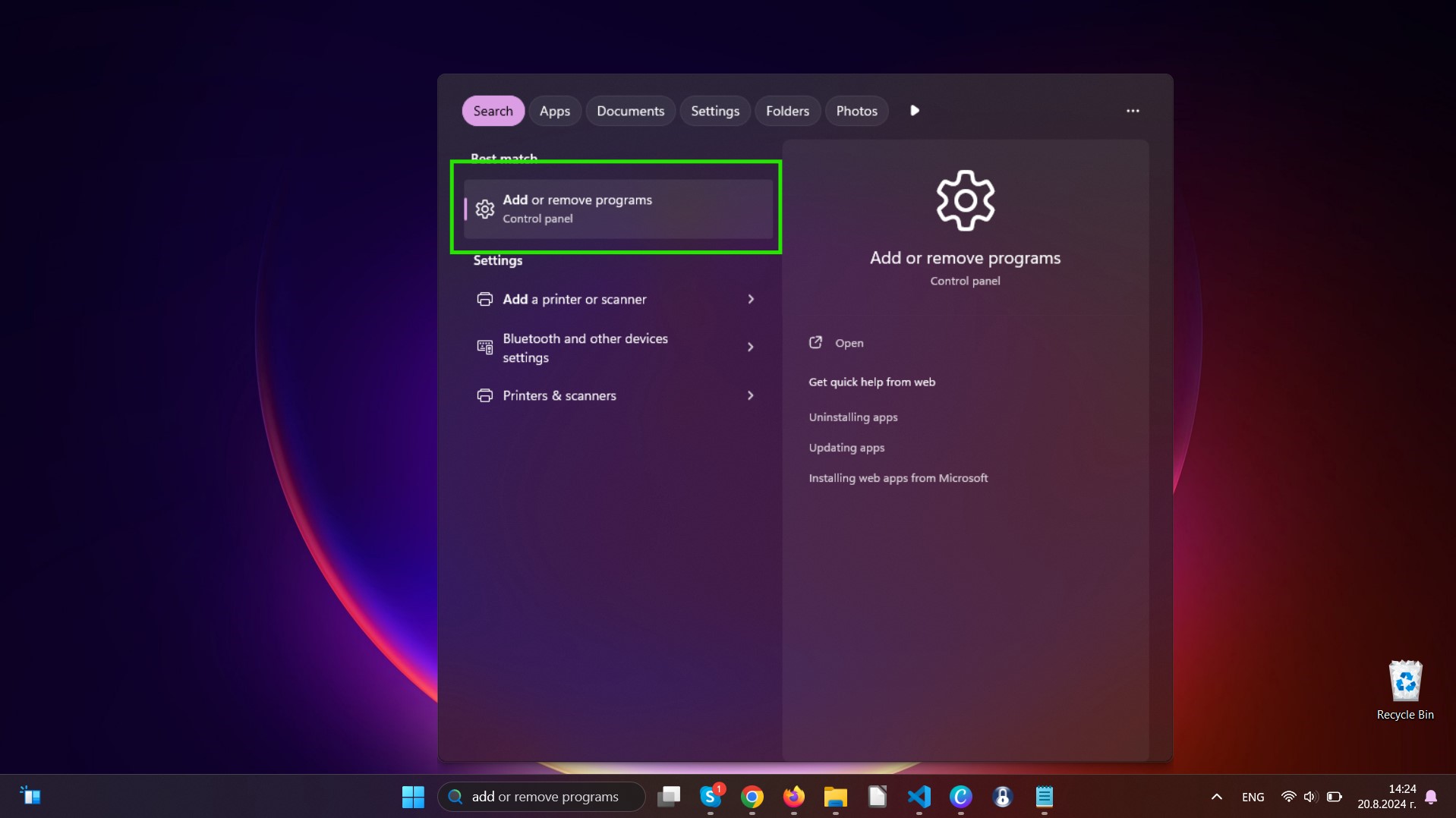
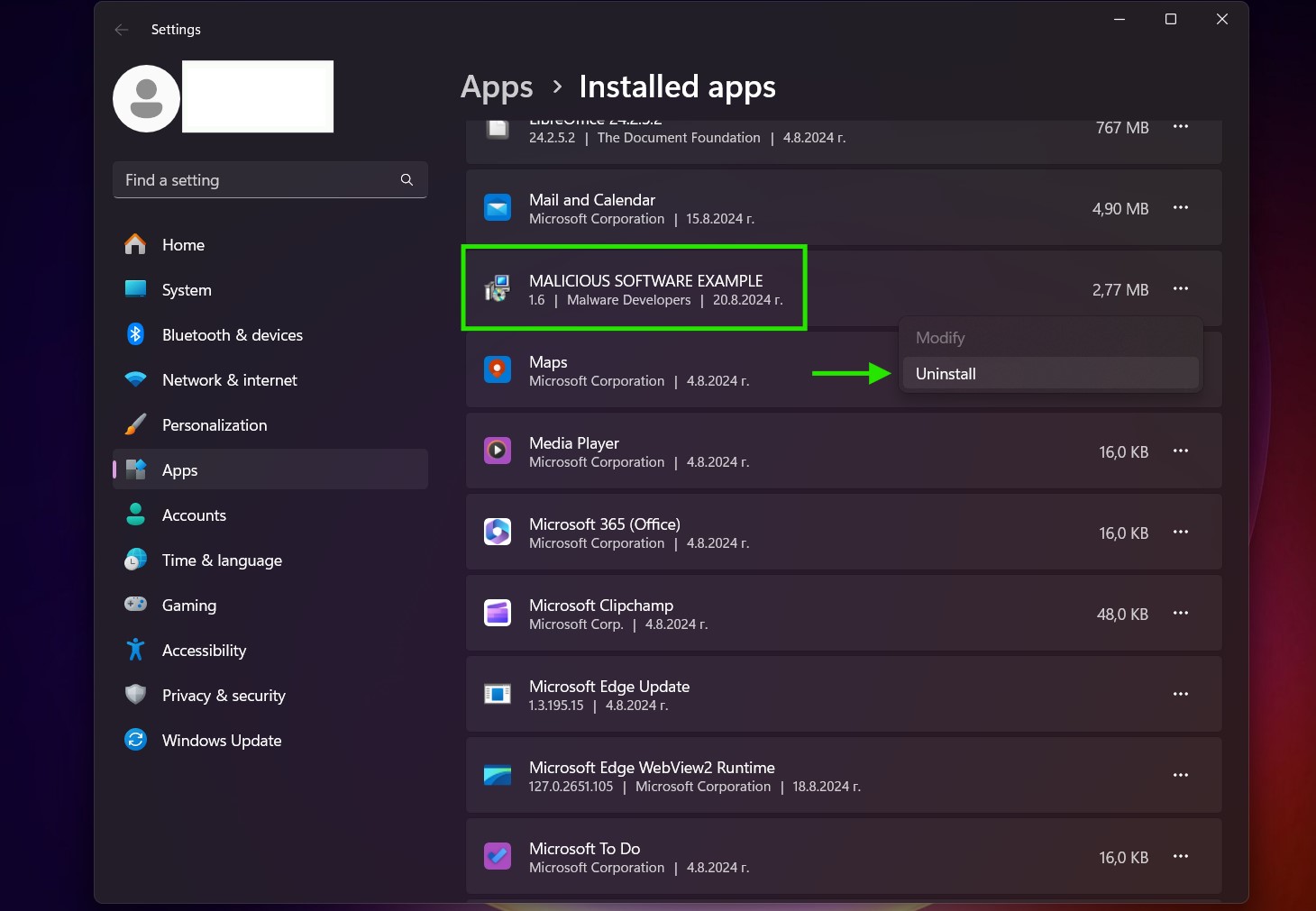
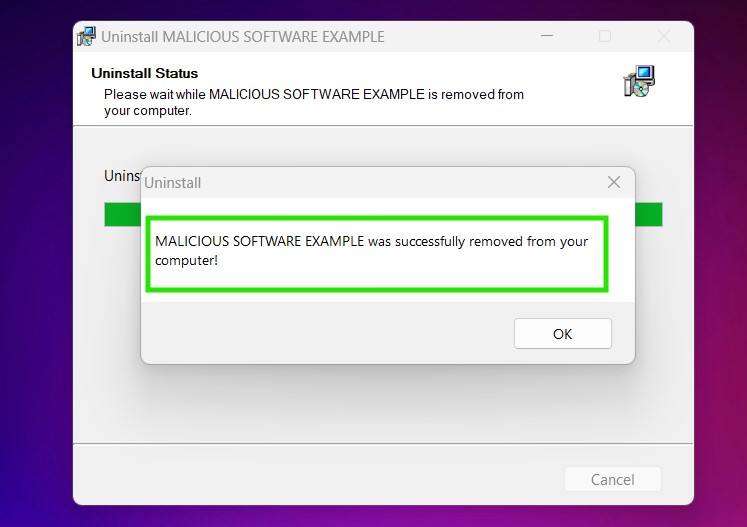
Uninstall Steps for Windows 10 and Older Versions
Here is a method in few easy steps that should be able to uninstall most programs. No matter if you are using Windows 10, 8, 7, Vista or XP, those steps will get the job done. Dragging the program or its folder to the recycle bin can be a very bad decision. If you do that, bits and pieces of the program are left behind, and that can lead to unstable work of your PC, errors with the file type associations and other unpleasant activities. The proper way to get a program off your computer is to Uninstall it. To do that:
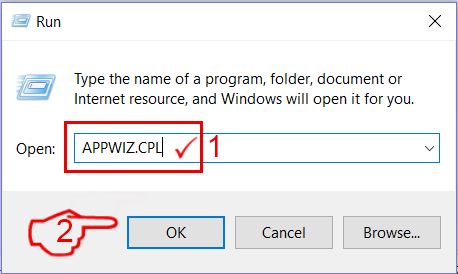
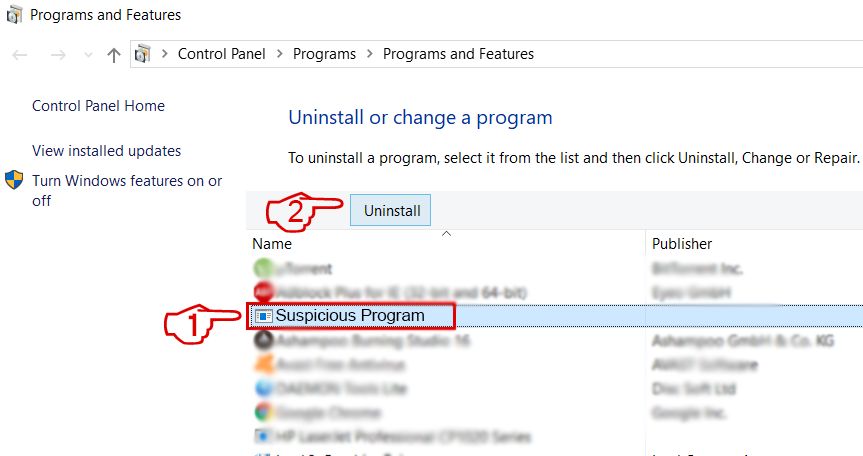 Follow the instructions above and you will successfully uninstall most programs.
Step 4: Clean Any registries, Created by Beasttrials.com on Your PC.
The usually targeted registries of Windows machines are the following:
- HKEY_LOCAL_MACHINE\Software\Microsoft\Windows\CurrentVersion\Run
- HKEY_CURRENT_USER\Software\Microsoft\Windows\CurrentVersion\Run
- HKEY_LOCAL_MACHINE\Software\Microsoft\Windows\CurrentVersion\RunOnce
- HKEY_CURRENT_USER\Software\Microsoft\Windows\CurrentVersion\RunOnce
You can access them by opening the Windows registry editor and deleting any values, created by Beasttrials.com there. This can happen by following the steps underneath:
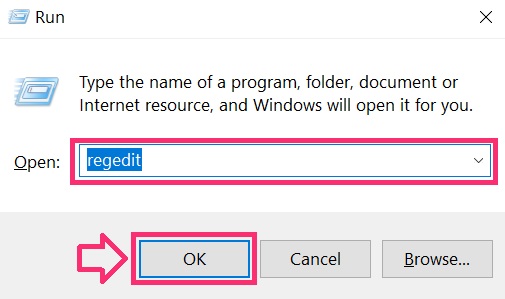
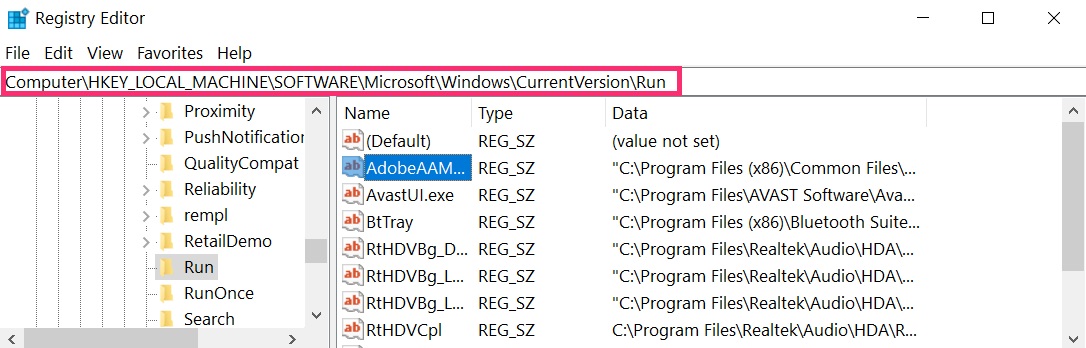
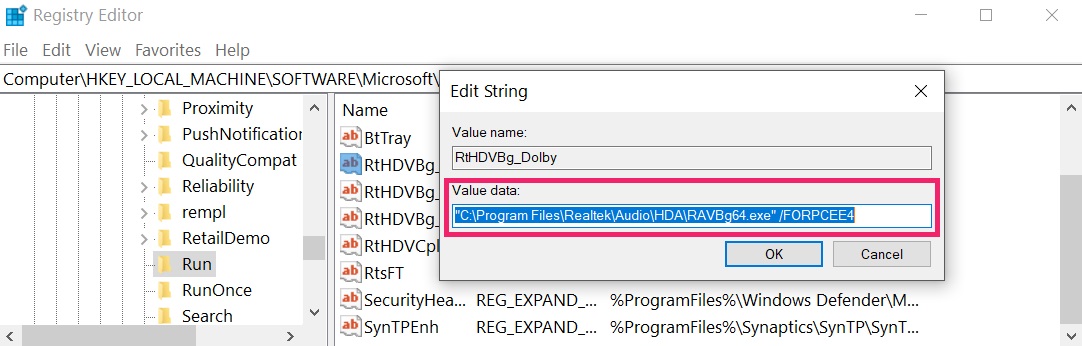 Tip: To find a virus-created value, you can right-click on it and click "Modify" to see which file it is set to run. If this is the virus file location, remove the value.
Video Removal Guide for Beasttrials.com (Windows).
Get rid of Beasttrials.com from Mac OS X.
Step 1: Uninstall Beasttrials.com and remove related files and objects
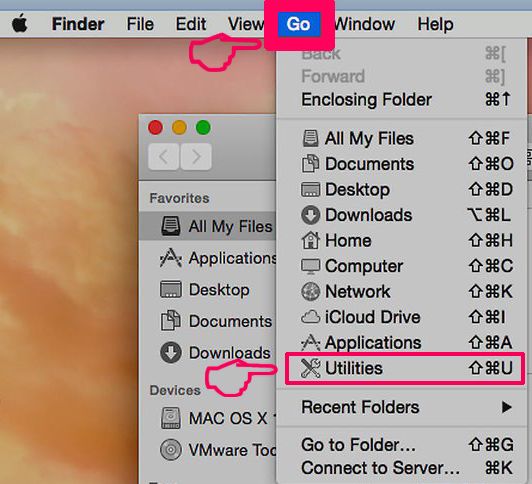
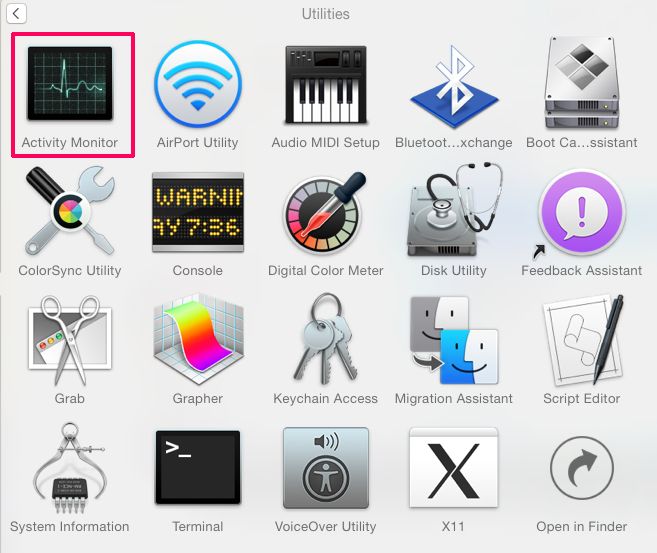
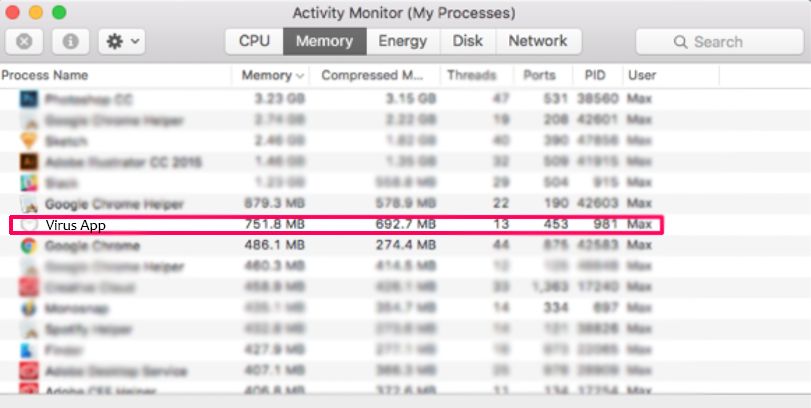
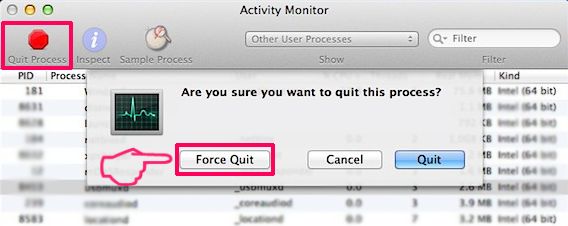
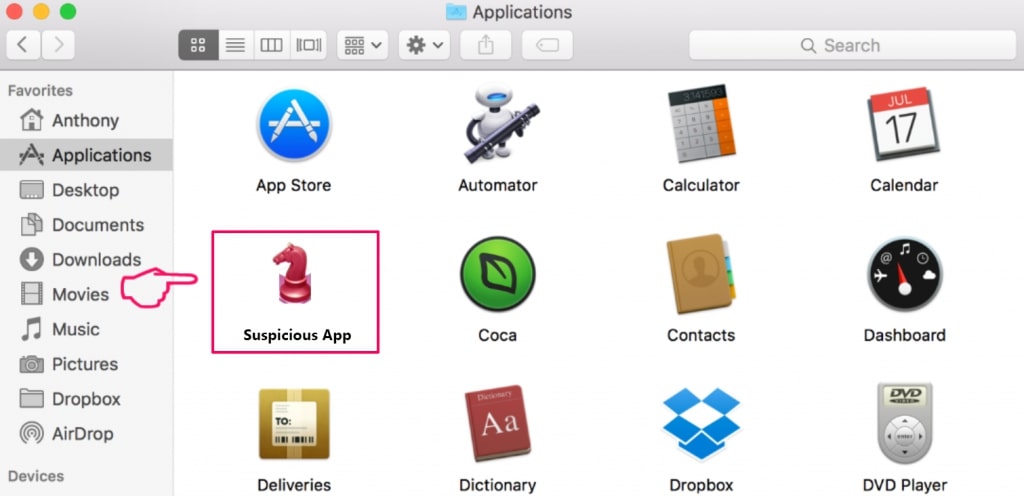
Your Mac will then show you a list of items that start automatically when you log in. Look for any suspicious apps identical or similar to Beasttrials.com. Check the app you want to stop from running automatically and then select on the Minus (“-“) icon to hide it.
- Go to Finder.
- In the search bar type the name of the app that you want to remove.
- Above the search bar change the two drop down menus to “System Files” and “Are Included” so that you can see all of the files associated with the application you want to remove. Bear in mind that some of the files may not be related to the app so be very careful which files you delete.
- If all of the files are related, hold the ⌘+A buttons to select them and then drive them to “Trash”.
In case you cannot remove Beasttrials.com via Step 1 above:
In case you cannot find the virus files and objects in your Applications or other places we have shown above, you can manually look for them in the Libraries of your Mac. But before doing this, please read the disclaimer below:

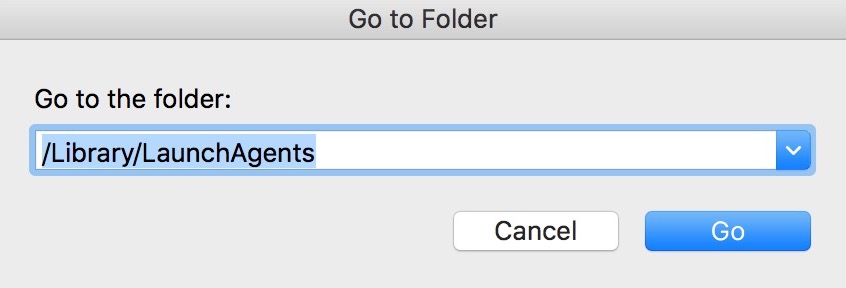
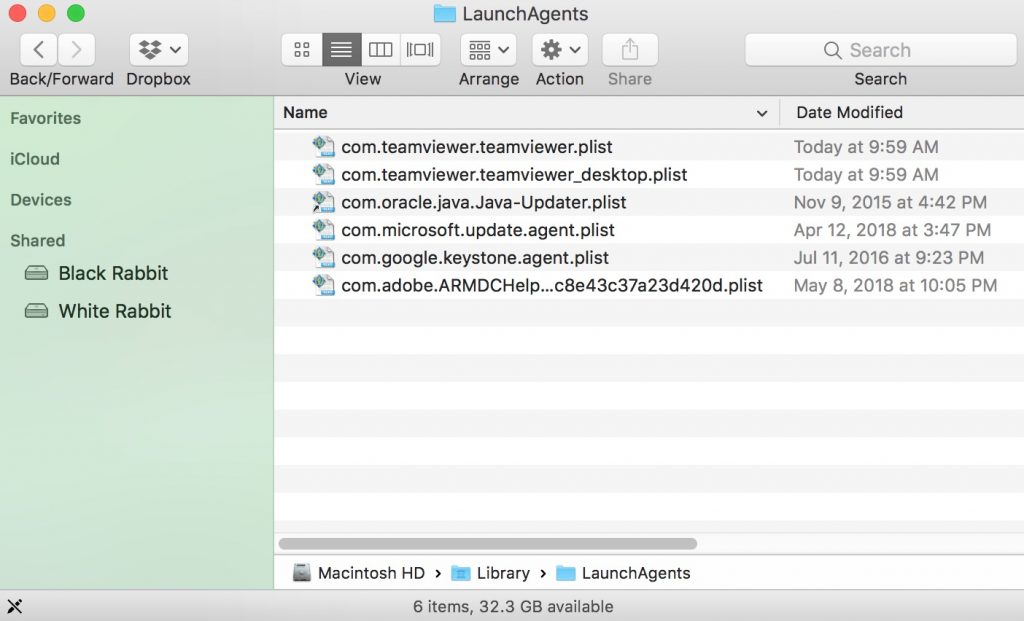
You can repeat the same procedure with the following other Library directories:
→ ~/Library/LaunchAgents
/Library/LaunchDaemons
Tip: ~ is there on purpose, because it leads to more LaunchAgents.
Step 2: Scan for and remove Beasttrials.com files from your Mac
When you are facing problems on your Mac as a result of unwanted scripts and programs such as Beasttrials.com, the recommended way of eliminating the threat is by using an anti-malware program. SpyHunter for Mac offers advanced security features along with other modules that will improve your Mac’s security and protect it in the future.
Video Removal Guide for Beasttrials.com (Mac)
Remove Beasttrials.com from Google Chrome.
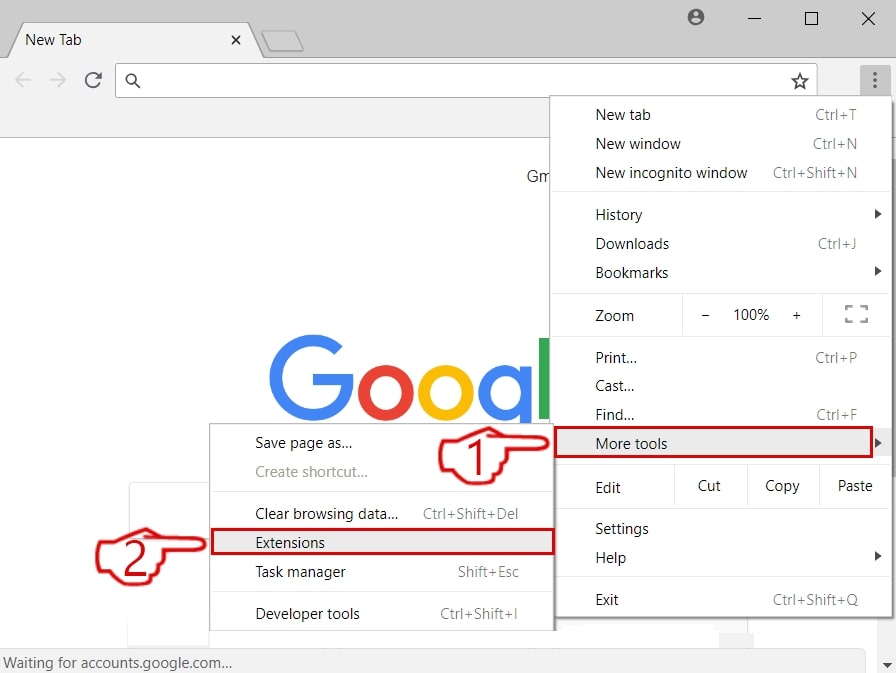
Step 1: Start Google Chrome and open the drop menu
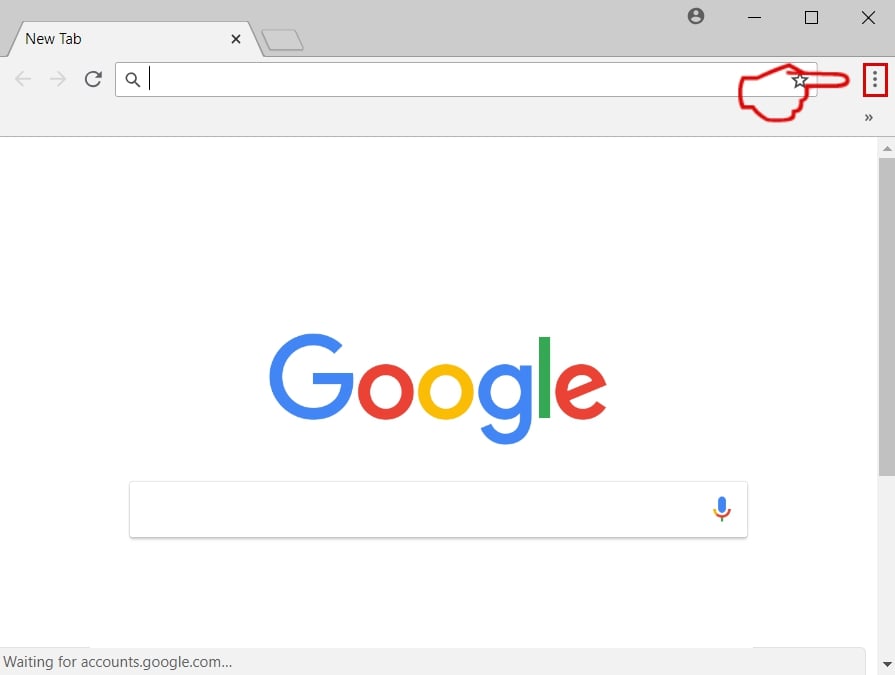
Step 2: Move the cursor over "Tools" and then from the extended menu choose "Extensions"
Step 3: From the opened "Extensions" menu locate the unwanted extension and click on its "Remove" button.
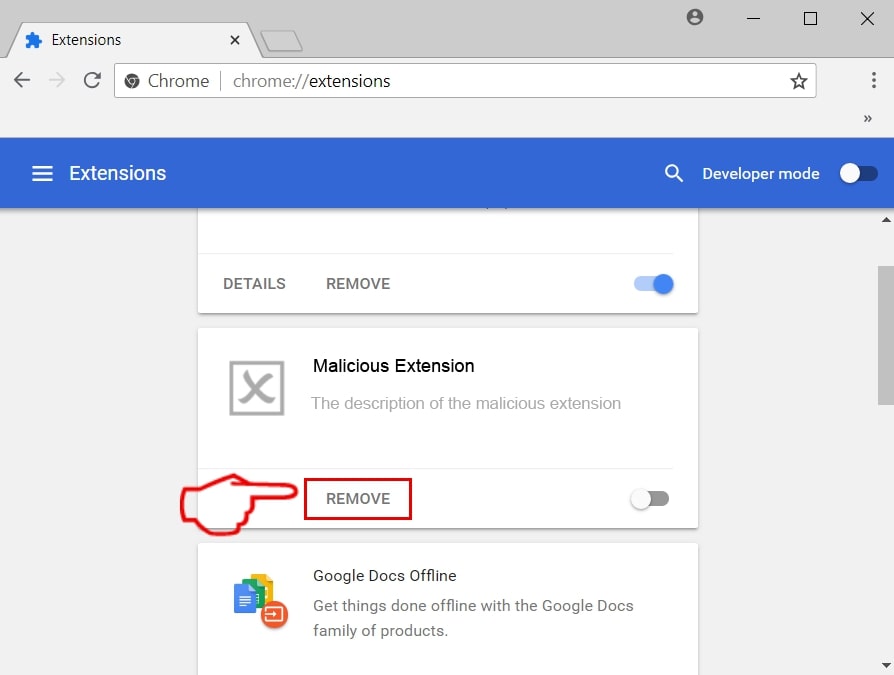
Step 4: After the extension is removed, restart Google Chrome by closing it from the red "X" button at the top right corner and start it again.
Erase Beasttrials.com from Mozilla Firefox.
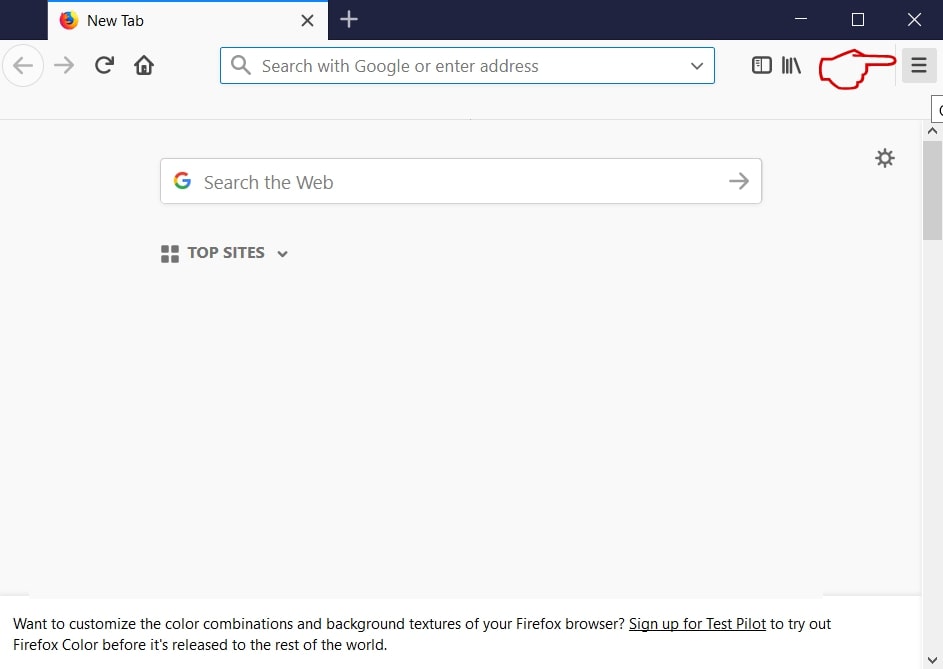
Step 1: Start Mozilla Firefox. Open the menu window:
Step 2: Select the "Add-ons" icon from the menu.
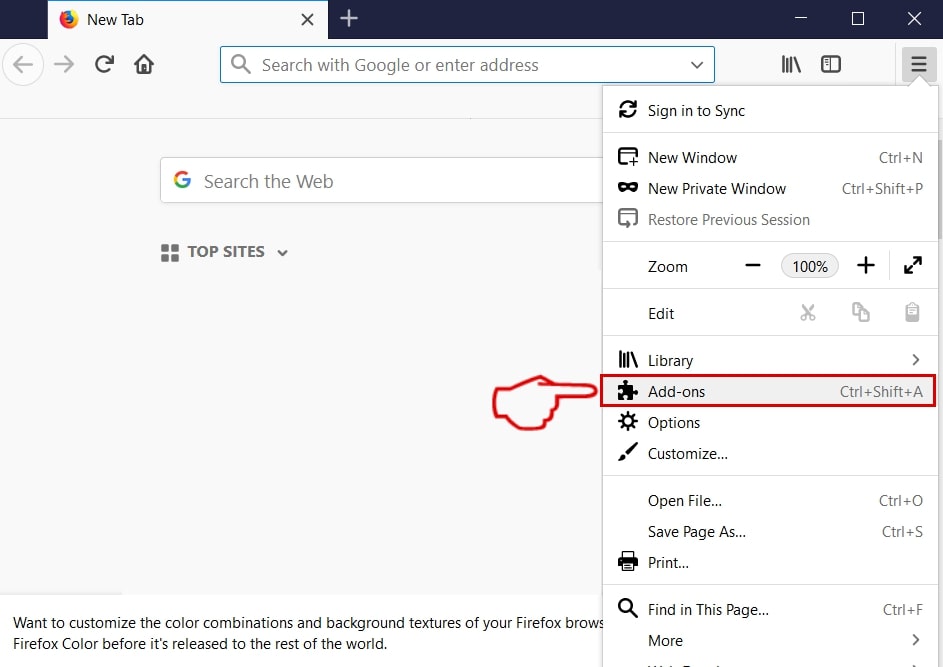
Step 3: Select the unwanted extension and click "Remove"

Step 4: After the extension is removed, restart Mozilla Firefox by closing it from the red "X" button at the top right corner and start it again.
Uninstall Beasttrials.com from Microsoft Edge.
Step 1: Start Edge browser.
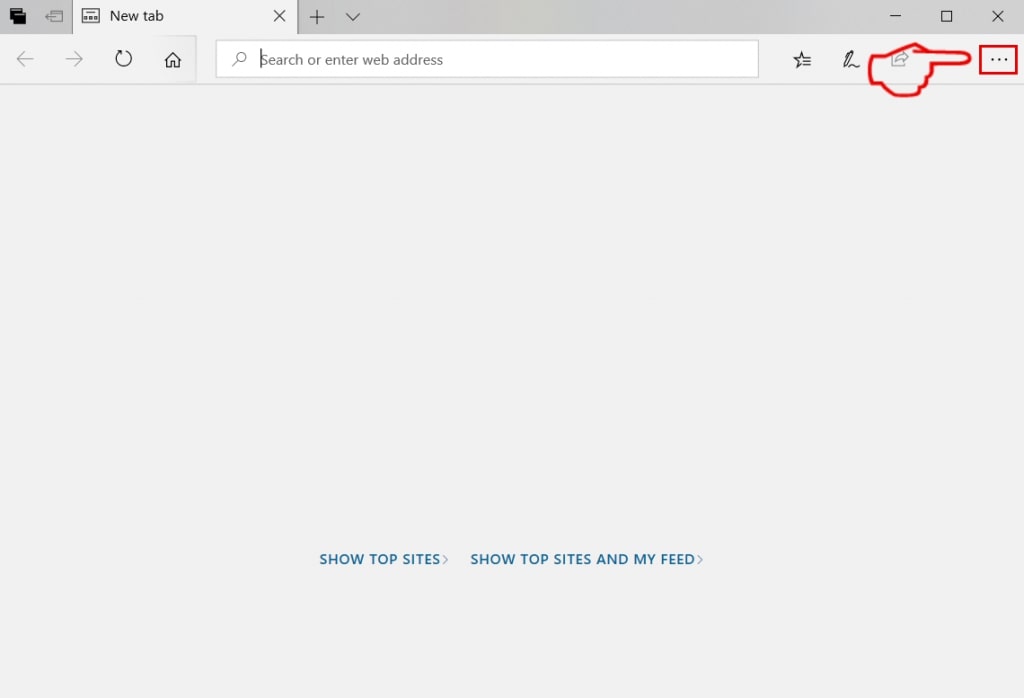
Step 2: Open the drop menu by clicking on the icon at the top right corner.
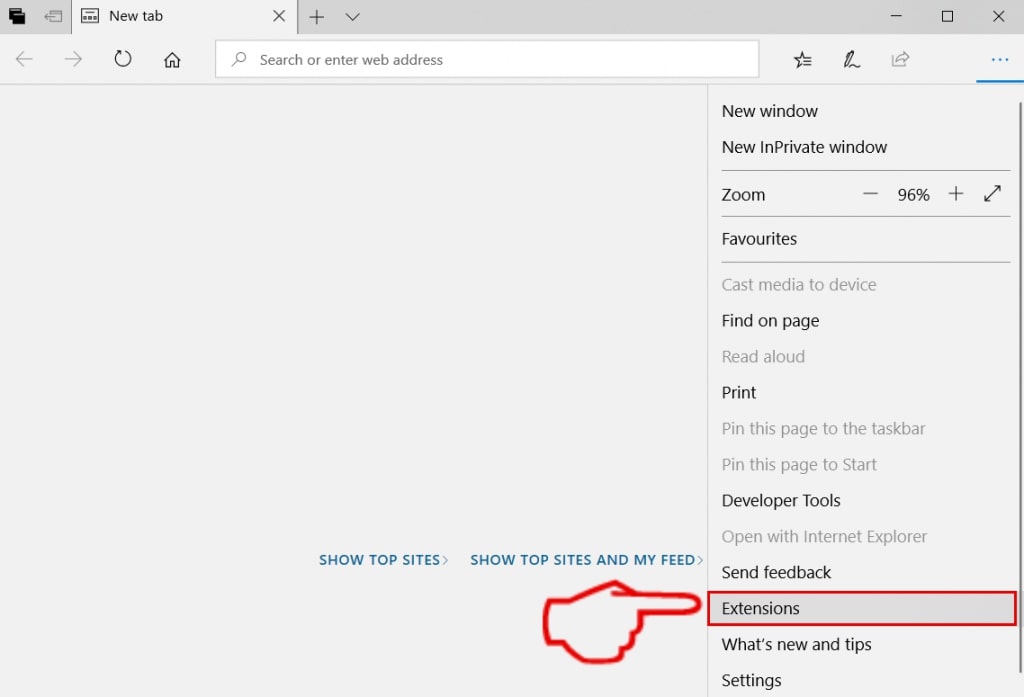
Step 3: From the drop menu select "Extensions".
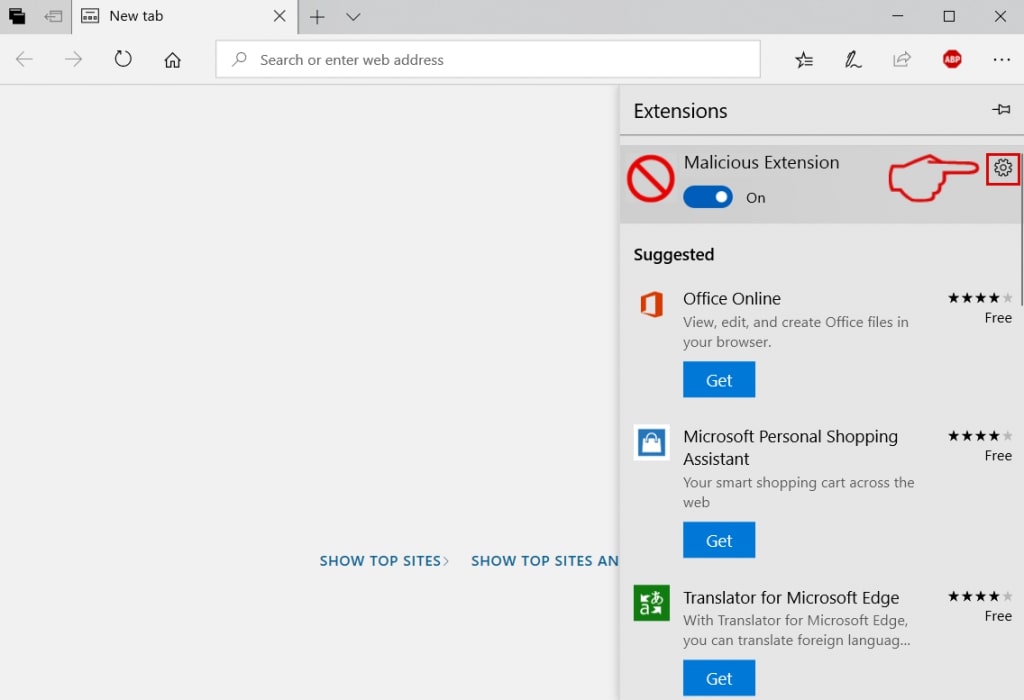
Step 4: Choose the suspected malicious extension you want to remove and then click on the gear icon.
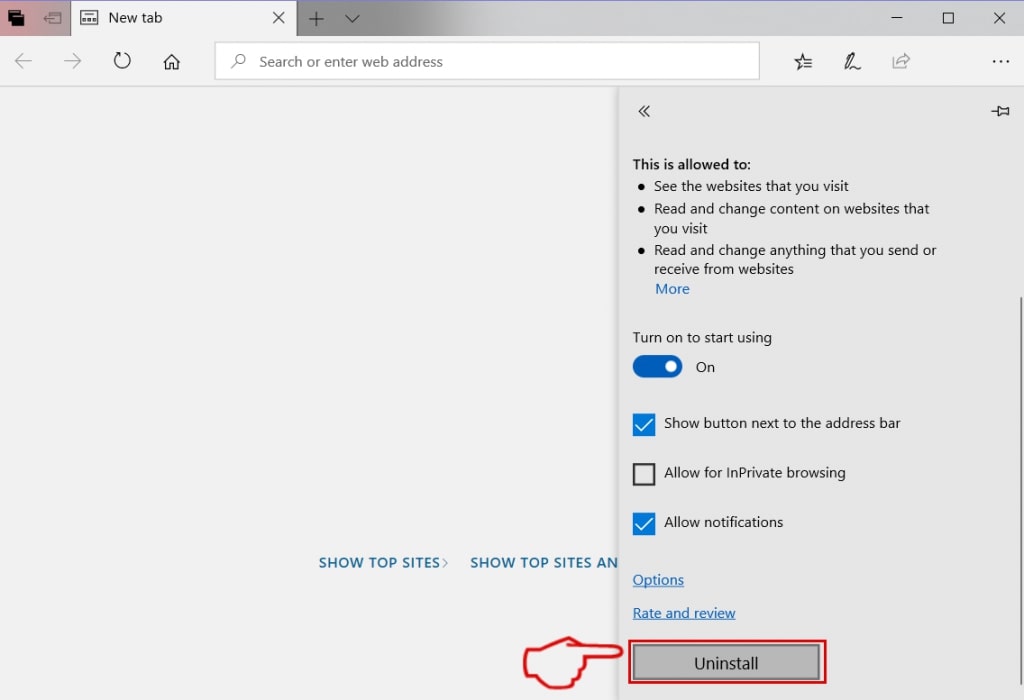
Step 5: Remove the malicious extension by scrolling down and then clicking on Uninstall.
Remove Beasttrials.com from Safari
Step 1: Start the Safari app.
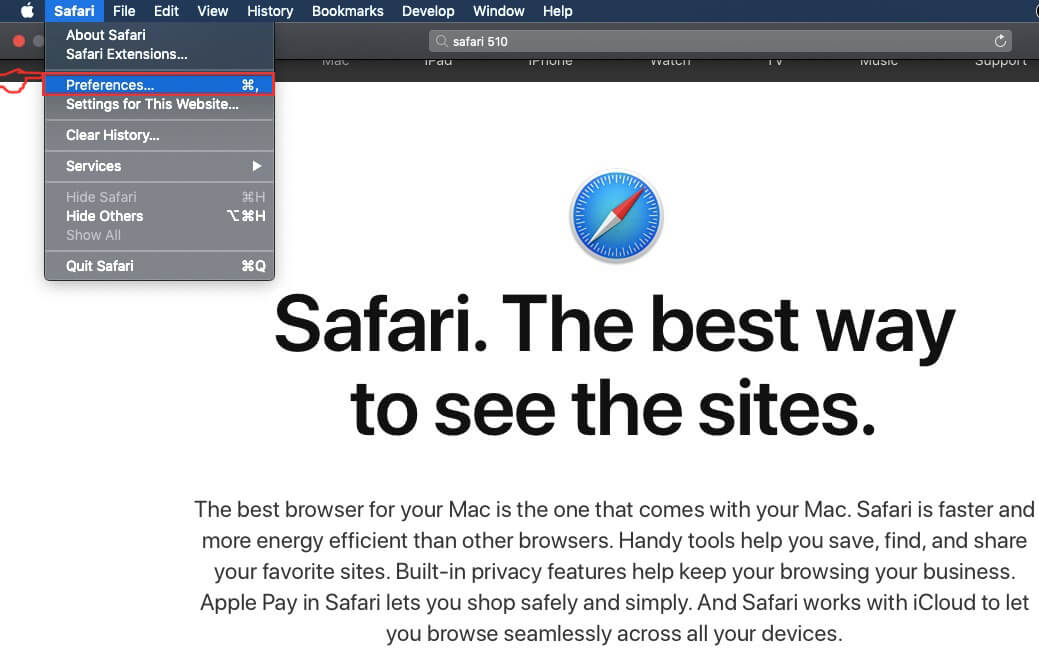
Step 2: After hovering your mouse cursor to the top of the screen, click on the Safari text to open its drop down menu.
Step 3: From the menu, click on "Preferences".
Step 4: After that, select the 'Extensions' Tab.

Step 5: Click once on the extension you want to remove.
Step 6: Click 'Uninstall'.
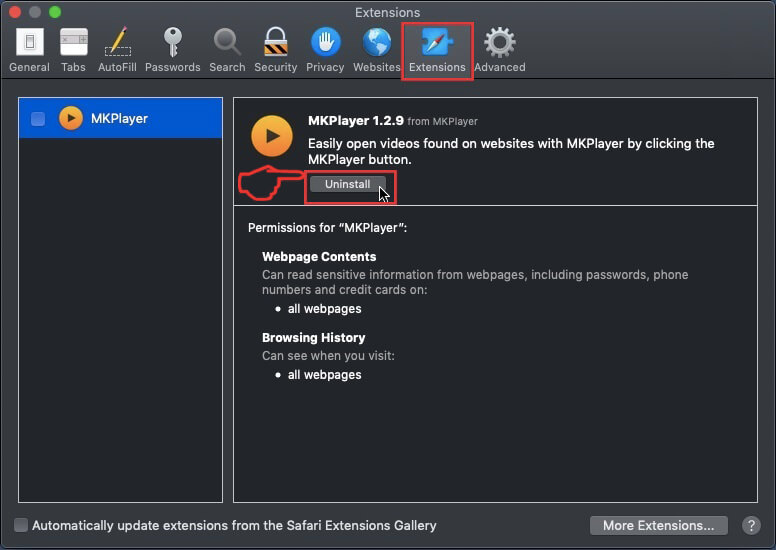
A pop-up window will appear asking for confirmation to uninstall the extension. Select 'Uninstall' again, and the Beasttrials.com will be removed.
Eliminate Beasttrials.com from Internet Explorer.
Step 1: Start Internet Explorer.
Step 2: Click on the gear icon labeled 'Tools' to open the drop menu and select 'Manage Add-ons'
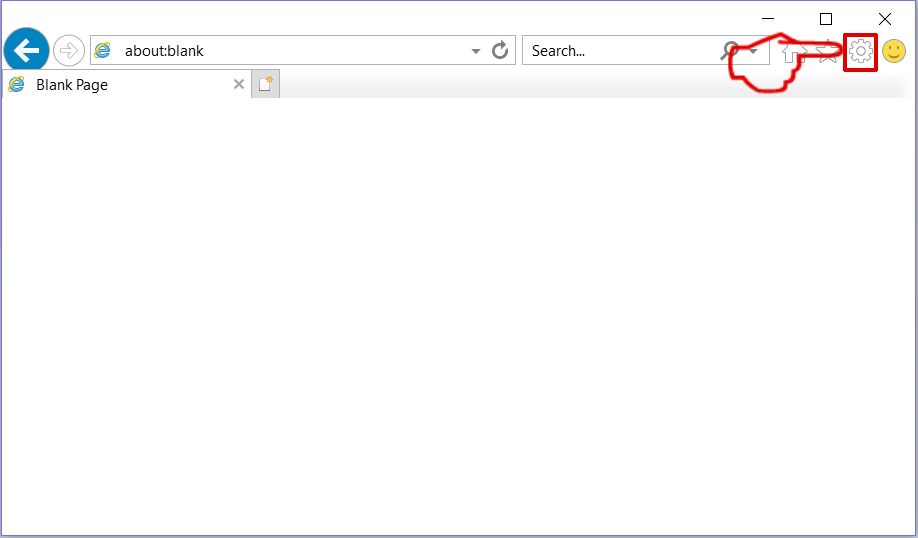
Step 3: In the 'Manage Add-ons' window.
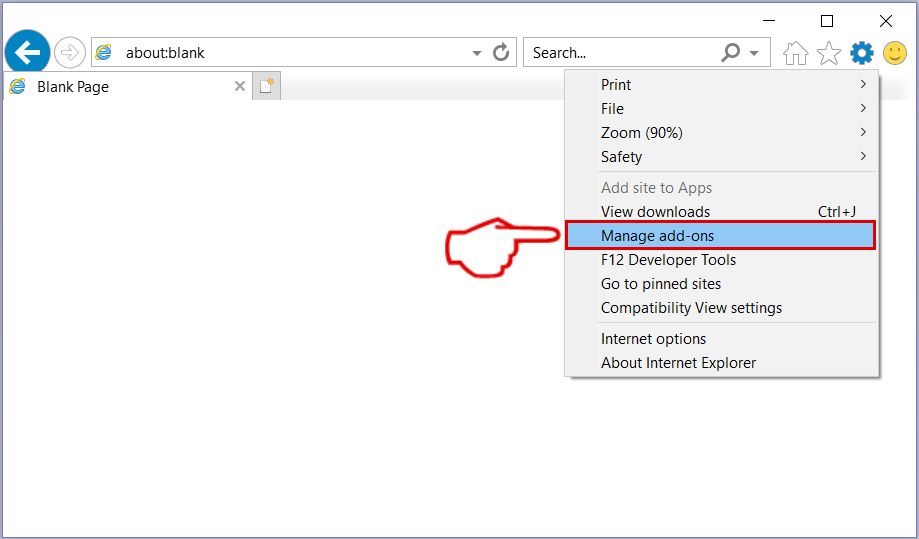
Step 4: Select the extension you want to remove and then click 'Disable'. A pop-up window will appear to inform you that you are about to disable the selected extension, and some more add-ons might be disabled as well. Leave all the boxes checked, and click 'Disable'.
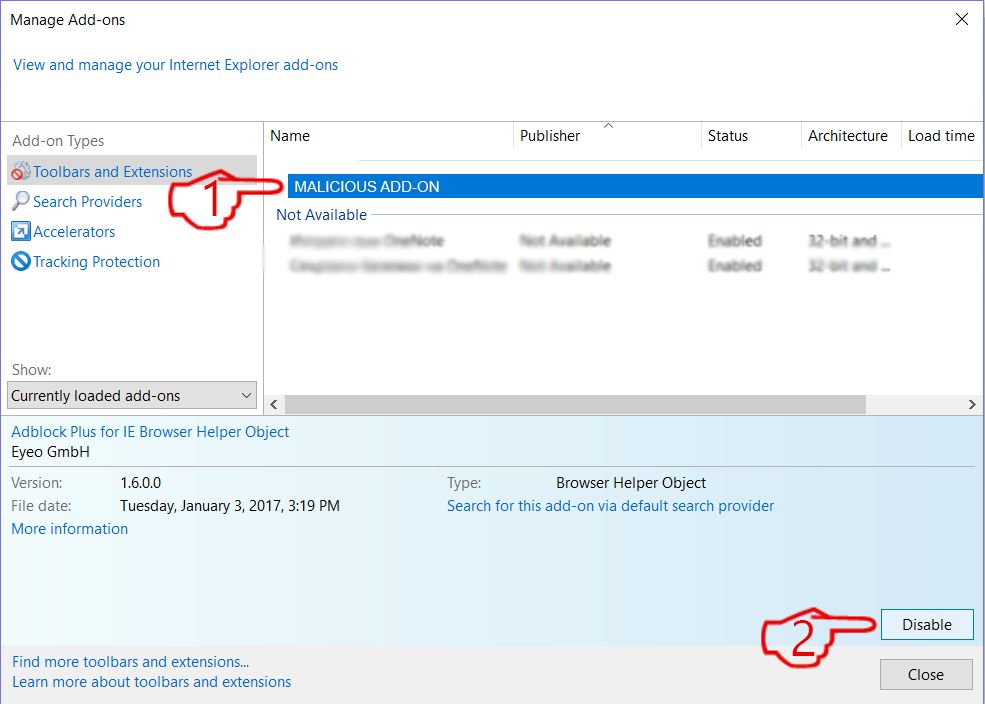
Step 5: After the unwanted extension has been removed, restart Internet Explorer by closing it from the red 'X' button located at the top right corner and start it again.
Remove Push Notifications from Your Browsers
Turn Off Push Notifications from Google Chrome
To disable any Push Notices from Google Chrome browser, please follow the steps below:
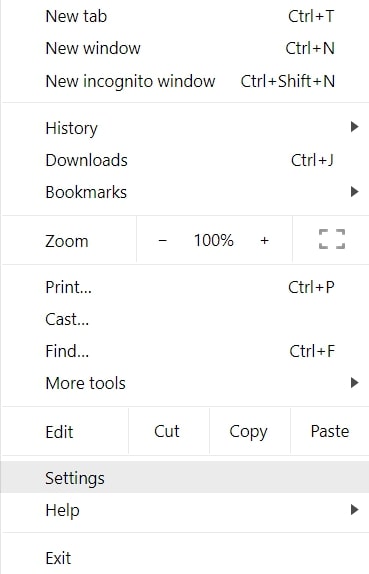
Step 1: Go to Settings in Chrome.
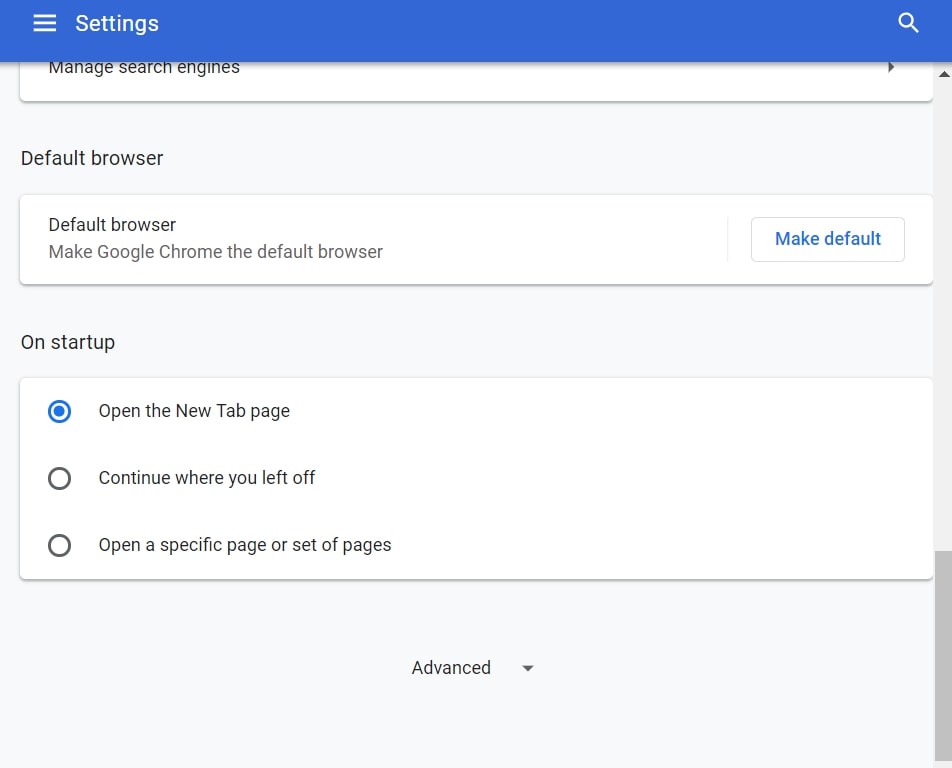
Step 2: In Settings, select “Advanced Settings”:
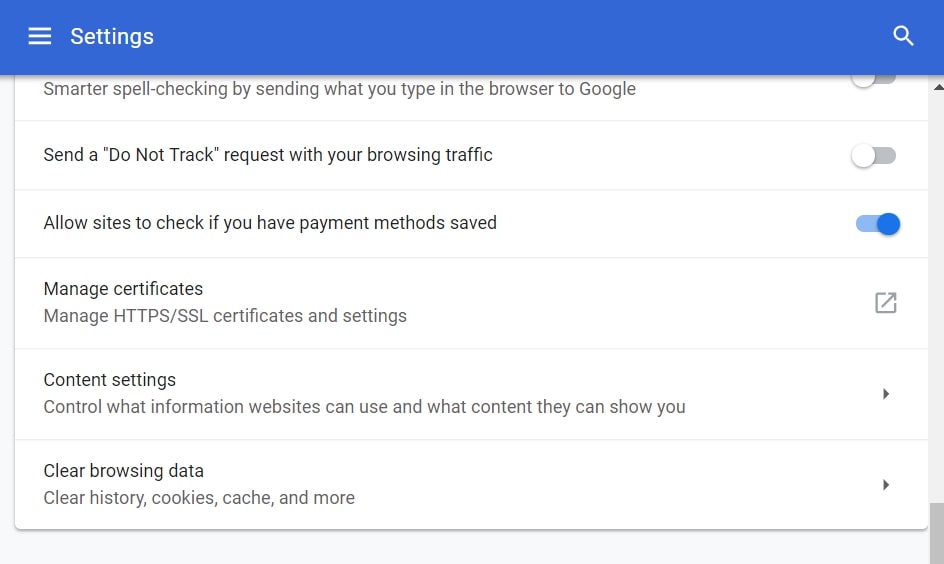
Step 3: Click “Content Settings”:
Step 4: Open “Notifications”:
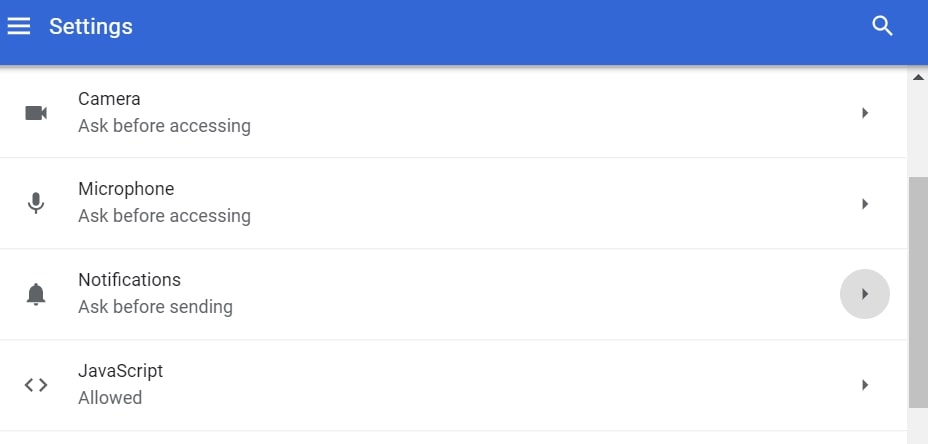
Step 5: Click the three dots and choose Block, Edit or Remove options:

Remove Push Notifications on Firefox
Step 1: Go to Firefox Options.
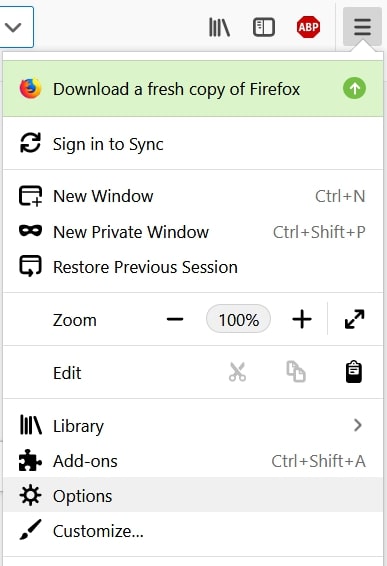
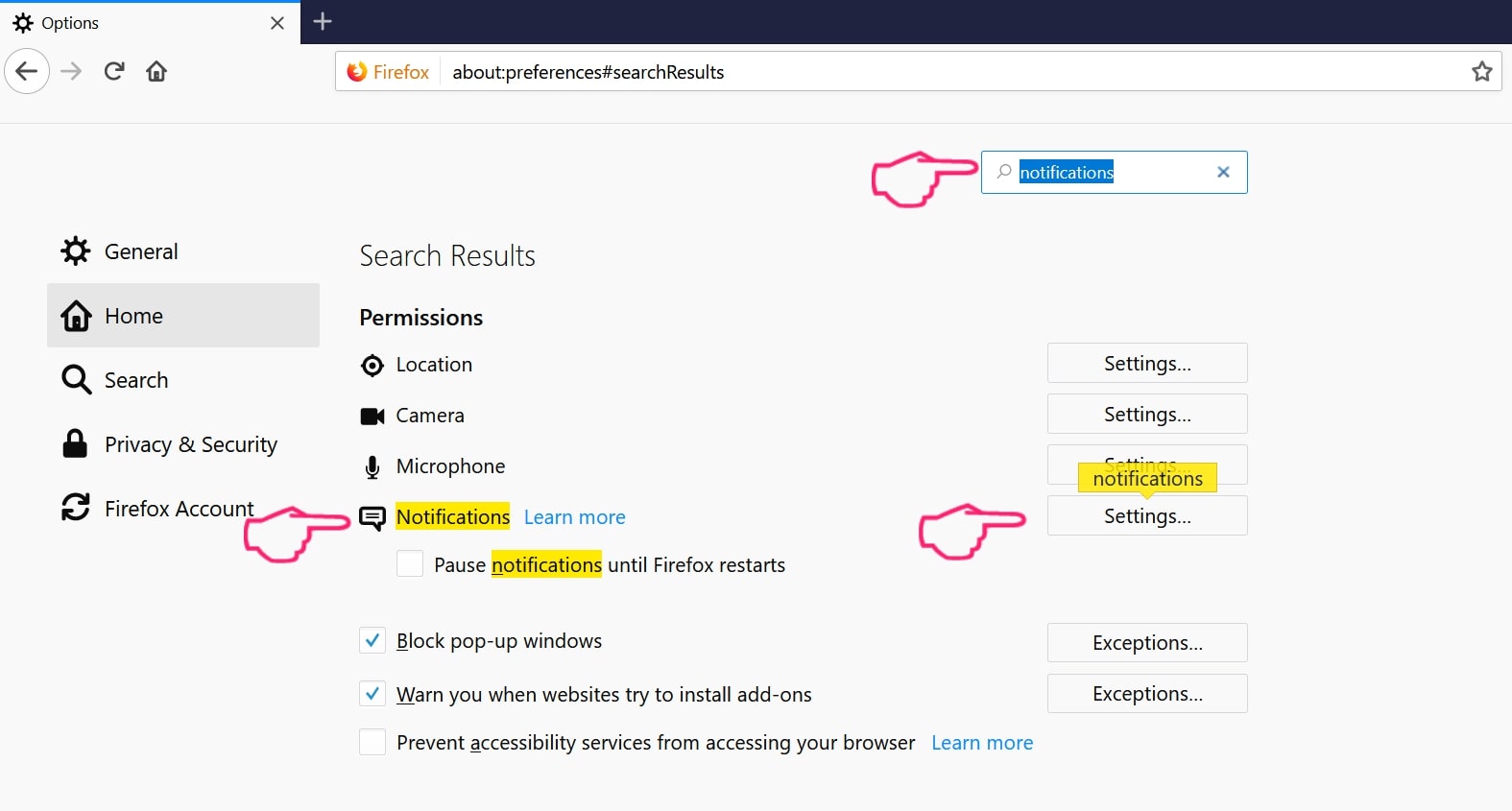
Step 2: Go to “Settings”, type “notifications” in the search bar and click "Settings":
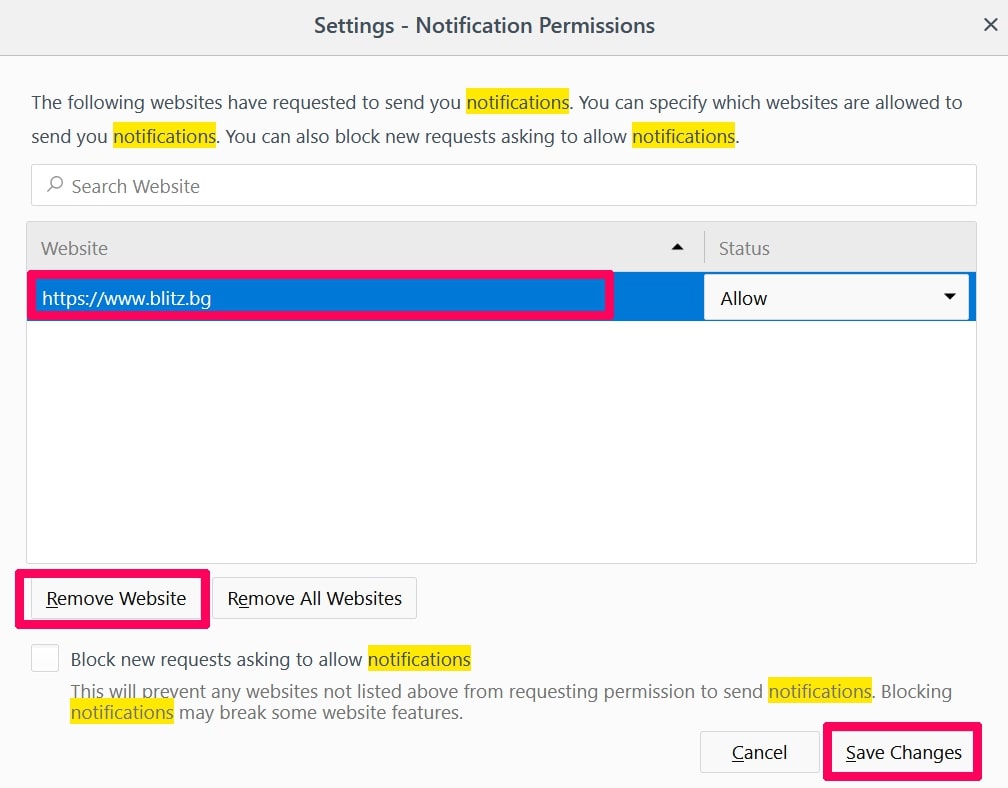
Step 3: Click “Remove” on any site you wish notifications gone and click “Save Changes”
Stop Push Notifications on Opera
Step 1: In Opera, press ALT+P to go to Settings.
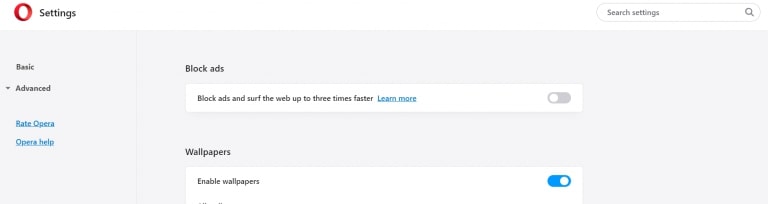
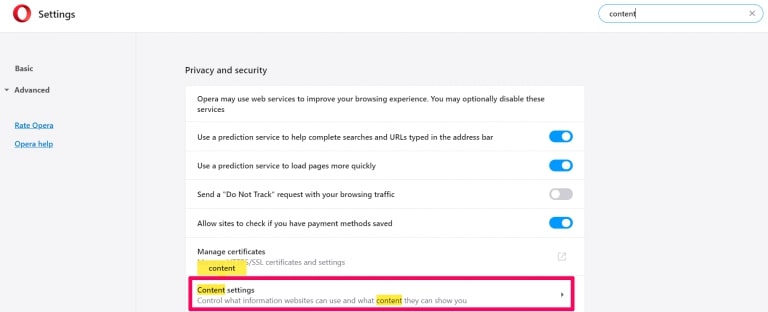
Step 2: In Setting search, type “Content” to go to Content Settings.
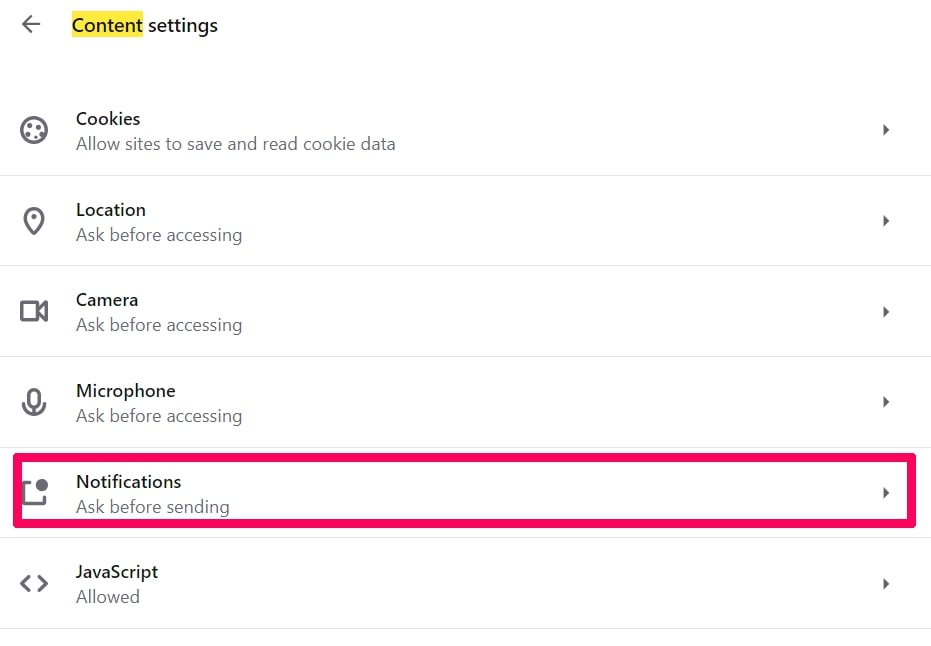
Step 3: Open Notifications:
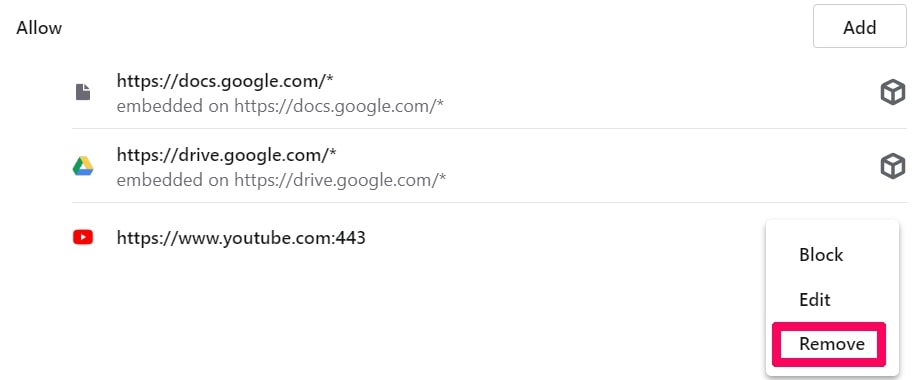
Step 4: Do the same as you did with Google Chrome (explained below):
Eliminate Push Notifications on Safari
Step 1: Open Safari Preferences.
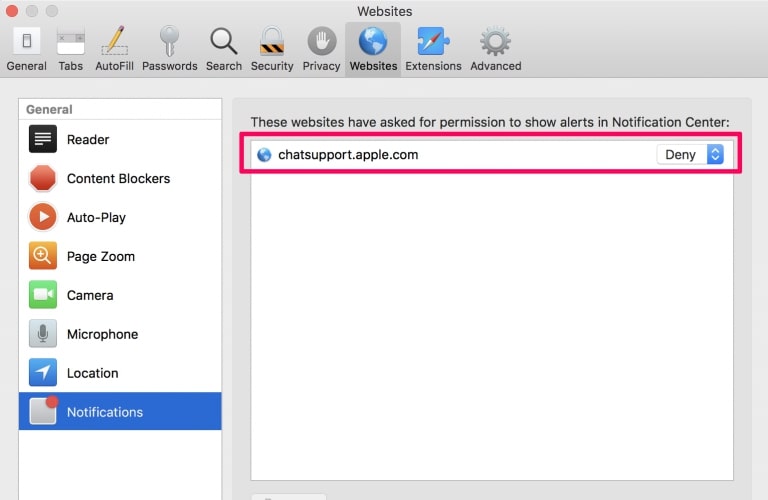
Step 2: Choose the domain from where you like push pop-ups gone and change to "Deny" from "Allow".
Beasttrials.com-FAQ
What Is Beasttrials.com?
The Beasttrials.com threat is adware or browser redirect virus.
It may slow your computer down significantly and display advertisements. The main idea is for your information to likely get stolen or more ads to appear on your device.
The creators of such unwanted apps work with pay-per-click schemes to get your computer to visit risky or different types of websites that may generate them funds. This is why they do not even care what types of websites show up on the ads. This makes their unwanted software indirectly risky for your OS.
What Are the Symptoms of Beasttrials.com?
There are several symptoms to look for when this particular threat and also unwanted apps in general are active:
Symptom #1: Your computer may become slow and have poor performance in general.
Symptom #2: You have toolbars, add-ons or extensions on your web browsers that you don't remember adding.
Symptom #3: You see all types of ads, like ad-supported search results, pop-ups and redirects to randomly appear.
Symptom #4: You see installed apps on your Mac running automatically and you do not remember installing them.
Symptom #5: You see suspicious processes running in your Task Manager.
If you see one or more of those symptoms, then security experts recommend that you check your computer for viruses.
What Types of Unwanted Programs Are There?
According to most malware researchers and cyber-security experts, the threats that can currently affect your device can be rogue antivirus software, adware, browser hijackers, clickers, fake optimizers and any forms of PUPs.
What to Do If I Have a "virus" like Beasttrials.com?
With few simple actions. First and foremost, it is imperative that you follow these steps:
Step 1: Find a safe computer and connect it to another network, not the one that your Mac was infected in.
Step 2: Change all of your passwords, starting from your email passwords.
Step 3: Enable two-factor authentication for protection of your important accounts.
Step 4: Call your bank to change your credit card details (secret code, etc.) if you have saved your credit card for online shopping or have done online activities with your card.
Step 5: Make sure to call your ISP (Internet provider or carrier) and ask them to change your IP address.
Step 6: Change your Wi-Fi password.
Step 7: (Optional): Make sure to scan all of the devices connected to your network for viruses and repeat these steps for them if they are affected.
Step 8: Install anti-malware software with real-time protection on every device you have.
Step 9: Try not to download software from sites you know nothing about and stay away from low-reputation websites in general.
If you follow these recommendations, your network and all devices will become significantly more secure against any threats or information invasive software and be virus free and protected in the future too.
How Does Beasttrials.com Work?
Once installed, Beasttrials.com can collect data using trackers. This data is about your web browsing habits, such as the websites you visit and the search terms you use. It is then used to target you with ads or to sell your information to third parties.
Beasttrials.com can also download other malicious software onto your computer, such as viruses and spyware, which can be used to steal your personal information and show risky ads, that may redirect to virus sites or scams.
Is Beasttrials.com Malware?
The truth is that PUPs (adware, browser hijackers) are not viruses, but may be just as dangerous since they may show you and redirect you to malware websites and scam pages.
Many security experts classify potentially unwanted programs as malware. This is because of the unwanted effects that PUPs can cause, such as displaying intrusive ads and collecting user data without the user’s knowledge or consent.
About the Beasttrials.com Research
The content we publish on SensorsTechForum.com, this Beasttrials.com how-to removal guide included, is the outcome of extensive research, hard work and our team’s devotion to help you remove the specific, adware-related problem, and restore your browser and computer system.
How did we conduct the research on Beasttrials.com?
Please note that our research is based on independent investigation. We are in contact with independent security researchers, thanks to which we receive daily updates on the latest malware, adware, and browser hijacker definitions.
Furthermore, the research behind the Beasttrials.com threat is backed with VirusTotal.
To better understand this online threat, please refer to the following articles which provide knowledgeable details.