

What Is Behavior:Win32/Interhta.Int Malware?
Behavior:Win32/Interhta.Int is a highly dangerous malware detection that indicates the presence of a malicious process actively abusing system permissions on a Windows-based computer. This threat is categorized as behavior-based malware, meaning it is identified not just by its code signature, but by its actions within the operating system. Once active, Behavior:Win32/Interhta.Int may gain extensive read and write access, allowing it to manipulate files, monitor user activity, and interact with sensitive system components.
Read this article to find out how Behavior:Win32/Interhta.Int operates, why it is considered a serious security risk, and what potential damage it may cause to your system and personal data. Understanding this malware is crucial, as its capabilities go far beyond simple adware or nuisance threats.
This malware is particularly dangerous because it often operates stealthily. Instead of immediately revealing its presence, it may run silently in the background, blending in with legitimate system processes. This makes early detection difficult and allows the malware to perform harmful activities over an extended period of time without the user’s knowledge.
Behavior:Win32/Interhta.Int Details
| Type | Trojan, Malware, Backdoor |
| Removal Time | Around 5 Minutes |
| Removal Tool |
See If Your System Has Been Affected by malware
Download
Malware Removal Tool
|
How Did I Get Behavior:Win32/Interhta.Int?
Behavior:Win32/Interhta.Int typically infiltrates systems through deceptive distribution methods. In most cases, users become infected after unknowingly executing a malicious file that appears legitimate. These files are often disguised as software installers, document attachments, or system updates.
Common infection sources include compromised email attachments, pirated software packages, cracked programs, and malicious scripts embedded in untrusted websites. Once executed, the malware immediately attempts to elevate its privileges, enabling it to access protected areas of the operating system.
Other common infection vectors include:
- Opening email attachments from unknown or spoofed senders.
- Downloading software from unofficial or peer-to-peer sources.
- Executing files disguised as invoices, receipts, or reports.
- Exploiting outdated software vulnerabilities.
In many cases, the initial infection may be facilitated by another malicious loader or trojan that silently installs Behavior:Win32/Interhta.Int as a secondary payload, further complicating detection and removal.
What Does Behavior:Win32/Interhta.Int Malware Do?
Once active, Behavior:Win32/Interhta.Int can perform a wide range of malicious actions that severely compromise system integrity and user privacy. By gaining read and write permissions, the malware is able to access, modify, and delete files across the system, including critical data stored in user directories.
The malware’s most dangerous capabilities include:
- Stealing stored passwords from browsers and applications.
- Collecting financial and payment-related information.
- Deleting or encrypting important files.
- Monitoring keystrokes and user behavior.
Behavior:Win32/Interhta.Int may also establish communication with remote command-and-control servers, allowing cybercriminals to issue commands dynamically. This enables the malware to download additional threats such as spyware, ransomware, or backdoor components, further escalating the attack.
Another major concern is data exfiltration. Personal documents, authentication tokens, and sensitive credentials may be silently transmitted to external servers. Victims often remain unaware until they experience account takeovers, unauthorized financial transactions, or identity theft.
How to Remove Behavior:Win32/Interhta.Int Malware
Removing Behavior:Win32/Interhta.Int requires thorough system analysis, as this threat often embeds itself deeply within the operating system. Due to its ability to manipulate files and processes, incomplete removal may allow the malware to regenerate or continue operating undetected.
Effective removal involves identifying malicious processes, locating altered system files, and eliminating any persistence mechanisms that allow the malware to start automatically. Special attention must be paid to startup entries, scheduled tasks, and suspicious registry modifications.
It is also critical to assess whether additional malware components were installed alongside Behavior:Win32/Interhta.Int. Many threats of this type function as part of a larger infection chain, meaning multiple malicious elements may coexist on the same system.
After removal, users should consider that any passwords, financial data, or personal information accessed on the infected system may have been compromised. Taking precautionary measures to secure accounts is strongly advised.
What should you do?
If your system has been affected by Behavior:Win32/Interhta.Int, immediate action is essential. Follow the removal instructions provided below this article to fully eliminate the malware and reduce the risk of further damage.
Ignoring this threat may result in data loss, privacy violations, and long-term security consequences. Removing Behavior:Win32/Interhta.Int as soon as possible is the most effective way to restore system safety and protect your personal and financial information.

Ventsislav Krastev
Ventsislav is a cybersecurity expert at SensorsTechForum since 2015. He has been researching, covering, helping victims with the latest malware infections plus testing and reviewing software and the newest tech developments. Having graduated Marketing as well, Ventsislav also has passion for learning new shifts and innovations in cybersecurity that become game changers. After studying Value Chain Management, Network Administration and Computer Administration of System Applications, he found his true calling within the cybersecrurity industry and is a strong believer in the education of every user towards online safety and security.
Follow Me:
Preparation before removing Behavior:Win32/Interhta.Int.
Before starting the actual removal process, we recommend that you do the following preparation steps.
- Make sure you have these instructions always open and in front of your eyes.
- Do a backup of all of your files, even if they could be damaged. You should back up your data with a cloud backup solution and insure your files against any type of loss, even from the most severe threats.
- Be patient as this could take a while.
- Scan for Malware
- Fix Registries
- Remove Virus Files
Step 1: Scan for Behavior:Win32/Interhta.Int with SpyHunter Anti-Malware Tool
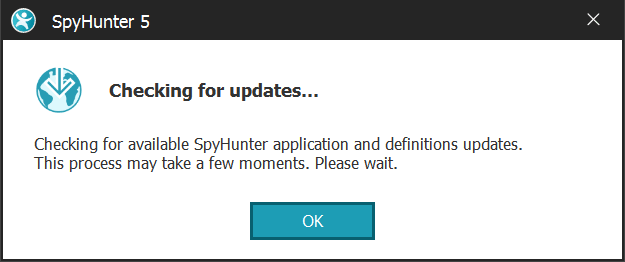
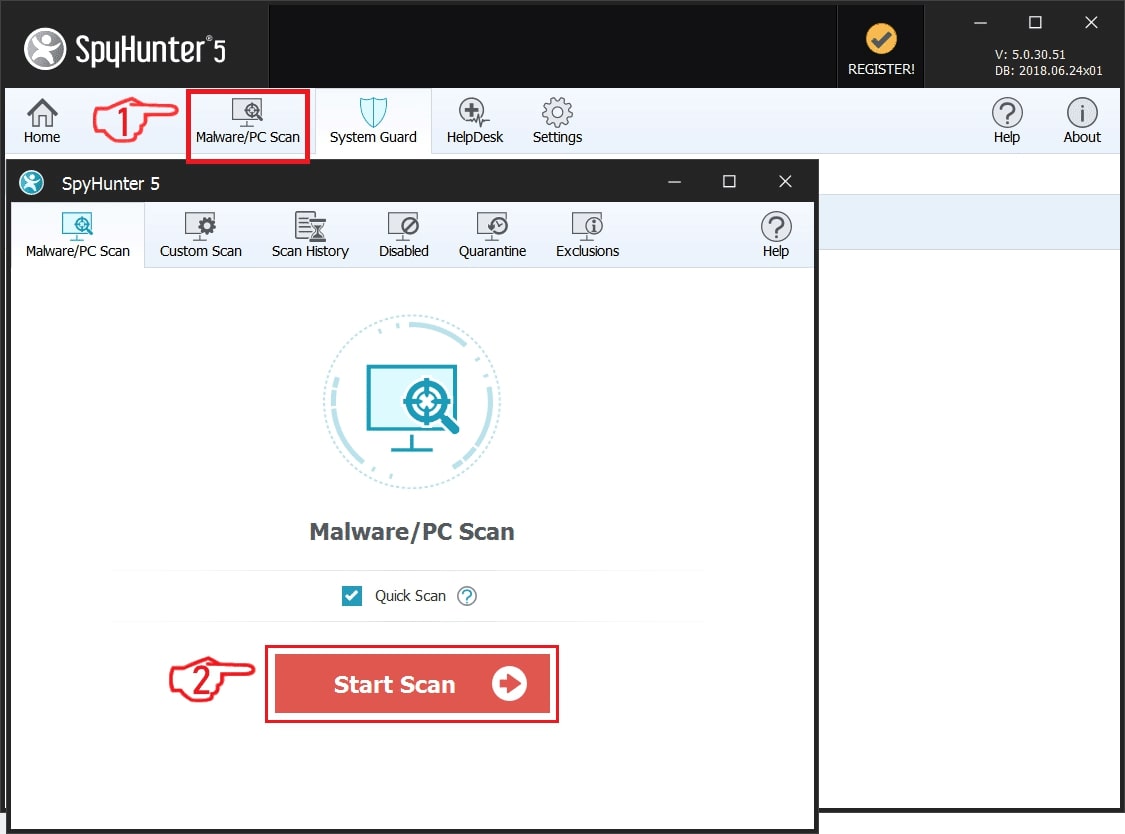
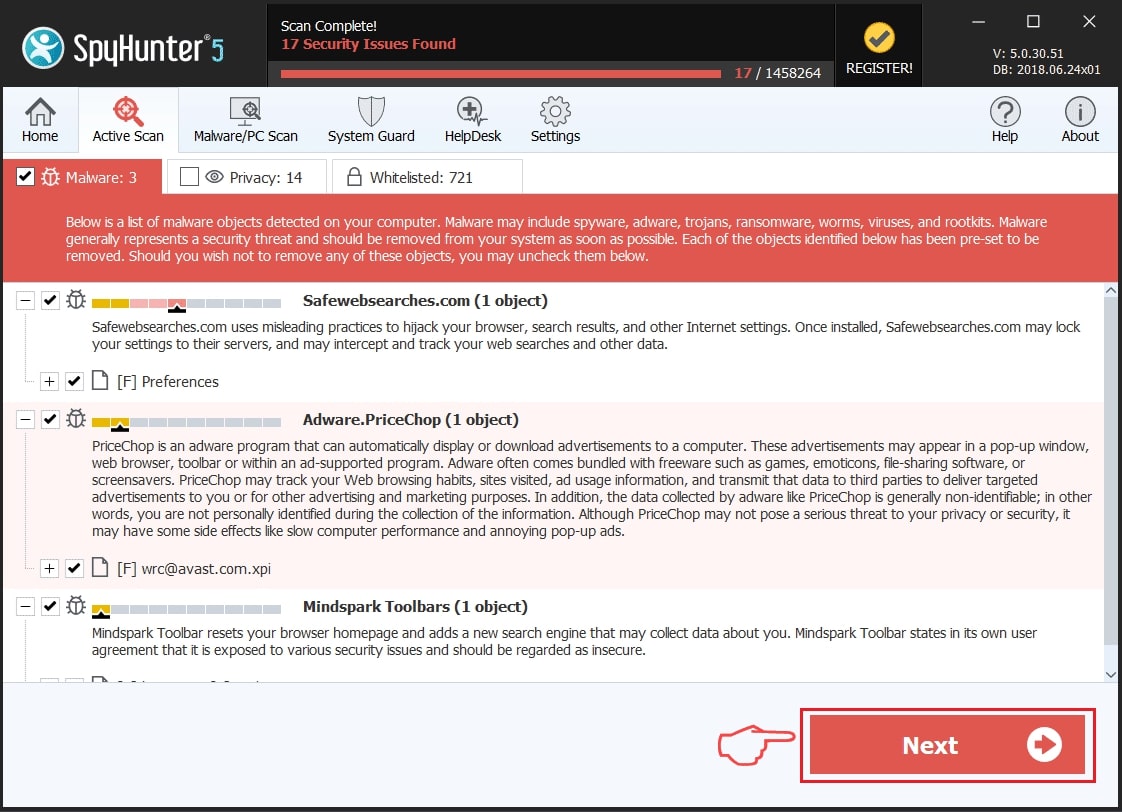
Step 2: Clean any registries, created by Behavior:Win32/Interhta.Int on your computer.
The usually targeted registries of Windows machines are the following:
- HKEY_LOCAL_MACHINE\Software\Microsoft\Windows\CurrentVersion\Run
- HKEY_CURRENT_USER\Software\Microsoft\Windows\CurrentVersion\Run
- HKEY_LOCAL_MACHINE\Software\Microsoft\Windows\CurrentVersion\RunOnce
- HKEY_CURRENT_USER\Software\Microsoft\Windows\CurrentVersion\RunOnce
You can access them by opening the Windows registry editor and deleting any values, created by Behavior:Win32/Interhta.Int there. This can happen by following the steps underneath:
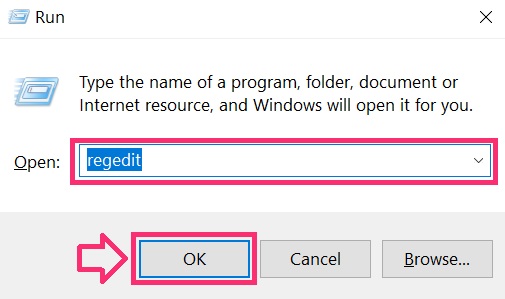
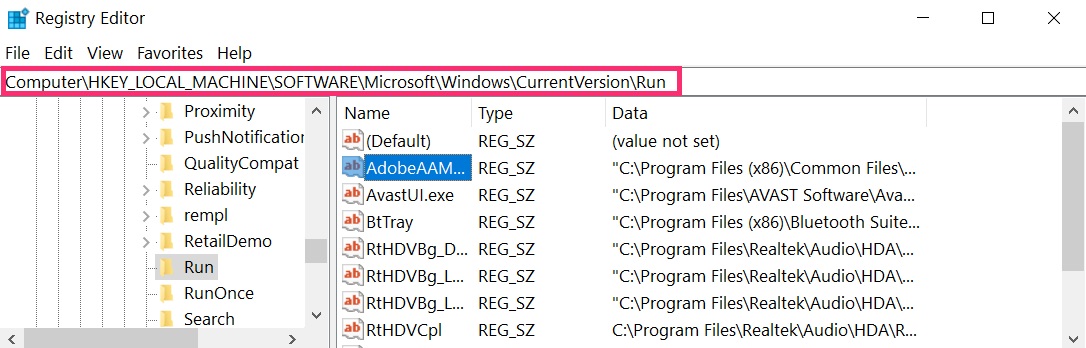
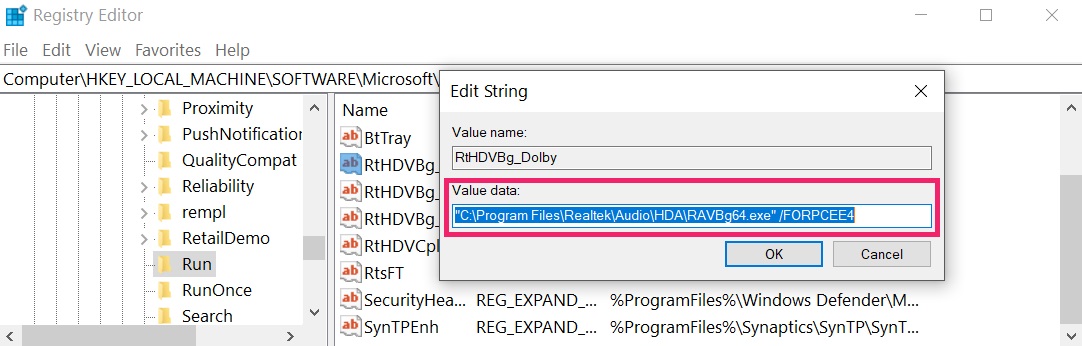 Tip: To find a virus-created value, you can right-click on it and click "Modify" to see which file it is set to run. If this is the virus file location, remove the value.
Step 3: Find virus files created by Behavior:Win32/Interhta.Int on your PC.
1.For Windows 8, 8.1 and 10.
For Newer Windows Operating Systems
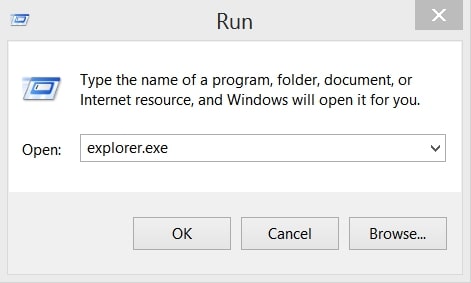
1: On your keyboard press + R and write explorer.exe in the Run text box and then click on the Ok button.
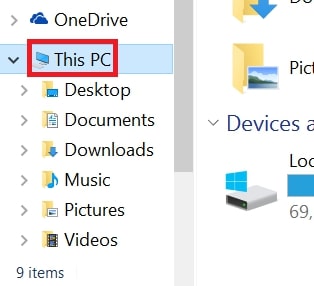
2: Click on your PC from the quick access bar. This is usually an icon with a monitor and its name is either “My Computer”, “My PC” or “This PC” or whatever you have named it.
3: Navigate to the search box in the top-right of your PC's screen and type “fileextension:” and after which type the file extension. If you are looking for malicious executables, an example may be "fileextension:exe". After doing that, leave a space and type the file name you believe the malware has created. Here is how it may appear if your file has been found:
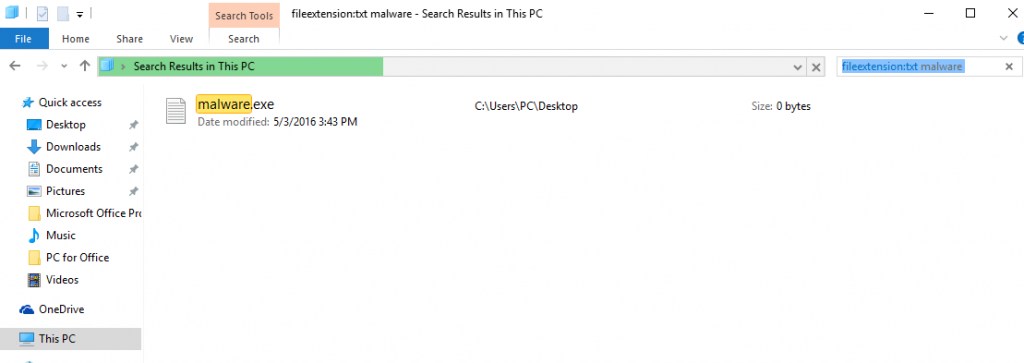
N.B. We recommend to wait for the green loading bar in the navigation box to fill up in case the PC is looking for the file and hasn't found it yet.
2.For Windows XP, Vista, and 7.
For Older Windows Operating Systems
In older Windows OS's the conventional approach should be the effective one:
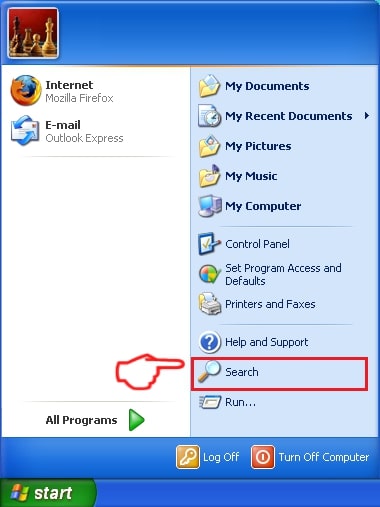
1: Click on the Start Menu icon (usually on your bottom-left) and then choose the Search preference.
2: After the search window appears, choose More Advanced Options from the search assistant box. Another way is by clicking on All Files and Folders.
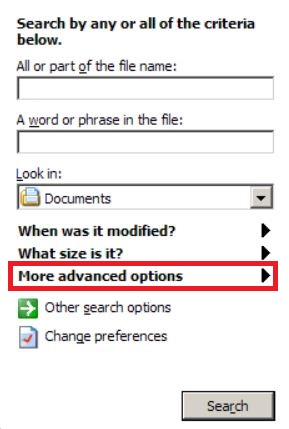
3: After that type the name of the file you are looking for and click on the Search button. This might take some time after which results will appear. If you have found the malicious file, you may copy or open its location by right-clicking on it.
Now you should be able to discover any file on Windows as long as it is on your hard drive and is not concealed via special software.
Behavior:Win32/Interhta.Int FAQ
What Does Behavior:Win32/Interhta.Int Trojan Do?
The Behavior:Win32/Interhta.Int Trojan is a malicious computer program designed to disrupt, damage, or gain unauthorized access to a computer system. It can be used to steal sensitive data, gain control over a system, or launch other malicious activities.
Can Trojans Steal Passwords?
Yes, Trojans, like Behavior:Win32/Interhta.Int, can steal passwords. These malicious programs are designed to gain access to a user's computer, spy on victims and steal sensitive information such as banking details and passwords.
Can Behavior:Win32/Interhta.Int Trojan Hide Itself?
Yes, it can. A Trojan can use various techniques to mask itself, including rootkits, encryption, and obfuscation, to hide from security scanners and evade detection.
Can a Trojan be Removed by Factory Reset?
Yes, a Trojan can be removed by factory resetting your device. This is because it will restore the device to its original state, eliminating any malicious software that may have been installed. Bear in mind that there are more sophisticated Trojans that leave backdoors and reinfect even after a factory reset.
Can Behavior:Win32/Interhta.Int Trojan Infect WiFi?
Yes, it is possible for a Trojan to infect WiFi networks. When a user connects to the infected network, the Trojan can spread to other connected devices and can access sensitive information on the network.
Can Trojans Be Deleted?
Yes, Trojans can be deleted. This is typically done by running a powerful anti-virus or anti-malware program that is designed to detect and remove malicious files. In some cases, manual deletion of the Trojan may also be necessary.
Can Trojans Steal Files?
Yes, Trojans can steal files if they are installed on a computer. This is done by allowing the malware author or user to gain access to the computer and then steal the files stored on it.
Which Anti-Malware Can Remove Trojans?
Anti-malware programs such as SpyHunter are capable of scanning for and removing Trojans from your computer. It is important to keep your anti-malware up to date and regularly scan your system for any malicious software.
Can Trojans Infect USB?
Yes, Trojans can infect USB devices. USB Trojans typically spread through malicious files downloaded from the internet or shared via email, allowing the hacker to gain access to a user's confidential data.
About the Behavior:Win32/Interhta.Int Research
The content we publish on SensorsTechForum.com, this Behavior:Win32/Interhta.Int how-to removal guide included, is the outcome of extensive research, hard work and our team’s devotion to help you remove the specific trojan problem.
How did we conduct the research on Behavior:Win32/Interhta.Int?
Please note that our research is based on an independent investigation. We are in contact with independent security researchers, thanks to which we receive daily updates on the latest malware definitions, including the various types of trojans (backdoor, downloader, infostealer, ransom, etc.)
Furthermore, the research behind the Behavior:Win32/Interhta.Int threat is backed with VirusTotal.
To better understand the threat posed by trojans, please refer to the following articles which provide knowledgeable details.