

TScope.Trojan.MSIL is a heuristic detection name applied by security tools to malicious or suspicious executables compiled with the .NET framework (Microsoft Intermediate Language, or MSIL). The detection does not refer to a single specific malware family – it is a category detection that covers .NET-compiled executables flagged by behavioral analysis as exhibiting trojan characteristics, including suspicious network activity, credential access attempts, process injection, or file system modifications consistent with malware behavior. Users seeing a TScope.Trojan.MSIL alert have an antivirus tool reporting that a .NET executable on their system has triggered heuristic trojan detection criteria.
The .NET framework is widely used for legitimate software development, which means TScope.Trojan.MSIL detections can occasionally flag legitimate applications exhibiting unusual behavioral patterns. However, the detection is also genuinely triggered by a broad range of MSIL trojans including information stealers, remote access trojans, banking trojans, and droppers. The appropriate response to a TScope.Trojan.MSIL detection is to identify the flagged file, assess whether it is a known legitimate application, and remove it if its origin cannot be confirmed as a trusted source.
TScope.Trojan.MSIL Short Overview
| Type | Trojan / MSIL-Based Malware / Generic Detection. TScope.Trojan.MSIL is a heuristic detection name used by security tools to flag suspicious .NET (MSIL) executables exhibiting trojan behavioral characteristics. The detection covers a broad category of .NET-compiled malware including stealers, droppers, RATs, and backdoors that share common suspicious behavioral patterns. |
| Detection Names | TScope.Trojan.MSIL; Trojan.MSIL.Generic; MSIL/Trojan.Generic; Trojan:MSIL/TScope; PUA:MSIL/TScope; Gen:Variant.MSIL.Trojan (various AV vendors) |
| Symptoms | TScope.Trojan.MSIL detection triggered by antivirus during a system scan or on file execution; unknown .NET process appearing in Task Manager with high network or CPU activity; browser saved passwords or system credentials accessed by an unidentified process; antivirus quarantining a recently downloaded or executed .NET executable; system performance degradation associated with a background MSIL process; unexpected outbound network connections to remote servers from an unrecognized process |
| Removal Time | Approximately 15 minutes for a full-system scan |
| Removal Tool | See If Your System Has Been Affected by malware
Download
Malware Removal Tool
|
How Did TScope.Trojan.MSIL Get on My Computer?
- Malicious .NET executables from phishing emails – email attachments disguised as invoices, shipping notifications, or document links deliver .NET-compiled malware that triggers TScope.Trojan.MSIL detection on execution or scanning.
- Cracked software and keygen tools – pirated software packages commonly include .NET-compiled malware components that are detected as TScope.Trojan.MSIL by security tools scanning the extracted files.
- Malware dropper deployment – other malware already on the system downloads and executes a .NET payload that triggers TScope.Trojan.MSIL detection as a secondary infection stage.
- Fake software from deceptive download pages – pages distributing fake utilities, fake browser updates, or fake codec installers deliver .NET executables detected as TScope.Trojan.MSIL.
What Can TScope.Trojan.MSIL Do?
As a heuristic category covering multiple .NET trojan families, TScope.Trojan.MSIL detections may represent any of the following threat behaviors:
- Credential theft – MSIL stealers harvest browser saved passwords, autocomplete data, cryptocurrency wallet files, and application credentials, transmitting them to attacker infrastructure.
- Remote access and backdoor establishment – MSIL RATs (Remote Access Trojans) establish persistent backdoor connections enabling attackers to control the infected system remotely, execute commands, access files, and deploy additional malware.
- Keylogging – some MSIL trojans in this detection category record keystrokes to capture passwords and sensitive data entered by the user.
- Dropper behavior – the detected .NET executable may function as a dropper, downloading and executing additional malware payloads from remote servers.
- Process injection – MSIL trojans may inject malicious code into legitimate Windows processes to hide their activity and evade process-based detection.
How to Fix TScope.Trojan.MSIL
- Identify the flagged file – note the file path reported in the antivirus alert. Determine whether the file belongs to software you knowingly installed from a trusted source. If the file’s origin cannot be confirmed, treat it as malicious.
- Quarantine or delete the flagged file using your antivirus tool. Do not attempt to run the file to investigate it.
- End any associated process in Task Manager if the detection occurred on a running process – locate it by name, right-click and End Task.
- Check startup entries and scheduled tasks for entries associated with the flagged file path – remove any startup or scheduled task referencing the detected file.
- Change passwords for browser-saved credentials and sensitive accounts from a clean device if the TScope.Trojan.MSIL detection involved an infostealer-class threat.
- Run a full system scan with SpyHunter to identify all components associated with the TScope.Trojan.MSIL detection and remove any additional malware that may have been deployed alongside it.

Ventsislav Krastev
Ventsislav is a cybersecurity expert at SensorsTechForum since 2015. He has been researching, covering, helping victims with the latest malware infections plus testing and reviewing software and the newest tech developments. Having graduated Marketing as well, Ventsislav also has passion for learning new shifts and innovations in cybersecurity that become game changers. After studying Value Chain Management, Network Administration and Computer Administration of System Applications, he found his true calling within the cybersecrurity industry and is a strong believer in the education of every user towards online safety and security.
Follow Me:
Preparation before removing TScope.Trojan.MSIL.
Before starting the actual removal process, we recommend that you do the following preparation steps.
- Make sure you have these instructions always open and in front of your eyes.
- Do a backup of all of your files, even if they could be damaged. You should back up your data with a cloud backup solution and insure your files against any type of loss, even from the most severe threats.
- Be patient as this could take a while.
- Scan for Malware
- Fix Registries
- Remove Virus Files
Step 1: Scan for TScope.Trojan.MSIL with SpyHunter Anti-Malware Tool
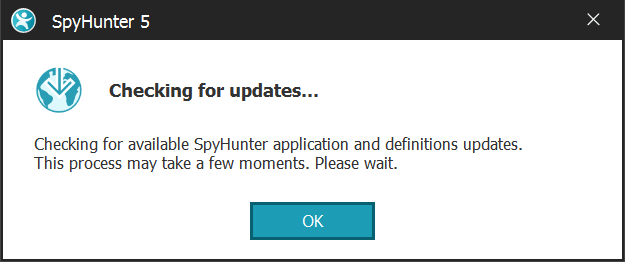
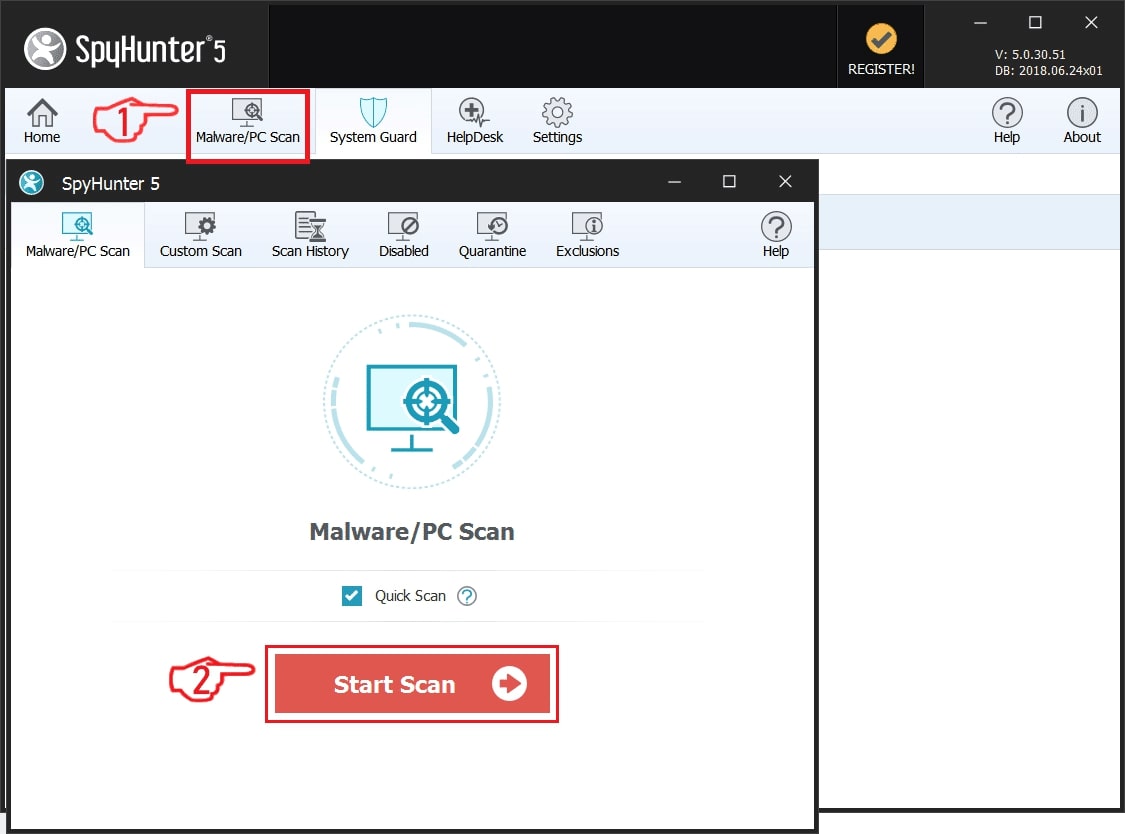
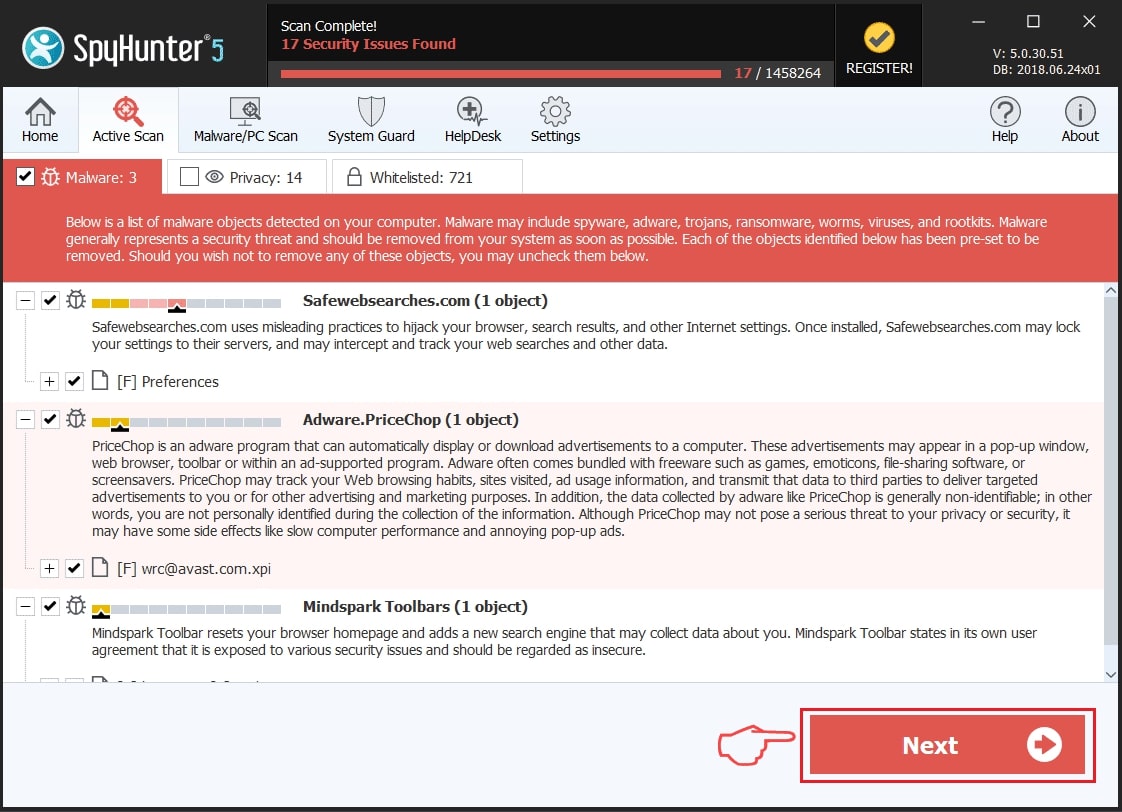
Step 2: Clean any registries, created by TScope.Trojan.MSIL on your computer.
The usually targeted registries of Windows machines are the following:
- HKEY_LOCAL_MACHINE\Software\Microsoft\Windows\CurrentVersion\Run
- HKEY_CURRENT_USER\Software\Microsoft\Windows\CurrentVersion\Run
- HKEY_LOCAL_MACHINE\Software\Microsoft\Windows\CurrentVersion\RunOnce
- HKEY_CURRENT_USER\Software\Microsoft\Windows\CurrentVersion\RunOnce
You can access them by opening the Windows registry editor and deleting any values, created by TScope.Trojan.MSIL there. This can happen by following the steps underneath:
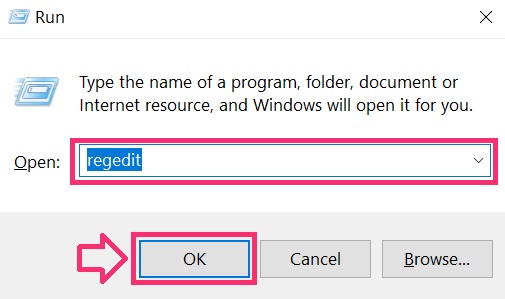
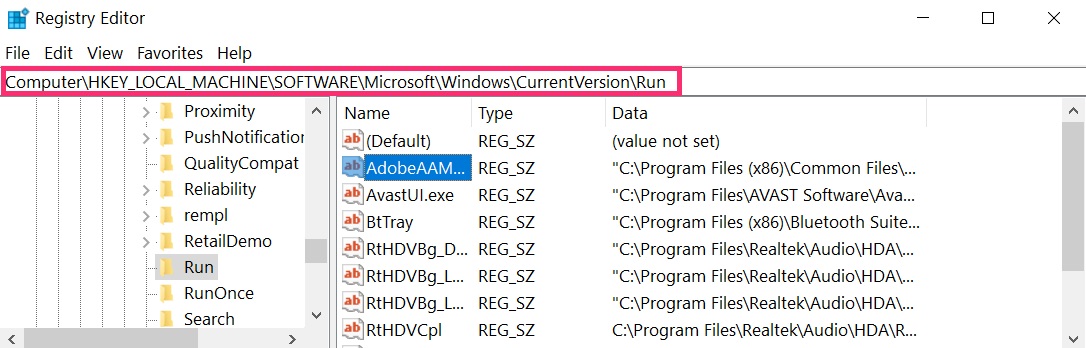
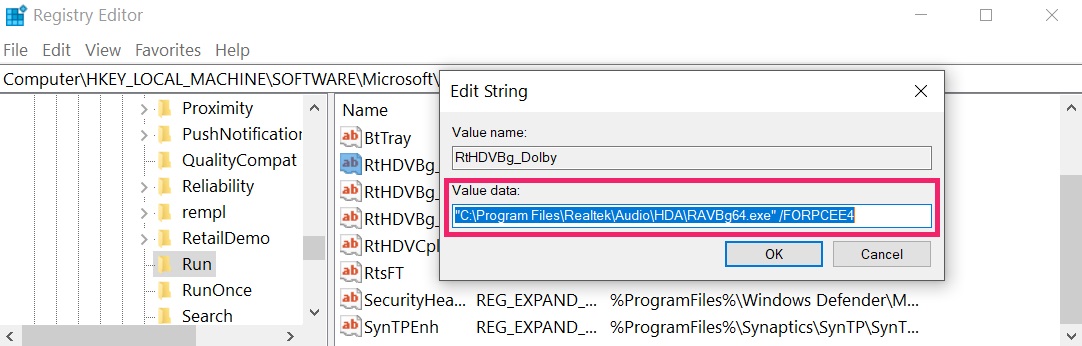 Tip: To find a virus-created value, you can right-click on it and click "Modify" to see which file it is set to run. If this is the virus file location, remove the value.
Step 3: Find virus files created by TScope.Trojan.MSIL on your PC.
1.For Windows 8, 8.1 and 10.
For Newer Windows Operating Systems
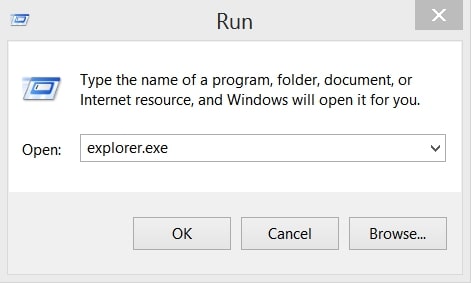
1: On your keyboard press + R and write explorer.exe in the Run text box and then click on the Ok button.
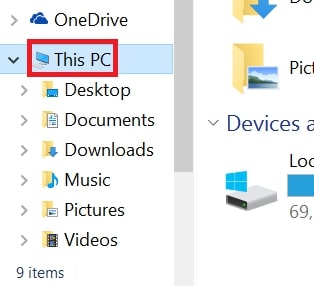
2: Click on your PC from the quick access bar. This is usually an icon with a monitor and its name is either “My Computer”, “My PC” or “This PC” or whatever you have named it.
3: Navigate to the search box in the top-right of your PC's screen and type “fileextension:” and after which type the file extension. If you are looking for malicious executables, an example may be "fileextension:exe". After doing that, leave a space and type the file name you believe the malware has created. Here is how it may appear if your file has been found:
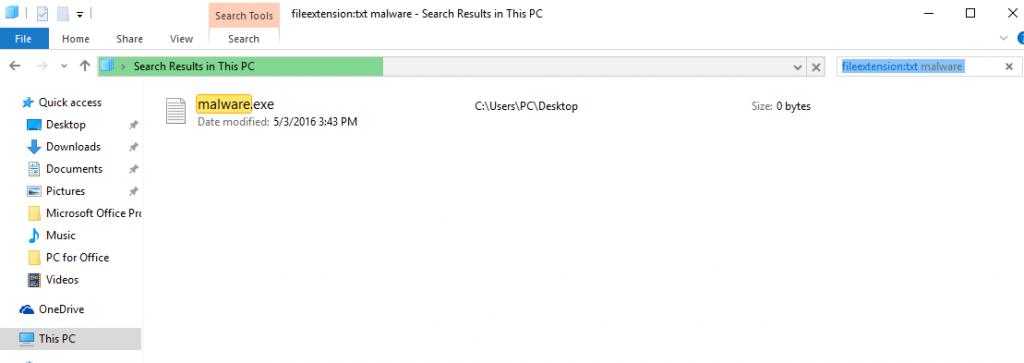
N.B. We recommend to wait for the green loading bar in the navigation box to fill up in case the PC is looking for the file and hasn't found it yet.
2.For Windows XP, Vista, and 7.
For Older Windows Operating Systems
In older Windows OS's the conventional approach should be the effective one:
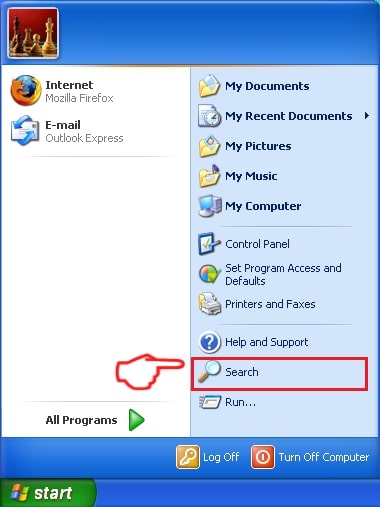
1: Click on the Start Menu icon (usually on your bottom-left) and then choose the Search preference.
2: After the search window appears, choose More Advanced Options from the search assistant box. Another way is by clicking on All Files and Folders.
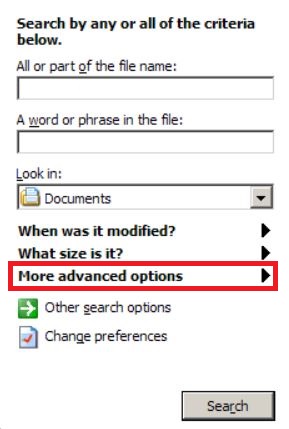
3: After that type the name of the file you are looking for and click on the Search button. This might take some time after which results will appear. If you have found the malicious file, you may copy or open its location by right-clicking on it.
Now you should be able to discover any file on Windows as long as it is on your hard drive and is not concealed via special software.
TScope.Trojan.MSIL FAQ
What Does TScope.Trojan.MSIL Trojan Do?
The TScope.Trojan.MSIL Trojan is a malicious computer program designed to disrupt, damage, or gain unauthorized access to a computer system. It can be used to steal sensitive data, gain control over a system, or launch other malicious activities.
Can Trojans Steal Passwords?
Yes, Trojans, like TScope.Trojan.MSIL, can steal passwords. These malicious programs are designed to gain access to a user's computer, spy on victims and steal sensitive information such as banking details and passwords.
Can TScope.Trojan.MSIL Trojan Hide Itself?
Yes, it can. A Trojan can use various techniques to mask itself, including rootkits, encryption, and obfuscation, to hide from security scanners and evade detection.
Can a Trojan be Removed by Factory Reset?
Yes, a Trojan can be removed by factory resetting your device. This is because it will restore the device to its original state, eliminating any malicious software that may have been installed. Bear in mind that there are more sophisticated Trojans that leave backdoors and reinfect even after a factory reset.
Can TScope.Trojan.MSIL Trojan Infect WiFi?
Yes, it is possible for a Trojan to infect WiFi networks. When a user connects to the infected network, the Trojan can spread to other connected devices and can access sensitive information on the network.
Can Trojans Be Deleted?
Yes, Trojans can be deleted. This is typically done by running a powerful anti-virus or anti-malware program that is designed to detect and remove malicious files. In some cases, manual deletion of the Trojan may also be necessary.
Can Trojans Steal Files?
Yes, Trojans can steal files if they are installed on a computer. This is done by allowing the malware author or user to gain access to the computer and then steal the files stored on it.
Which Anti-Malware Can Remove Trojans?
Anti-malware programs such as SpyHunter are capable of scanning for and removing Trojans from your computer. It is important to keep your anti-malware up to date and regularly scan your system for any malicious software.
Can Trojans Infect USB?
Yes, Trojans can infect USB devices. USB Trojans typically spread through malicious files downloaded from the internet or shared via email, allowing the hacker to gain access to a user's confidential data.
About the TScope.Trojan.MSIL Research
The content we publish on SensorsTechForum.com, this TScope.Trojan.MSIL how-to removal guide included, is the outcome of extensive research, hard work and our team’s devotion to help you remove the specific trojan problem.
How did we conduct the research on TScope.Trojan.MSIL?
Please note that our research is based on an independent investigation. We are in contact with independent security researchers, thanks to which we receive daily updates on the latest malware definitions, including the various types of trojans (backdoor, downloader, infostealer, ransom, etc.)
Furthermore, the research behind the TScope.Trojan.MSIL threat is backed with VirusTotal.
To better understand the threat posed by trojans, please refer to the following articles which provide knowledgeable details.