

Amaozn.com – Is It Safe? If you ended up on Amaozn.com instead of the real Amazon and you are wondering whether it is safe to log in or enter your card details, read this article to find out what this look-alike domain really is, how it can steal your money and data, and what you should do right now to protect your accounts and devices.
What Is Amaozn.com?
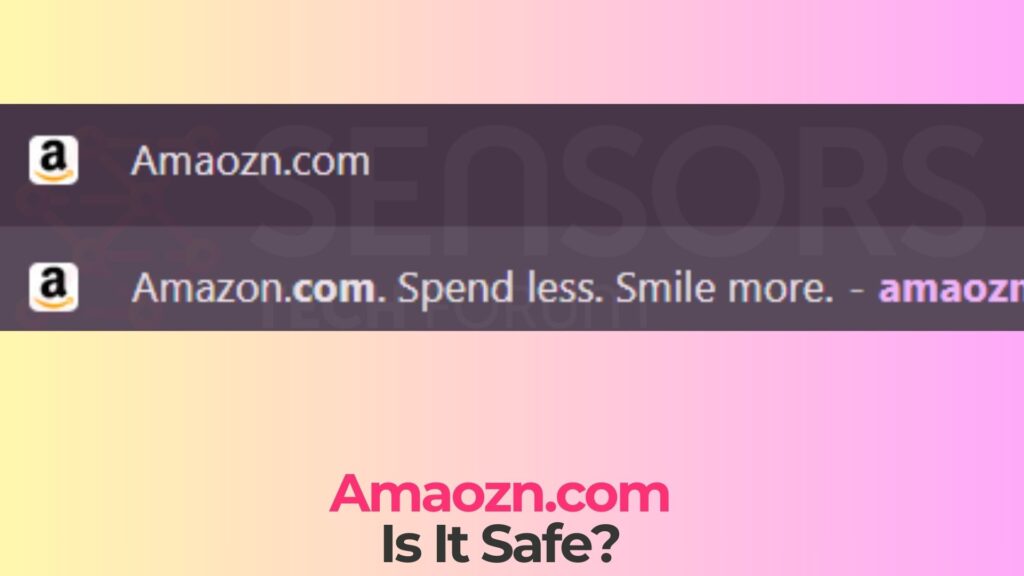
Amaozn.com is a classic example of a typosquatting and phishing domain – a fake website that abuses a misspelling of “Amazon.com” to trick users who type the address incorrectly or click on a misleading link. Instead of being operated by the official Amazon company, the Amaozn.com domain is controlled by third parties who may use it for fraudulent activity, most commonly credential phishing and payment data theft.
Typosquatting relies on the fact that users often make small keyboard mistakes. Swapping the “o” and “z” in “amazon” to form “amaozn” is one of the typical patterns used by attackers. The malicious site is then designed to look very similar to the real Amazon portal: it may copy the logo, color scheme, navigation bar, and even localized language and currency. At first glance, many users will not notice they are on a fake domain, especially on mobile screens where the full address bar is not always visible.
Short Overview
| Type | Scam, Fake Website, Browser Hijacker, Redirect, PUA |
| Short Description | A suspicious website and rogue search engine that hijacks your browsers and causes redirects. |
| Symptoms | Unwanted pop-ups may start appearing while you are browsing the web. A browser hijacker may be downloaded without your knowledge. |
| Removal Time | Approximately 15 minutes for a full-system scan |
| Removal Tool |
See If Your System Has Been Affected by malware
Download
Malware Removal Tool
|
Security analyses of Amaozn.com and similar domains show several worrying characteristics. These include a very low trust score in automated reputation systems, inconsistent company information, and patterns that match known phishing kits used to steal login credentials and credit card details. In some cases, fake order pages and “special offer” landing pages are hosted on such domains during large shopping events like Black Friday or Prime Day, further increasing their success rate.
In short, Amaozn.com is not a legitimate mirror or regional version of Amazon. It is a dangerous impersonation site that should be treated as hostile and avoided completely.
Amaozn.com as Part of Broader Amazon Phishing Campaigns
Amaozn.com does not exist in isolation. Cybercriminals routinely register hundreds or even thousands of Amazon-themed typo domains around major sales periods. These domains often share infrastructure, design templates, and phishing kits. They may rotate quickly: once one domain is reported and blocked by browsers or security products, another similar domain goes live.
This industrialized approach means that Amaozn.com could be used for various fraudulent scenarios over time, including fake login pages, fake checkout portals, or spoofed customer support forms. The exact content may change, but the underlying goal is always the same – to harvest valuable data and monetize it through unauthorized transactions, account takeovers, or resale of stolen information.
How Did I Get It? Ways You May Land on Amaozn.com
You usually do not “install” Amaozn.com as software on your computer. Instead, you are led to this phishing site through deceptive links, typing mistakes, or malicious promotion channels. Understanding how you got there will help you avoid similar traps in the future.
Common Ways Users End Up on Amaozn.com
Victims frequently report one or more of the following scenarios when they discover they have been interacting with the Amaozn.com domain instead of the real Amazon site:
- Typing errors in the address bar: Intending to visit “amazon.com”, but accidentally typing “amaozn.com” and pressing Enter, especially on smartphones where auto-correct and small keyboards increase the error rate.
- Phishing emails claiming to be from Amazon: Messages about “account suspension”, “refund error”, “order confirmation” or “package problem” with a button that visually looks legitimate but secretly points to the Amaozn.com domain.
- Fake “special offer” or “exclusive deal” pages: Ads or promotional posts on social media promising unbelievable discounts on popular Amazon products, which redirect to Amaozn.com as the checkout or sign-in page.
- Malicious search ads and SEO poisoning: Sponsored links or manipulated search results that appear when you look for “Amazon login”, “Amazon support”, or similar terms, but actually resolve to the typo domain.
- Messages in messaging apps or SMS (smishing): Texts that contain urgent tracking alerts, delivery notifications, or prize claims, where the shortened or obfuscated URL takes you to the Amaozn.com phishing site.
- Links inside fake order PDFs or attachments: Malicious invoices, shipping documents, or receipts that imitate Amazon’s format and embed links pointing to Amaozn.com rather than the genuine portal.
In all these cases, the attackers exploit trust in Amazon as a recognizable brand and abuse either urgency (“your account will be locked”) or opportunity (“you have a refund waiting”) to push you into clicking or logging in without carefully checking the URL.
Could My Computer Have Been Infected When I Visited Amaozn.com?
Most Amazon-themed phishing domains, including Amaozn.com, are primarily focused on social engineering and data theft rather than silently dropping malware. However, this does not mean there is zero technical risk. Phishing kits and scripts hosted on such sites can be combined with:
- Suspicious JavaScript that exfiltrates form data and session information in real time.
- Redirect chains leading to exploit kits or fake “browser update” pages that attempt to trick you into downloading malware.
- Tracking pixels and third-party code that profile your device and browser for later targeting.
- Prompts to install browser extensions or mobile apps that claim to “secure” your Amazon account but actually act as spyware or adware.
If you noticed unusual pop-ups, strange redirects, or prompts to install anything while on Amaozn.com, your system may have been exposed to additional threats and should be examined more closely with reputable anti-malware tools.
What Does It Do? Risks of the Amaozn.com Phishing Site
The core purpose of Amaozn.com is to impersonate Amazon and trick you into handing over sensitive information. Once you interact with the site, particularly by logging in or attempting to pay, several types of attacks become possible.
Credential Theft and Account Takeover
The most straightforward use of a domain like Amaozn.com is to collect your Amazon login credentials. The site may display an almost perfect copy of the official login page, including branding, language, and UI elements. When you type your email address and password and click “Sign In”, the following can happen behind the scenes:
- Your credentials are sent directly to the attacker’s server and stored in a database.
- A script may immediately try to log in to the real Amazon site with the captured credentials to verify them and bypass one-time codes if you are currently authenticated.
- Once authenticated, attackers can access your order history, saved addresses, stored payment methods, and gift card balances.
- They may change account details, set up forwarding of invoices, or add new delivery addresses and payment instruments.
If you reuse the same email and password combination on other services, the damage can extend far beyond your Amazon account. Attackers often test stolen credentials against email providers, online banking, payment gateways, and other high-value platforms.
Payment Card Harvesting and Financial Fraud
Amaozn.com may also host a fake checkout page that asks you to enter full card details, including number, expiry date, CVV code, and sometimes 3D Secure information under the pretense of completing a purchase or resolving a “payment decline”. Attackers can monetize this data in several ways:
- Making direct fraudulent purchases with your card until the bank blocks it.
- Selling your card data on underground markets where other criminals can use it later.
- Combining card data with address and phone number information to commit more convincing fraud.
Unlike genuine Amazon purchases, there is no real product or order behind these transactions. The entire flow is designed solely to extract and abuse your financial information.
Harvesting Personal and Contact Information
Fake Amazon domains also collect a significant amount of personal data that may seem harmless at first: your name, shipping address, phone number, and email address. In reality, this information is extremely valuable to cybercriminals. It can be used to:
- Craft highly targeted phishing campaigns that reference real orders, addresses, or devices you own.
- Conduct social engineering attacks over the phone, pretending to be Amazon support, a delivery company, or your bank.
- Augment identity profiles that can be used in credit fraud or to open unauthorized accounts in your name.
Some victims even report receiving unsolicited calls or messages where the attackers quote their exact address and shopping habits, further increasing the illusion that the caller is a legitimate Amazon representative.
Technical and Browser-Level Consequences
Beyond the immediate theft of credentials and payment data, interacting with Amaozn.com can have technical side effects on your browser and device. Potential issues include:
- Persistent cookies and local storage entries that allow tracking across sessions.
- Granted notification permissions that later enable spammy or malicious browser push notifications mimicking system alerts or Amazon messages.
- New, unwanted browser extensions if you were tricked into installing “shopping helpers”, coupon tools, or “security add-ons”.
These elements may not be full-blown malware, but they erode your privacy, increase the risk of further phishing, and degrade system performance and usability.
How to Remove It
Because Amaozn.com is a web domain and not a traditional application, you do not “uninstall” it from your system. However, if you interacted with the site, you must treat the situation as a security incident and take action on three main fronts: your accounts, your finances, and your device environment.
Contain the Damage to Your Accounts and Finances
If you entered your Amazon login details on Amaozn.com, assume that your credentials are compromised. You should immediately log in to the real Amazon website or mobile app using a trusted path (typing the address manually or using a known bookmark), change your password to a strong, unique one, and review your recent account activity. If you see orders, logins, or support actions that you do not recognize, report them through Amazon’s official support channels.
If you provided card details on the Amaozn.com payment page, treat the card as exposed. Contact your bank or card issuer, explain that you entered card data into a suspected phishing site, and ask them to block the card and issue a new one. Request a review of recent transactions and dispute unknown charges according to your bank’s procedures. Using a credit card instead of a debit card often provides stronger consumer protection, but in both cases, fast reporting significantly increases your chances of recovering funds.
Secure Other Accounts That Might Share the Same Password
Credential reuse is a common problem. If the password you used on Amaozn.com is also used on other platforms, change it on those sites as well, starting with your main email account, online banking, and other financial or shopping services. It is strongly recommended to use a password manager to generate and store unique passwords for every service, as this greatly reduces the impact of a single phishing incident.
Wherever possible, enable multi-factor authentication (MFA). Even if attackers know your password, they will find it much harder to log in without the additional one-time codes delivered by an authenticator app, hardware key, or SMS.
Clean Up Your Browser and Device Environment
From a technical perspective, visiting Amaozn.com likely left behind tracking artefacts and possibly granted permissions. To reduce future risk and improve your privacy and security posture, you should:
- Open your browser’s settings and review which sites are allowed to send notifications. Revoke permissions for Amaozn.com and any unknown or suspicious domains.
- Clear recent browsing history, cookies, and cached files, particularly for the period in which you accessed the phishing site.
- Inspect your installed browser extensions or add-ons and remove any you do not recognize, no longer use, or that appeared around the time you visited Amaozn.com.
- Run a full scan with a reputable anti-malware solution to check for potentially unwanted programs, adware, or other threats that may have been introduced through redirects or deceptive downloads.
These actions help limit any lingering impact of the phishing incident and make it harder for attackers to keep tracking or targeting you through the same environment.
Strengthen Your Future Defenses Against Look-Alike Domains
The incident with Amaozn.com should be treated as a warning to adjust your everyday habits when dealing with high-value sites like Amazon. Make sure you always double-check URLs in the address bar, especially before logging in or entering card details. Consider adding the legitimate Amazon domain to your bookmarks and using that bookmark rather than typing the address manually. Be sceptical of unsolicited emails, texts, or social media messages that ask you to click on a link to “fix” an account problem or claim a refund.
Implementing these defensive habits significantly reduces your risk of falling for similar phishing campaigns, not only those targeting Amazon but also those impersonating banks, payment services, and government portals.
What Should You Do?
If you have interacted with Amaozn.com in any way – especially if you logged in, entered card details, or attempted to complete a purchase – act on the assumption that your credentials and financial information may already be in the hands of attackers. Secure your Amazon account and other online accounts, contact your bank or card issuer to review and protect your payment methods, and clean up your browser and device as described above. To fully safeguard your system and minimize any hidden risks, carefully follow the detailed removal and security-hardening instructions provided directly beneath this article – they will guide you through checking your machine, tightening your settings, and shielding yourself from future phishing sites that impersonate Amazon or other major brands.

Ventsislav Krastev
Ventsislav is a cybersecurity expert at SensorsTechForum since 2015. He has been researching, covering, helping victims with the latest malware infections plus testing and reviewing software and the newest tech developments. Having graduated Marketing as well, Ventsislav also has passion for learning new shifts and innovations in cybersecurity that become game changers. After studying Value Chain Management, Network Administration and Computer Administration of System Applications, he found his true calling within the cybersecrurity industry and is a strong believer in the education of every user towards online safety and security.
Follow Me: