

What is Trojan:Win64/Lazy.PGLI!MTB?
Microsoft Defender is flagging Trojan:Win64/Lazy.PGLI!MTB and the alert keeps returning every day at startup even after Defender reports it removed. Read this article carefully before taking manual action – this detection has specific documented characteristics that are important to understand before attempting removal.
Trojan:Win64/Lazy.PGLI!MTB is a Microsoft Defender detection published to Microsoft Security Intelligence on September 18, 2025. The !MTB suffix indicates a machine-learning threat-based detection method, meaning Defender is classifying the threat based on behavioral indicators and machine learning analysis rather than matching it against an exact known file signature. Microsoft’s official threat record states that the Trojan can perform a number of actions of a malicious actor’s choice on the affected device. Community reports of confirmed infections document a consistent pattern: the alert fires at startup every day, Defender shows the threat as removed, but the same detection appears again on the next boot. A companion error message – “Windows cannot find ProgramDataServicesRecycle.exe” – is consistently reported alongside the recurring Defender alert in documented cases, pointing to a scheduled task or startup entry that attempts to relaunch the malicious component after each removal. Microsoft Defender detects and removes the threat but may require a full offline scan and manual cleanup of persistence mechanisms for complete removal.
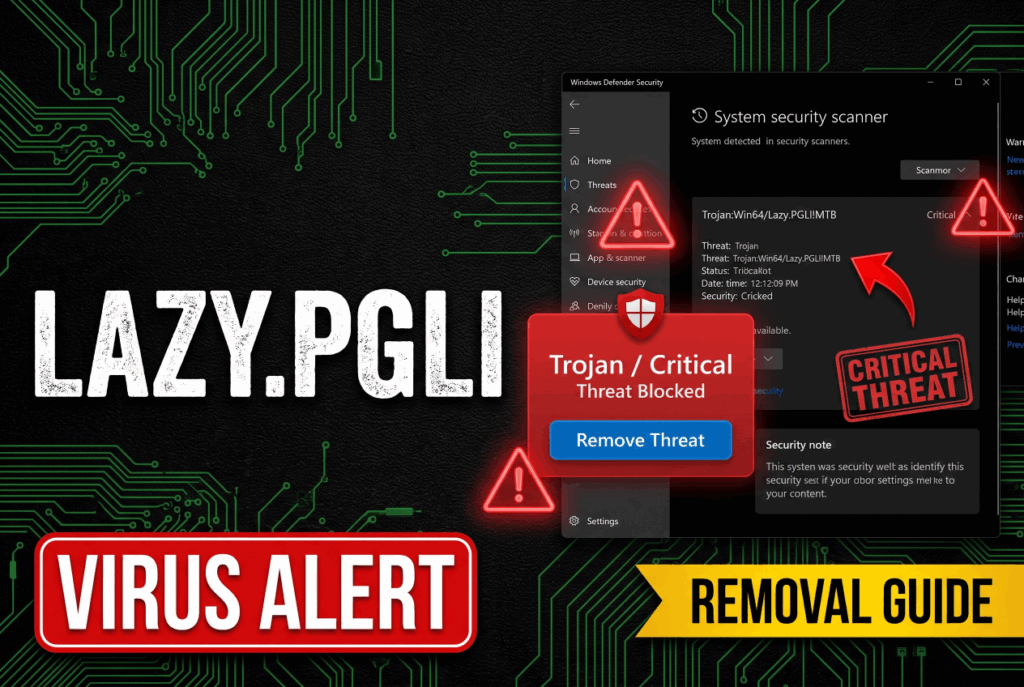
Trojan:Win64/Lazy.PGLI!MTB Short Overview
| Type | Microsoft Defender machine-learning threat-based detection (!MTB) published September 18, 2025. Trojan that can perform a number of actions of a malicious actor’s choice. Documented behaviors: drops Recycle.exe into C:ProgramDataServices for persistence, uses a scheduled task to relaunch after each removal causing daily recurring Defender alerts, blocks Windows shutdown and restart. Requires offline scan and manual scheduled task removal for complete cleanup. |
| Symptoms | Microsoft Defender flagging Trojan:Win64/Lazy.PGLI!MTB every day at startup for multiple days in a row. Defender reporting the threat as removed but the same alert reappearing at the next boot. A companion Windows error saying Windows cannot find ProgramDataServicesRecycle.exe. The “This app is preventing you from restarting” message with a blank app name appearing at shutdown. Recycle.exe present in C:ProgramDataServices on a system where this file should not exist. |
| Removal Time | Approximately 15 minutes for a full-system scan |
| Removal Tool | See If Your System Has Been Affected by malware
Download
Malware Removal Tool
|
How Did I Get Trojan:Win64/Lazy.PGLI!MTB?
The infection typically arrives through these documented routes:
- Software bundling with free downloads from unofficial sources – A free program downloaded from a third-party site includes the Trojan component as a bundled addition through software bundling, installing silently alongside the expected application.
- Pirated software and cracked application installers – Cracked software packages from torrent or unofficial distribution sites frequently embed Trojan components in the installer that run automatically during setup, placing Recycle.exe in ProgramDataServices as part of the installation process.
- Malicious email attachments – A document or archive received through a spam email executes a dropper that installs the Trojan and its persistence mechanisms on the system when opened.
- Drive-by downloads from compromised or ad-heavy pages – Visiting a compromised page can silently download and execute the Trojan installer without any deliberate user action.
What Does Trojan:Win64/Lazy.PGLI!MTB Do?
Microsoft’s threat record confirms the Trojan can perform a number of actions of a malicious actor’s choice. Community documentation adds the following specific behaviors:
- Drops Recycle.exe into ProgramDataServices for persistence – The infection places a file named Recycle.exe in C:ProgramDataServices – a location that should not contain this file on a clean Windows installation. This file is the component Defender detects, but simply removing the file is not enough because a launcher restores it.
- Uses a scheduled task to relaunch after each removal – The most consistently documented behavior: a scheduled task or startup entry attempts to relaunch Recycle.exe at every system startup, causing the Defender alert to return daily even after the file is successfully quarantined or deleted. The companion “Windows cannot find ProgramDataServicesRecycle.exe” error confirms the launcher is trying and failing to relaunch the already-removed file.
- Blocks Windows shutdown and restart – Documented community reports confirm the infection can hook into the Windows shutdown sequence, producing the “This app is preventing you from restarting” message with a blank app name as the malware attempts to prevent termination during a restart.
- Performs malicious actor-directed actions on the device – Microsoft’s classification means the payload capabilities are determined by the attacker’s instructions to the specific sample, which can include credential theft, malicious advertising injection, and unauthorized use of system resources.
What Should You Do?
Do not restore or allow the quarantined file. Update Defender to the latest security intelligence definitions and run a full scan first, then run a Microsoft Defender Offline Scan (Windows Security, Virus and Threat Protection, Scan Options, Microsoft Defender Offline Scan) – the offline scan runs before Windows loads and can catch persistence components that hide during normal startup. After scanning, open Task Scheduler (taskschd.msc) and look for any scheduled task pointing to ProgramDataServicesRecycle.exe or any unfamiliar script path, and delete it. Navigate to C:ProgramDataServices and delete Recycle.exe if present. If the alert continues to return after these steps, use the Farbar Recovery Scan Tool (FRST) to generate a system scan log and post it to the MalwareTips or Malwarebytes forums for community-assisted cleanup, as stubborn variants of this infection require a customized fix script to fully remove all persistence mechanisms. Run a full scan with a dedicated anti-malware tool as a second-opinion check after Defender cleanup. Follow the complete removal guide below this article for the full step-by-step process.

Ventsislav Krastev
Ventsislav is a cybersecurity expert at SensorsTechForum since 2015. He has been researching, covering, helping victims with the latest malware infections plus testing and reviewing software and the newest tech developments. Having graduated Marketing as well, Ventsislav also has passion for learning new shifts and innovations in cybersecurity that become game changers. After studying Value Chain Management, Network Administration and Computer Administration of System Applications, he found his true calling within the cybersecrurity industry and is a strong believer in the education of every user towards online safety and security.
Follow Me:
Preparation before removing Trojan:Win64/Lazy.PGLI!MTB.
Before starting the actual removal process, we recommend that you do the following preparation steps.
- Make sure you have these instructions always open and in front of your eyes.
- Do a backup of all of your files, even if they could be damaged. You should back up your data with a cloud backup solution and insure your files against any type of loss, even from the most severe threats.
- Be patient as this could take a while.
- Scan for Malware
- Fix Registries
- Remove Virus Files
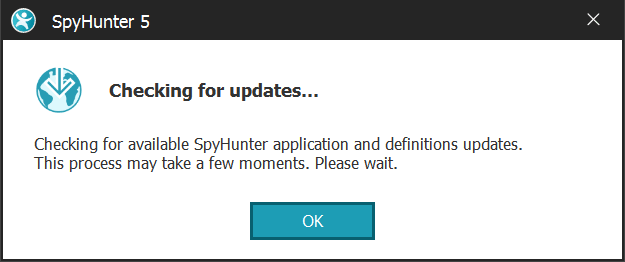
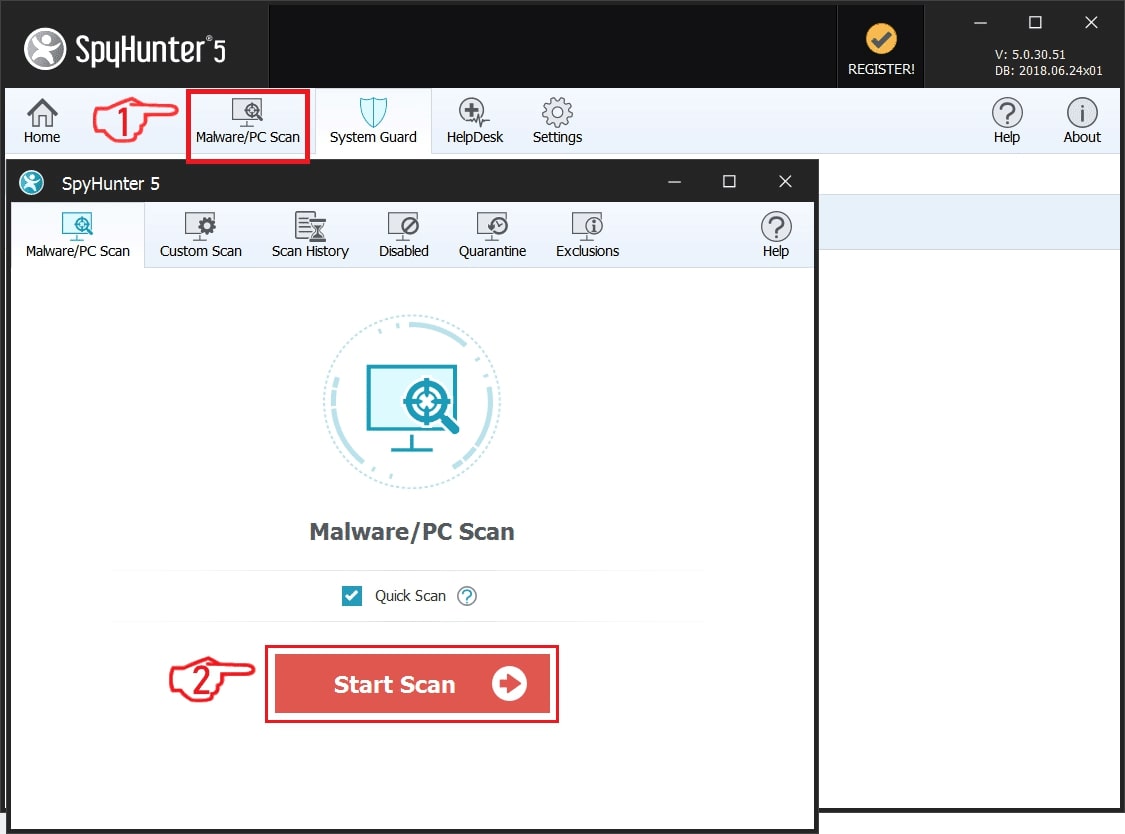
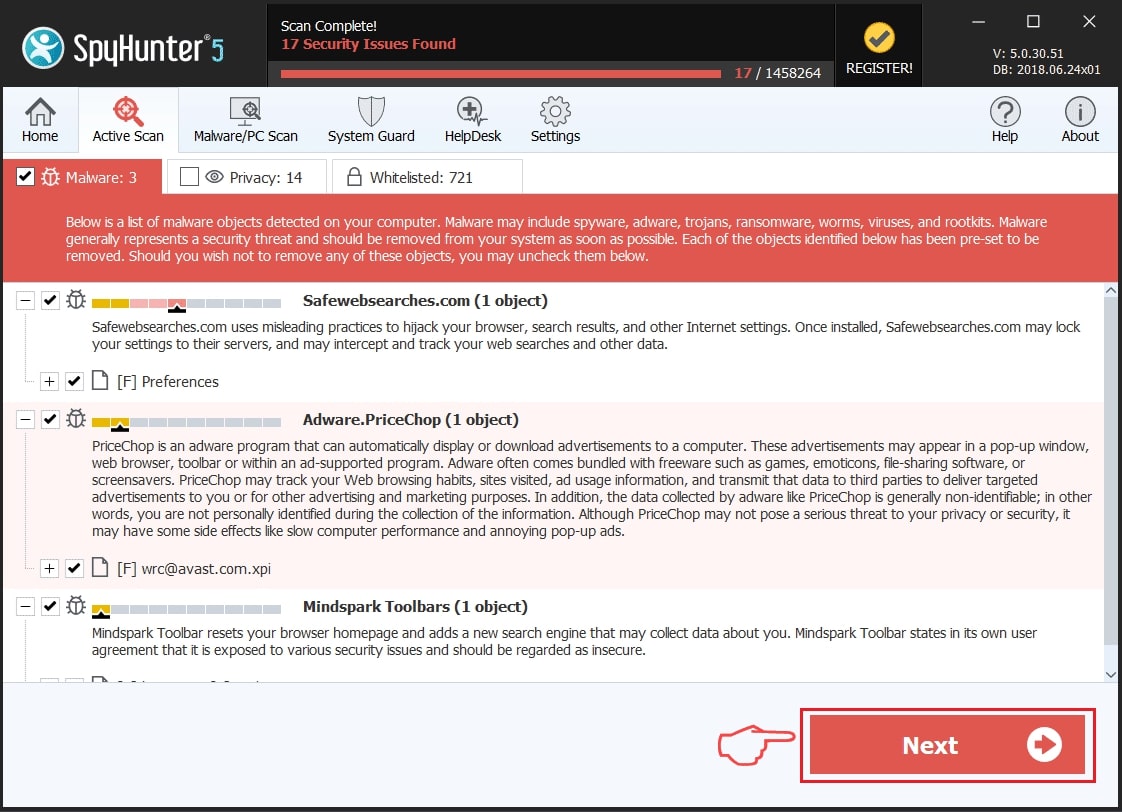
Step 1: Scan for Trojan:Win64/Lazy.PGLI!MTB with SpyHunter Anti-Malware Tool
Step 2: Clean any registries, created by Trojan:Win64/Lazy.PGLI!MTB on your computer.
The usually targeted registries of Windows machines are the following:
- HKEY_LOCAL_MACHINE\Software\Microsoft\Windows\CurrentVersion\Run
- HKEY_CURRENT_USER\Software\Microsoft\Windows\CurrentVersion\Run
- HKEY_LOCAL_MACHINE\Software\Microsoft\Windows\CurrentVersion\RunOnce
- HKEY_CURRENT_USER\Software\Microsoft\Windows\CurrentVersion\RunOnce
You can access them by opening the Windows registry editor and deleting any values, created by Trojan:Win64/Lazy.PGLI!MTB there. This can happen by following the steps underneath:
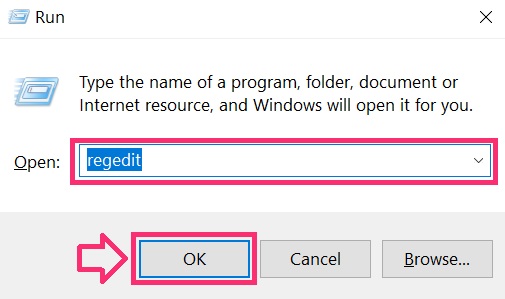
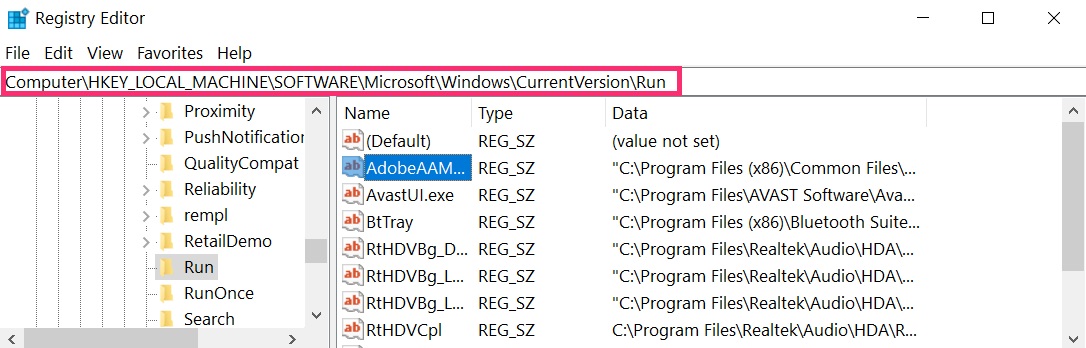
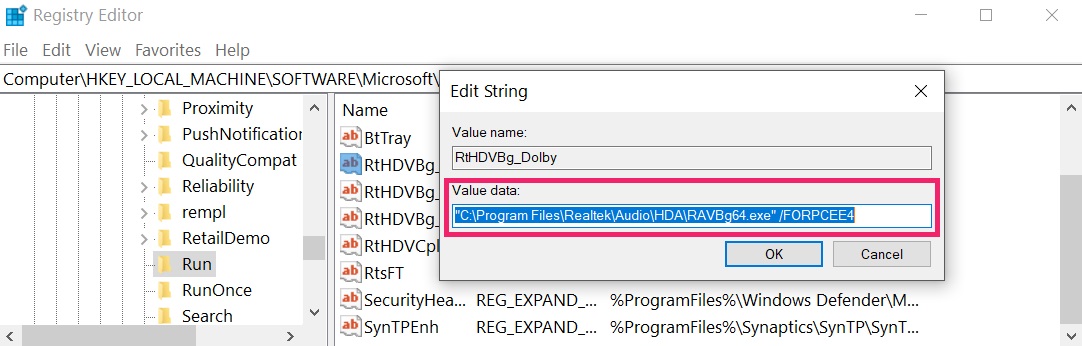 Tip: To find a virus-created value, you can right-click on it and click "Modify" to see which file it is set to run. If this is the virus file location, remove the value.
Step 3: Find virus files created by Trojan:Win64/Lazy.PGLI!MTB on your PC.
1.For Windows 8, 8.1 and 10.
For Newer Windows Operating Systems
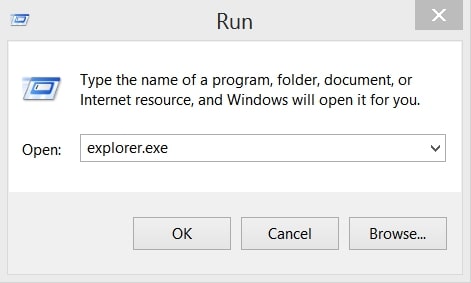
1: On your keyboard press + R and write explorer.exe in the Run text box and then click on the Ok button.
2: Click on your PC from the quick access bar. This is usually an icon with a monitor and its name is either “My Computer”, “My PC” or “This PC” or whatever you have named it.
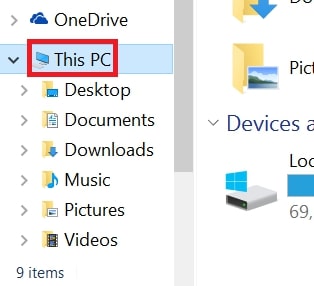
3: Navigate to the search box in the top-right of your PC's screen and type “fileextension:” and after which type the file extension. If you are looking for malicious executables, an example may be "fileextension:exe". After doing that, leave a space and type the file name you believe the malware has created. Here is how it may appear if your file has been found:
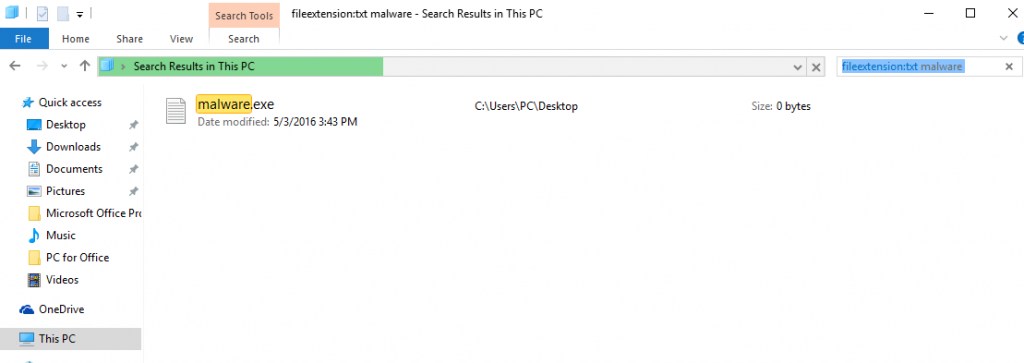
N.B. We recommend to wait for the green loading bar in the navigation box to fill up in case the PC is looking for the file and hasn't found it yet.
2.For Windows XP, Vista, and 7.
For Older Windows Operating Systems
In older Windows OS's the conventional approach should be the effective one:
1: Click on the Start Menu icon (usually on your bottom-left) and then choose the Search preference.
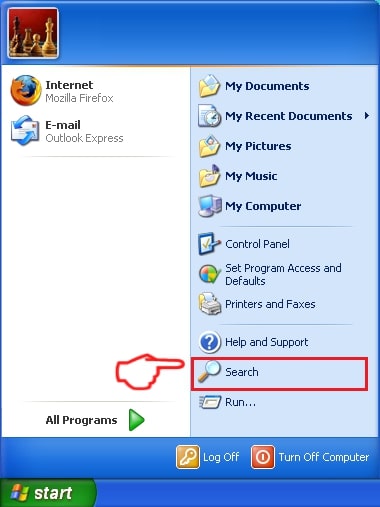
2: After the search window appears, choose More Advanced Options from the search assistant box. Another way is by clicking on All Files and Folders.
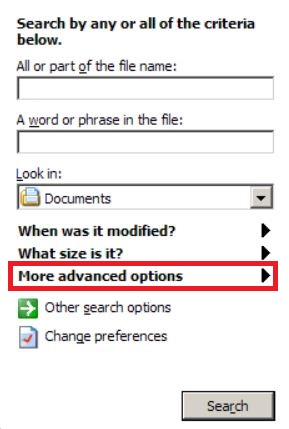
3: After that type the name of the file you are looking for and click on the Search button. This might take some time after which results will appear. If you have found the malicious file, you may copy or open its location by right-clicking on it.
Now you should be able to discover any file on Windows as long as it is on your hard drive and is not concealed via special software.
Trojan:Win64/Lazy.PGLI!MTB FAQ
What Does Trojan:Win64/Lazy.PGLI!MTB Trojan Do?
The Trojan:Win64/Lazy.PGLI!MTB Trojan is a malicious computer program designed to disrupt, damage, or gain unauthorized access to a computer system. It can be used to steal sensitive data, gain control over a system, or launch other malicious activities.
Can Trojans Steal Passwords?
Yes, Trojans, like Trojan:Win64/Lazy.PGLI!MTB, can steal passwords. These malicious programs are designed to gain access to a user's computer, spy on victims and steal sensitive information such as banking details and passwords.
Can Trojan:Win64/Lazy.PGLI!MTB Trojan Hide Itself?
Yes, it can. A Trojan can use various techniques to mask itself, including rootkits, encryption, and obfuscation, to hide from security scanners and evade detection.
Can a Trojan be Removed by Factory Reset?
Yes, a Trojan can be removed by factory resetting your device. This is because it will restore the device to its original state, eliminating any malicious software that may have been installed. Bear in mind that there are more sophisticated Trojans that leave backdoors and reinfect even after a factory reset.
Can Trojan:Win64/Lazy.PGLI!MTB Trojan Infect WiFi?
Yes, it is possible for a Trojan to infect WiFi networks. When a user connects to the infected network, the Trojan can spread to other connected devices and can access sensitive information on the network.
Can Trojans Be Deleted?
Yes, Trojans can be deleted. This is typically done by running a powerful anti-virus or anti-malware program that is designed to detect and remove malicious files. In some cases, manual deletion of the Trojan may also be necessary.
Can Trojans Steal Files?
Yes, Trojans can steal files if they are installed on a computer. This is done by allowing the malware author or user to gain access to the computer and then steal the files stored on it.
Which Anti-Malware Can Remove Trojans?
Anti-malware programs such as SpyHunter are capable of scanning for and removing Trojans from your computer. It is important to keep your anti-malware up to date and regularly scan your system for any malicious software.
Can Trojans Infect USB?
Yes, Trojans can infect USB devices. USB Trojans typically spread through malicious files downloaded from the internet or shared via email, allowing the hacker to gain access to a user's confidential data.
About the Trojan:Win64/Lazy.PGLI!MTB Research
The content we publish on SensorsTechForum.com, this Trojan:Win64/Lazy.PGLI!MTB how-to removal guide included, is the outcome of extensive research, hard work and our team’s devotion to help you remove the specific trojan problem.
How did we conduct the research on Trojan:Win64/Lazy.PGLI!MTB?
Please note that our research is based on an independent investigation. We are in contact with independent security researchers, thanks to which we receive daily updates on the latest malware definitions, including the various types of trojans (backdoor, downloader, infostealer, ransom, etc.)
Furthermore, the research behind the Trojan:Win64/Lazy.PGLI!MTB threat is backed with VirusTotal.
To better understand the threat posed by trojans, please refer to the following articles which provide knowledgeable details.