

Is Ineed.porn Safe? The Redirect Virus Risk Explained
Your browser started redirecting to ineed.porn without you navigating there deliberately, or visiting the site triggered a flood of pop-up ads and notification prompts you never agreed to. Read this article right now to understand the security risk, then follow the removal guide at the bottom.
Ineed.porn is an adult streaming site that, like most free content platforms in this category, sustains itself entirely through advertising revenue from ad networks that are not held to the same standards as mainstream ad platforms. MalwareTips’ research into this category of site is direct: less reputable sites display malicious advertising that can redirect a browser to further harmful pages to generate advertising revenue, and if a browser is continuously redirected to such a site without deliberate navigation, a malicious program is most likely already installed on the device. PCRisk’s analysis of the wider adult streaming site category confirms that these sites frequently trick visitors into granting browser push notification permissions during playback — presenting a “Click Allow to play” prompt that grants the site’s ad network standing permission to push spam notifications to the desktop around the clock, even after the browser is closed.
![Ineed.porn - Is It Safe? [Virus from Redirects]](https://cdn.sensorstechforum.com/wp-content/uploads/2026/07/ineed_porn_safe_or_scam_article_hero.jpg-1024x687.png)
Ineed.porn Short Overview
| Type | Adult streaming site whose ad networks deliver push notification spam, malicious advertising redirects, and adware to visitors. If the browser redirects to this site without deliberate navigation, an installed adware component is the most likely cause. |
| Symptoms | Browser redirecting to ineed.porn without deliberate navigation. Notification permission prompts appearing during video playback. Desktop push notifications appearing from the site’s ad network even after the browser is closed. Unwanted pop-up ads for fake security software, gambling, or prize scams appearing during or after a visit. |
| Removal Time | Approximately 15 minutes for a full-system scan |
| Removal Tool | See If Your System Has Been Affected by malware
Download
Malware Removal Tool
|
How Did I Get Ineed.porn Redirects and Pop-ups?
There are two distinct ways the ineed.porn redirect and notification problem typically starts. Here is how each one works:
- A deceptive notification permission prompt on the site itself — A “Click Allow to play” or “Press Allow to continue watching” prompt presented during video playback functions as a browser notification opt-in rather than a media control — granting the site’s ad network permanent permission to push content to the desktop.
- Adware already installed on the device — If adware or a PUP installed through software bundling is already present, it can actively redirect the browser to ad-heavy pages including this one — meaning the redirects happen regardless of deliberate navigation.
- Pop-under windows granting hidden permissions — Some ad-heavy sites open pop-under browser windows presenting a notification permission prompt in the background; any click on the main page can inadvertently confirm the hidden request.
- Malicious advertising redirect chains — Clicking an ad elsewhere that routes through a malicious redirect chain can land the browser on this site or trigger an ad network associated with it, without any deliberate visit.
What Security Risks Does Ineed.porn Create?
The security risks from ineed.porn are not about the content of the site itself — they are about the ad networks it uses and the browser permissions those networks acquire. Here is the full picture:
- Push notification spam once permission is granted — MacSecurity’s analysis of this category confirms that push notifications from adult streaming site ad networks appear even after the browser is closed, covering fake virus warnings, fake tech support messages, and unwanted promotions delivered at the OS level — bypassing all standard browser pop-up blockers.
- Redirects to further harmful pages via malicious ads — Ad networks on sites like this are not vetted — clicking any ad can route through a chain that attempts to deliver malware, push scareware, or collect credentials through phishing pages.
- Adware and PUP delivery through the site’s ad network — HowToFix.Guide’s research on this category documents that clicking ad content on adult streaming sites can trigger silent download attempts for adware and potentially unwanted programs onto the device.
- Browser data collection through embedded tracking scripts — Trackers embedded in the ad network collect browsing behavior and device data for data collection throughout every session.
What Should You Do?
Check your browser’s notification settings and remove ineed.porn and any related domains from the allowed list. If the browser is being redirected there without deliberate navigation, run a full scan with a dedicated anti-adware tool such as Malwarebytes or AdwCleaner to find and remove any adware component actively generating the redirects, since no browser setting change will stop an installed adware program from continuing the behavior. Remove any unfamiliar browser extensions, reset browser settings to defaults, and clear browsing data using the “All Time” range to flush cached scripts and tracking cookies. Follow the complete removal guide below this article for the full steps across Windows, Mac, and Android.

Ventsislav Krastev
Ventsislav is a cybersecurity expert at SensorsTechForum since 2015. He has been researching, covering, helping victims with the latest malware infections plus testing and reviewing software and the newest tech developments. Having graduated Marketing as well, Ventsislav also has passion for learning new shifts and innovations in cybersecurity that become game changers. After studying Value Chain Management, Network Administration and Computer Administration of System Applications, he found his true calling within the cybersecrurity industry and is a strong believer in the education of every user towards online safety and security.
Follow Me:
- Windows
- Mac OS X
- Google Chrome
- Mozilla Firefox
- Microsoft Edge
- Safari
- Internet Explorer
- Stop Push Pop-ups
How to Remove Ineed.porn from Windows.
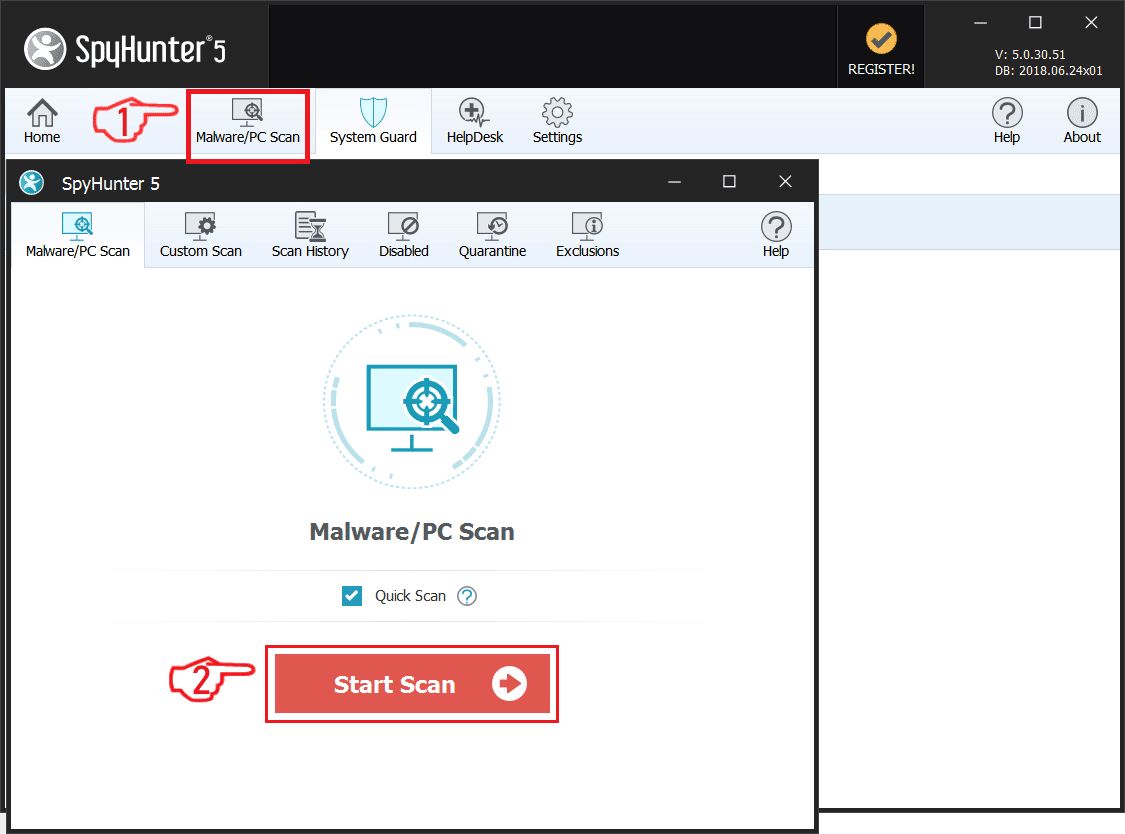
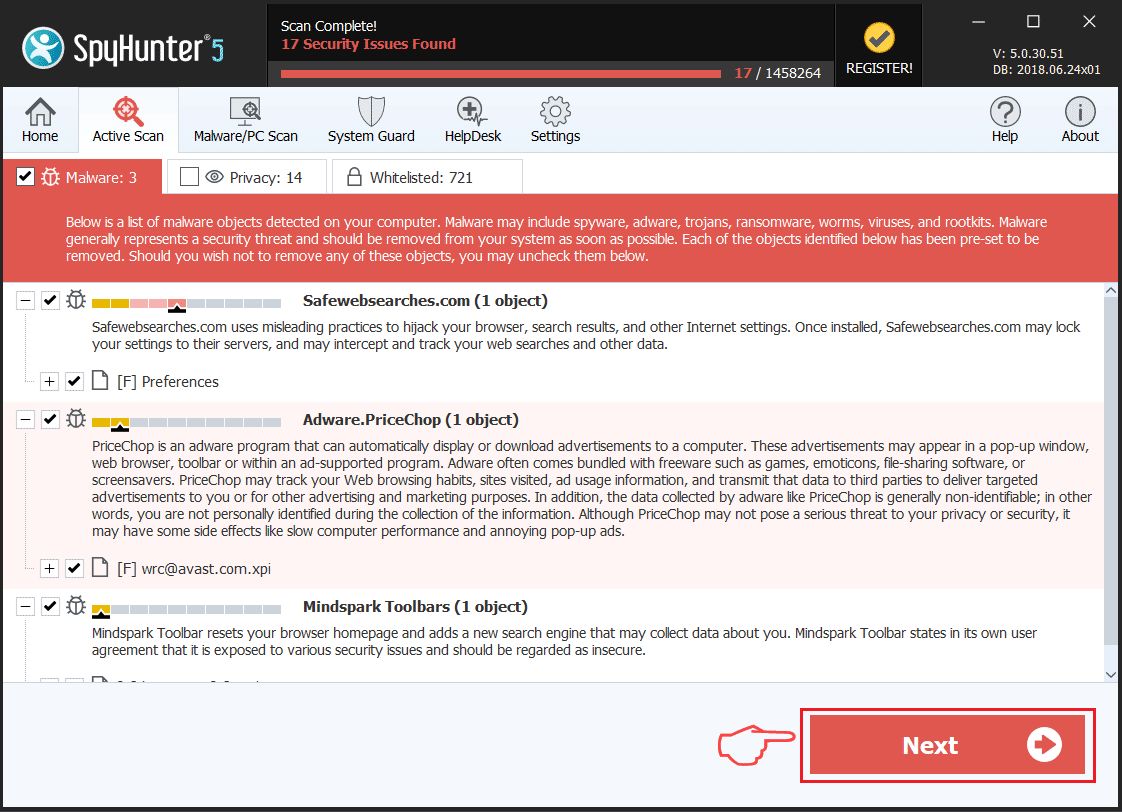
Step 1: Scan for Ineed.porn with SpyHunter Anti-Malware Tool
Step 2: Boot Your PC In Safe Mode
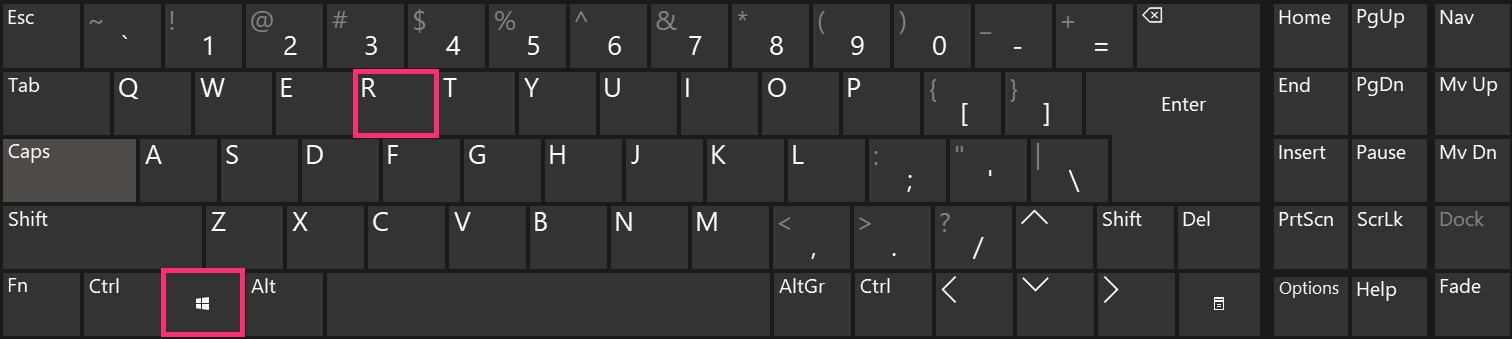
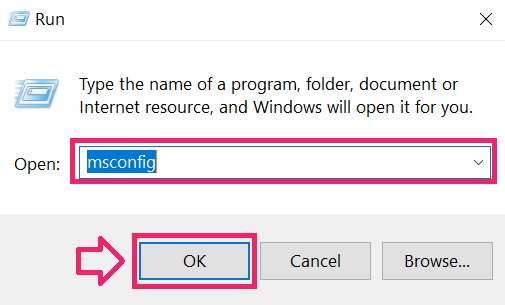
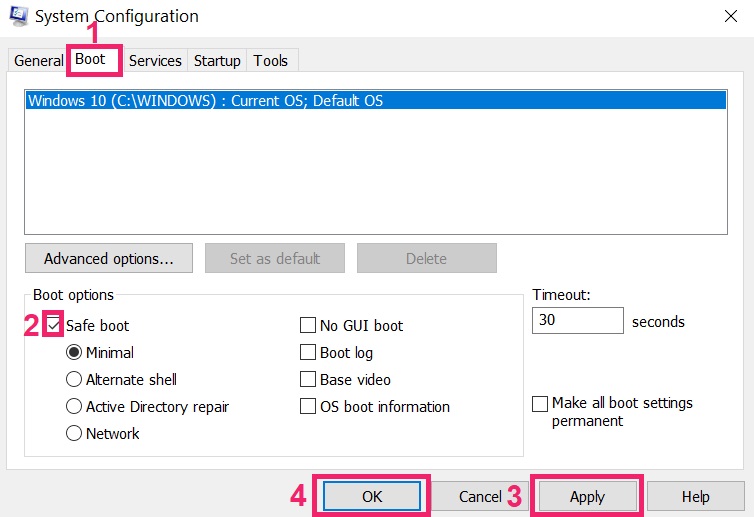
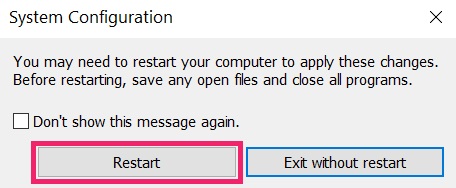
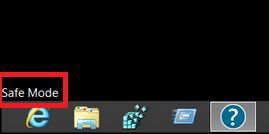
Step 3: Uninstall Ineed.porn and related software from Windows
Uninstall Steps for Windows 11
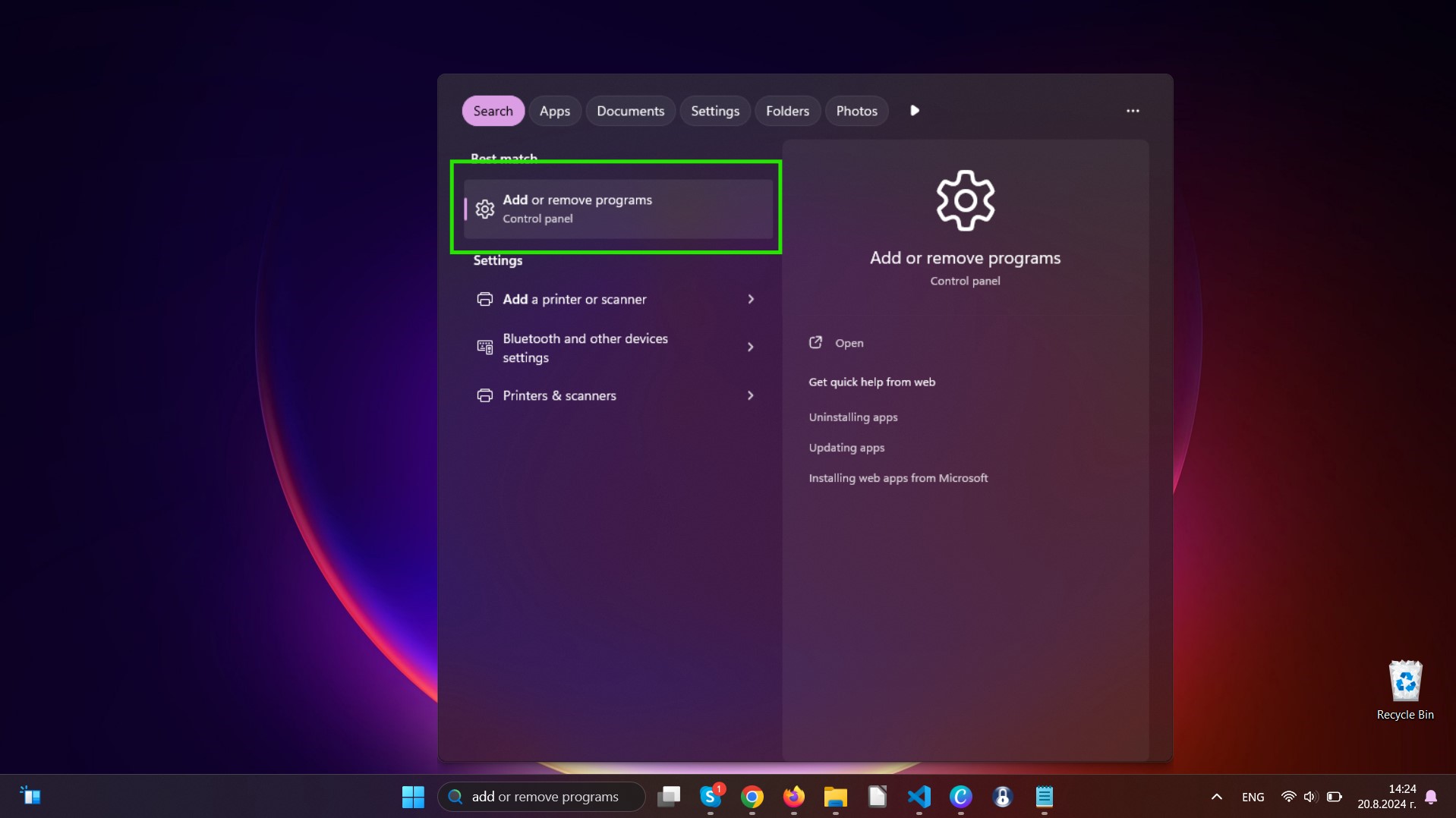
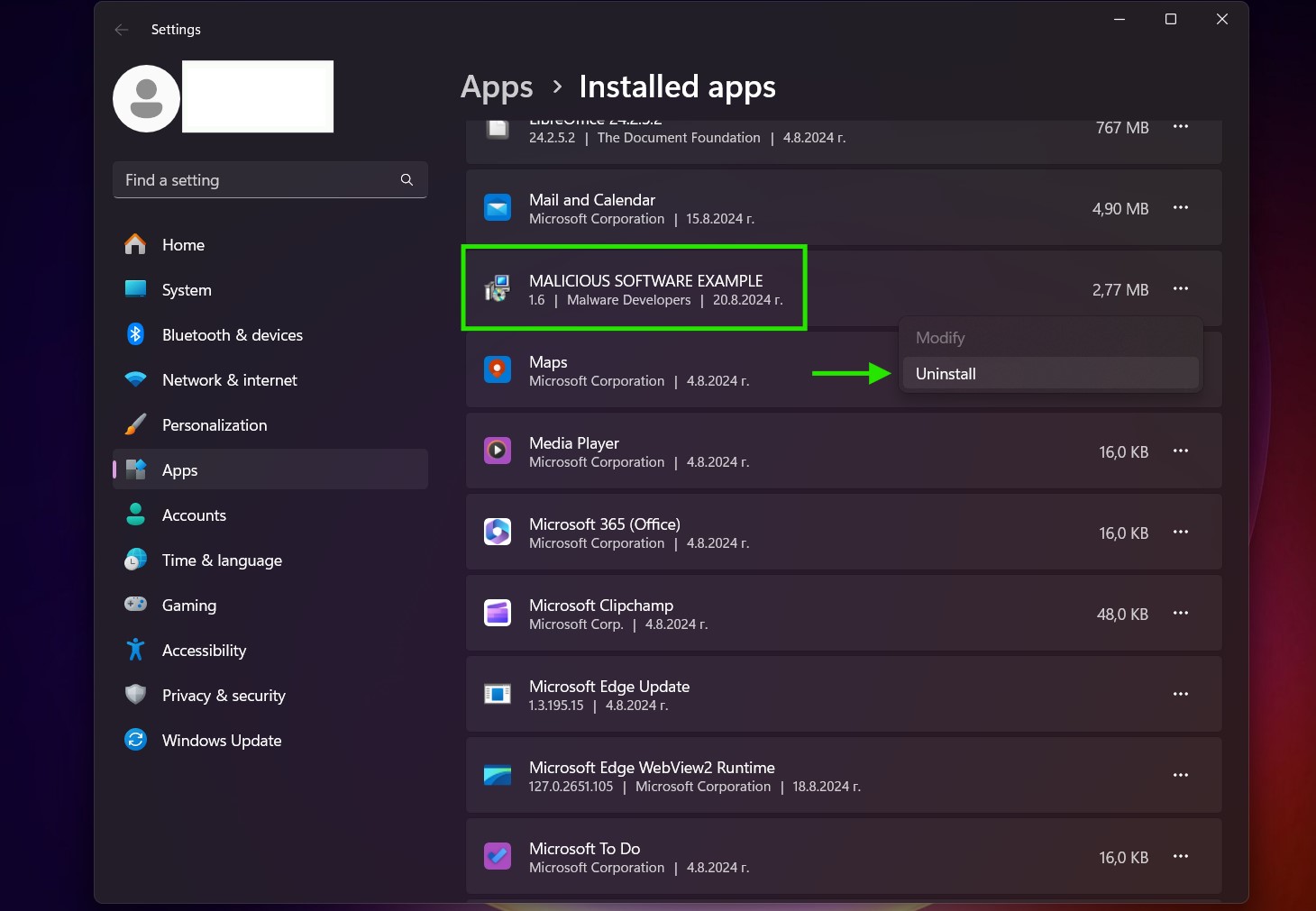
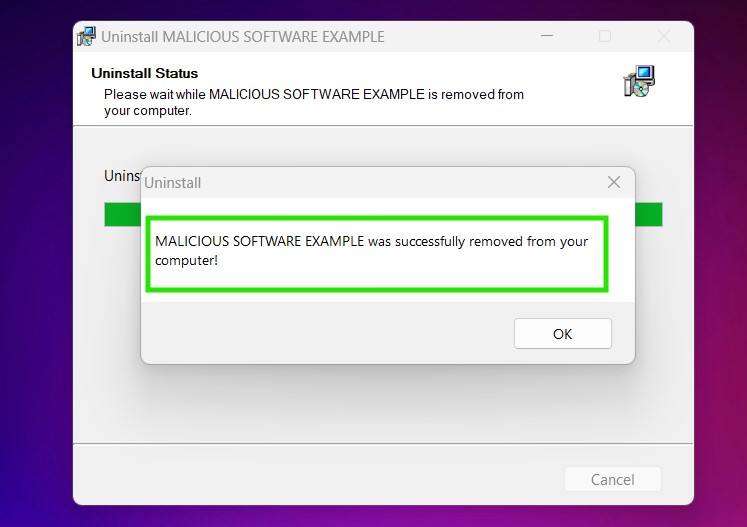
Uninstall Steps for Windows 10 and Older Versions
Here is a method in few easy steps that should be able to uninstall most programs. No matter if you are using Windows 10, 8, 7, Vista or XP, those steps will get the job done. Dragging the program or its folder to the recycle bin can be a very bad decision. If you do that, bits and pieces of the program are left behind, and that can lead to unstable work of your PC, errors with the file type associations and other unpleasant activities. The proper way to get a program off your computer is to Uninstall it. To do that:
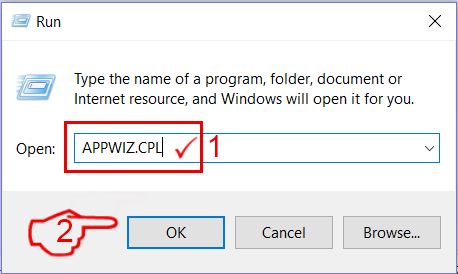
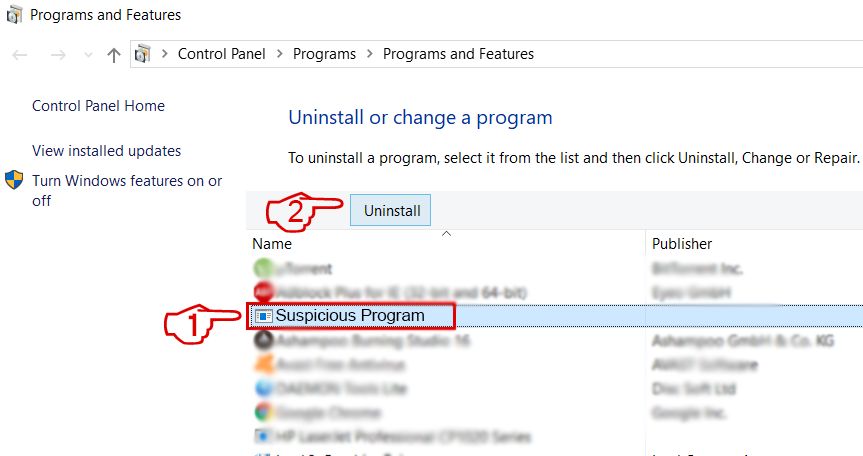 Follow the instructions above and you will successfully uninstall most programs.
Step 4: Clean Any registries, Created by Ineed.porn on Your PC.
The usually targeted registries of Windows machines are the following:
- HKEY_LOCAL_MACHINE\Software\Microsoft\Windows\CurrentVersion\Run
- HKEY_CURRENT_USER\Software\Microsoft\Windows\CurrentVersion\Run
- HKEY_LOCAL_MACHINE\Software\Microsoft\Windows\CurrentVersion\RunOnce
- HKEY_CURRENT_USER\Software\Microsoft\Windows\CurrentVersion\RunOnce
You can access them by opening the Windows registry editor and deleting any values, created by Ineed.porn there. This can happen by following the steps underneath:
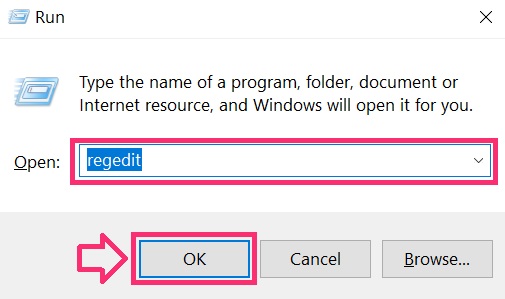
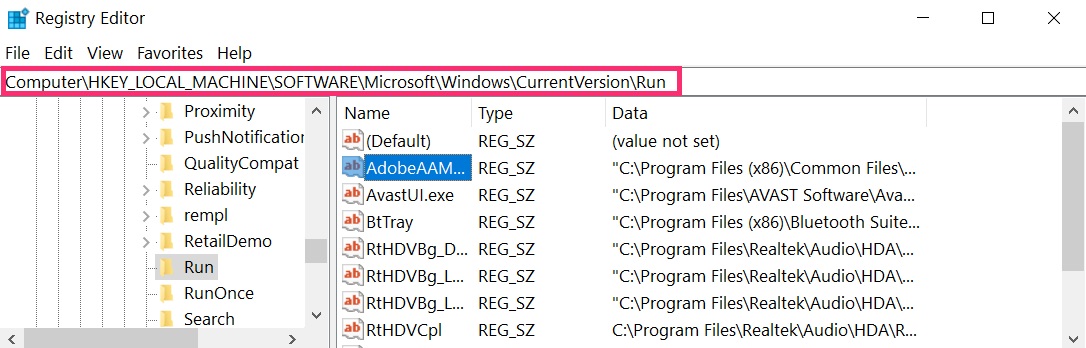
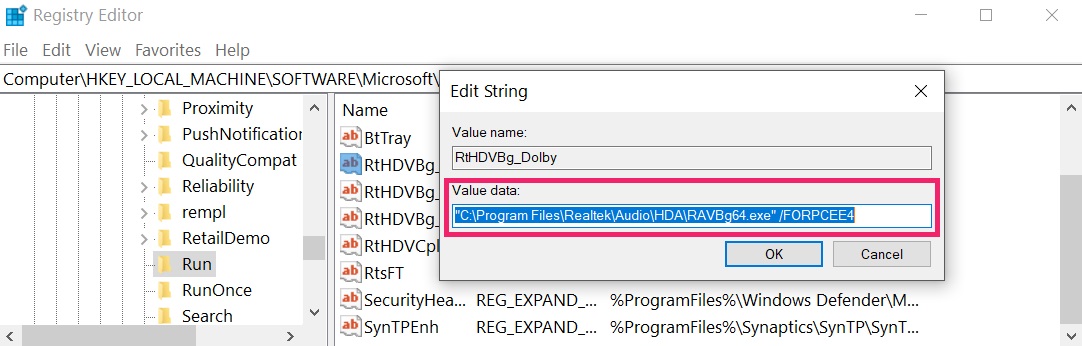 Tip: To find a virus-created value, you can right-click on it and click "Modify" to see which file it is set to run. If this is the virus file location, remove the value.
Video Removal Guide for Ineed.porn (Windows).
Get rid of Ineed.porn from Mac OS X.
Step 1: Uninstall Ineed.porn and remove related files and objects
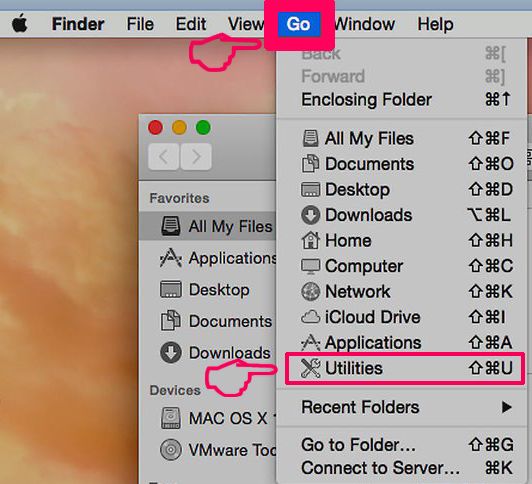
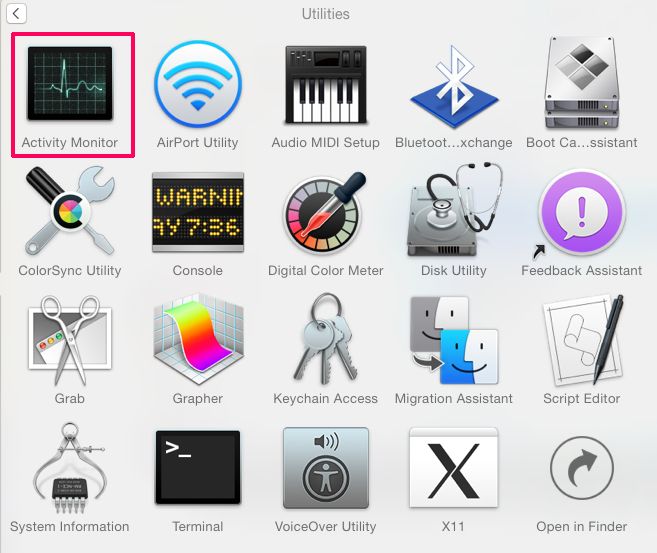
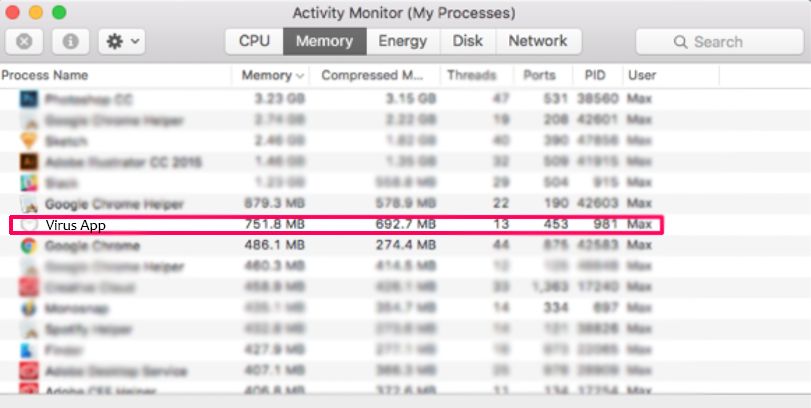
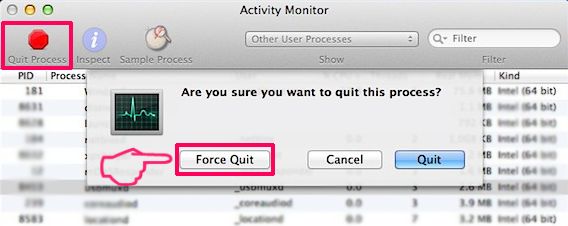
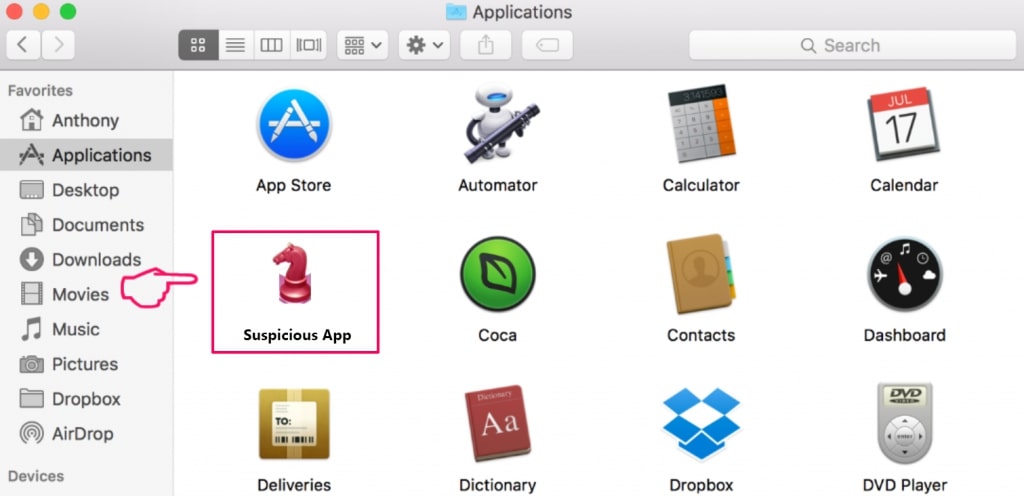
Your Mac will then show you a list of items that start automatically when you log in. Look for any suspicious apps identical or similar to Ineed.porn. Check the app you want to stop from running automatically and then select on the Minus (“-“) icon to hide it.
- Go to Finder.
- In the search bar type the name of the app that you want to remove.
- Above the search bar change the two drop down menus to “System Files” and “Are Included” so that you can see all of the files associated with the application you want to remove. Bear in mind that some of the files may not be related to the app so be very careful which files you delete.
- If all of the files are related, hold the ⌘+A buttons to select them and then drive them to “Trash”.
In case you cannot remove Ineed.porn via Step 1 above:
In case you cannot find the virus files and objects in your Applications or other places we have shown above, you can manually look for them in the Libraries of your Mac. But before doing this, please read the disclaimer below:
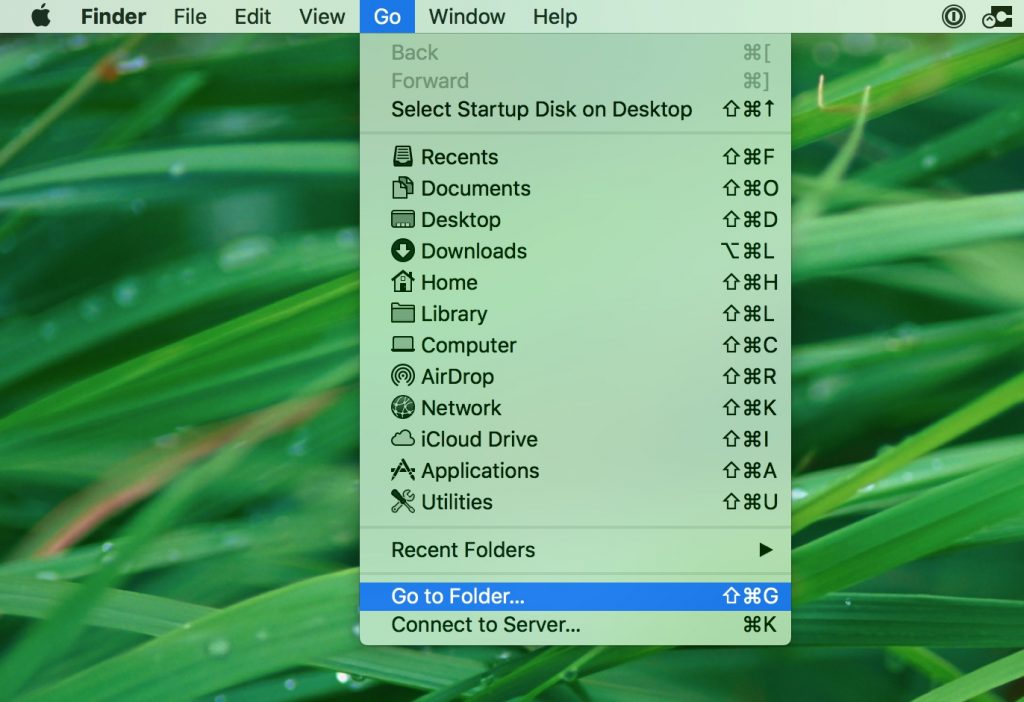
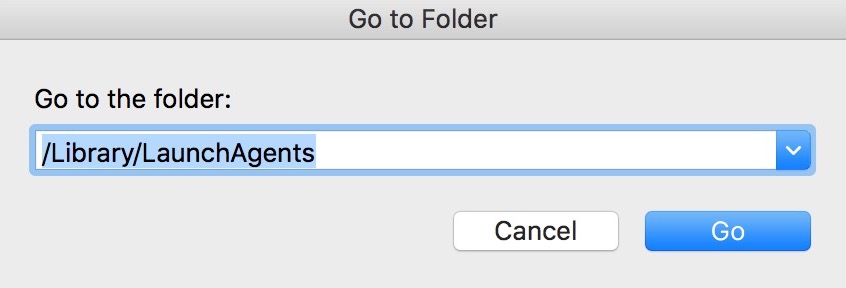
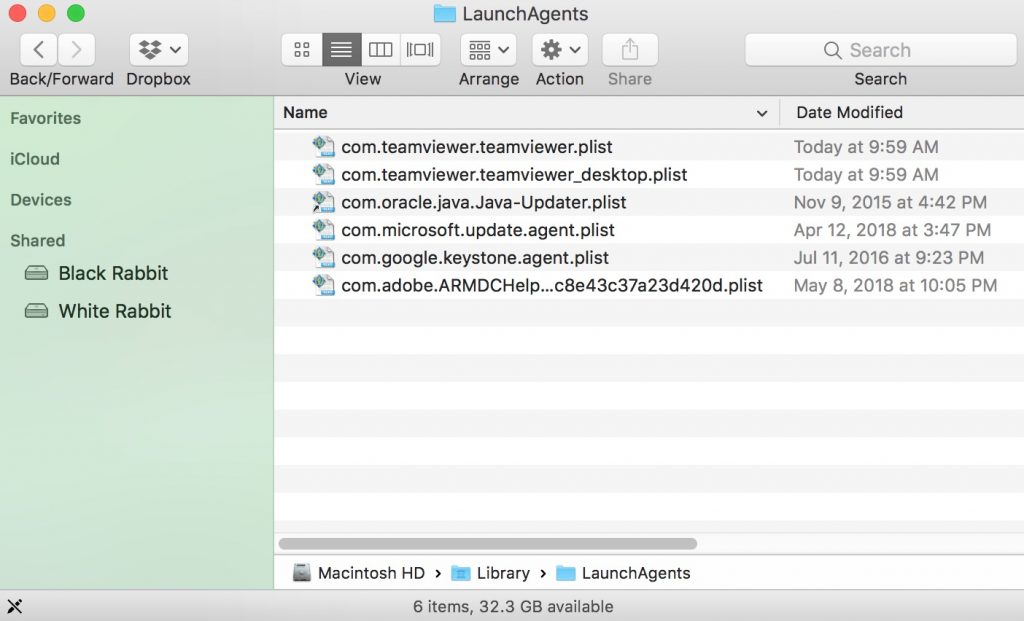
You can repeat the same procedure with the following other Library directories:
→ ~/Library/LaunchAgents
/Library/LaunchDaemons
Tip: ~ is there on purpose, because it leads to more LaunchAgents.
Step 2: Scan for and remove Ineed.porn files from your Mac
When you are facing problems on your Mac as a result of unwanted scripts and programs such as Ineed.porn, the recommended way of eliminating the threat is by using an anti-malware program. SpyHunter for Mac offers advanced security features along with other modules that will improve your Mac’s security and protect it in the future.
Video Removal Guide for Ineed.porn (Mac)
Remove Ineed.porn from Google Chrome.
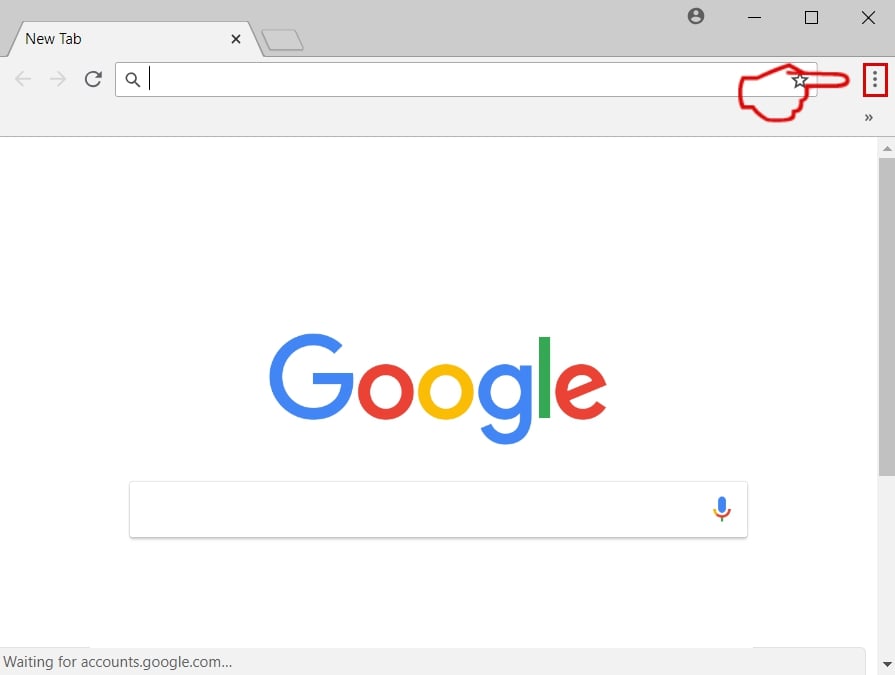
Step 1: Start Google Chrome and open the drop menu
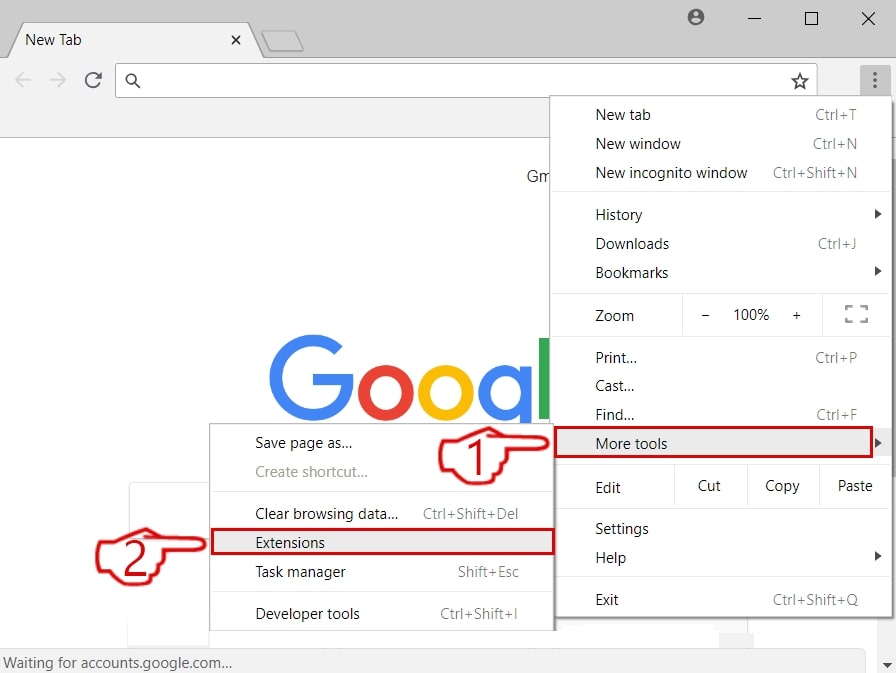
Step 2: Move the cursor over "Tools" and then from the extended menu choose "Extensions"
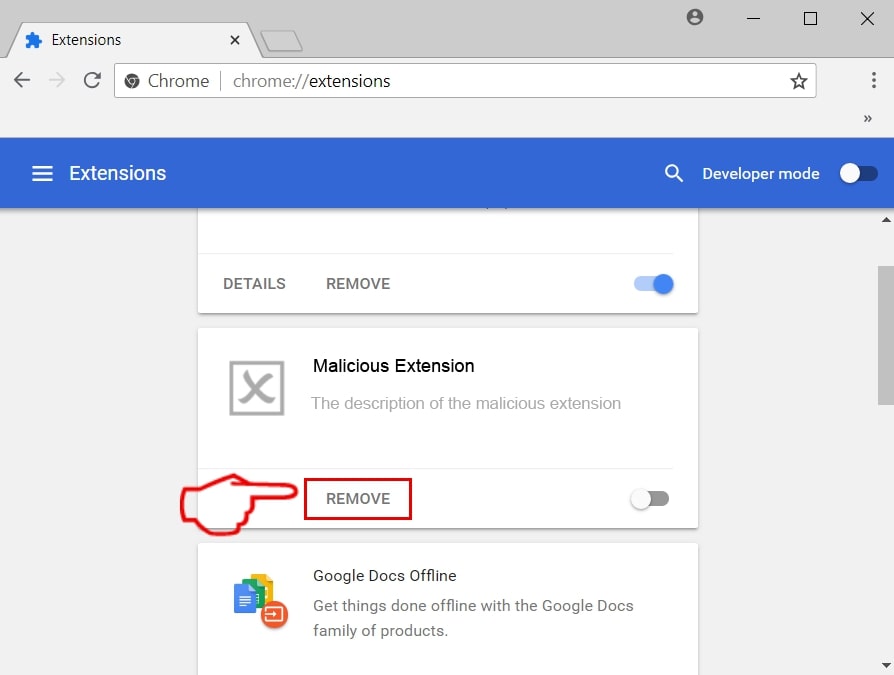
Step 3: From the opened "Extensions" menu locate the unwanted extension and click on its "Remove" button.
Step 4: After the extension is removed, restart Google Chrome by closing it from the red "X" button at the top right corner and start it again.
Erase Ineed.porn from Mozilla Firefox.
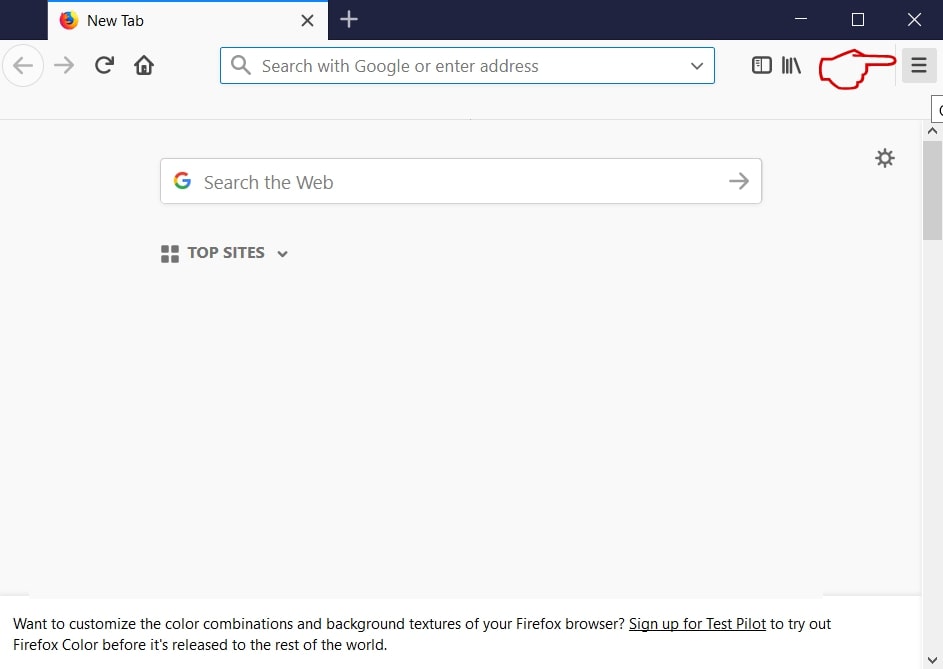
Step 1: Start Mozilla Firefox. Open the menu window:
Step 2: Select the "Add-ons" icon from the menu.
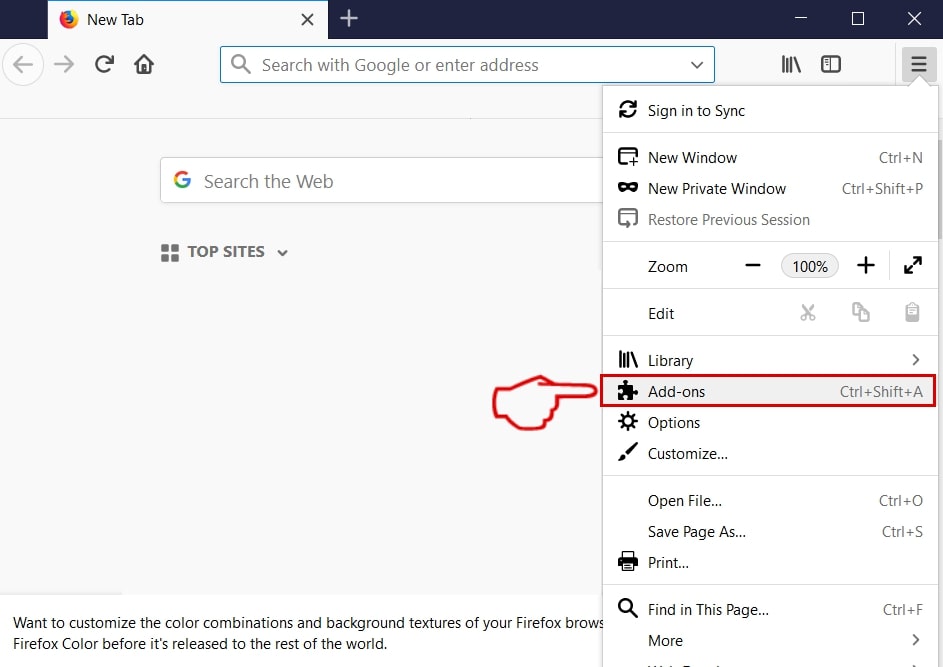
Step 3: Select the unwanted extension and click "Remove"

Step 4: After the extension is removed, restart Mozilla Firefox by closing it from the red "X" button at the top right corner and start it again.
Uninstall Ineed.porn from Microsoft Edge.
Step 1: Start Edge browser.
Step 2: Open the drop menu by clicking on the icon at the top right corner.
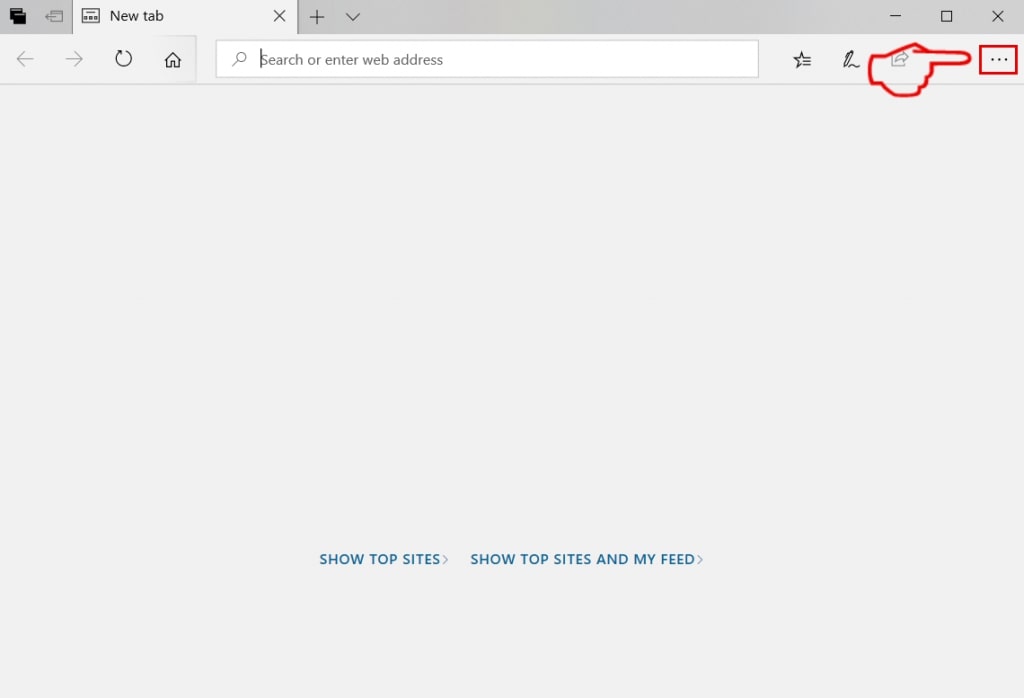
Step 3: From the drop menu select "Extensions".
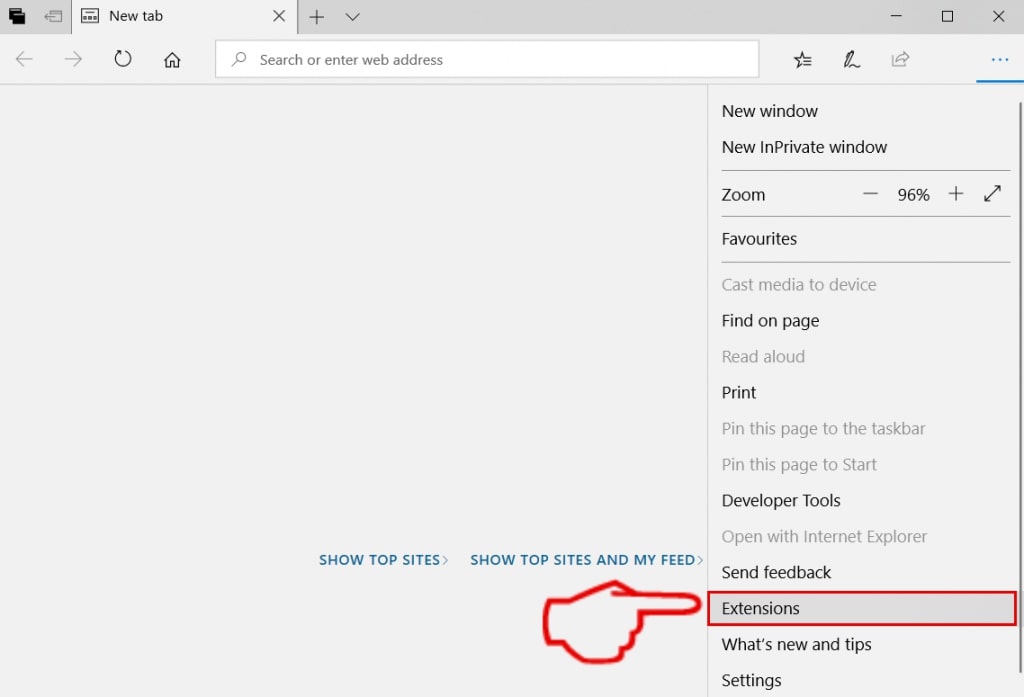
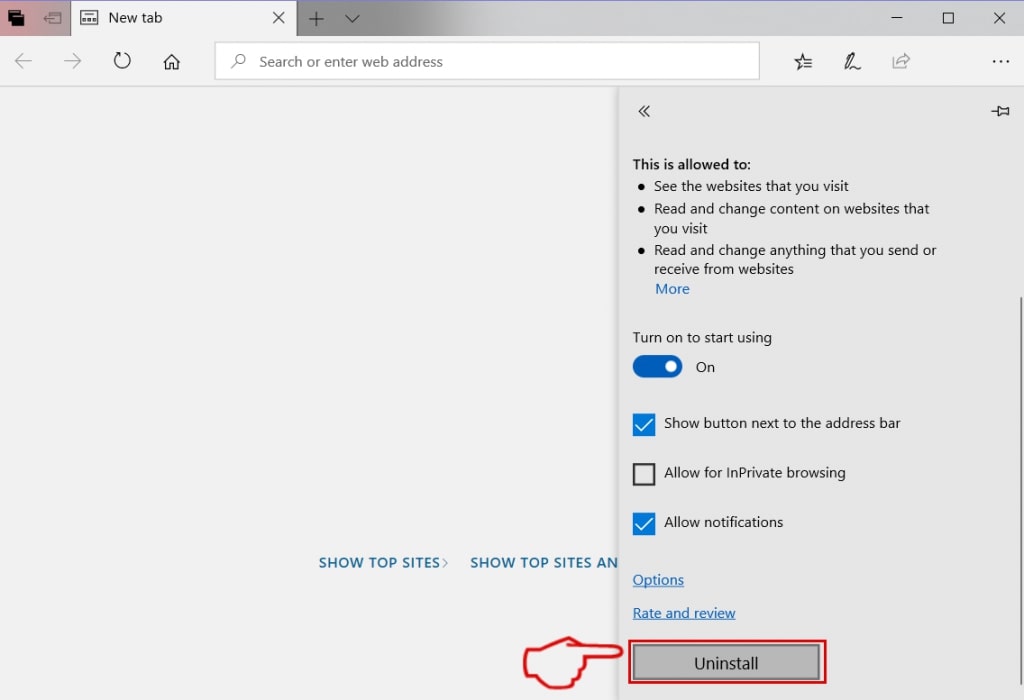
Step 4: Choose the suspected malicious extension you want to remove and then click on the gear icon.
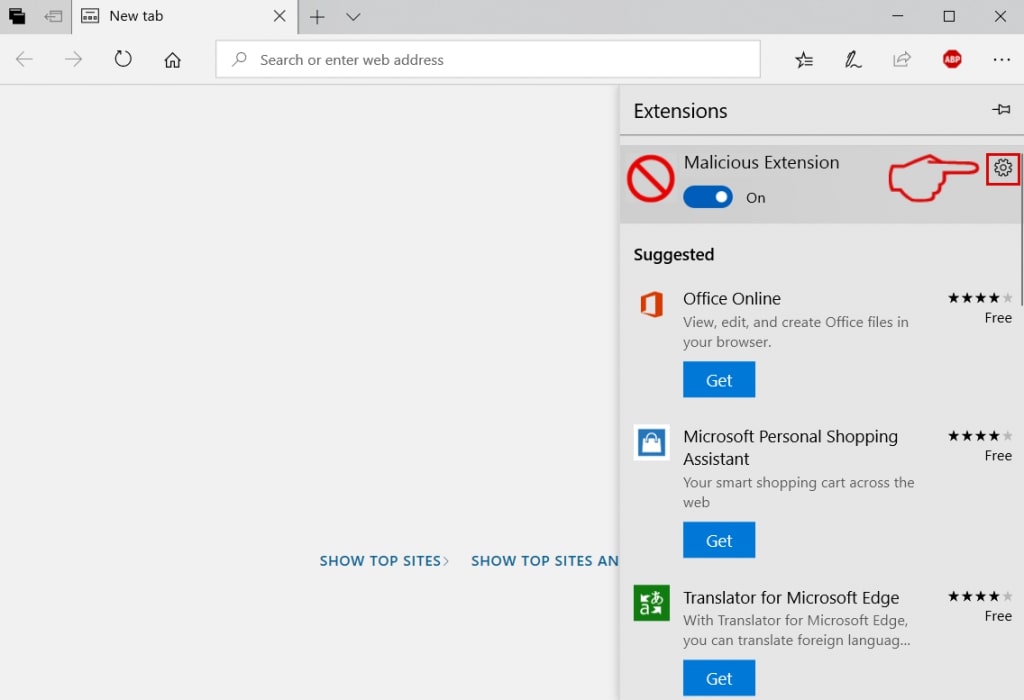
Step 5: Remove the malicious extension by scrolling down and then clicking on Uninstall.
Remove Ineed.porn from Safari
Step 1: Start the Safari app.
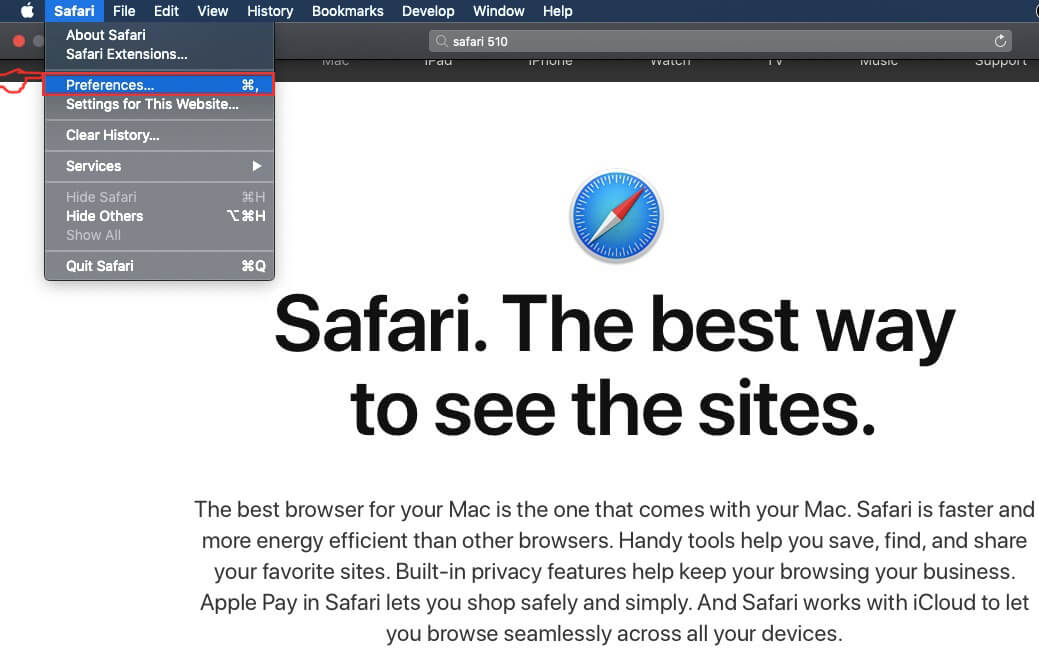
Step 2: After hovering your mouse cursor to the top of the screen, click on the Safari text to open its drop down menu.
Step 3: From the menu, click on "Preferences".
Step 4: After that, select the 'Extensions' Tab.

Step 5: Click once on the extension you want to remove.
Step 6: Click 'Uninstall'.
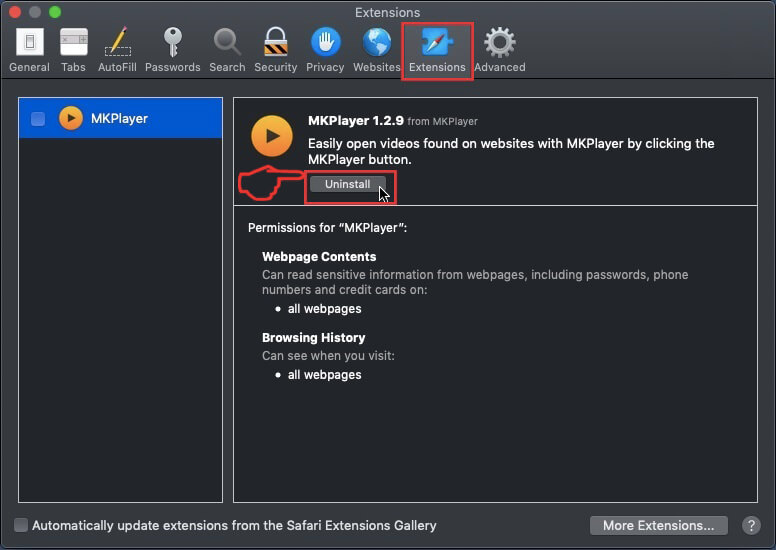
A pop-up window will appear asking for confirmation to uninstall the extension. Select 'Uninstall' again, and the Ineed.porn will be removed.
Eliminate Ineed.porn from Internet Explorer.
Step 1: Start Internet Explorer.
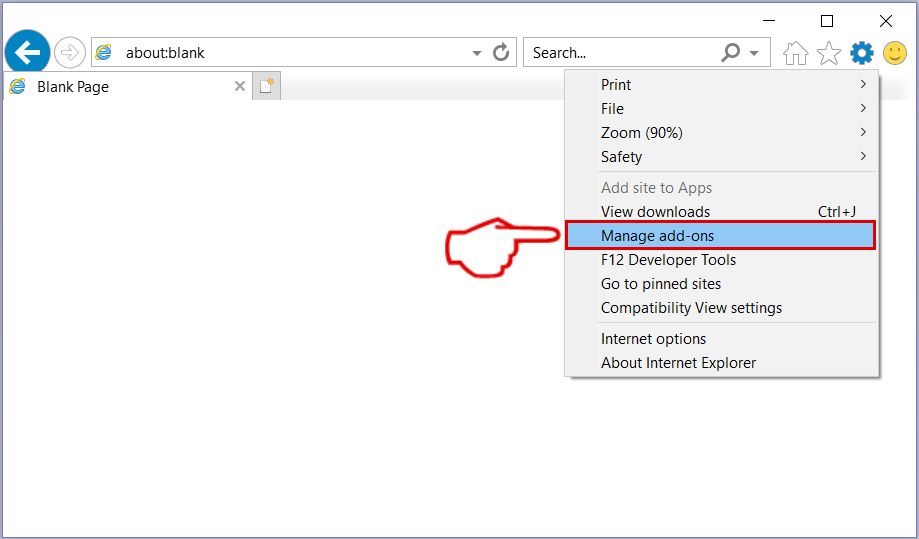
Step 2: Click on the gear icon labeled 'Tools' to open the drop menu and select 'Manage Add-ons'
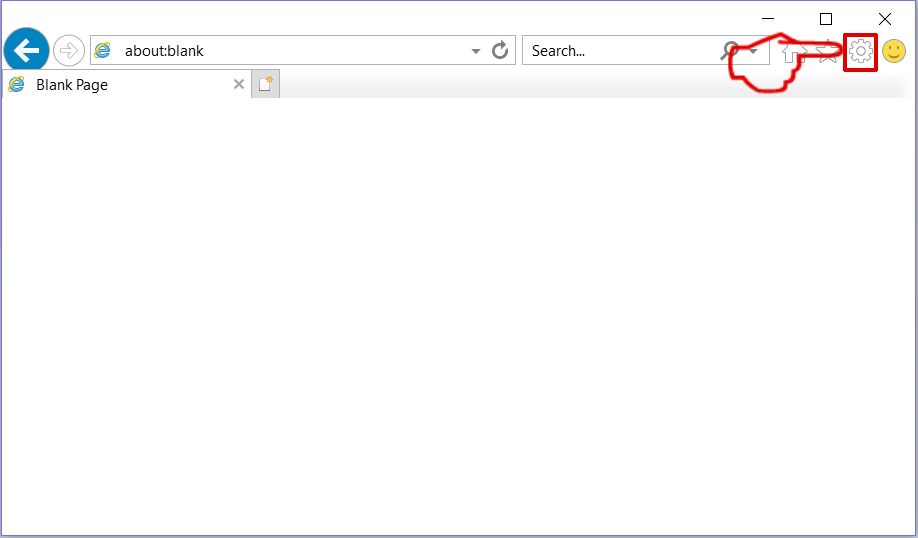
Step 3: In the 'Manage Add-ons' window.
Step 4: Select the extension you want to remove and then click 'Disable'. A pop-up window will appear to inform you that you are about to disable the selected extension, and some more add-ons might be disabled as well. Leave all the boxes checked, and click 'Disable'.
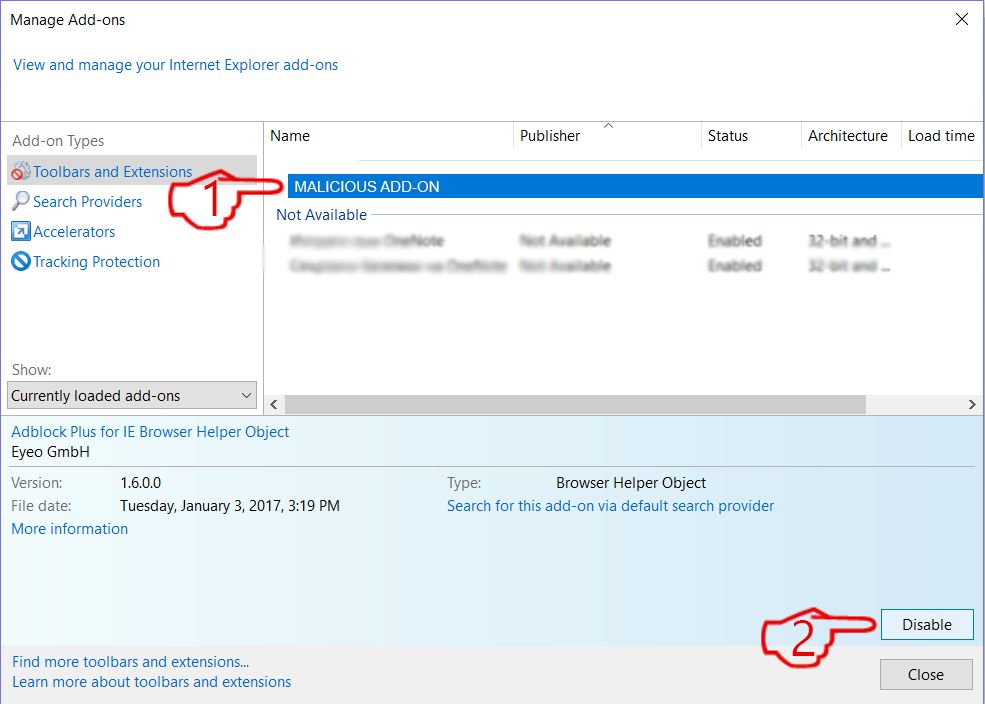
Step 5: After the unwanted extension has been removed, restart Internet Explorer by closing it from the red 'X' button located at the top right corner and start it again.
Remove Push Notifications from Your Browsers
Turn Off Push Notifications from Google Chrome
To disable any Push Notices from Google Chrome browser, please follow the steps below:
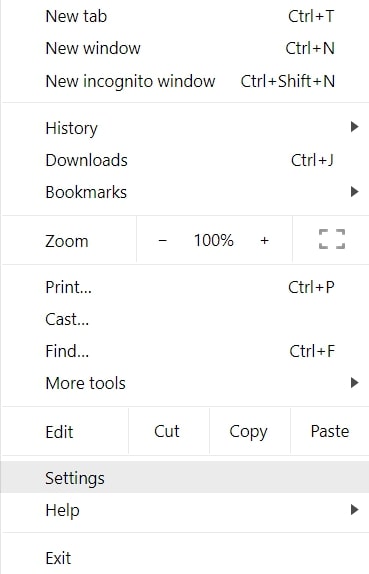
Step 1: Go to Settings in Chrome.
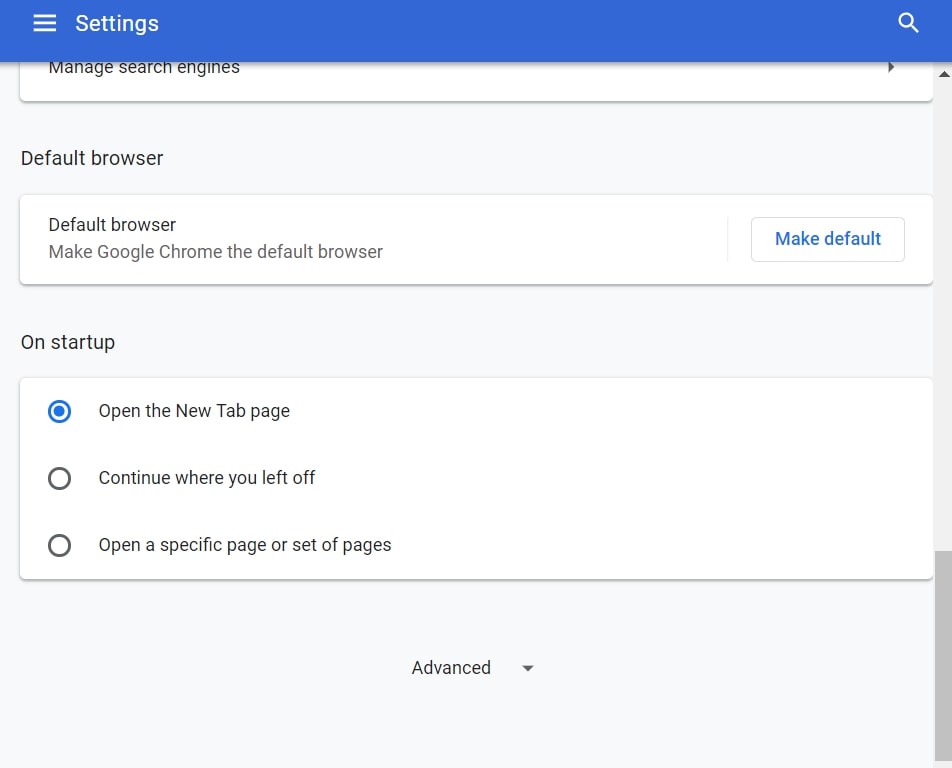
Step 2: In Settings, select “Advanced Settings”:
Step 3: Click “Content Settings”:
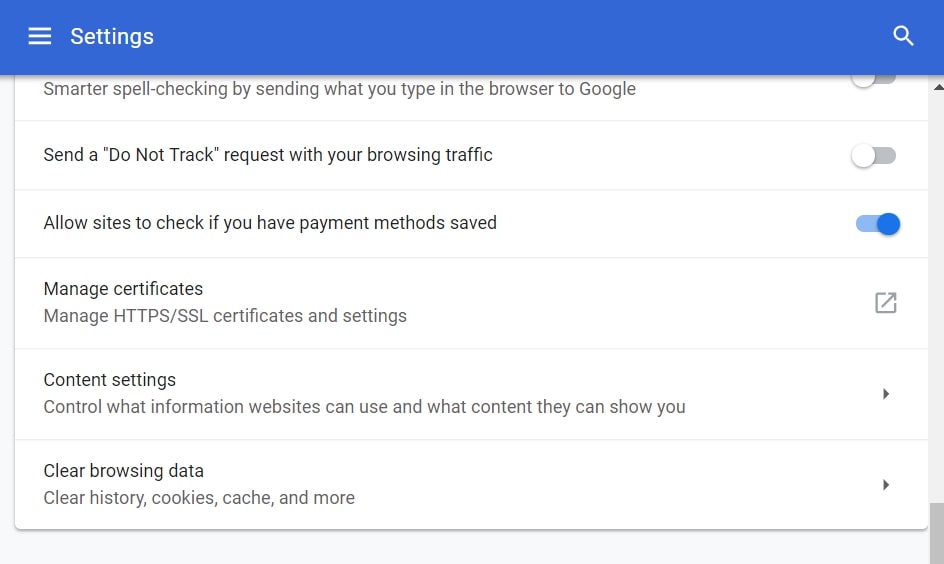
Step 4: Open “Notifications”:
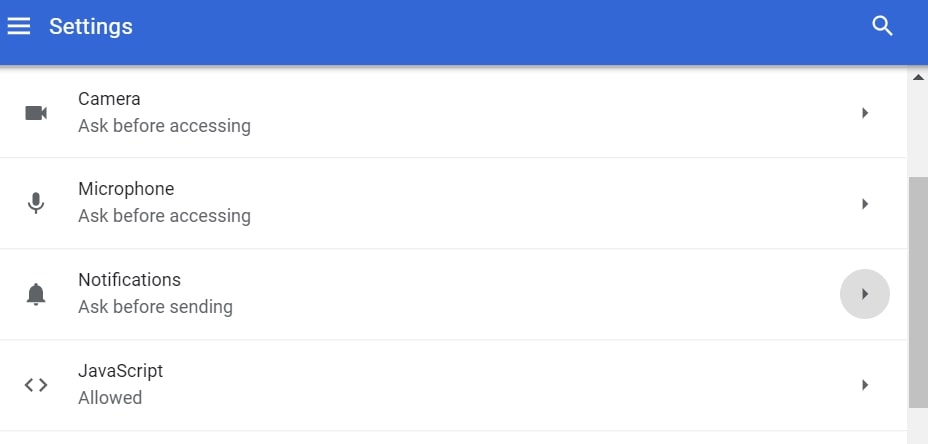
Step 5: Click the three dots and choose Block, Edit or Remove options:

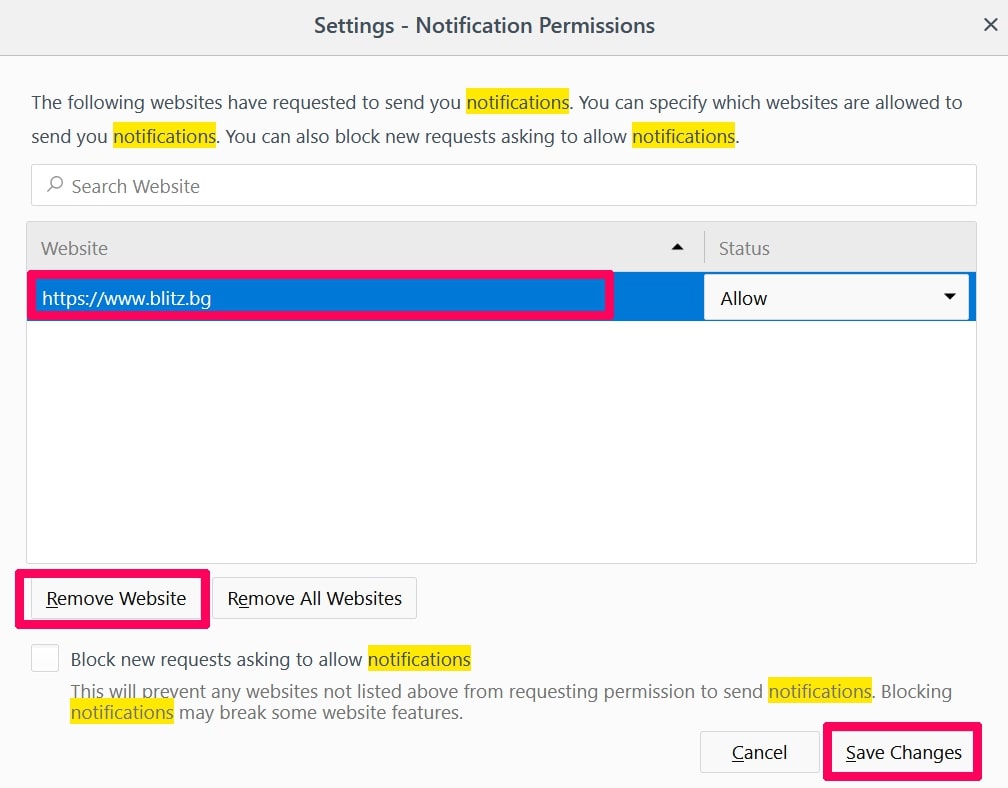
Remove Push Notifications on Firefox
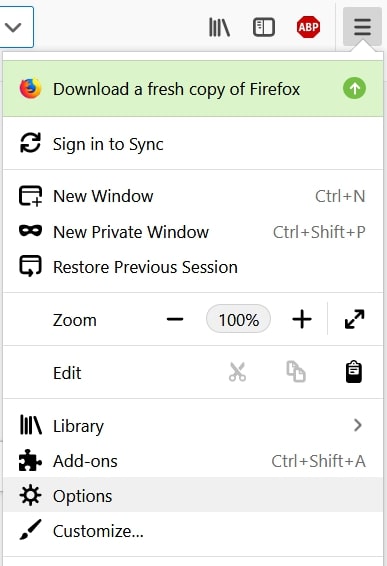
Step 1: Go to Firefox Options.
Step 2: Go to “Settings”, type “notifications” in the search bar and click "Settings":
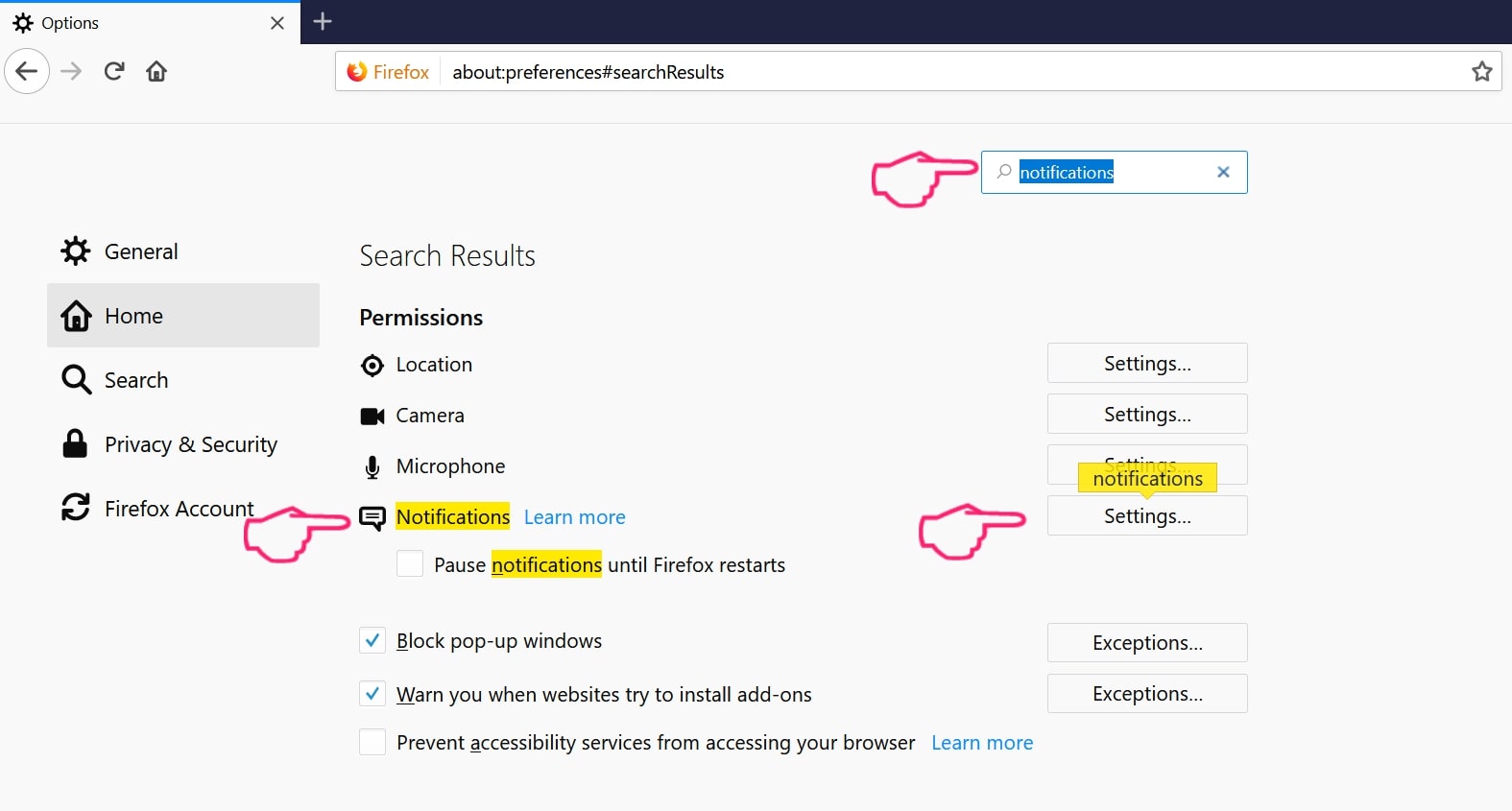
Step 3: Click “Remove” on any site you wish notifications gone and click “Save Changes”
Stop Push Notifications on Opera
Step 1: In Opera, press ALT+P to go to Settings.
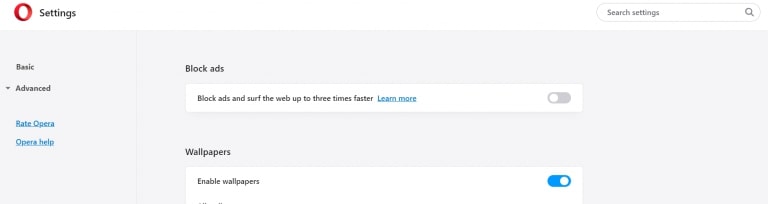
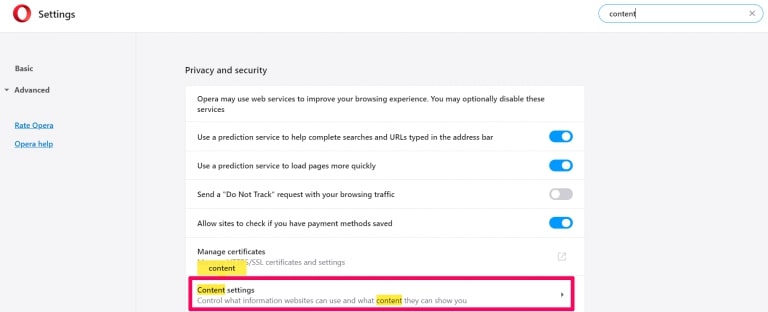
Step 2: In Setting search, type “Content” to go to Content Settings.
Step 3: Open Notifications:
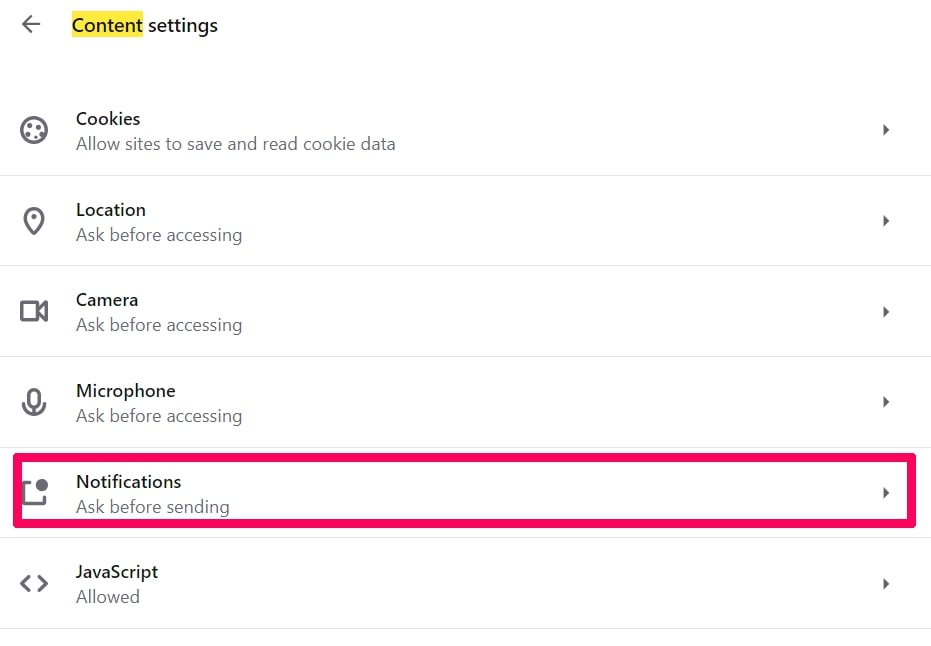
Step 4: Do the same as you did with Google Chrome (explained below):
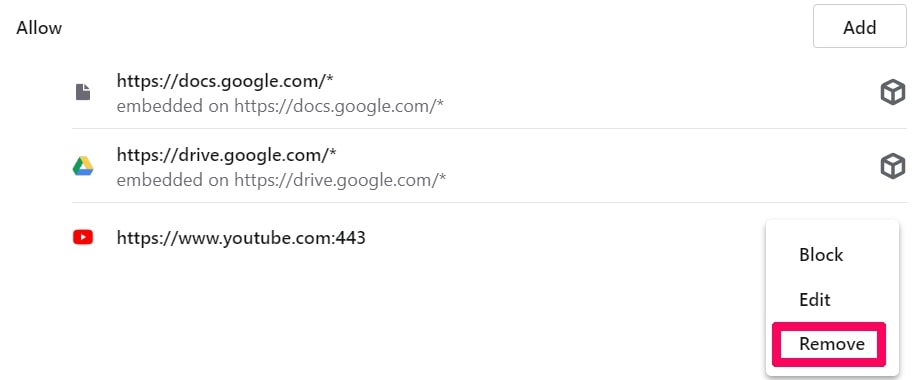
Eliminate Push Notifications on Safari
Step 1: Open Safari Preferences.
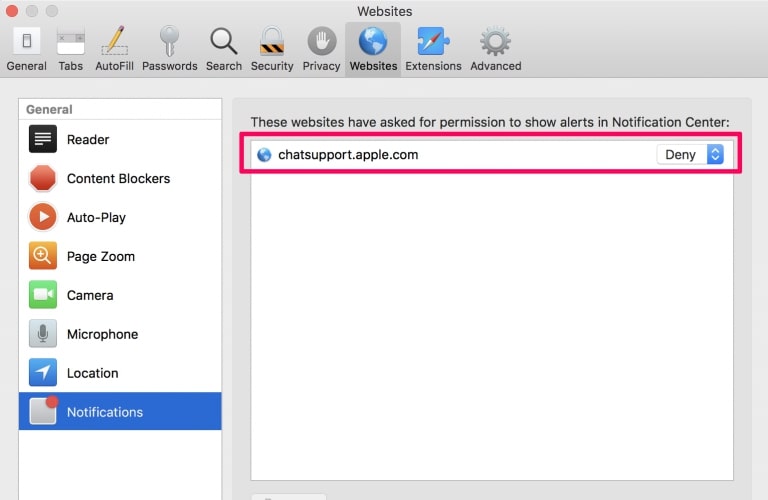
Step 2: Choose the domain from where you like push pop-ups gone and change to "Deny" from "Allow".
Ineed.porn-FAQ
What Is Ineed.porn?
The Ineed.porn threat is adware or browser redirect virus.
It may slow your computer down significantly and display advertisements. The main idea is for your information to likely get stolen or more ads to appear on your device.
The creators of such unwanted apps work with pay-per-click schemes to get your computer to visit risky or different types of websites that may generate them funds. This is why they do not even care what types of websites show up on the ads. This makes their unwanted software indirectly risky for your OS.
What Are the Symptoms of Ineed.porn?
There are several symptoms to look for when this particular threat and also unwanted apps in general are active:
Symptom #1: Your computer may become slow and have poor performance in general.
Symptom #2: You have toolbars, add-ons or extensions on your web browsers that you don't remember adding.
Symptom #3: You see all types of ads, like ad-supported search results, pop-ups and redirects to randomly appear.
Symptom #4: You see installed apps on your Mac running automatically and you do not remember installing them.
Symptom #5: You see suspicious processes running in your Task Manager.
If you see one or more of those symptoms, then security experts recommend that you check your computer for viruses.
What Types of Unwanted Programs Are There?
According to most malware researchers and cyber-security experts, the threats that can currently affect your device can be rogue antivirus software, adware, browser hijackers, clickers, fake optimizers and any forms of PUPs.
What to Do If I Have a "virus" like Ineed.porn?
With few simple actions. First and foremost, it is imperative that you follow these steps:
Step 1: Find a safe computer and connect it to another network, not the one that your Mac was infected in.
Step 2: Change all of your passwords, starting from your email passwords.
Step 3: Enable two-factor authentication for protection of your important accounts.
Step 4: Call your bank to change your credit card details (secret code, etc.) if you have saved your credit card for online shopping or have done online activities with your card.
Step 5: Make sure to call your ISP (Internet provider or carrier) and ask them to change your IP address.
Step 6: Change your Wi-Fi password.
Step 7: (Optional): Make sure to scan all of the devices connected to your network for viruses and repeat these steps for them if they are affected.
Step 8: Install anti-malware software with real-time protection on every device you have.
Step 9: Try not to download software from sites you know nothing about and stay away from low-reputation websites in general.
If you follow these recommendations, your network and all devices will become significantly more secure against any threats or information invasive software and be virus free and protected in the future too.
How Does Ineed.porn Work?
Once installed, Ineed.porn can collect data using trackers. This data is about your web browsing habits, such as the websites you visit and the search terms you use. It is then used to target you with ads or to sell your information to third parties.
Ineed.porn can also download other malicious software onto your computer, such as viruses and spyware, which can be used to steal your personal information and show risky ads, that may redirect to virus sites or scams.
Is Ineed.porn Malware?
The truth is that PUPs (adware, browser hijackers) are not viruses, but may be just as dangerous since they may show you and redirect you to malware websites and scam pages.
Many security experts classify potentially unwanted programs as malware. This is because of the unwanted effects that PUPs can cause, such as displaying intrusive ads and collecting user data without the user’s knowledge or consent.
About the Ineed.porn Research
The content we publish on SensorsTechForum.com, this Ineed.porn how-to removal guide included, is the outcome of extensive research, hard work and our team’s devotion to help you remove the specific, adware-related problem, and restore your browser and computer system.
How did we conduct the research on Ineed.porn?
Please note that our research is based on independent investigation. We are in contact with independent security researchers, thanks to which we receive daily updates on the latest malware, adware, and browser hijacker definitions.
Furthermore, the research behind the Ineed.porn threat is backed with VirusTotal.
To better understand this online threat, please refer to the following articles which provide knowledgeable details.