

If Microsoft Defender or another security solution has started flagging VirTool:PowerShell/Magnib, you are most likely dealing with a malicious or suspicious PowerShell script running in the background of your Windows system. This detection usually means that threat actors are abusing PowerShell to execute code directly in memory, download additional payloads, or extract sensitive information like passwords and system data. Read this article to find out what the VirTool:PowerShell/Magnib Virus really is, how it may have ended up on your PC, what damage it can cause, and what you should keep in mind when you proceed with VirTool:PowerShell/Magnib Virus – How to Remove It using the removal instructions that follow below.
PowerShell-based malware has become a preferred technique for cybercriminals because it uses a legitimate Windows component to perform malicious actions, often without dropping traditional files on disk. As a result, infections like VirTool:PowerShell/Magnib may be harder to notice and can remain on a system longer than classic executable-based malware if they are not properly removed. If you see recurring alerts for this detection, do not ignore them – they are an early warning sign that your machine might be part of a larger compromise.

What is VirTool:PowerShell/Magnib Virus?
VirTool:PowerShell/Magnib is a heuristic detection name used by security products (most notably Microsoft Defender) to flag potentially malicious PowerShell scripts or script components that behave like a “virtualization” or “tool” layer for malware. In practice, this means that Magnib is not always a single, clearly defined Trojan with a fixed payload. Instead, it often identifies a script or framework that attackers use to:
- Execute arbitrary PowerShell commands on an infected system.
- Download and run additional malware modules or payloads from remote servers.
- Modify persistence mechanisms so that the malicious script runs on every startup or on a schedule.
- Interact with process memory in a way that hides malicious code from traditional file-based scanners.
VirTool:PowerShell/Magnib Details
| Type | Trojan, Malware, Backdoor |
| Removal Time | Around 5 Minutes |
| Removal Tool |
See If Your System Has Been Affected by malware
Download
Malware Removal Tool
|
This aligns with the broader class of PowerShell-based and fileless malware that leverages built-in Windows tools instead of dropping obvious executable files. These scripts often use heavy obfuscation, encoded command blocks, and living-off-the-land binaries (LOLBins) to disguise malicious behavior and blend in with normal administrative automation tasks.
Why does Defender classify it as “VirTool”?
The “VirTool” prefix is usually assigned to tool-like components that are designed to assist malware rather than being the final destructive payload themselves. In the case of VirTool:PowerShell/Magnib, the detection often points to a PowerShell stager, loader, or management script that:
- Tests the environment (for example, checking for virtual machines or sandboxes).
- Loads additional code from memory, from a remote URL, or from embedded resources.
- Executes stealthy operations to avoid easy identification by security products.
Because the detection is heuristic, some legitimate scripts can occasionally trigger it if they include certain patterns (for example, aggressive obfuscation or unusual execution chains). However, whenever the detection repeats or appears together with other threats, it should be treated as a strong indicator of compromise.
How Did I Get VirTool:PowerShell/Magnib on My PC?
In most real-world cases, PowerShell threats like VirTool:PowerShell/Magnib do not appear on a system out of nowhere. They are usually part of a larger infection chain, deployed after the attacker has already gained a foothold using another vector. Understanding how this might have happened can help you reduce the chances of reinfection in the future.
Common infection vectors for PowerShell-based malware
Cybercriminals often rely on the following typical methods to deliver malicious PowerShell scripts:
- Malicious email attachments and links: phishing or spear-phishing messages that trick you into opening a document, archive, or script file. The attachment may contain a malicious attachment, embedded scripts, or links that, once executed, spawn PowerShell commands in the background.
- Cracked or pirated software installers: Untrusted installers, “patches,” “activators,” and keygens downloaded from file-sharing or warez sites are a frequent source of bundled Trojans that later execute hidden PowerShell commands to download additional malware.
- Malicious or compromised websites: Drive-by downloads, exploit kits, or poisoned advertisements can silently execute scripts that call PowerShell, especially if the browser or its plugins are outdated. These often result in a malicious redirect.
- Abused remote administration tools: If attackers obtain remote access credentials (via brute-force or stolen passwords), they can log into the machine and manually run PowerShell-based toolkits to deploy Magnib-like loaders and management scripts.
- Side-loading from existing malware: Some Trojans or backdoors download and execute PowerShell payloads as part of their post-exploitation routine, using them to perform more advanced tasks like credential theft or data exfiltration.
Configuration weaknesses that help the infection
Even if the initial vector is external, certain system misconfigurations or risky practices greatly increase the odds that a PowerShell-based malware will succeed:
- Running outdated Windows versions or missing security patches that allow vulnerable components to be exploited quietly.
- Disabled or misconfigured security solutions, including real-time protection and cloud-based detection features.
- Exposed RDP or other remote access services with weak or reused passwords that attackers can brute force or obtain from leaks.
- Lack of application control or script execution policies, leaving PowerShell free to run any script without restriction.
Once a threat actor has a reliable way to execute commands, PowerShell becomes a flexible weapon. That is why a seemingly simple detection like VirTool:PowerShell/Magnib should prompt a deeper look at your system’s overall security posture.
What Does VirTool:PowerShell/Magnib Do?
The behaviors observed in infections flagged as VirTool:PowerShell/Magnib are not identical in every case, because the detection often applies to a family of scripts and loaders rather than a single hard-coded Trojan. However, most instances share a set of dangerous capabilities that can seriously compromise your privacy, data, and system stability.
Stealthy execution and persistence
A key objective of Magnib-type scripts is to remain active and undetected as long as possible. To achieve this, they typically:
- Leverage fileless techniques: Running code directly in memory through PowerShell, minimizing the need for obvious binaries on disk.
- Use heavy obfuscation: Encoded commands, randomized variable names, and string manipulation that make the script difficult to analyze manually.
- Create persistence mechanisms: Scheduled tasks, registry Run entries, WMI subscriptions, or services that ensure the malicious PowerShell code is launched periodically or at startup.
This stealthy behavior allows attackers to maintain a foothold on the machine even if part of their toolset is removed by an antivirus scan.
Information theft and reconnaissance
Your initial description of VirTool:PowerShell/Magnib as a risky PowerShell scripting malware that can “extract key information” is consistent with how such threats are commonly abused. Attackers frequently use PowerShell to:
- Enumerate system information: Collect details about the operating system, installed software, user accounts, domain membership, network configuration, and security tools.
- Harvest credentials and authentication data: Query credential managers, browser-saved passwords, cached tokens, and sometimes even attempt to interact with LSASS or other sensitive processes through additional modules.
- Access files and documents: Search for specific file types (for example, office documents, archives, wallet files) and stage them for exfiltration to a remote server.
The collected information is extremely valuable for attackers, whether they are planning a targeted intrusion, lateral movement across a network, or resale of stolen data in underground markets.
Downloading and executing additional malware
In many incidents, a VirTool:PowerShell detection is only the tip of the iceberg. The PowerShell component may act as a loader or stager that:
- Downloads ransomware, banking Trojans, spyware, or crypto-miners from a command-and-control (C2) server.
- Executes shellcode directly in memory to deploy advanced post-exploitation frameworks.
- Updates itself or retrieves new commands from the attacker for further malicious tasks.
This means that leaving VirTool:PowerShell/Magnib active is not just a nuisance; it can quickly escalate into severe consequences such as encrypted files, stolen online banking credentials, or full remote control of your machine.
Impact on system performance and stability
Even before more obvious payloads are dropped, a PowerScript-based infection can noticeably impact your system:
- High CPU and RAM usage due to frequently spawning PowerShell processes or running heavy scripts in the background.
- Network slowdowns from repeated connections to suspicious domains or IP addresses used for C2 communication or data exfiltration.
- Unexpected pop-ups or command windows as PowerShell instances are created and terminated repeatedly. These often resemble pop-ups.
These symptoms are often what prompts users to investigate—and why they eventually discover recurring VirTool:PowerShell/Magnib alerts in their security logs.
How to Remove VirTool:PowerShell/Magnib Virus
Because PowerShell-based threats can be modular, obfuscated, and fileless, removing VirTool:PowerShell/Magnib Virus properly requires more than simply closing a visible PowerShell window or deleting a single file. The goal is not only to remove the script that triggers the detection but also to identify and eliminate any related payloads, persistence mechanisms, and configuration changes.
Why automated and manual approaches should be combined
Modern security tools have improved significantly at detecting malicious PowerShell activity. Many of them combine behavioral analysis, script scanning, and cloud-assisted intelligence to flag suspicious commands even if they are heavily obfuscated. Nevertheless, manual verification remains important, especially if:
- The detection keeps reappearing even after security scans.
- You suspect that cracked software, malicious documents, or untrusted browser plug-ins triggered the infection.
- There are clear signs of deeper compromise, such as disabled security settings, changed system policies, or unauthorized user accounts.
Automated scanners are well suited for quickly locating known malicious components and cleaning obvious traces, while manual analysis helps uncover hidden persistence and risky system changes. This combination reduces the risk of leaving a partially cleaned infection that might simply regenerate the Magnib script at the next startup or scheduled task run.
Typical elements that must be checked during removal
When planning to remove VirTool:PowerShell/Magnib, it is important to keep in mind the kinds of artefacts and configurations that malware authors typically abuse. Common areas that may need inspection and cleaning include:
- Persistent tasks and services: Scheduled tasks that run obscure commands, PowerShell one-liners, or scripts from temporary or user profile folders, as well as newly created or modified Windows services.
- Registry autorun locations: Run and RunOnce keys, as well as other startup-related locations that may contain encoded or obfuscated PowerShell commands. These sometimes hide malicious changes inside a registry key.
- Suspicious PowerShell profiles or modules: Modified profile scripts that auto-execute when PowerShell starts, and unauthorized modules stored in user directories. A malicious module may reinject commands silently.
- Downloaded payloads and temporary files: Malicious scripts or executables stored in temp directories, downloads folders, or obscure locations under AppData or ProgramData.
- Browser and application add-ons: Rogue extensions, plug-ins, or side-loaded components that may reinject scripts or reconnect to the attacker’s infrastructure. In some cases, these resemble a browser hijacker.
Thoroughly addressing these vectors is essential to prevent the infection from resurfacing after what appears to be a successful clean-up.
Post-removal hardening and monitoring
Once the active components of VirTool:PowerShell/Magnib have been removed using the dedicated removal guide, it is critical to harden the system to reduce the likelihood of a successful reinfection. Good practices in this phase include:
- Reviewing your software sources: Avoiding cracked or unofficial installers and limiting downloads to reputable vendors and stores.
- Keeping Windows and all applications fully updated: Applying patches reduces the available attack surface for exploit-based delivery.
- Using strong, unique passwords with multi-factor authentication: Protecting RDP, VPNs, and other services from brute-force or credential-stuffing attacks.
- Enforcing sensible PowerShell and script execution policies: Restricting script execution to signed or trusted scripts where possible and monitoring PowerShell usage on the system.
- Regularly reviewing security logs and alerts: Watching for unusual PowerShell activity, repeated detections, or unexplained remote connections.
PowerShell is a powerful administrative tool, but in the hands of attackers it becomes just as powerful for malicious purposes. Treat any alert for VirTool:PowerShell/Magnib as an opportunity to tighten your defenses and review security hygiene across all your devices.
What should you do?
If your security solution has reported VirTool:PowerShell/Magnib Virus, you should assume that your system may be compromised by a stealthy PowerShell-based threat that can collect sensitive information and potentially download additional malware. Do not ignore repeated alerts or rely solely on closing visible PowerShell windows. Instead, follow the detailed VirTool:PowerShell/Magnib Virus – How to Remove It instructions provided in the removal guide below this article to clean your device thoroughly, check for persistence, and restore a secure configuration. Taking prompt action now significantly reduces the risk of data theft, account compromise, and further system damage.

Ventsislav Krastev
Ventsislav is a cybersecurity expert at SensorsTechForum since 2015. He has been researching, covering, helping victims with the latest malware infections plus testing and reviewing software and the newest tech developments. Having graduated Marketing as well, Ventsislav also has passion for learning new shifts and innovations in cybersecurity that become game changers. After studying Value Chain Management, Network Administration and Computer Administration of System Applications, he found his true calling within the cybersecrurity industry and is a strong believer in the education of every user towards online safety and security.
Follow Me:
Preparation before removing VirTool:PowerShell/Magnib.
Before starting the actual removal process, we recommend that you do the following preparation steps.
- Make sure you have these instructions always open and in front of your eyes.
- Do a backup of all of your files, even if they could be damaged. You should back up your data with a cloud backup solution and insure your files against any type of loss, even from the most severe threats.
- Be patient as this could take a while.
- Scan for Malware
- Fix Registries
- Remove Virus Files
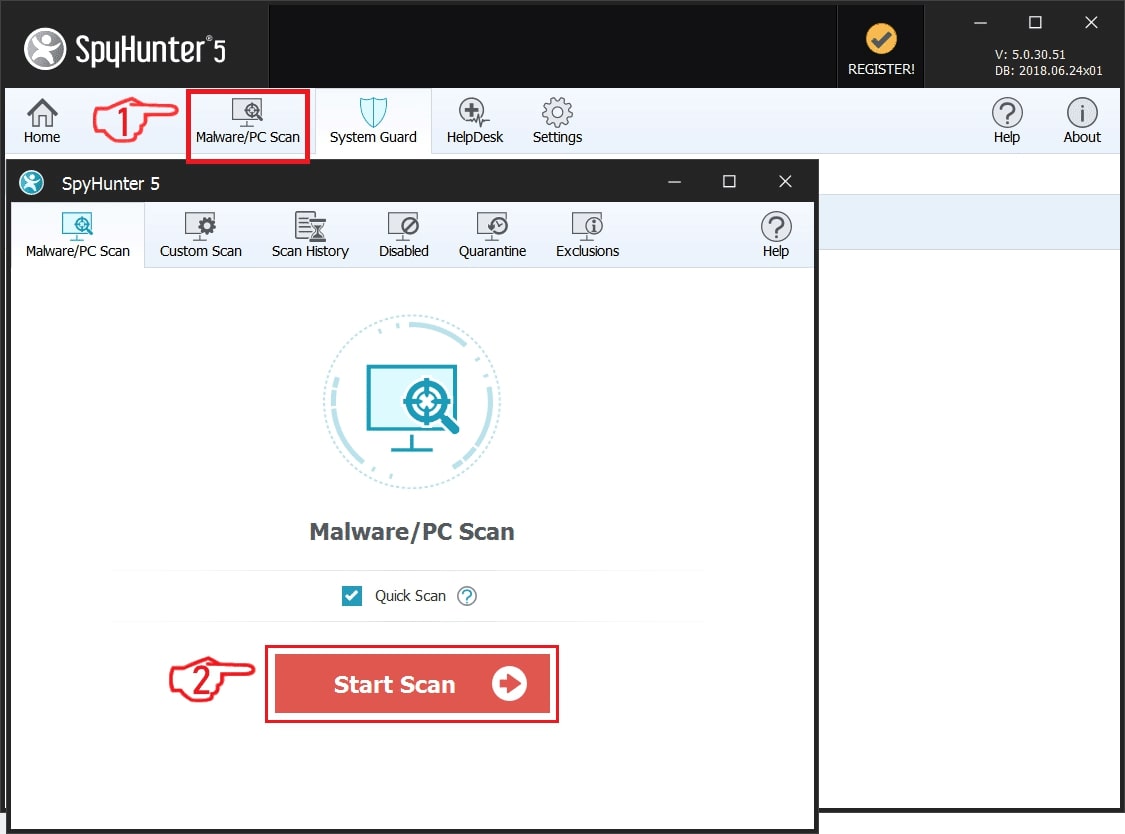
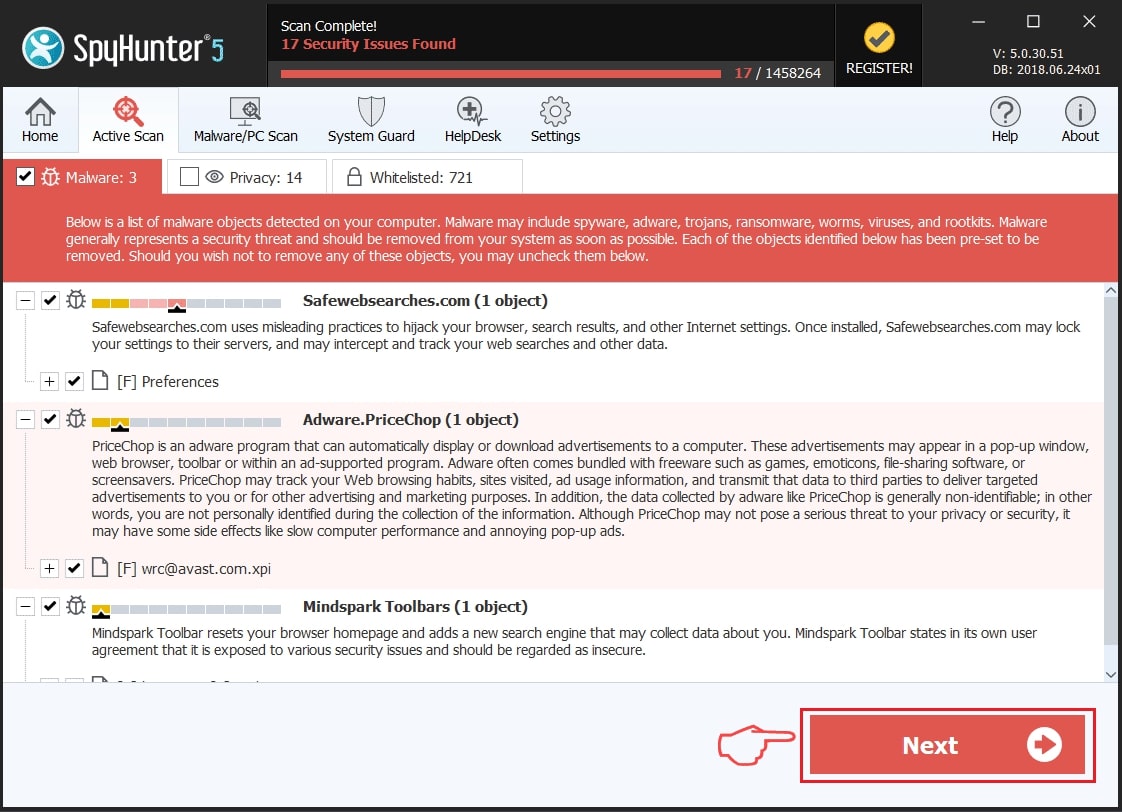
Step 1: Scan for VirTool:PowerShell/Magnib with SpyHunter Anti-Malware Tool
Step 2: Clean any registries, created by VirTool:PowerShell/Magnib on your computer.
The usually targeted registries of Windows machines are the following:
- HKEY_LOCAL_MACHINE\Software\Microsoft\Windows\CurrentVersion\Run
- HKEY_CURRENT_USER\Software\Microsoft\Windows\CurrentVersion\Run
- HKEY_LOCAL_MACHINE\Software\Microsoft\Windows\CurrentVersion\RunOnce
- HKEY_CURRENT_USER\Software\Microsoft\Windows\CurrentVersion\RunOnce
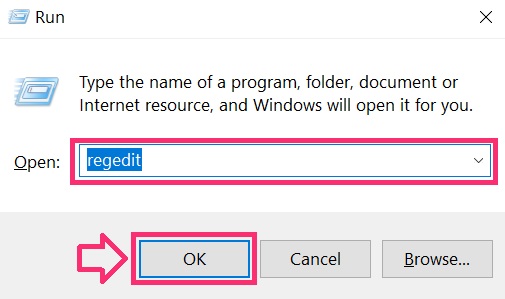
You can access them by opening the Windows registry editor and deleting any values, created by VirTool:PowerShell/Magnib there. This can happen by following the steps underneath:
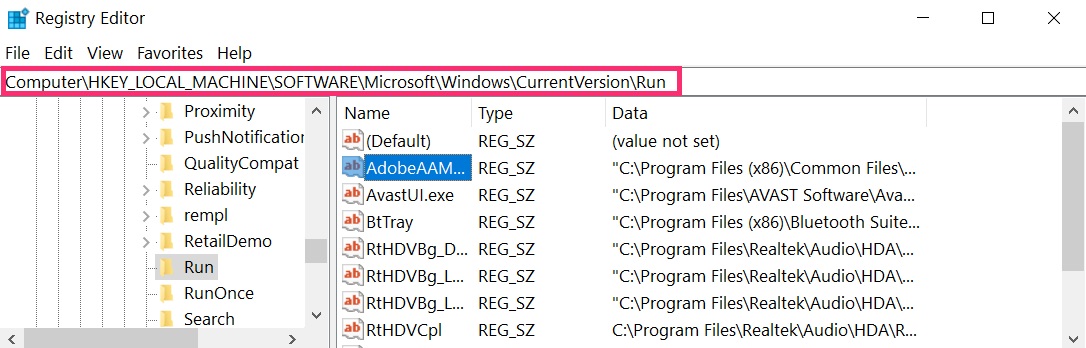
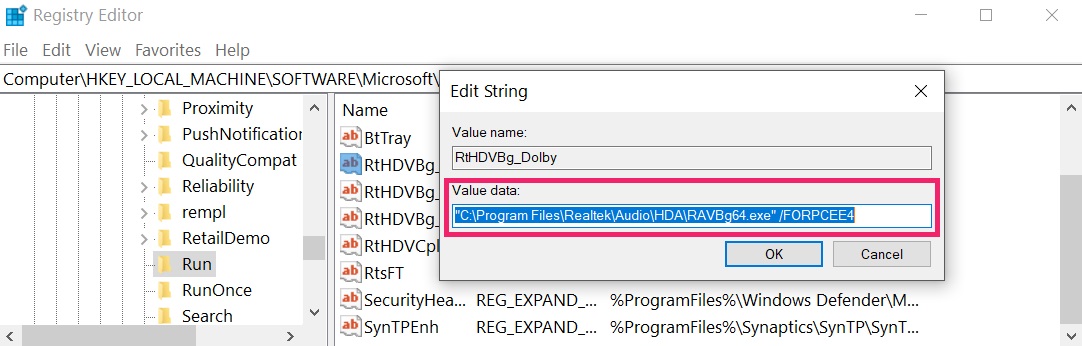 Tip: To find a virus-created value, you can right-click on it and click "Modify" to see which file it is set to run. If this is the virus file location, remove the value.
Step 3: Find virus files created by VirTool:PowerShell/Magnib on your PC.
1.For Windows 8, 8.1 and 10.
For Newer Windows Operating Systems
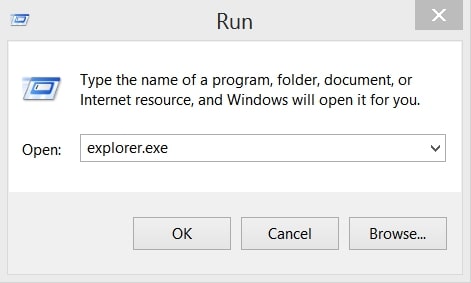
1: On your keyboard press + R and write explorer.exe in the Run text box and then click on the Ok button.
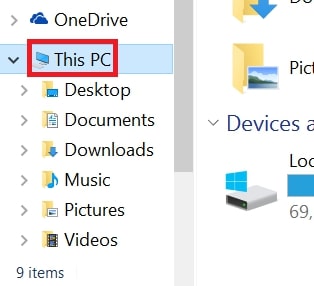
2: Click on your PC from the quick access bar. This is usually an icon with a monitor and its name is either “My Computer”, “My PC” or “This PC” or whatever you have named it.
3: Navigate to the search box in the top-right of your PC's screen and type “fileextension:” and after which type the file extension. If you are looking for malicious executables, an example may be "fileextension:exe". After doing that, leave a space and type the file name you believe the malware has created. Here is how it may appear if your file has been found:
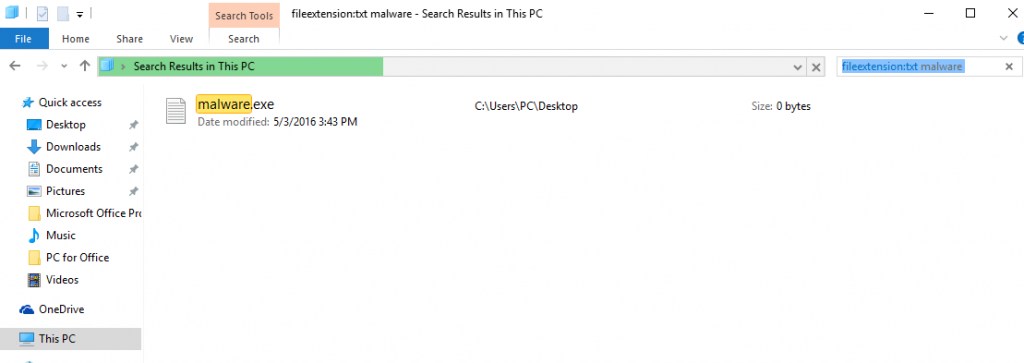
N.B. We recommend to wait for the green loading bar in the navigation box to fill up in case the PC is looking for the file and hasn't found it yet.
2.For Windows XP, Vista, and 7.
For Older Windows Operating Systems
In older Windows OS's the conventional approach should be the effective one:
1: Click on the Start Menu icon (usually on your bottom-left) and then choose the Search preference.
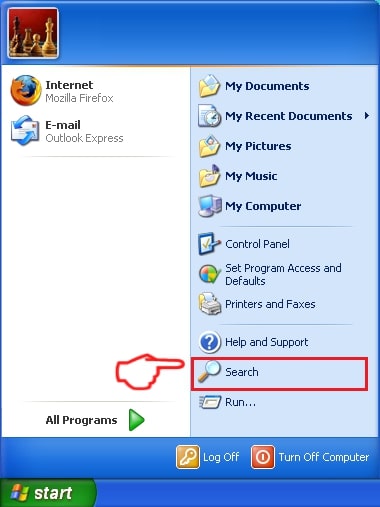
2: After the search window appears, choose More Advanced Options from the search assistant box. Another way is by clicking on All Files and Folders.
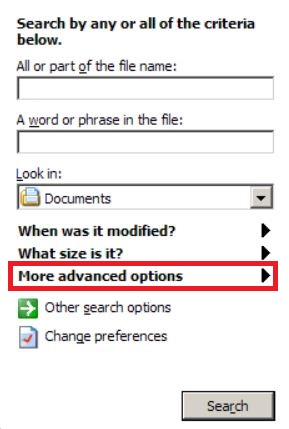
3: After that type the name of the file you are looking for and click on the Search button. This might take some time after which results will appear. If you have found the malicious file, you may copy or open its location by right-clicking on it.
Now you should be able to discover any file on Windows as long as it is on your hard drive and is not concealed via special software.
VirTool:PowerShell/Magnib FAQ
What Does VirTool:PowerShell/Magnib Trojan Do?
The VirTool:PowerShell/Magnib Trojan is a malicious computer program designed to disrupt, damage, or gain unauthorized access to a computer system. It can be used to steal sensitive data, gain control over a system, or launch other malicious activities.
Can Trojans Steal Passwords?
Yes, Trojans, like VirTool:PowerShell/Magnib, can steal passwords. These malicious programs are designed to gain access to a user's computer, spy on victims and steal sensitive information such as banking details and passwords.
Can VirTool:PowerShell/Magnib Trojan Hide Itself?
Yes, it can. A Trojan can use various techniques to mask itself, including rootkits, encryption, and obfuscation, to hide from security scanners and evade detection.
Can a Trojan be Removed by Factory Reset?
Yes, a Trojan can be removed by factory resetting your device. This is because it will restore the device to its original state, eliminating any malicious software that may have been installed. Bear in mind that there are more sophisticated Trojans that leave backdoors and reinfect even after a factory reset.
Can VirTool:PowerShell/Magnib Trojan Infect WiFi?
Yes, it is possible for a Trojan to infect WiFi networks. When a user connects to the infected network, the Trojan can spread to other connected devices and can access sensitive information on the network.
Can Trojans Be Deleted?
Yes, Trojans can be deleted. This is typically done by running a powerful anti-virus or anti-malware program that is designed to detect and remove malicious files. In some cases, manual deletion of the Trojan may also be necessary.
Can Trojans Steal Files?
Yes, Trojans can steal files if they are installed on a computer. This is done by allowing the malware author or user to gain access to the computer and then steal the files stored on it.
Which Anti-Malware Can Remove Trojans?
Anti-malware programs such as SpyHunter are capable of scanning for and removing Trojans from your computer. It is important to keep your anti-malware up to date and regularly scan your system for any malicious software.
Can Trojans Infect USB?
Yes, Trojans can infect USB devices. USB Trojans typically spread through malicious files downloaded from the internet or shared via email, allowing the hacker to gain access to a user's confidential data.
About the VirTool:PowerShell/Magnib Research
The content we publish on SensorsTechForum.com, this VirTool:PowerShell/Magnib how-to removal guide included, is the outcome of extensive research, hard work and our team’s devotion to help you remove the specific trojan problem.
How did we conduct the research on VirTool:PowerShell/Magnib?
Please note that our research is based on an independent investigation. We are in contact with independent security researchers, thanks to which we receive daily updates on the latest malware definitions, including the various types of trojans (backdoor, downloader, infostealer, ransom, etc.)
Furthermore, the research behind the VirTool:PowerShell/Magnib threat is backed with VirusTotal.
To better understand the threat posed by trojans, please refer to the following articles which provide knowledgeable details.