

What is Graphite Spyware?
You received an Apple or WhatsApp threat notification saying your device may have been targeted with advanced spyware, or you’ve been reading about Graphite and wondering if you could be at risk. Read this article right now — Graphite is one of the most sophisticated mobile surveillance tools ever documented, and understanding it is the first step to protecting yourself. The guide at the bottom covers detection and the most effective mitigation steps available.
Graphite is a commercial-grade mercenary spyware platform developed by Israeli company Paragon Solutions. It is not freely available malware — it is a military-grade surveillance tool sold exclusively to government clients. In January 2025, WhatsApp notified approximately 90 journalists and civil society members in over 20 countries that they had been targeted with Graphite. In June 2025, The Citizen Lab published the first forensic confirmation of Graphite infections on iOS devices belonging to two journalists, with the attack exploiting CVE-2025-43200 — a zero-day vulnerability in iMessage that Apple later patched in iOS 18.3.1. The Italian government confirmed using Graphite against journalists and humanitarian workers, resulting in Paragon terminating that contract. The U.S. Immigration and Customs Enforcement (ICE) agency has also confirmed use of Graphite under a contract with Paragon that was reactivated in 2025 despite significant civil liberties concerns.
![Graphite Spyware - Detect and Delete It [Steps]](https://cdn.sensorstechforum.com/wp-content/uploads/2026/05/Graphite-Spyware-Detect-and-Delete-It-Steps-1024x576.png)
Graphite Spyware Short Overview
| Type | Commercial mercenary spyware / Nation-state surveillance tool targeting iOS and Android devices via zero-click exploits. |
| Symptoms | Apple threat notification on iPhone. WhatsApp alert about targeting by advanced spyware. Unusual battery drain or device overheating. Unexpected background network activity. Forensic tools (via Citizen Lab’s MVT) detecting Graphite infrastructure fingerprints. No visible symptoms in most cases — Graphite is specifically designed to be completely invisible to the victim. |
| Removal Time | Approximately 15 minutes for a full-system scan |
| Removal Tool |
See If Your System Has Been Affected by malware
Download
Malware Removal Tool
|
How Does Graphite Spyware Infect Devices?
Graphite uses attack vectors that are specifically designed to require zero interaction from the target — making it unlike almost any other threat covered on this site. Here’s how infections occur:
- Zero-click iMessage exploit — The most documented Graphite attack vector exploits vulnerabilities in how iMessage processes incoming media and documents. A specially crafted iMessage is sent to the target’s Apple ID. The device processes it automatically — no clicking, no opening, no interaction whatsoever. CVE-2025-43200 was the specific zero-click flaw used in the June 2025 confirmed infections. Apple patched it in iOS 18.3.1, but Paragon’s researchers continuously develop new exploits as old ones get patched.
- WhatsApp zero-click exploit — Paragon exploited a vulnerability in how WhatsApp processes incoming PDFs and media files to deliver Graphite silently through WhatsApp group messages. Meta identified, mitigated, and notified victims of this specific attack vector in January 2025, sending a cease-and-desist to Paragon.
- Targeted deployment by government clients — Unlike consumer malware, Graphite is not distributed broadly. Each infection is a deliberate, targeted decision made by a Paragon government customer. Known targets include journalists, humanitarian workers, civil society activists, lawyers, and political figures.
What Does Graphite Spyware Do?
Graphite is a modular spyware platform with capabilities that go far beyond anything available in commercial stalkerware or criminal malware. Here’s what a Graphite infection enables:
- Complete encrypted message access — Graphite bypasses app-level encryption entirely by operating at the device level — reading messages after they’ve been decrypted by the app. WhatsApp, Signal, iMessage, and Telegram are all fully readable to a Graphite operator. There is no encrypted messaging app that provides protection against a device-level compromise of this kind.
- Real-time surveillance — Graphite can silently activate your device’s microphone and camera for real-time audio and video monitoring, access your GPS location at any time, read all stored photos and videos, and intercept call logs — all transmitted through encrypted channels to a remote C&C server that blends into normal app traffic to evade detection.
- Comprehensive data theft — All contacts, calendar data, browser history, saved passwords, and app data are accessible to the operator. The data collection scope is essentially unlimited — if it’s on your phone, Graphite can access it.
- Anti-forensic self-defense — Graphite includes a self-defense module that detects analysis attempts and can self-delete to avoid forensic discovery. It operates within legitimate app processes to minimize detectable anomalies. This is what makes it so difficult to confirm without specialized forensic tools.
It’s important to note that the vast majority of people will never be targeted by Graphite — it is expensive, government-deployed, and aimed at specific high-value targets. However, if you are a journalist, activist, lawyer, humanitarian worker, or political figure, the threat is real and documented.
What Should You Do?
Update your iPhone to the latest iOS version immediately — this is the single most impactful step available to most people, as it patches known Graphite exploit vectors like CVE-2025-43200. If you received an Apple or WhatsApp threat notification, contact Access Now’s Digital Security Helpline or The Citizen Lab for professional forensic analysis — do not attempt to investigate yourself. Enable Lockdown Mode on iPhone for maximum protection if you are a high-risk individual. Follow the full detection and mitigation guide below this article for all available protective steps.

Ventsislav Krastev
Ventsislav is a cybersecurity expert at SensorsTechForum since 2015. He has been researching, covering, helping victims with the latest malware infections plus testing and reviewing software and the newest tech developments. Having graduated Marketing as well, Ventsislav also has passion for learning new shifts and innovations in cybersecurity that become game changers. After studying Value Chain Management, Network Administration and Computer Administration of System Applications, he found his true calling within the cybersecrurity industry and is a strong believer in the education of every user towards online safety and security.
Follow Me:
Preparation before removing Graphite Spyware.
Before starting the actual removal process, we recommend that you do the following preparation steps.
- Make sure you have these instructions always open and in front of your eyes.
- Do a backup of all of your files, even if they could be damaged. You should back up your data with a cloud backup solution and insure your files against any type of loss, even from the most severe threats.
- Be patient as this could take a while.
- Scan for Malware
- Fix Registries
- Remove Virus Files
Step 1: Scan for Graphite Spyware with SpyHunter Anti-Malware Tool
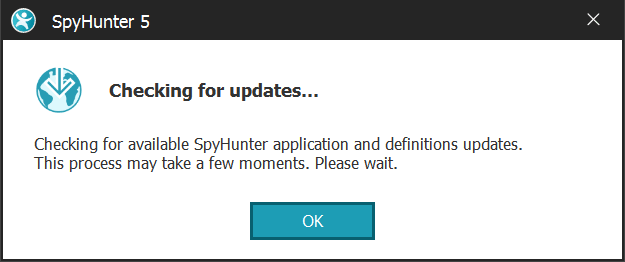
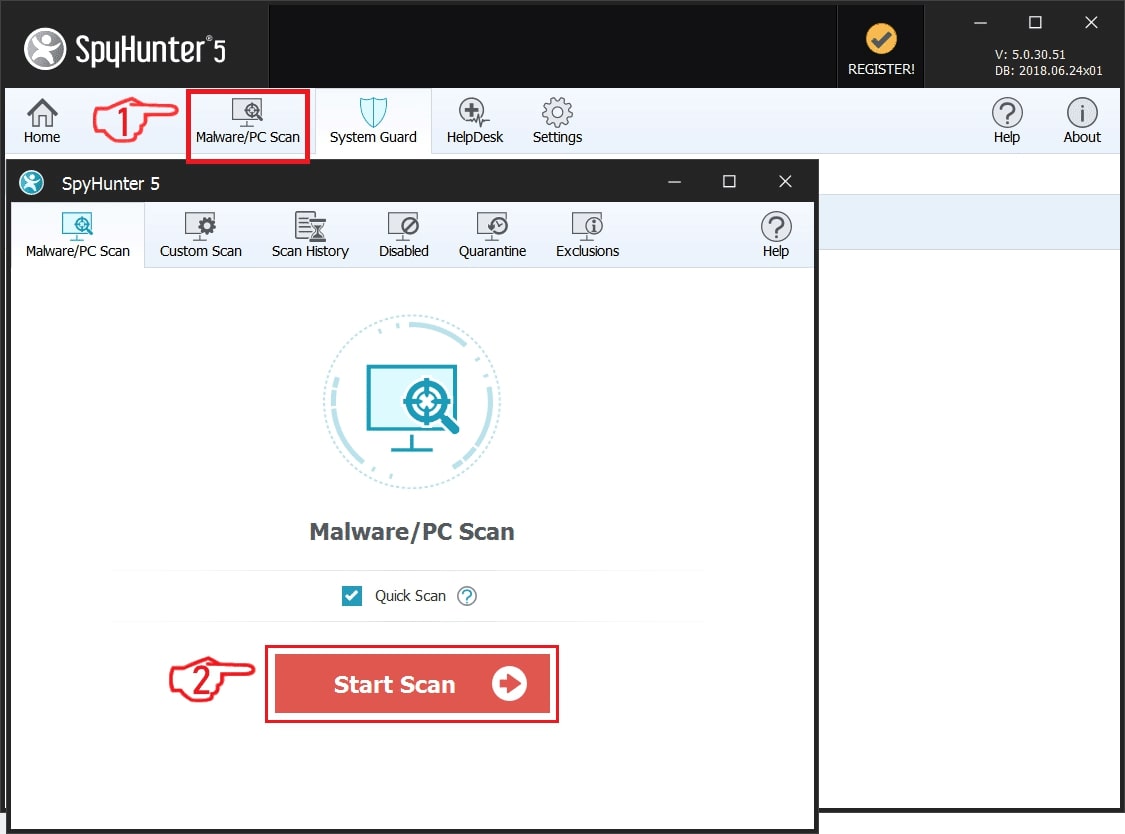
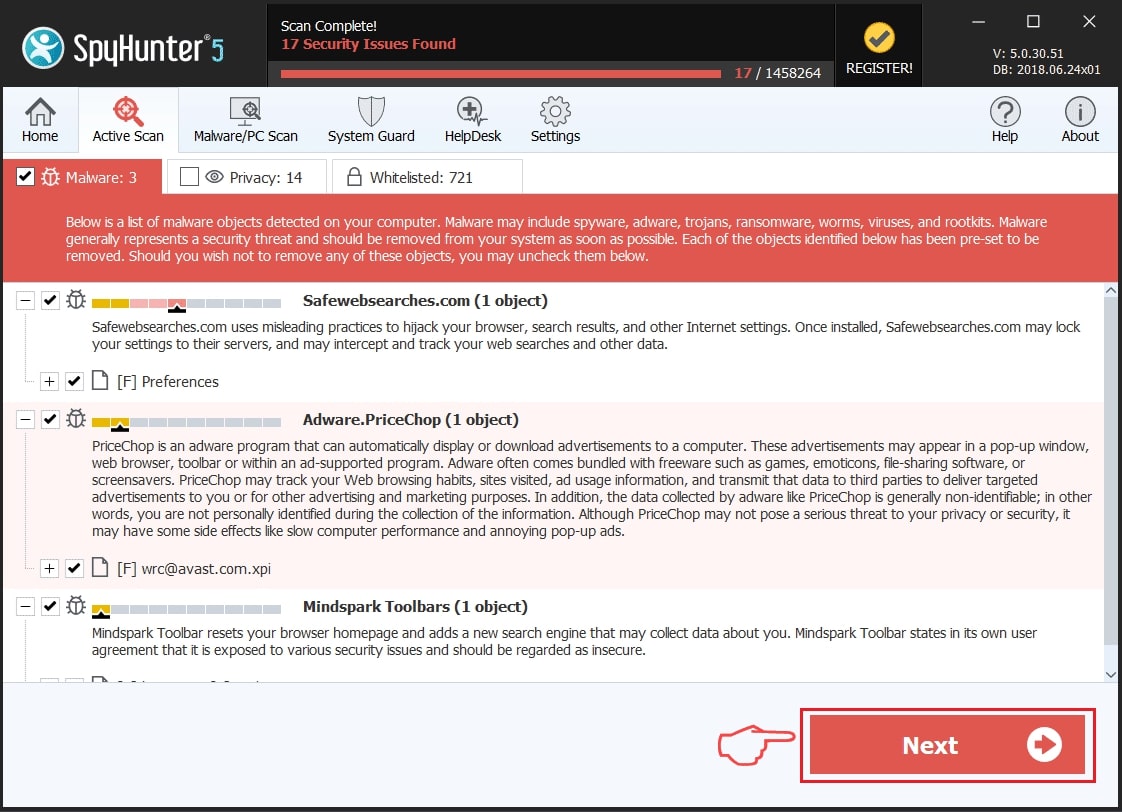
Step 2: Clean any registries, created by Graphite Spyware on your computer.
The usually targeted registries of Windows machines are the following:
- HKEY_LOCAL_MACHINE\Software\Microsoft\Windows\CurrentVersion\Run
- HKEY_CURRENT_USER\Software\Microsoft\Windows\CurrentVersion\Run
- HKEY_LOCAL_MACHINE\Software\Microsoft\Windows\CurrentVersion\RunOnce
- HKEY_CURRENT_USER\Software\Microsoft\Windows\CurrentVersion\RunOnce
You can access them by opening the Windows registry editor and deleting any values, created by Graphite Spyware there. This can happen by following the steps underneath:
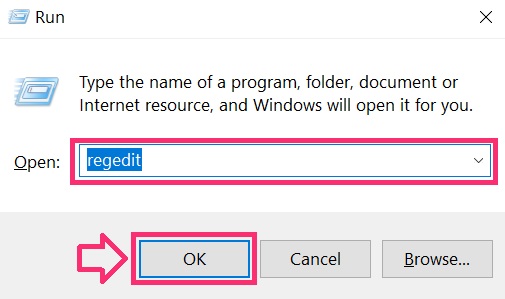
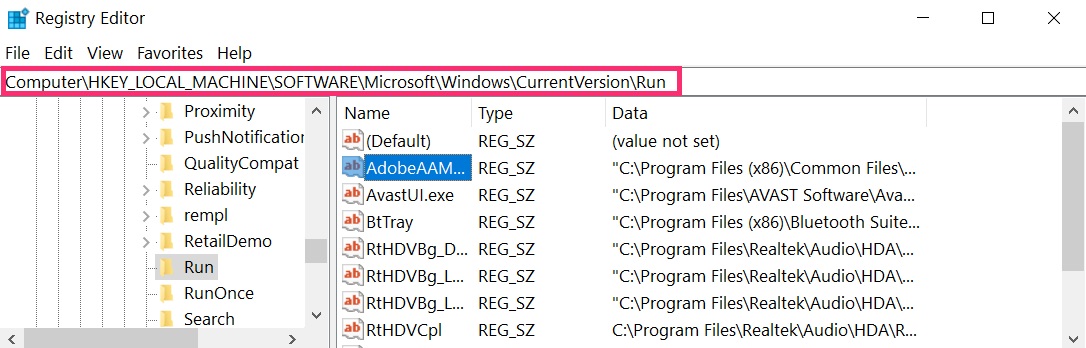
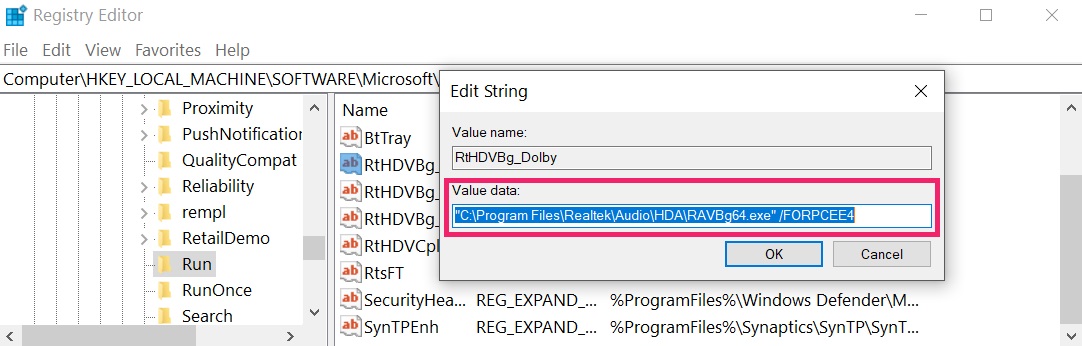 Tip: To find a virus-created value, you can right-click on it and click "Modify" to see which file it is set to run. If this is the virus file location, remove the value.
Step 3: Find virus files created by Graphite Spyware on your PC.
1.For Windows 8, 8.1 and 10.
For Newer Windows Operating Systems
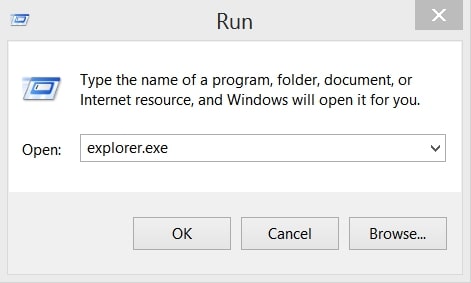
1: On your keyboard press + R and write explorer.exe in the Run text box and then click on the Ok button.
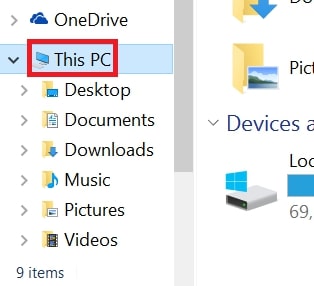
2: Click on your PC from the quick access bar. This is usually an icon with a monitor and its name is either “My Computer”, “My PC” or “This PC” or whatever you have named it.
3: Navigate to the search box in the top-right of your PC's screen and type “fileextension:” and after which type the file extension. If you are looking for malicious executables, an example may be "fileextension:exe". After doing that, leave a space and type the file name you believe the malware has created. Here is how it may appear if your file has been found:
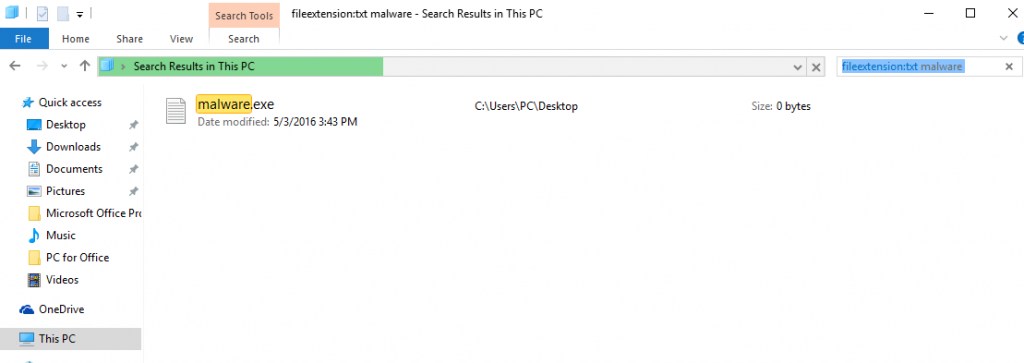
N.B. We recommend to wait for the green loading bar in the navigation box to fill up in case the PC is looking for the file and hasn't found it yet.
2.For Windows XP, Vista, and 7.
For Older Windows Operating Systems
In older Windows OS's the conventional approach should be the effective one:
1: Click on the Start Menu icon (usually on your bottom-left) and then choose the Search preference.
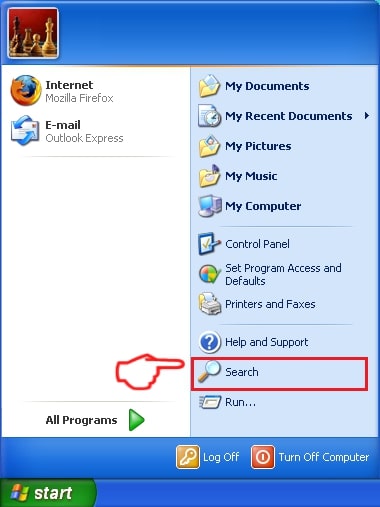
2: After the search window appears, choose More Advanced Options from the search assistant box. Another way is by clicking on All Files and Folders.
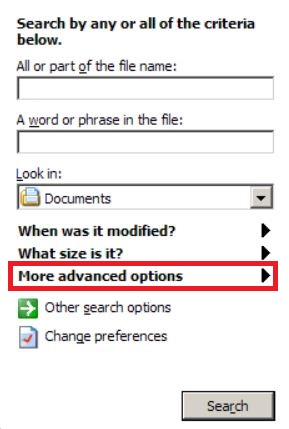
3: After that type the name of the file you are looking for and click on the Search button. This might take some time after which results will appear. If you have found the malicious file, you may copy or open its location by right-clicking on it.
Now you should be able to discover any file on Windows as long as it is on your hard drive and is not concealed via special software.
Graphite Spyware FAQ
What Does Graphite Spyware Trojan Do?
The Graphite Spyware Trojan is a malicious computer program designed to disrupt, damage, or gain unauthorized access to a computer system. It can be used to steal sensitive data, gain control over a system, or launch other malicious activities.
Can Trojans Steal Passwords?
Yes, Trojans, like Graphite Spyware, can steal passwords. These malicious programs are designed to gain access to a user's computer, spy on victims and steal sensitive information such as banking details and passwords.
Can Graphite Spyware Trojan Hide Itself?
Yes, it can. A Trojan can use various techniques to mask itself, including rootkits, encryption, and obfuscation, to hide from security scanners and evade detection.
Can a Trojan be Removed by Factory Reset?
Yes, a Trojan can be removed by factory resetting your device. This is because it will restore the device to its original state, eliminating any malicious software that may have been installed. Bear in mind that there are more sophisticated Trojans that leave backdoors and reinfect even after a factory reset.
Can Graphite Spyware Trojan Infect WiFi?
Yes, it is possible for a Trojan to infect WiFi networks. When a user connects to the infected network, the Trojan can spread to other connected devices and can access sensitive information on the network.
Can Trojans Be Deleted?
Yes, Trojans can be deleted. This is typically done by running a powerful anti-virus or anti-malware program that is designed to detect and remove malicious files. In some cases, manual deletion of the Trojan may also be necessary.
Can Trojans Steal Files?
Yes, Trojans can steal files if they are installed on a computer. This is done by allowing the malware author or user to gain access to the computer and then steal the files stored on it.
Which Anti-Malware Can Remove Trojans?
Anti-malware programs such as SpyHunter are capable of scanning for and removing Trojans from your computer. It is important to keep your anti-malware up to date and regularly scan your system for any malicious software.
Can Trojans Infect USB?
Yes, Trojans can infect USB devices. USB Trojans typically spread through malicious files downloaded from the internet or shared via email, allowing the hacker to gain access to a user's confidential data.
About the Graphite Spyware Research
The content we publish on SensorsTechForum.com, this Graphite Spyware how-to removal guide included, is the outcome of extensive research, hard work and our team’s devotion to help you remove the specific trojan problem.
How did we conduct the research on Graphite Spyware?
Please note that our research is based on an independent investigation. We are in contact with independent security researchers, thanks to which we receive daily updates on the latest malware definitions, including the various types of trojans (backdoor, downloader, infostealer, ransom, etc.)
Furthermore, the research behind the Graphite Spyware threat is backed with VirusTotal.
To better understand the threat posed by trojans, please refer to the following articles which provide knowledgeable details.