

If you have noticed ProfluxeflowAiRC on your device, you should treat it as a serious security risk. This threat is associated with dangerous trojan-like and infostealer behavior that may expose passwords, browser data, session tokens, and other sensitive information stored on the infected Windows system. Read this article to find out what ProfluxeflowAiRC is, how it may have entered your PC, what it can do after execution, and why immediate removal is strongly recommended.
Unlike ordinary adware or low-risk unwanted software, ProfluxeflowAiRC appears to be designed to operate quietly in the background. In many cases, threats of this type rely on deception, fake installers, misleading pop-ups, cracked software packages, or poisoned downloads that convince users to launch a malicious file manually. Once started, the payload may create files in user directories, imitate trusted applications, and attempt to remain active long enough to collect valuable information.
Because of that, users who have interacted with this malware should assume that browser-stored credentials, autofill data, cookies, crypto wallet extensions, and even parts of the local system configuration may have been compromised. Therefore, removal should not be delayed.
What is ProfluxeflowAiRC?
ProfluxeflowAiRC is a suspicious Windows threat that fits the profile of a trojan and possible information-stealing malware. It is not a legitimate system process, and it should not be trusted simply because it may appear under a familiar-looking name. In fact, one of the more dangerous characteristics of modern malware is its ability to mimic normal software in order to reduce suspicion and stay unnoticed for longer.
Based on publicly discussed behavior, ProfluxeflowAiRC may masquerade as a benign application while performing hidden actions in the background. Cybercriminals often use this technique to trick users into thinking they launched a normal installer or a known desktop app. However, the real purpose of the file is typically very different. Instead of providing the promised content, it may load a malicious module, connect to attacker-controlled infrastructure, and begin harvesting information from the infected machine.
ProfluxeflowAiRC Details
| Type | Trojan, Malware, Backdoor |
| Removal Time | Around 5 Minutes |
| Removal Tool |
See If Your System Has Been Affected by malware
Download
Malware Removal Tool
|
This is why ProfluxeflowAiRC should be considered more than a nuisance. Trojans of this category are commonly used as entry points for broader compromise. They can collect passwords, capture authentication tokens, inspect browser profiles, enumerate installed software, and prepare the host for secondary payload delivery. In other words, the presence of this malware may indicate both immediate data theft and future system abuse.
Another reason the threat is dangerous is that it may not trigger obvious signs right away. Some victims notice only a strange executable, an unfamiliar program folder, or a process that looks unrelated to the original downloaded file. Meanwhile, the malware may already be scanning the system for saved logins, documents, wallet data, or social media and communication platform credentials.
Why ProfluxeflowAiRC is risky
ProfluxeflowAiRC is especially concerning because malware in this class often focuses on stealth, persistence, and data exfiltration rather than visible destruction. As a result, many users do not realize anything is wrong until accounts become hijacked or suspicious sign-ins begin appearing.
- It may function as a trojan downloader or loader.
- It may steal passwords, cookies, and session data from browsers.
- It may target communication apps, gaming accounts, and wallet extensions.
- It may create persistence so it launches again after reboot.
- It may expose the system to additional malware infections.
How Did I Get It?
Infections with threats like ProfluxeflowAiRC usually begin with social engineering. That means the malware does not always exploit a system vulnerability directly. Instead, it persuades the victim to download and open the file voluntarily. This is extremely common in the current malware landscape because fake downloads are easy to spread through ads, compromised websites, bogus software pages, and reposted archives.
One common scenario involves misleading pop-ups that claim a browser component, media codec, verification utility, or software update is required before a page can be accessed. Another frequent tactic is bundling the payload inside a setup file that looks harmless at first glance. In some cases, the filename appears generic, while in others the malware is padded to resemble a real installer package. Either way, the end goal is the same: get the user to execute the malicious file.
ProfluxeflowAiRC may also be distributed through pirated programs, cheat tools, fake game mods, “unlockers,” malicious GitHub pages, file-sharing links, or archive attachments sent through chat platforms. Additionally, threat actors sometimes use compromised social media accounts or forum posts to spread a download link that appears trustworthy because it was shared from an existing profile.
Even careful users can be caught off guard. A single rushed click on a deceptive executable is enough. After launch, the file may display a blank window, a fake checkbox, or some other minimal interface to make the user think a normal process is taking place. At the same time, the malware may copy itself into a local directory, create startup-related entries, and begin its hidden operations.
Common infection sources
Understanding how this malware arrives is important because it helps prevent reinfection later. Even after removal, using the same risky download habits can expose the system again.
- Fake software installers and update prompts.
- Pirated applications, cracks, and key generators.
- Malicious ads and misleading adult or streaming site pop-ups.
- Suspicious repositories, downloads, or bundled archives.
- Email attachments and direct messages with executable files.
What Does It Do?
Once ProfluxeflowAiRC is active, its behavior may go far beyond merely existing on the machine. The most serious concern is credential theft. This malware may inspect installed browsers and search for saved usernames, passwords, autofill entries, and stored payment-related data. Furthermore, it may attempt to extract cookies and authentication tokens, which can allow attackers to access accounts even without knowing the raw password.
That is particularly dangerous for users who stay logged in to email services, cloud platforms, banking portals, gaming clients, and social networks. If the malware steals valid session data, attackers may be able to bypass part of the login process and take over accounts before the victim realizes what happened.
In addition, ProfluxeflowAiRC may collect reconnaissance data about the infected device. This often includes the computer name, user profile details, installed applications, hardware information, operating system data, and security product presence. Such discovery activity helps attackers decide whether the machine is worth exploiting further and what additional malware can be delivered successfully.
Another likely function is persistence. Instead of disappearing after the first run, the malware may create a foothold so that it launches again during startup or through a helper component. That gives it more time to steal information and makes removal harder if the victim only deletes the original downloaded file. The visible installer may be just one part of the infection chain.
Threats like this may also impersonate legitimate applications. For example, a malicious executable can be named after a popular program in order to blend into Task Manager or local folders. This disguise lowers the chance of manual detection and can mislead inexperienced users into thinking the process belongs to trusted software already installed on the system.
In worse cases, the compromise does not stop with data theft. A trojan of this type can act as a loader for secondary threats, including ransomware, remote access trojans, crypto-drainers, browser hijackers, or additional spyware. Therefore, even if the initial symptoms seem limited, the security impact can escalate very quickly.
Possible effects of a ProfluxeflowAiRC infection
The overall damage depends on how long the malware remained active and what accounts or applications were present on the machine. Nevertheless, victims should assume exposure of all sensitive data handled by the infected user profile.
- Saved passwords may be stolen from browsers and desktop apps.
- Cookies and sessions may be abused for account takeover.
- Cryptocurrency wallet-related data may be targeted.
- Attackers may profile the system for follow-up payloads.
- Startup persistence may allow the threat to return after reboot.
How to Remove It
Removing ProfluxeflowAiRC is essential, but cleanup alone may not be enough if sensitive accounts were already exposed. Because this threat may maintain persistence and hide under deceptive filenames, a complete inspection of the system is necessary. Users should look for recently added suspicious programs, unfamiliar folders in AppData, rogue startup entries, abnormal scheduled tasks, and strange background processes. A trusted anti-malware tool should also be used to perform a full system scan and detect remnants that manual inspection may miss.
It is equally important to understand that deleting the visible executable does not guarantee the infection is gone. Malware of this class may leave behind helper files, registry-based persistence, scheduled launch items, or alternate directories used for relaunch. Therefore, the machine should be checked carefully after restart to confirm that no suspicious process returns.
At the same time, incident response should extend beyond the infected PC. All passwords used on that machine should be changed from a separate, clean device. This includes email accounts, banking or payment services, cloud storage, social platforms, communication apps, game launchers, administrative dashboards, and any browser-saved logins. Sessions should be revoked where possible. If a password manager was unlocked during the infection, its master password should be changed as well.
Users should also review multi-factor authentication settings, active logins, connected devices, inbox rules, and account recovery options. Cybercriminals often attempt to maintain access by adding backup email addresses, creating forwarding rules, or generating new session tokens after the initial compromise. Consequently, the infection should be treated as both a malware event and an account security incident.
For high-risk cases, especially where financial accounts, company credentials, or crypto wallets were accessed from the infected PC, a full operating system reinstall may be the safest path. While that may sound drastic, it is often the most reliable way to eliminate uncertainty after a trojan or infostealer compromise.
Signs you should take removal seriously
Even when the malware appears inactive, the risk may remain significant. The following indicators suggest that deeper cleanup and account protection are necessary.
- A suspicious process reappears after reboot.
- You notice strange folders in AppData or unusual startup entries.
- Browsers log you out unexpectedly or accounts show unknown sessions.
- Security alerts report sign-ins from unfamiliar devices or locations.
- The infection involved credentials, wallets, business data, or payment access.
What should you do?
You should act immediately if ProfluxeflowAiRC has been detected on your computer. Remove the threat from the system, scan for leftovers, and treat all passwords, cookies, and active sessions used on that PC as potentially compromised. After that, continue with the removal guidance below and complete the full security recovery process to reduce the chance of account theft, repeat infection, or additional malware deployment.

Ventsislav Krastev
Ventsislav is a cybersecurity expert at SensorsTechForum since 2015. He has been researching, covering, helping victims with the latest malware infections plus testing and reviewing software and the newest tech developments. Having graduated Marketing as well, Ventsislav also has passion for learning new shifts and innovations in cybersecurity that become game changers. After studying Value Chain Management, Network Administration and Computer Administration of System Applications, he found his true calling within the cybersecrurity industry and is a strong believer in the education of every user towards online safety and security.
Follow Me:
Preparation before removing ProfluxeflowAiRC.
Before starting the actual removal process, we recommend that you do the following preparation steps.
- Make sure you have these instructions always open and in front of your eyes.
- Do a backup of all of your files, even if they could be damaged. You should back up your data with a cloud backup solution and insure your files against any type of loss, even from the most severe threats.
- Be patient as this could take a while.
- Scan for Malware
- Fix Registries
- Remove Virus Files
Step 1: Scan for ProfluxeflowAiRC with SpyHunter Anti-Malware Tool
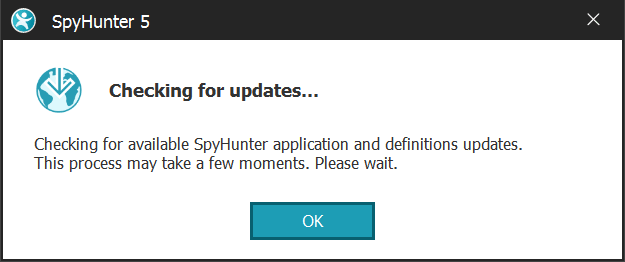
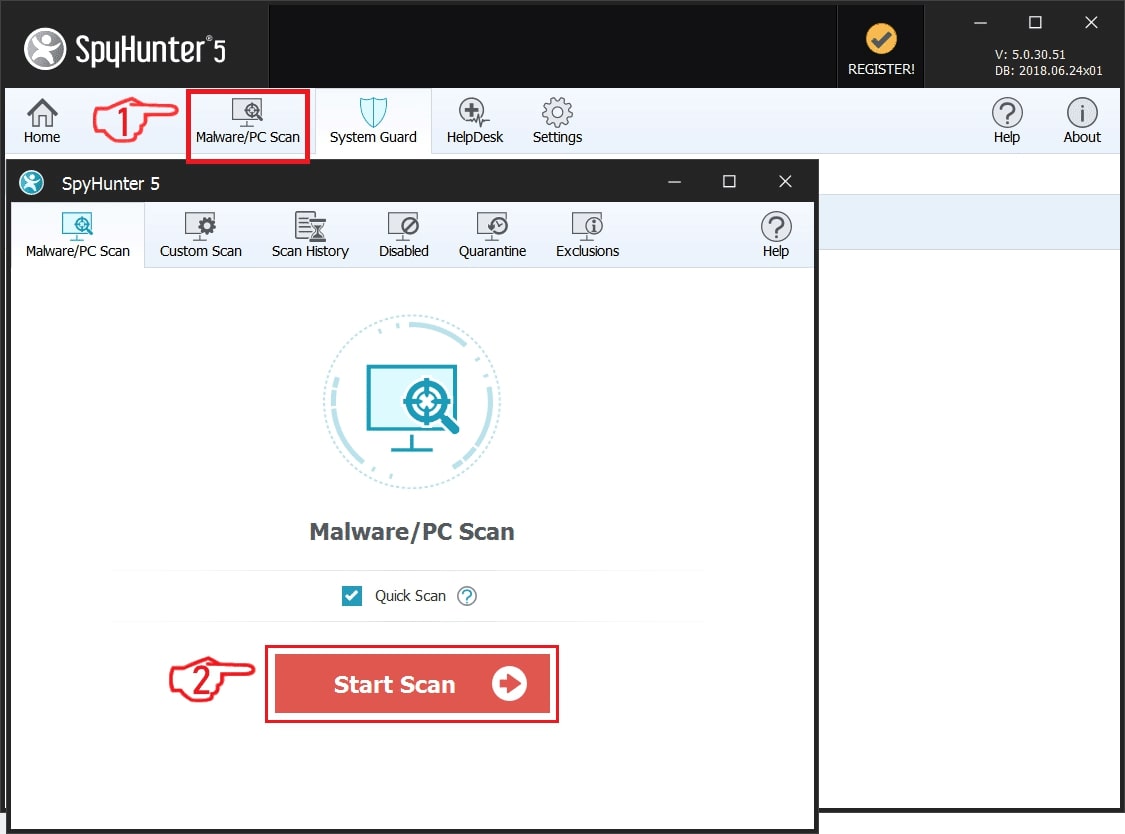
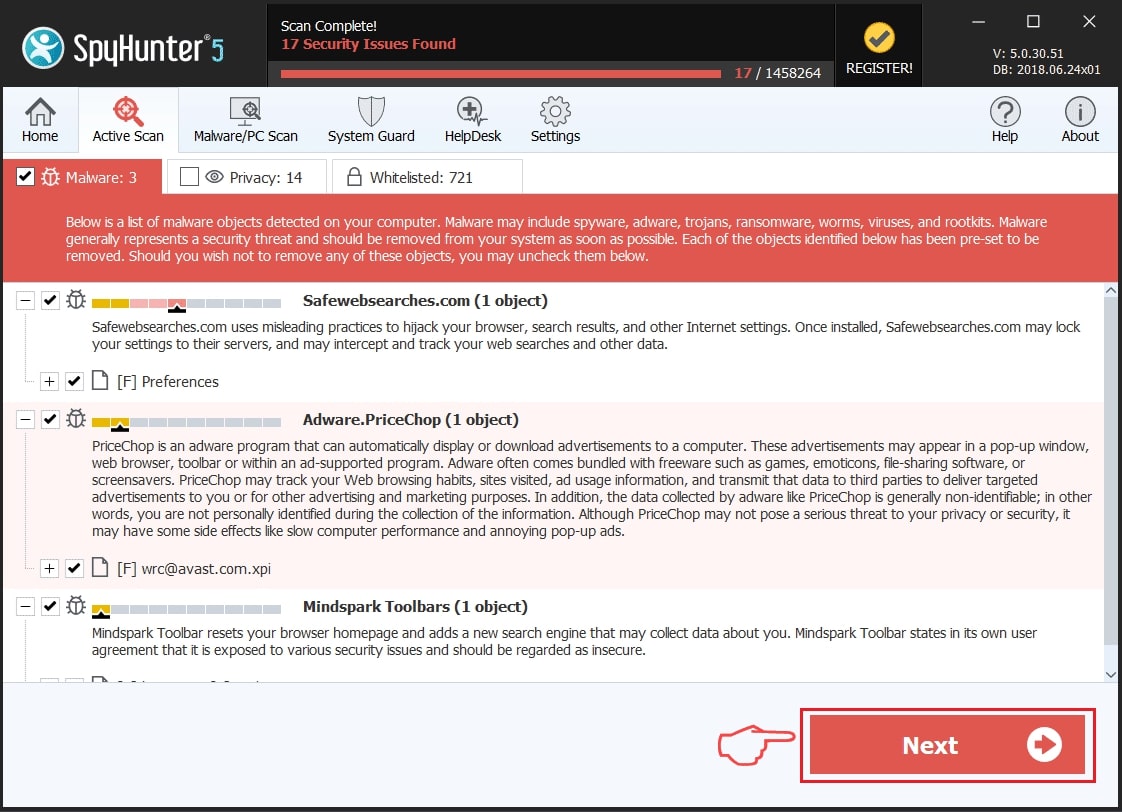
Step 2: Clean any registries, created by ProfluxeflowAiRC on your computer.
The usually targeted registries of Windows machines are the following:
- HKEY_LOCAL_MACHINE\Software\Microsoft\Windows\CurrentVersion\Run
- HKEY_CURRENT_USER\Software\Microsoft\Windows\CurrentVersion\Run
- HKEY_LOCAL_MACHINE\Software\Microsoft\Windows\CurrentVersion\RunOnce
- HKEY_CURRENT_USER\Software\Microsoft\Windows\CurrentVersion\RunOnce
You can access them by opening the Windows registry editor and deleting any values, created by ProfluxeflowAiRC there. This can happen by following the steps underneath:
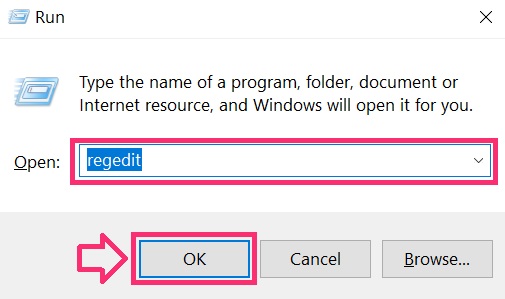
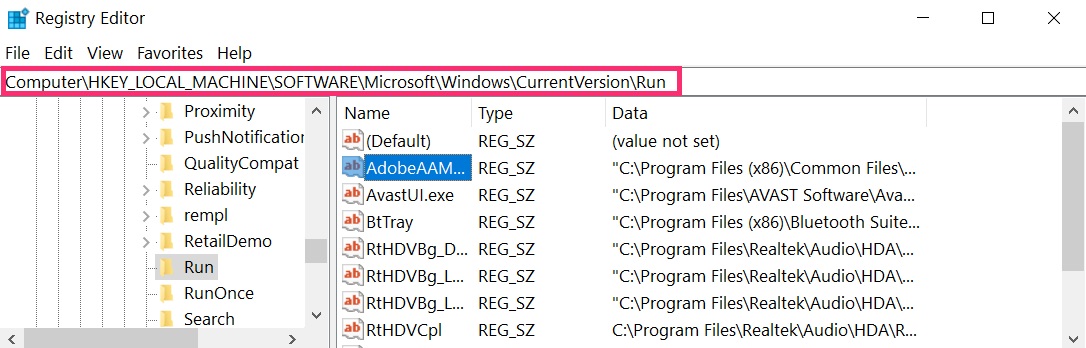
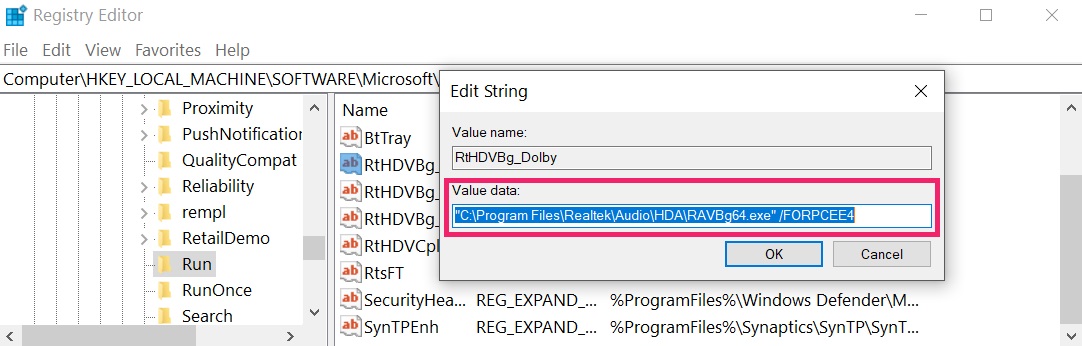 Tip: To find a virus-created value, you can right-click on it and click "Modify" to see which file it is set to run. If this is the virus file location, remove the value.
Step 3: Find virus files created by ProfluxeflowAiRC on your PC.
1.For Windows 8, 8.1 and 10.
For Newer Windows Operating Systems
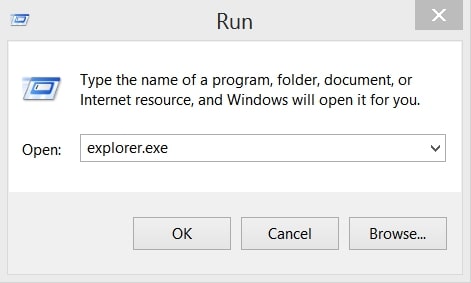
1: On your keyboard press + R and write explorer.exe in the Run text box and then click on the Ok button.
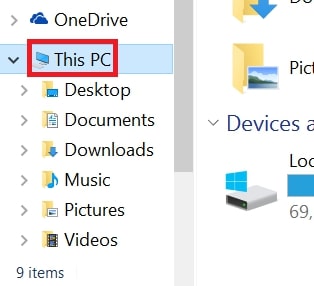
2: Click on your PC from the quick access bar. This is usually an icon with a monitor and its name is either “My Computer”, “My PC” or “This PC” or whatever you have named it.
3: Navigate to the search box in the top-right of your PC's screen and type “fileextension:” and after which type the file extension. If you are looking for malicious executables, an example may be "fileextension:exe". After doing that, leave a space and type the file name you believe the malware has created. Here is how it may appear if your file has been found:
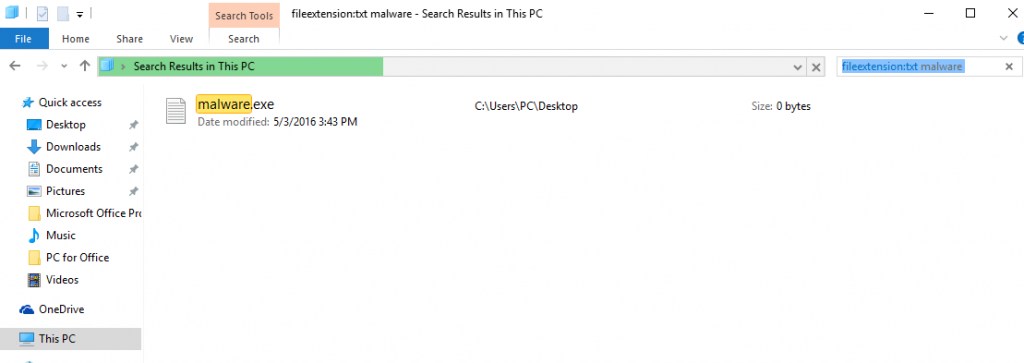
N.B. We recommend to wait for the green loading bar in the navigation box to fill up in case the PC is looking for the file and hasn't found it yet.
2.For Windows XP, Vista, and 7.
For Older Windows Operating Systems
In older Windows OS's the conventional approach should be the effective one:
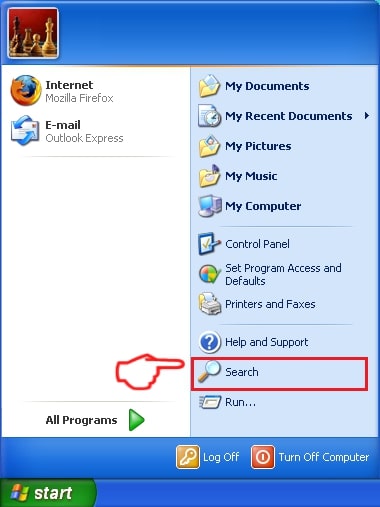
1: Click on the Start Menu icon (usually on your bottom-left) and then choose the Search preference.
2: After the search window appears, choose More Advanced Options from the search assistant box. Another way is by clicking on All Files and Folders.
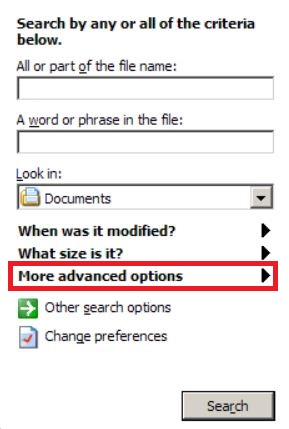
3: After that type the name of the file you are looking for and click on the Search button. This might take some time after which results will appear. If you have found the malicious file, you may copy or open its location by right-clicking on it.
Now you should be able to discover any file on Windows as long as it is on your hard drive and is not concealed via special software.
ProfluxeflowAiRC FAQ
What Does ProfluxeflowAiRC Trojan Do?
The ProfluxeflowAiRC Trojan is a malicious computer program designed to disrupt, damage, or gain unauthorized access to a computer system. It can be used to steal sensitive data, gain control over a system, or launch other malicious activities.
Can Trojans Steal Passwords?
Yes, Trojans, like ProfluxeflowAiRC, can steal passwords. These malicious programs are designed to gain access to a user's computer, spy on victims and steal sensitive information such as banking details and passwords.
Can ProfluxeflowAiRC Trojan Hide Itself?
Yes, it can. A Trojan can use various techniques to mask itself, including rootkits, encryption, and obfuscation, to hide from security scanners and evade detection.
Can a Trojan be Removed by Factory Reset?
Yes, a Trojan can be removed by factory resetting your device. This is because it will restore the device to its original state, eliminating any malicious software that may have been installed. Bear in mind that there are more sophisticated Trojans that leave backdoors and reinfect even after a factory reset.
Can ProfluxeflowAiRC Trojan Infect WiFi?
Yes, it is possible for a Trojan to infect WiFi networks. When a user connects to the infected network, the Trojan can spread to other connected devices and can access sensitive information on the network.
Can Trojans Be Deleted?
Yes, Trojans can be deleted. This is typically done by running a powerful anti-virus or anti-malware program that is designed to detect and remove malicious files. In some cases, manual deletion of the Trojan may also be necessary.
Can Trojans Steal Files?
Yes, Trojans can steal files if they are installed on a computer. This is done by allowing the malware author or user to gain access to the computer and then steal the files stored on it.
Which Anti-Malware Can Remove Trojans?
Anti-malware programs such as SpyHunter are capable of scanning for and removing Trojans from your computer. It is important to keep your anti-malware up to date and regularly scan your system for any malicious software.
Can Trojans Infect USB?
Yes, Trojans can infect USB devices. USB Trojans typically spread through malicious files downloaded from the internet or shared via email, allowing the hacker to gain access to a user's confidential data.
About the ProfluxeflowAiRC Research
The content we publish on SensorsTechForum.com, this ProfluxeflowAiRC how-to removal guide included, is the outcome of extensive research, hard work and our team’s devotion to help you remove the specific trojan problem.
How did we conduct the research on ProfluxeflowAiRC?
Please note that our research is based on an independent investigation. We are in contact with independent security researchers, thanks to which we receive daily updates on the latest malware definitions, including the various types of trojans (backdoor, downloader, infostealer, ransom, etc.)
Furthermore, the research behind the ProfluxeflowAiRC threat is backed with VirusTotal.
To better understand the threat posed by trojans, please refer to the following articles which provide knowledgeable details.