

Riskware.Koala.AGen malware may look like a harmless game-related component, but detections under this name should never be ignored. In many cases, users encounter it after downloading unofficial game packs, modified installers, cracked launchers, or suspicious archives that claim to contain assets for Poppy Playtime. Read this article to find out what Riskware.Koala.AGen is, how it may have entered your system, what it can do after execution, and how to remove it safely before it causes more problems.
What is Riskware.Koala.AGen Malware?
Riskware.Koala.AGen is a detection name associated with software that may not always behave like a classic destructive virus, but still presents a serious security risk to the affected machine. The word riskware is important here. It usually refers to a file, tool, or component that can be abused, bundled with unwanted payloads, or used in ways that compromise system integrity, privacy, and performance. In the context of fake game files, this means the detected object may pretend to be a necessary executable, patch, launcher, or support library while actually exposing the device to unsafe behavior.
Riskware.Koala.AGen Details
| Type | Riskware Malware |
| Removal Time | Around 5 Minutes |
| Removal Tool |
See If Your System Has Been Affected by malware
Download
Malware Removal Tool
|
When tied to a popular title such as Poppy Playtime, this detection becomes even more dangerous because cybercriminals often rely on recognizable game names to trick users into lowering their guard. A file may be presented as a missing DLL, an optimization patch, a chapter unlocker, a mod loader, or a setup package. Once launched, it can trigger hidden processes, modify system settings, connect to remote infrastructure, or drop additional unwanted software in the background.
One of the main problems with threats in the riskware category is that they often operate in a gray zone from the user’s perspective. Some people assume such files are harmless because they are disguised as “tools” or “helpers.” In reality, a detection like Riskware.Koala.AGen can indicate that the file demonstrates suspicious logic, includes unauthorized modifications, abuses legitimate functions, or behaves in a way commonly associated with trojans, loaders, cracks, and backdoor-capable components. Even when the initial file does not destroy data immediately, it may still weaken the system and open the door to more severe infections.
Why this detection should be taken seriously
Even if the file pretends to be part of a game installation, it can still create a direct security issue. Threat actors frequently bundle suspicious executables with popular game names because gamers are more likely to run unfamiliar files when they believe those files are needed for launching or unlocking content.
- It may masquerade as a legitimate game file, patch, or launcher.
- It can be bundled with pirated or unofficial copies of games.
- It may execute hidden scripts or side-load additional payloads.
- It can lower overall system security and privacy.
- It may act as a gateway to spyware, stealers, miners, or trojans.
How Did I Get It on My PC?
In most cases, Riskware.Koala.AGen does not appear on a machine without some form of user interaction. The infection chain usually begins with a misleading download source. Since your supplied information mentions that the file may pretend to be part of the game files for Poppy Playtime, the most likely scenario is a fake or tampered package distributed outside trusted channels. Cybercriminals know that users often search for free copies, unlocked chapters, bonus files, mods, cheats, or compressed archives that promise quick access to a game. That search behavior creates an ideal delivery path for malicious or potentially dangerous files.
These files may arrive through torrent portals, warez pages, file-sharing services, Discord attachments, YouTube download links, unofficial Telegram channels, cloned storefront pages, or misleading “free download” sites. In some campaigns, the user is told that antivirus software is showing a false positive and should be disabled temporarily. That social engineering tactic is a major red flag because it is meant to remove the only barrier standing between the payload and the operating system.
Another common infection route involves bundled installers. You may believe you are opening a game setup file, but the installer includes extra scripts, silent tasks, registry key edits, or secondary executables that run before the visible installation even begins. Some of these packages are designed to look convincing, using game artwork, believable filenames, fake readme files, and folder structures that mimic legitimate releases. The result is that the victim executes the file voluntarily, believing it belongs to the game.
Most common distribution methods
Threats of this type typically rely on the user’s trust in a familiar game title and the urgency to install fast. That combination makes fake packages much more effective than generic malware spam.
- Unofficial game downloads claiming to include Poppy Playtime files.
- Cracked installers, key generators, and activation bypass tools.
- Fake updates, chapter unlockers, or “performance boost” patches.
- Archive files shared through forums, chats, and social media groups.
- Malicious advertising pages that imitate real game distribution platforms.
- Email or direct-message attachments pretending to contain game assets.
It is also possible for the threat to arrive as part of a multi-stage infection. In that case, another potentially unwanted program, downloader, or trojan already on the system may retrieve Riskware.Koala.AGen later. This is why users sometimes do not remember the exact moment of infection. The file may not be the original threat, but rather one stage in a broader compromise.
What Does It Do on the System?
The behavior of Riskware.Koala.AGen can vary depending on the exact file behind the detection, but the risk comes from the same general principle: the detected object may perform suspicious actions that are not necessary for normal game functionality. A real game file should not need to tamper with security settings, inject into unrelated processes, establish covert persistence, or communicate with unknown infrastructure without a valid reason. When such behavior is observed, the detection becomes much more than a nuisance.
On an infected system, the file may run hidden background processes and attempt to survive reboots through autorun entries, scheduled tasks, startup folder modifications, or registry changes. It may also attempt to evade simple user inspection by using generic filenames, nesting itself in temporary folders, or launching child processes that look unrelated to the original executable. In some cases, riskware-type files act as loaders, meaning their primary role is to fetch and launch additional malicious payloads after initial execution.
That secondary payload is where the danger escalates. A fake game component can lead to information theft, browser data harvesting, credential extraction, cryptocurrency mining, remote command execution, or installation of adware and spyware. If the file abuses a trusted process, the user may not immediately notice anything except slower performance, unexpected outbound traffic, antivirus warnings, browser instability, or random pop-ups. By the time the symptoms become obvious, the compromise may already be broader than one suspicious file.
Files disguised as gaming content are also frequently linked to credential-focused attacks. A malicious actor understands that many users store browser passwords, payment details, gaming account logins, session cookies, and launcher credentials on the same computer. That means one deceptive executable disguised as a game file can become the entry point to account takeover, financial abuse, and wider identity compromise.
Possible harmful actions
Not every sample will perform every action listed below, but these are among the most common risks associated with suspicious game-related riskware detections.
- Dropping additional malware onto the device.
- Changing Windows Registry entries for persistence.
- Disabling or interfering with security tools.
- Stealing browser-stored passwords and cookies.
- Collecting system information and user activity data.
- Connecting to remote servers to receive commands.
- Launching unwanted advertisements or redirects.
- Using CPU and GPU resources for hidden mining activity.
- Creating instability, crashes, and abnormal system slowdowns.
How to Remove It
Removing Riskware.Koala.AGen requires more than simply deleting the visible file from the Downloads folder. If the executable has already been launched, there is a chance that persistence mechanisms, temporary payloads, scheduled tasks, or registry changes were created in the background. That is why a full malware cleanup approach is necessary. The affected computer should be treated as potentially compromised until a reputable anti-malware scan confirms otherwise.
Begin by isolating the machine from unnecessary network activity, especially if you suspect the file may be communicating with a remote server. Then inspect recently downloaded files related to Poppy Playtime, cracked game content, suspicious archives, installers, and unknown executable files. Anything that arrived from an unofficial source and triggered the detection should be considered unsafe. Quarantine or delete the file only after the security software has fully analyzed it and after you are sure no legitimate data will be removed with it.
A complete system scan is essential because the initial file may have already dropped secondary components into folders such as AppData, Temp, ProgramData, Downloads, or user profile subdirectories. Startup items and scheduled tasks should also be reviewed for unknown entries. Browser security matters too. If the threat had information-stealing capability, saved credentials, cookies, and active sessions may already be at risk. In such cases, password resets should be performed from a separate clean device, not from the possibly infected machine.
Users should also pay attention to signs of persistence after cleanup. If the same alert returns, if unknown processes reappear, or if the browser starts behaving abnormally again, the system may still contain a loader or a companion payload. In those cases, deeper remediation may be required, including reviewing restore points, checking exclusions in security software, removing rogue browser extensions, and auditing installed applications for recently added unknown programs.
What effective cleanup usually includes
A proper removal strategy focuses on the entire compromise, not just the originally detected file.
- Run a full scan with trusted anti-malware software.
- Remove or quarantine all files related to the detection.
- Check startup entries, scheduled tasks, and suspicious services.
- Review temporary folders and recent downloads for leftover payloads.
- Inspect browsers for rogue extensions and stolen session risk.
- Change passwords from a clean device if credentials may be exposed.
- Update Windows and security software after the cleanup is complete.
Because this threat may have been disguised as a game file, it is also wise to delete the entire suspicious game package rather than keeping selected files from it. Users often attempt to salvage one DLL, loader, or setup file from a compromised archive, but that can lead to reinfection later. If the source was untrusted, the whole package should be considered contaminated.
What should you do?
You should treat Riskware.Koala.AGen as a genuine security warning, especially if it appeared after downloading files that claimed to be related to Poppy Playtime. Do not assume the detection is harmless just because the file looked like part of a game. Remove the suspicious package, scan the entire system with reputable security software, and review your machine for persistence, credential exposure, and additional payloads. The faster you react, the lower the chance that the threat will escalate into data theft, account compromise, or a more serious malware infection.
If this detection was triggered by an unofficial game installer, cracked archive, mod package, or fake launcher, avoid reopening it under any circumstances. Follow the removal instructions below this article and complete the cleanup as soon as possible to secure your PC and prevent the threat from returning.

Ventsislav Krastev
Ventsislav is a cybersecurity expert at SensorsTechForum since 2015. He has been researching, covering, helping victims with the latest malware infections plus testing and reviewing software and the newest tech developments. Having graduated Marketing as well, Ventsislav also has passion for learning new shifts and innovations in cybersecurity that become game changers. After studying Value Chain Management, Network Administration and Computer Administration of System Applications, he found his true calling within the cybersecrurity industry and is a strong believer in the education of every user towards online safety and security.
Follow Me:
Preparation before removing Riskware.Koala.AGen.
Before starting the actual removal process, we recommend that you do the following preparation steps.
- Make sure you have these instructions always open and in front of your eyes.
- Do a backup of all of your files, even if they could be damaged. You should back up your data with a cloud backup solution and insure your files against any type of loss, even from the most severe threats.
- Be patient as this could take a while.
- Scan for Malware
- Fix Registries
- Remove Virus Files
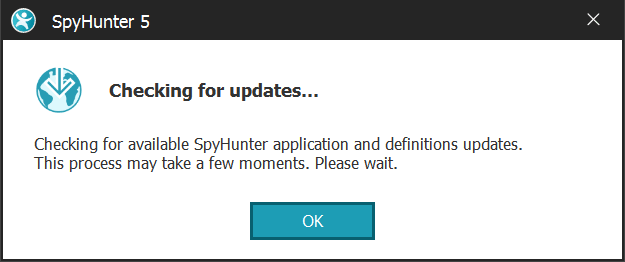
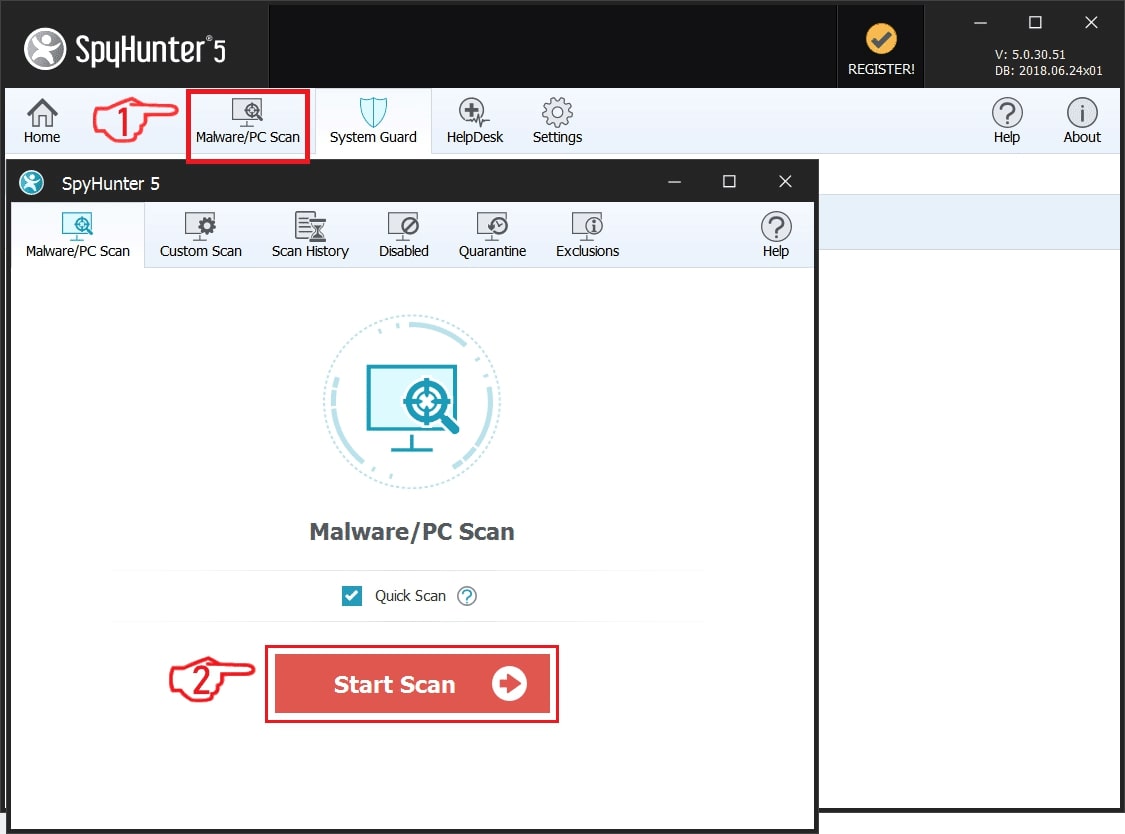
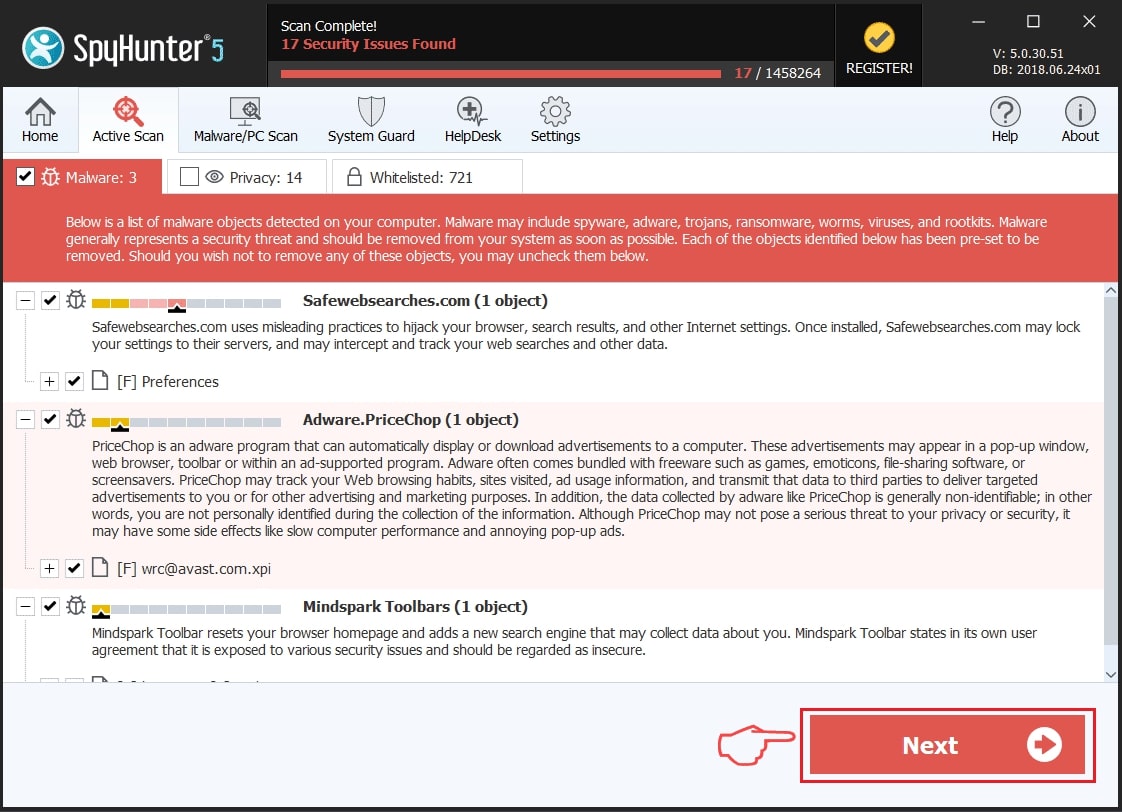
Step 1: Scan for Riskware.Koala.AGen with SpyHunter Anti-Malware Tool
Step 2: Clean any registries, created by Riskware.Koala.AGen on your computer.
The usually targeted registries of Windows machines are the following:
- HKEY_LOCAL_MACHINE\Software\Microsoft\Windows\CurrentVersion\Run
- HKEY_CURRENT_USER\Software\Microsoft\Windows\CurrentVersion\Run
- HKEY_LOCAL_MACHINE\Software\Microsoft\Windows\CurrentVersion\RunOnce
- HKEY_CURRENT_USER\Software\Microsoft\Windows\CurrentVersion\RunOnce
You can access them by opening the Windows registry editor and deleting any values, created by Riskware.Koala.AGen there. This can happen by following the steps underneath:
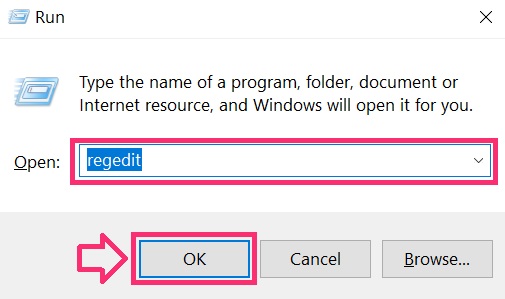
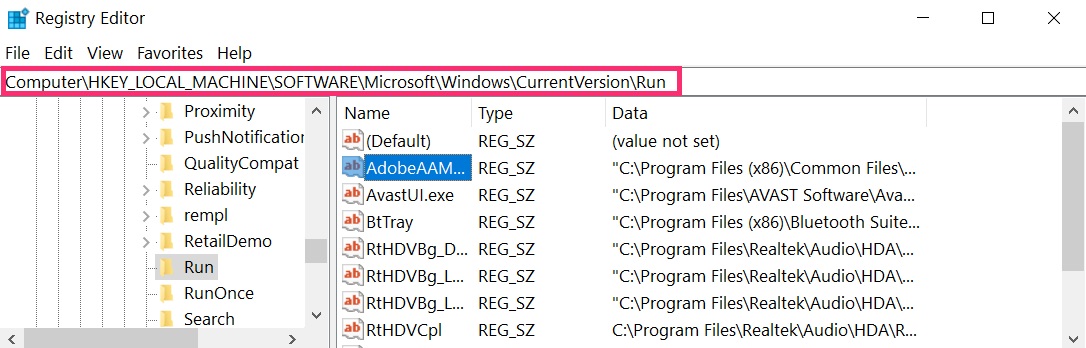
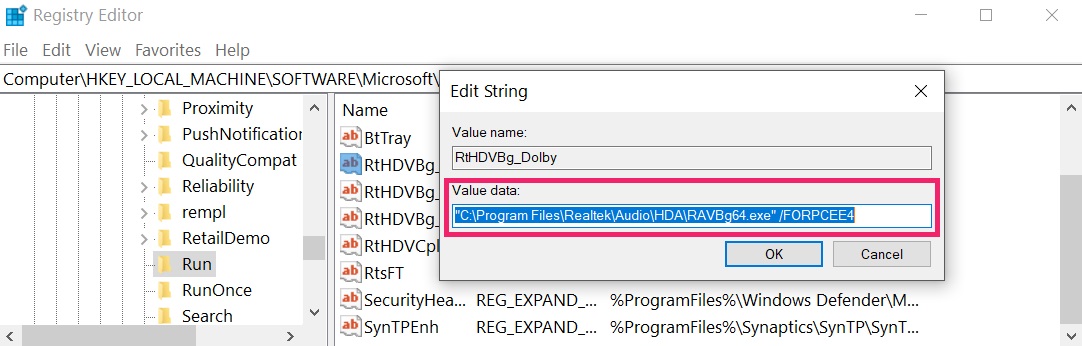 Tip: To find a virus-created value, you can right-click on it and click "Modify" to see which file it is set to run. If this is the virus file location, remove the value.
Step 3: Find virus files created by Riskware.Koala.AGen on your PC.
1.For Windows 8, 8.1 and 10.
For Newer Windows Operating Systems
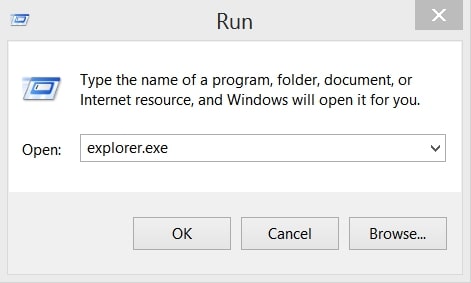
1: On your keyboard press + R and write explorer.exe in the Run text box and then click on the Ok button.
2: Click on your PC from the quick access bar. This is usually an icon with a monitor and its name is either “My Computer”, “My PC” or “This PC” or whatever you have named it.
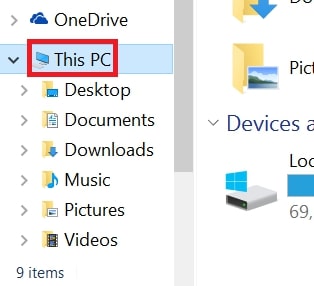
3: Navigate to the search box in the top-right of your PC's screen and type “fileextension:” and after which type the file extension. If you are looking for malicious executables, an example may be "fileextension:exe". After doing that, leave a space and type the file name you believe the malware has created. Here is how it may appear if your file has been found:
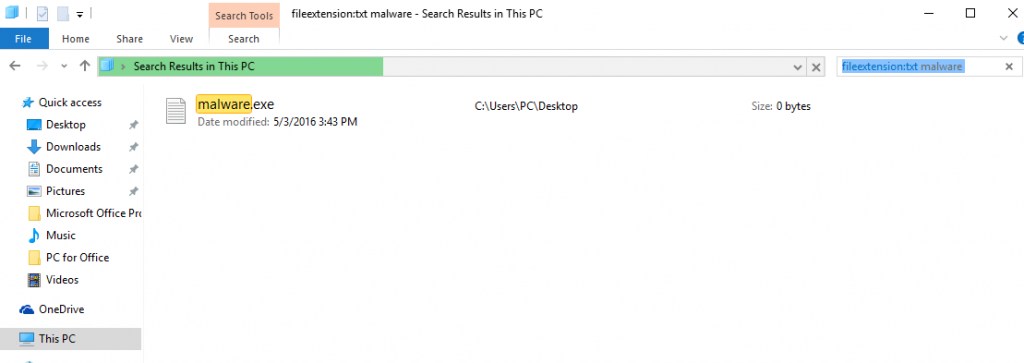
N.B. We recommend to wait for the green loading bar in the navigation box to fill up in case the PC is looking for the file and hasn't found it yet.
2.For Windows XP, Vista, and 7.
For Older Windows Operating Systems
In older Windows OS's the conventional approach should be the effective one:
1: Click on the Start Menu icon (usually on your bottom-left) and then choose the Search preference.
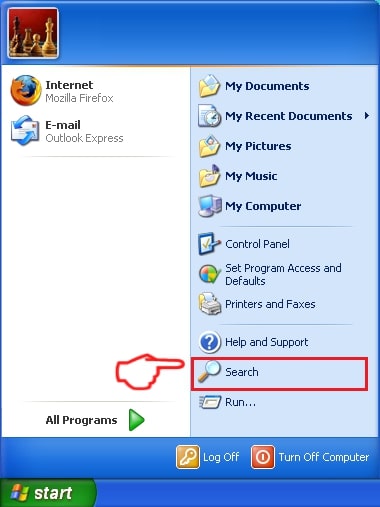
2: After the search window appears, choose More Advanced Options from the search assistant box. Another way is by clicking on All Files and Folders.
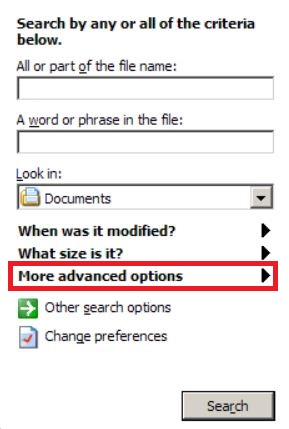
3: After that type the name of the file you are looking for and click on the Search button. This might take some time after which results will appear. If you have found the malicious file, you may copy or open its location by right-clicking on it.
Now you should be able to discover any file on Windows as long as it is on your hard drive and is not concealed via special software.
Riskware.Koala.AGen FAQ
What Does Riskware.Koala.AGen Trojan Do?
The Riskware.Koala.AGen Trojan is a malicious computer program designed to disrupt, damage, or gain unauthorized access to a computer system. It can be used to steal sensitive data, gain control over a system, or launch other malicious activities.
Can Trojans Steal Passwords?
Yes, Trojans, like Riskware.Koala.AGen, can steal passwords. These malicious programs are designed to gain access to a user's computer, spy on victims and steal sensitive information such as banking details and passwords.
Can Riskware.Koala.AGen Trojan Hide Itself?
Yes, it can. A Trojan can use various techniques to mask itself, including rootkits, encryption, and obfuscation, to hide from security scanners and evade detection.
Can a Trojan be Removed by Factory Reset?
Yes, a Trojan can be removed by factory resetting your device. This is because it will restore the device to its original state, eliminating any malicious software that may have been installed. Bear in mind that there are more sophisticated Trojans that leave backdoors and reinfect even after a factory reset.
Can Riskware.Koala.AGen Trojan Infect WiFi?
Yes, it is possible for a Trojan to infect WiFi networks. When a user connects to the infected network, the Trojan can spread to other connected devices and can access sensitive information on the network.
Can Trojans Be Deleted?
Yes, Trojans can be deleted. This is typically done by running a powerful anti-virus or anti-malware program that is designed to detect and remove malicious files. In some cases, manual deletion of the Trojan may also be necessary.
Can Trojans Steal Files?
Yes, Trojans can steal files if they are installed on a computer. This is done by allowing the malware author or user to gain access to the computer and then steal the files stored on it.
Which Anti-Malware Can Remove Trojans?
Anti-malware programs such as SpyHunter are capable of scanning for and removing Trojans from your computer. It is important to keep your anti-malware up to date and regularly scan your system for any malicious software.
Can Trojans Infect USB?
Yes, Trojans can infect USB devices. USB Trojans typically spread through malicious files downloaded from the internet or shared via email, allowing the hacker to gain access to a user's confidential data.
About the Riskware.Koala.AGen Research
The content we publish on SensorsTechForum.com, this Riskware.Koala.AGen how-to removal guide included, is the outcome of extensive research, hard work and our team’s devotion to help you remove the specific trojan problem.
How did we conduct the research on Riskware.Koala.AGen?
Please note that our research is based on an independent investigation. We are in contact with independent security researchers, thanks to which we receive daily updates on the latest malware definitions, including the various types of trojans (backdoor, downloader, infostealer, ransom, etc.)
Furthermore, the research behind the Riskware.Koala.AGen threat is backed with VirusTotal.
To better understand the threat posed by trojans, please refer to the following articles which provide knowledgeable details.