

What is Attacco Ransomware?
Your files are encrypted, everything is inaccessible, and there’s a ransom demand on your screen — and you’re trying to figure out what hit you. Read this article right now before doing anything else, because the wrong move at this stage can make recovery impossible. The removal and file restoration guide at the bottom of this page is your next step.
“Attacco ransomware” refers to ransomware attacks — the Italian word “attacco” simply means “attack” — that specifically target Italian-speaking individuals, businesses, and organizations, as well as global victims who encounter Italian-language ransom notes and communications. Italy has been one of the most heavily targeted countries in Europe for ransomware attacks, with major ransomware family operations including LockBit, Qilin, DragonForce, and BlackBasta all running active campaigns against Italian organizations. The attack pattern is consistent globally: the ransomware infiltrates your network, spends days or weeks mapping and exfiltrating data, then triggers a mass encryption event that locks every file it can reach and drops a ransom note demanding cryptocurrency payment for the decryption key. Whether you’re dealing with LockBit, Qilin, or any other active strain, the core removal and recovery principles are the same — and they start right here.
Attacco Ransomware Short Overview
| Type | Ransomware / File-encrypting malware targeting Italian organizations and global victims. Associated with major RaaS families including LockBit, Qilin, DragonForce, and BlackBasta. |
| Symptoms | Files encrypted with an appended extension and rendered completely inaccessible. Ransom note left on desktop and in every affected folder demanding cryptocurrency payment. Volume Shadow Copies deleted. Security tools disabled or interfered with. Wallpaper changed to ransom message. Backup servers and NAS devices may also be encrypted. |
| Removal Time | Approximately 15 minutes for a full-system scan |
| Removal Tool |
See If Your System Has Been Affected by malware
Download
Malware Removal Tool
|
How Did the Ransomware Get In?
Ransomware doesn’t just appear — it gets in through specific, well-documented attack vectors. Here are the most common ways these attacks gain initial access:
- Phishing emails with malicious attachments — The most common initial access vector by far. A targeted phishing email carrying a malicious attachment — often disguised as an invoice, delivery notification, or official document — executes the ransomware loader the moment it’s opened. Malspam campaigns targeting Italian businesses specifically use localized language and Italian brand impersonation to maximize click rates.
- Exposed RDP and VPN endpoints — Internet-facing Remote Desktop Protocol servers and unpatched VPN appliances are among the most exploited entry points for ransomware affiliates. Stolen or brute-forced credentials on these systems give attackers direct network access with no user interaction required.
- Exploitation of unpatched vulnerabilities — Ransomware operators scan for and exploit known unpatched vulnerabilities in internet-facing systems. Every unaddressed zero-day vulnerability in your infrastructure is a potential ransomware entry point.
- Software bundling and malicious downloads — For individual users, downloading freeware or pirated software from unofficial sources through software bundling remains one of the most reliable ransomware delivery mechanisms targeting home users and small businesses.
What Does Ransomware Actually Do to Your System?
Modern ransomware attacks are multi-stage operations, not just file encryption events. Here’s the full picture of what happens from the moment the attacker gains access to the moment your files are locked:
- Silent reconnaissance and lateral movement — After gaining initial access, attackers spend days or weeks quietly mapping your network using tools like Cobalt Strike and Advanced IP Scanner. They identify domain controllers, backup servers, and critical data repositories — and harvest credentials using tools like Mimikatz. The encryption trigger comes only after they’ve positioned themselves to maximize damage.
- Data exfiltration for double extortion — Before any file is encrypted, sensitive data is silently copied to external servers. This creates the second extortion lever: pay the ransom or have your data published on their dark web leak site. This data collection phase is often the most damaging part of the attack from a compliance and regulatory standpoint.
- File encryption — The ransomware binary deploys across the network and uses strong AES encryption combined with RSA encryption to lock files. A custom extension is appended to every encrypted file and a ransom note is placed in every affected directory. The cipher used is mathematically unbreakable without the attacker’s private key.
- Defense evasion and backup destruction — Volume Shadow Copies are deleted via WMIC commands, backup jobs are disabled, tape backups are erased where reachable, and security tools are disabled using Bring Your Own Vulnerable Driver (BYOVD) techniques. The ransomware contacts a remote C&C server to coordinate the attack and may modify registry key entries to ensure persistence across reboots during the attack window.
The average ransomware recovery time in 2025 is 24.6 days, according to SQMagazine research — and that’s for organizations with incident response plans. Without tested offline backups and a clear response strategy, recovery can take months. Do not pay the ransom without professional incident response guidance — payment does not guarantee recovery and does not undo the data theft.
What Should You Do?
Isolate every affected system from the network immediately — disconnect network cables, disable Wi-Fi, but do NOT restart encrypted machines. Preserve all forensic evidence including the ransom note and any malware samples. Visit nomoreransom.org to check for any available free decryptors for your specific variant. Report the attack to CISA, the FBI’s IC3, or the relevant national cybersecurity authority. Then follow the complete removal and recovery guide below this article for your best path forward.

Ventsislav Krastev
Ventsislav is a cybersecurity expert at SensorsTechForum since 2015. He has been researching, covering, helping victims with the latest malware infections plus testing and reviewing software and the newest tech developments. Having graduated Marketing as well, Ventsislav also has passion for learning new shifts and innovations in cybersecurity that become game changers. After studying Value Chain Management, Network Administration and Computer Administration of System Applications, he found his true calling within the cybersecrurity industry and is a strong believer in the education of every user towards online safety and security.
Follow Me:
- Step 1
- Step 2
- Step 3
- Step 4
- Step 5
Step 1: Scan for Attacco Ransomware with SpyHunter Anti-Malware Tool
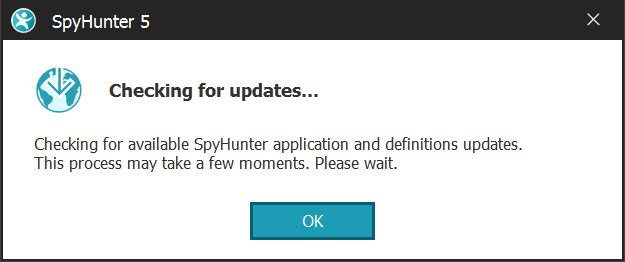
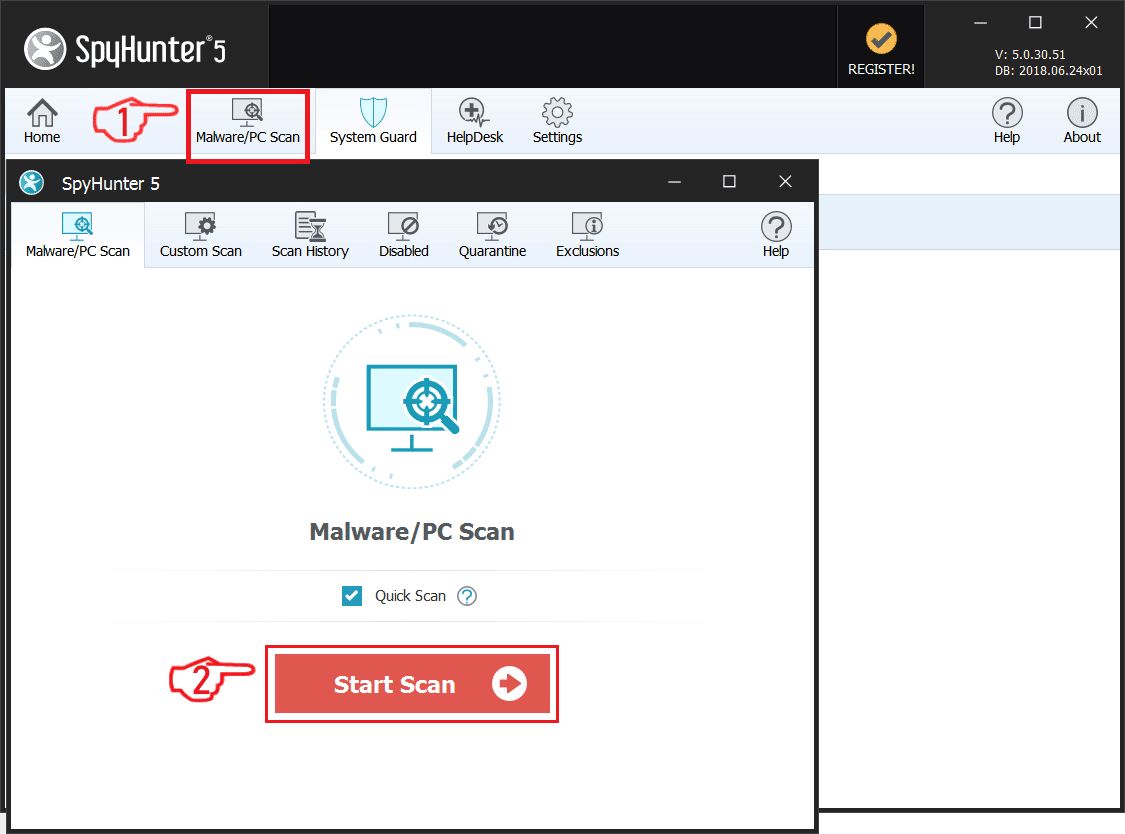
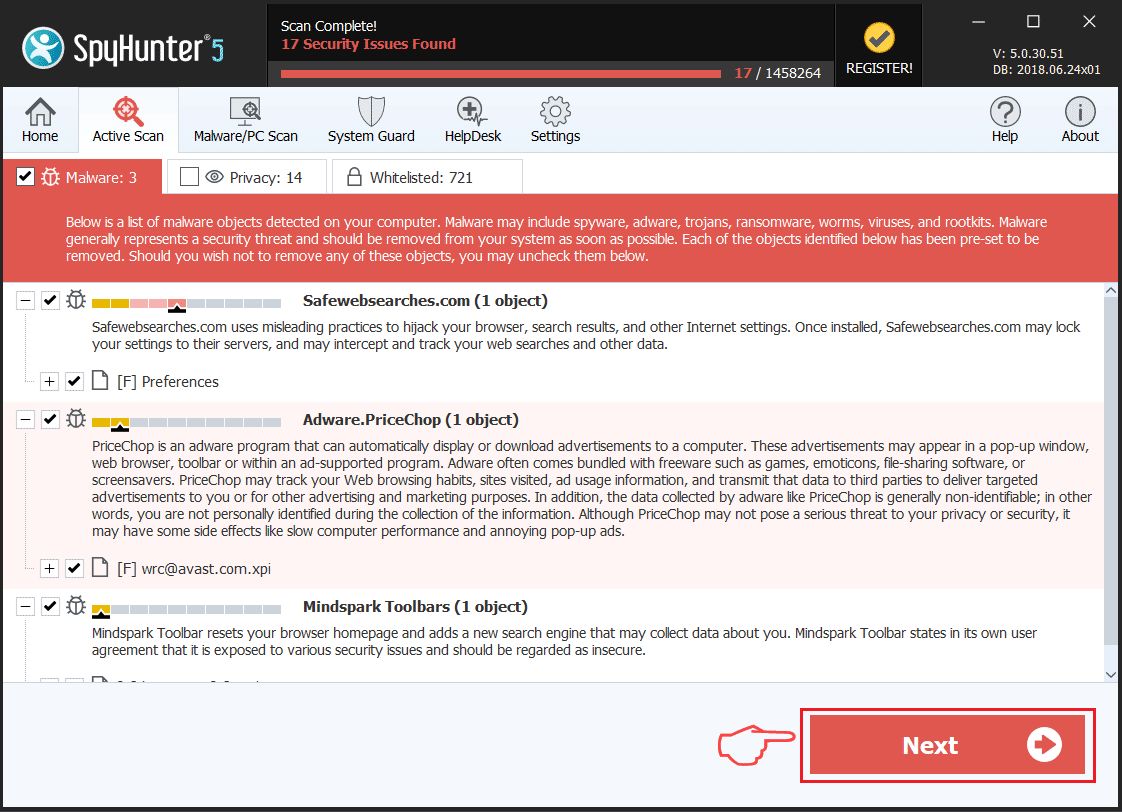
Ransomware Automatic Removal - Video Guide
Step 2: Uninstall Attacco Ransomware and related malware from Windows
Here is a method in few easy steps that should be able to uninstall most programs. No matter if you are using Windows 10, 8, 7, Vista or XP, those steps will get the job done. Dragging the program or its folder to the recycle bin can be a very bad decision. If you do that, bits and pieces of the program are left behind, and that can lead to unstable work of your PC, errors with the file type associations and other unpleasant activities. The proper way to get a program off your computer is to Uninstall it. To do that:
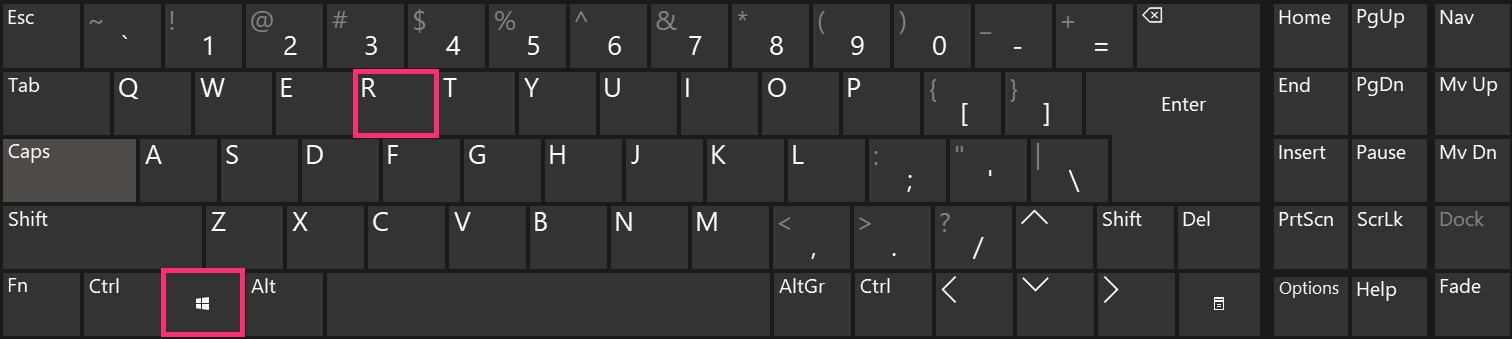
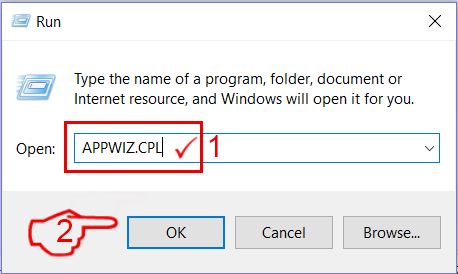
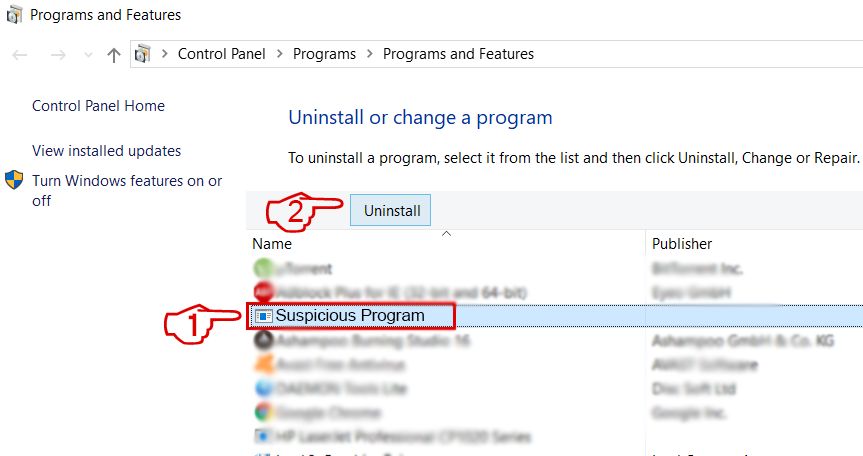 Follow the instructions above and you will successfully delete most unwanted and malicious programs.
Step 3: Clean any registries, created by Attacco Ransomware on your computer.
The usually targeted registries of Windows machines are the following:
- HKEY_LOCAL_MACHINE\Software\Microsoft\Windows\CurrentVersion\Run
- HKEY_CURRENT_USER\Software\Microsoft\Windows\CurrentVersion\Run
- HKEY_LOCAL_MACHINE\Software\Microsoft\Windows\CurrentVersion\RunOnce
- HKEY_CURRENT_USER\Software\Microsoft\Windows\CurrentVersion\RunOnce
You can access them by opening the Windows registry editor and deleting any values, created by Attacco Ransomware there. This can happen by following the steps underneath:
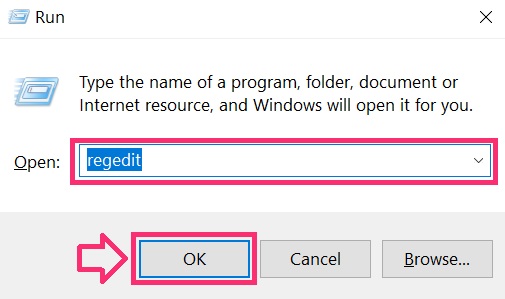
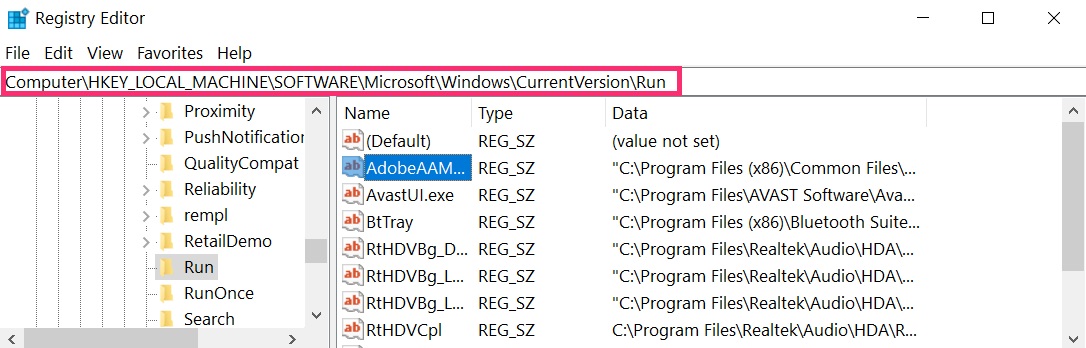
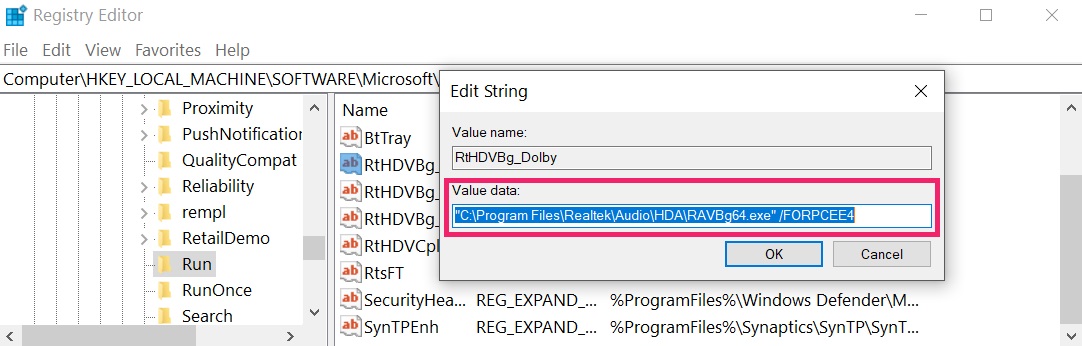 Tip: To find a virus-created value, you can right-click on it and click "Modify" to see which file it is set to run. If this is the virus file location, remove the value.
Before starting "Step 4", please boot back into Normal mode, in case you are currently in Safe Mode.
This will enable you to install and use SpyHunter 5 successfully.
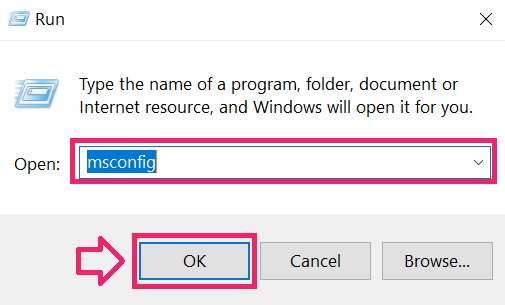
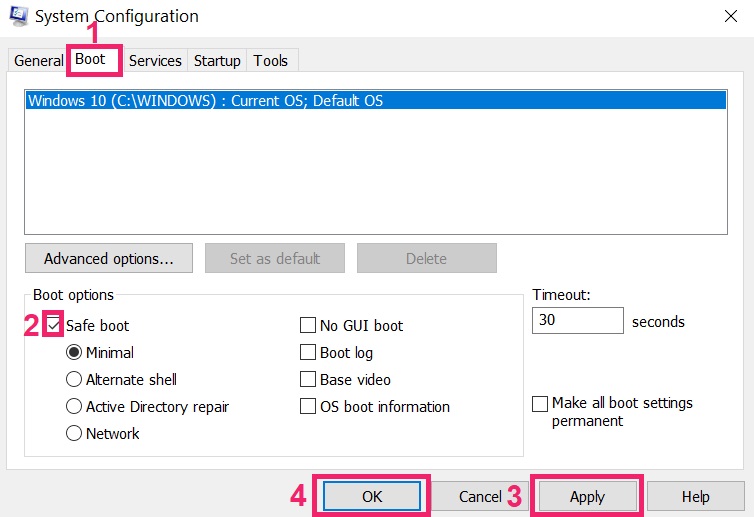
Step 4: Boot Your PC In Safe Mode to isolate and remove Attacco Ransomware
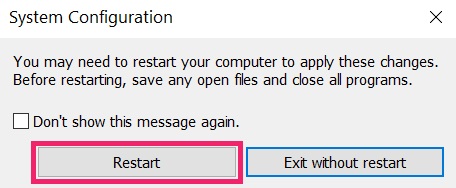
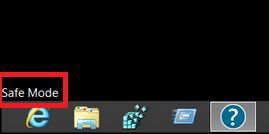
Step 5: Try to Restore Files Encrypted by Attacco Ransomware.
Method 1: Use STOP Decrypter by Emsisoft.
Not all variants of this ransomware can be decrypted for free, but we have added the decryptor used by researchers that is often updated with the variants which become eventually decrypted. You can try and decrypt your files using the instructions below, but if they do not work, then unfortunately your variant of the ransomware virus is not decryptable.
Follow the instructions below to use the Emsisoft decrypter and decrypt your files for free. You can download the Emsisoft decryption tool linked here and then follow the steps provided below:
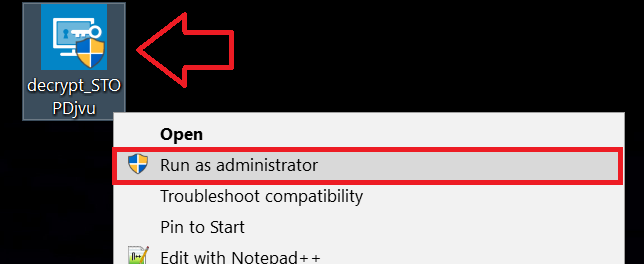
1 Right-click on the decrypter and click on Run as Administrator as shown below:
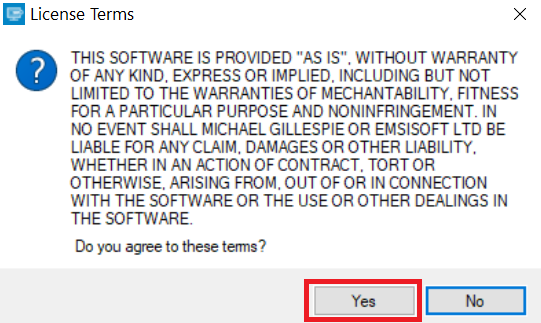
2. Agree with the license terms:
3. Click on "Add Folder" and then add the folders where you want files decrypted as shown underneath:
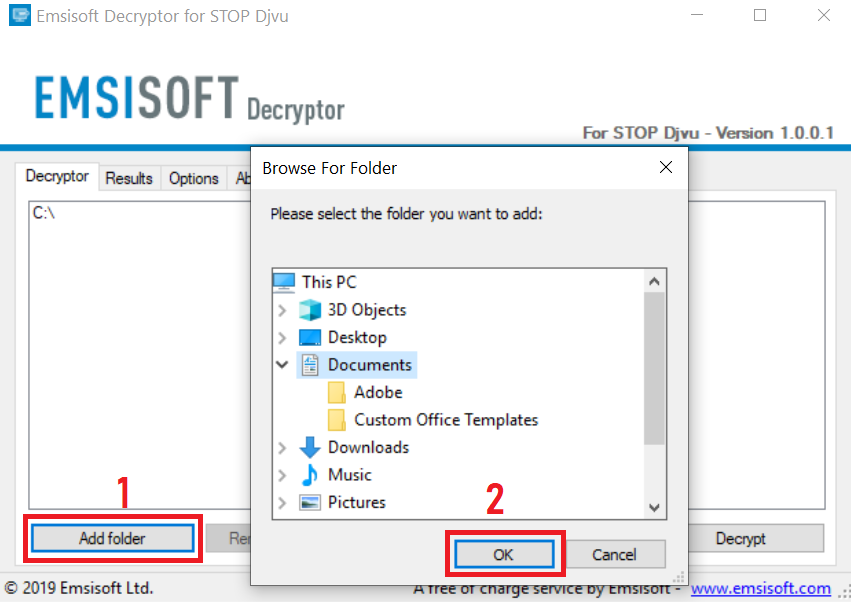
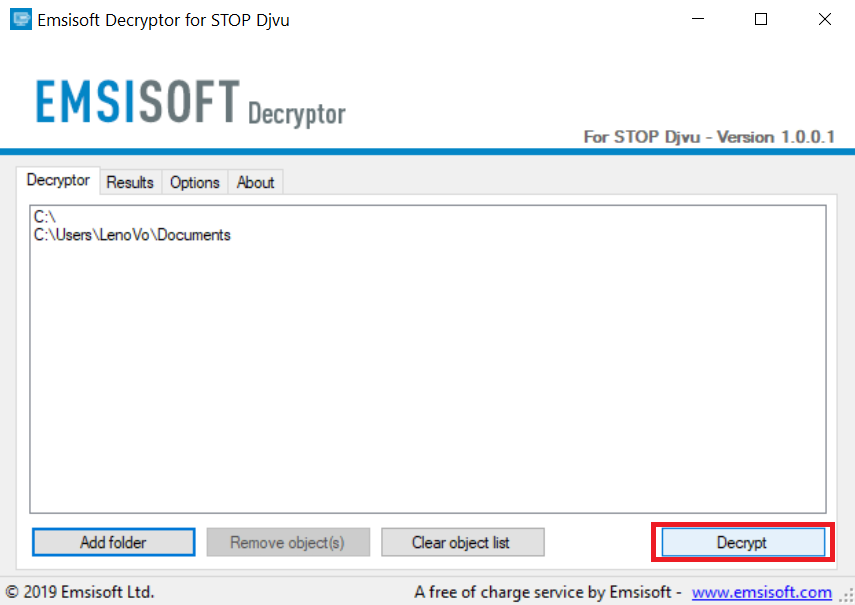
4. Click on "Decrypt" and wait for your files to be decoded.
Note: Credit for the decryptor goes to Emsisoft researchers who have made the breakthrough with this virus.
Method 2: Use data recovery software
Ransomware infections and Attacco Ransomware aim to encrypt your files using an encryption algorithm which may be very difficult to decrypt. This is why we have suggested a data recovery method that may help you go around direct decryption and try to restore your files. Bear in mind that this method may not be 100% effective but may also help you a little or a lot in different situations.
Simply click on the link and on the website menus on the top, choose Data Recovery - Data Recovery Wizard for Windows or Mac (depending on your OS), and then download and run the tool.
Attacco Ransomware-FAQ
What is Attacco Ransomware Ransomware?
Attacco Ransomware is a ransomware infection - the malicious software that enters your computer silently and blocks either access to the computer itself or encrypt your files.
Many ransomware viruses use sophisticated encryption algorithms to make your files inaccessible. The goal of ransomware infections is to demand that you pay a ransom payment to get access to your files back.
What Does Attacco Ransomware Ransomware Do?
Ransomware in general is a malicious software that is designed to block access to your computer or files until a ransom is paid.
Ransomware viruses can also damage your system, corrupt data and delete files, resulting in the permanent loss of important files.
How Does Attacco Ransomware Infect?
Via several ways.Attacco Ransomware Ransomware infects computers by being sent via phishing emails, containing virus attachment. This attachment is usually masked as an important document, like an invoice, bank document or even a plane ticket and it looks very convincing to users.
Another way you may become a victim of Attacco Ransomware is if you download a fake installer, crack or patch from a low reputation website or if you click on a virus link. Many users report getting a ransomware infection by downloading torrents.
How to Open .Attacco Ransomware files?
You can't without a decryptor. At this point, the .Attacco Ransomware files are encrypted. You can only open them once they are decrypted using a specific decryption key for the particular algorithm.
What to Do If a Decryptor Does Not Work?
Do not panic, and backup the files. If a decryptor did not decrypt your .Attacco Ransomware files successfully, then do not despair, because this virus is still new.
Can I Restore ".Attacco Ransomware" Files?
Yes, sometimes files can be restored. We have suggested several file recovery methods that could work if you want to restore .Attacco Ransomware files.
These methods are in no way 100% guaranteed that you will be able to get your files back. But if you have a backup, your chances of success are much greater.
How To Get Rid of Attacco Ransomware Virus?
The safest way and the most efficient one for the removal of this ransomware infection is the use a professional anti-malware program.
It will scan for and locate Attacco Ransomware ransomware and then remove it without causing any additional harm to your important .Attacco Ransomware files.
Can I Report Ransomware to Authorities?
In case your computer got infected with a ransomware infection, you can report it to the local Police departments. It can help authorities worldwide track and determine the perpetrators behind the virus that has infected your computer.
Below, we have prepared a list with government websites, where you can file a report in case you are a victim of a cybercrime:
Cyber-security authorities, responsible for handling ransomware attack reports in different regions all over the world:
Germany - Offizielles Portal der deutschen Polizei
United States - IC3 Internet Crime Complaint Centre
United Kingdom - Action Fraud Police
France - Ministère de l'Intérieur
Italy - Polizia Di Stato
Spain - Policía Nacional
Netherlands - Politie
Poland - Policja
Portugal - Polícia Judiciária
Greece - Cyber Crime Unit (Hellenic Police)
India - Mumbai Police - CyberCrime Investigation Cell
Australia - Australian High Tech Crime Center
Reports may be responded to in different timeframes, depending on your local authorities.
Can You Stop Ransomware from Encrypting Your Files?
Yes, you can prevent ransomware. The best way to do this is to ensure your computer system is updated with the latest security patches, use a reputable anti-malware program and firewall, backup your important files frequently, and avoid clicking on malicious links or downloading unknown files.
Can Attacco Ransomware Ransomware Steal Your Data?
Yes, in most cases ransomware will steal your information. It is a form of malware that steals data from a user's computer, encrypts it, and then demands a ransom in order to decrypt it.
In many cases, the malware authors or attackers will threaten to delete the data or publish it online unless the ransom is paid.
Can Ransomware Infect WiFi?
Yes, ransomware can infect WiFi networks, as malicious actors can use it to gain control of the network, steal confidential data, and lock out users. If a ransomware attack is successful, it could lead to a loss of service and/or data, and in some cases, financial losses.
Should I Pay Ransomware?
No, you should not pay ransomware extortionists. Paying them only encourages criminals and does not guarantee that the files or data will be restored. The better approach is to have a secure backup of important data and be vigilant about security in the first place.
What Happens If I Don't Pay Ransom?
If you don't pay the ransom, the hackers may still have access to your computer, data, or files and may continue to threaten to expose or delete them, or even use them to commit cybercrimes. In some cases, they may even continue to demand additional ransom payments.
Can a Ransomware Attack Be Detected?
Yes, ransomware can be detected. Anti-malware software and other advanced security tools can detect ransomware and alert the user when it is present on a machine.
It is important to stay up-to-date on the latest security measures and to keep security software updated to ensure ransomware can be detected and prevented.
Do Ransomware Criminals Get Caught?
Yes, ransomware criminals do get caught. Law enforcement agencies, such as the FBI, Interpol and others have been successful in tracking down and prosecuting ransomware criminals in the US and other countries. As ransomware threats continue to increase, so does the enforcement activity.
About the Attacco Ransomware Research
The content we publish on SensorsTechForum.com, this Attacco Ransomware how-to removal guide included, is the outcome of extensive research, hard work and our team’s devotion to help you remove the specific malware and restore your encrypted files.
How did we conduct the research on this ransomware?
Our research is based on an independent investigation. We are in contact with independent security researchers, and as such, we receive daily updates on the latest malware and ransomware definitions.
Furthermore, the research behind the Attacco Ransomware ransomware threat is backed with VirusTotal and the NoMoreRansom project.
To better understand the ransomware threat, please refer to the following articles which provide knowledgeable details.
As a site that has been dedicated to providing free removal instructions for ransomware and malware since 2014, SensorsTechForum’s recommendation is to only pay attention to trustworthy sources.
How to recognize trustworthy sources:
- Always check "About Us" web page.
- Profile of the content creator.
- Make sure that real people are behind the site and not fake names and profiles.
- Verify Facebook, LinkedIn and Twitter personal profiles.