

The internet is filled with deceptive websites designed to disrupt your browsing experience and expose your system to serious threats. One such example is the Letsdraw.tv pop-ups Virus, a rogue site associated with aggressive advertising and redirects. If you have been experiencing excessive pop-ups or unexpected redirects, your system may be affected. Read this article to find out what Letsdraw.tv Pop-ups Virus is, how it infiltrates your device, and how you can remove it effectively.
What is Letsdraw.tv Pop-ups Virus?
Letsdraw.tv Pop-ups Virus is not a traditional virus but rather a browser-based threat categorized as adware or a potentially unwanted program (PUP). It is linked to a malicious website that bombards users with intrusive pop-up advertisements and redirects them to unsafe domains.
This site typically attempts to trick users into enabling browser notifications by displaying misleading messages such as “Click Allow to continue” or “Verify you are not a robot.” Once permissions are granted, the site gains the ability to deliver persistent push notifications directly to the user’s desktop or browser.

Letsdraw.tv Short Overview
| Type | Scam, Browser Hijacker, Redirect, PUP |
| Short Description | A suspicious website that steals data and causes redirects. |
| Symptoms | Unwanted pop-ups may start appearing while you are browsing the web. A browser hijacker may be downloaded without your knowledge. |
| Removal Time | Approximately 15 minutes for a full-system scan |
| Removal Tool |
See If Your System Has Been Affected by malware
Download
Malware Removal Tool
|
These notifications often contain deceptive content, including fake software updates, phishing links, adult content, or scareware messages designed to manipulate users into taking further harmful actions.
The primary goal of Letsdraw.tv is to generate revenue through aggressive advertising while simultaneously exposing users to additional malware risks.
How Did I Get It Letsdraw.tv Pop-ups Virus?
Users typically encounter Letsdraw.tv through indirect methods rather than intentionally visiting the site. This threat relies heavily on deceptive distribution techniques that malicious redirect users without their full awareness.
Common ways users end up on Letsdraw.tv include:
- Clicking on malicious advertisements embedded in low-quality or compromised websites.
- Redirects triggered by adware already installed on the system.
- Visiting torrent, streaming, or pirated content platforms.
- Clicking on misleading links in spam emails or social media messages.
- Installing free software bundles that include hidden adware components.
In many cases, users may not realize how they landed on the site, as redirects can occur instantly after interacting with seemingly harmless content.
Systems that lack proper security protection or have outdated software are more susceptible to such threats. Additionally, users who frequently download software from unofficial sources are at higher risk.
What Does Letsdraw.tv Pop-ups Virus Do?
Once active, Letsdraw.tv can significantly disrupt normal browsing activity and expose users to various security risks. Its primary function is to deliver unwanted advertisements and redirect users to potentially harmful websites.
The behavior of this threat includes:
- Displaying continuous pop-up notifications even when the browser is closed.
- Redirecting users to scam pages, phishing sites, or malware download pages.
- Promoting fake software updates or security alerts.
- Tracking browsing activity to deliver targeted advertisements.
- Slowing down system performance due to excessive background processes.
In more severe cases, the redirects may lead to exploit kits or malware distribution platforms, increasing the risk of further infections such as trojans, ransomware, or spyware.
Another concern is privacy. The site may collect data collection such as IP addresses, browsing history, and user preferences, which can be shared with third parties for malicious purposes.
Over time, the constant exposure to intrusive ads and redirects can degrade both system performance and user experience, making it difficult to browse safely.
How to Remove It
Removing Letsdraw.tv Pop-ups Virus involves addressing both the browser settings and any underlying adware that may be causing redirects. Since this threat is often linked to notification abuse, revoking permissions is a crucial first step.
Start by reviewing your browser notification settings and removing Letsdraw.tv or any unfamiliar websites from the allowed list. This will stop the intrusive pop-ups from appearing.
Next, inspect your installed browser extensions and remove any suspicious or unknown add-ons that may be responsible for redirects, especially any browser extension.
Clearing your browser cache and cookies can help eliminate stored data associated with the malicious site, ensuring that no tracking scripts or trackers remain active.
Check your system for recently installed programs that you do not recognize. Uninstall any suspicious software, especially if it was installed around the time the issue began through software bundling.
Running a full system scan with a reputable anti-malware tool is highly recommended. This will help detect and remove any hidden adware or potentially unwanted programs.
Additionally, resetting your browser settings to default can help restore normal functionality and remove unwanted changes to your home page.
Maintaining updated software and practicing safe browsing habits are essential to prevent future infections. Avoid interacting with suspicious pop-ups and only download software from trusted sources.
What should you do?
If you are affected by the Letsdraw.tv Pop-ups Virus, take immediate action to stop the intrusive ads and protect your system. Do not click on any pop-ups or allow notifications from unknown sites. Follow the removal recommendations above and use a trusted anti-malware solution to fully clean your device. Staying vigilant and avoiding suspicious websites is key to maintaining your online safety against a computer virus.

Ventsislav Krastev
Ventsislav is a cybersecurity expert at SensorsTechForum since 2015. He has been researching, covering, helping victims with the latest malware infections plus testing and reviewing software and the newest tech developments. Having graduated Marketing as well, Ventsislav also has passion for learning new shifts and innovations in cybersecurity that become game changers. After studying Value Chain Management, Network Administration and Computer Administration of System Applications, he found his true calling within the cybersecrurity industry and is a strong believer in the education of every user towards online safety and security.
Follow Me:
- Windows
- Mac OS X
- Google Chrome
- Mozilla Firefox
- Microsoft Edge
- Safari
- Internet Explorer
- Stop Push Pop-ups
How to Remove Letsdraw.tv from Windows.
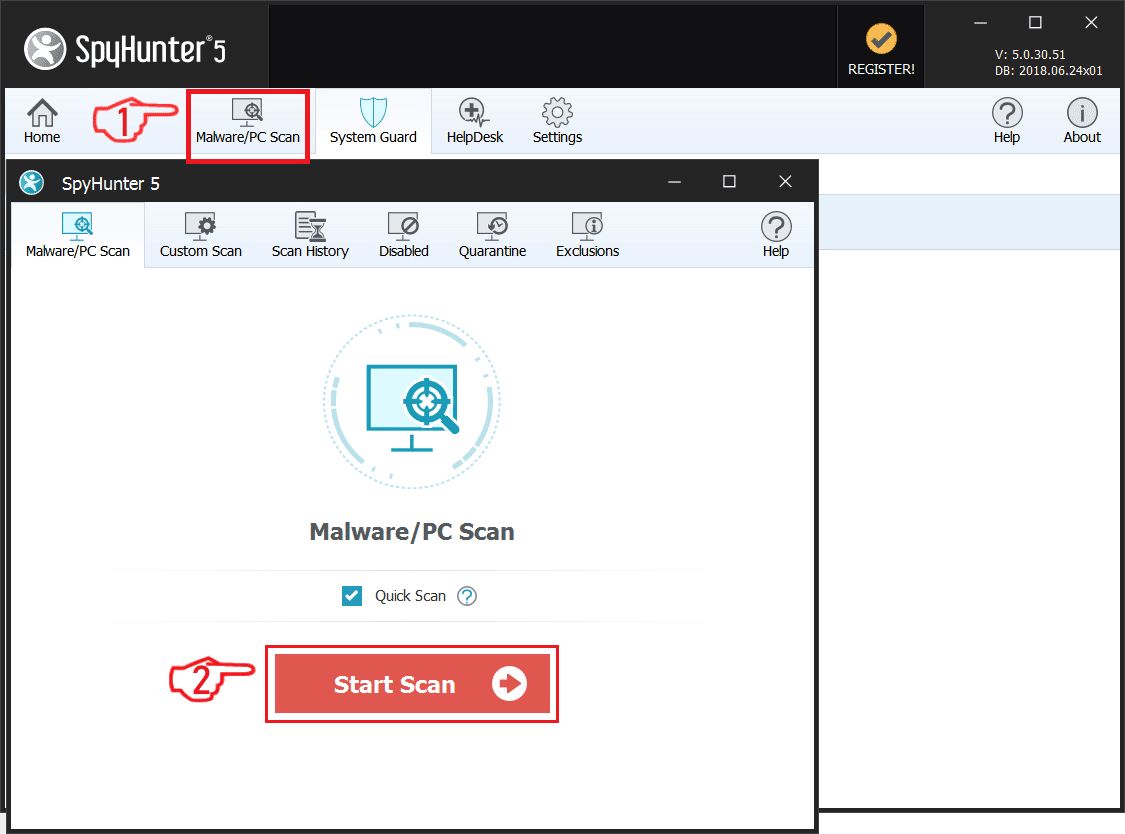
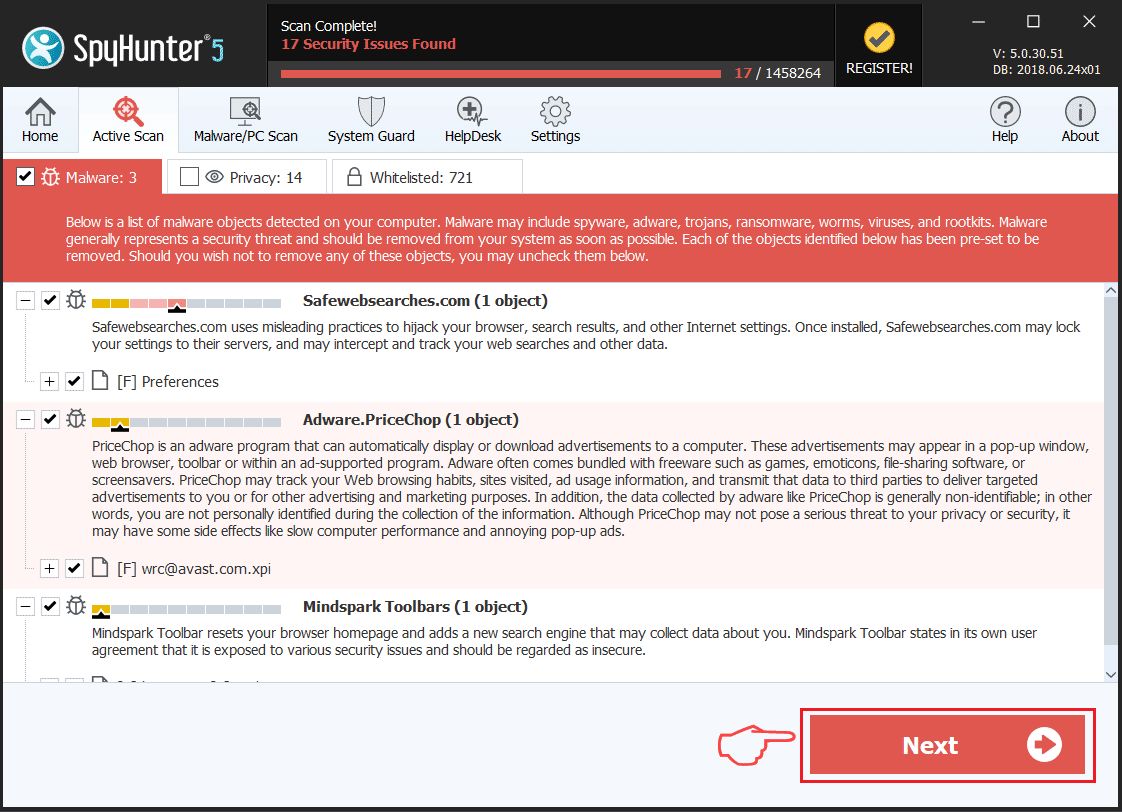
Step 1: Scan for Letsdraw.tv with SpyHunter Anti-Malware Tool
Step 2: Boot Your PC In Safe Mode
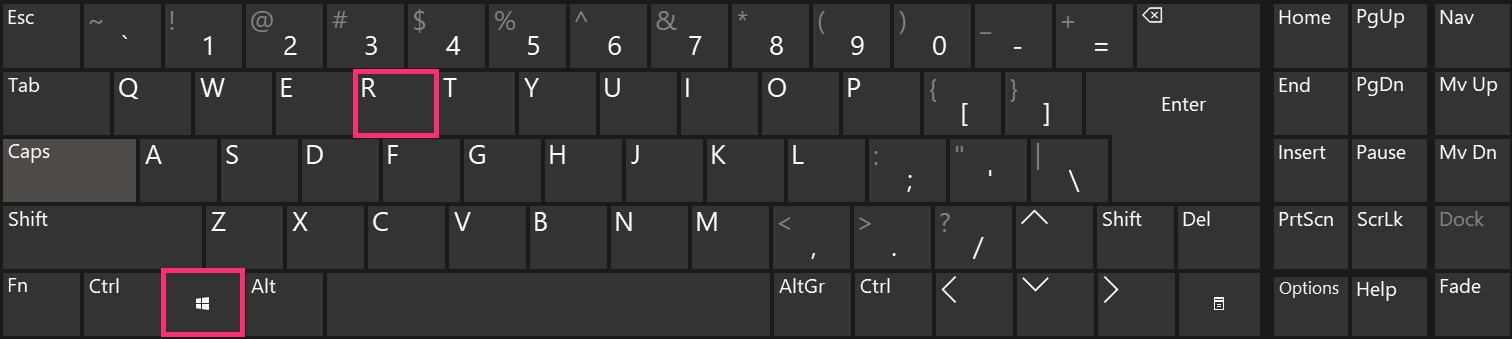
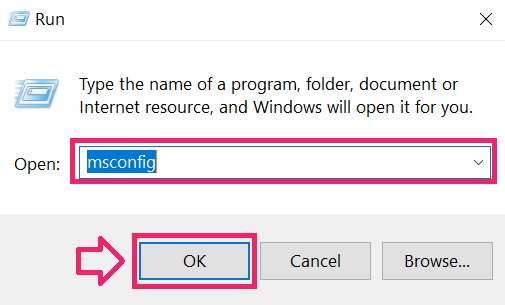
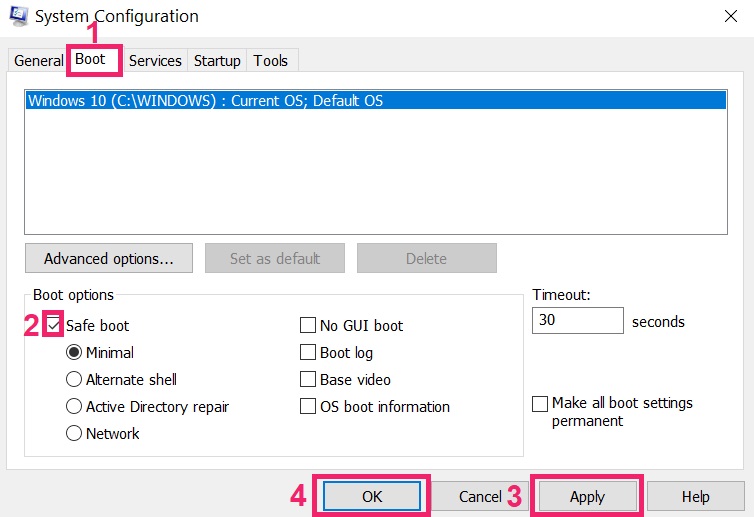
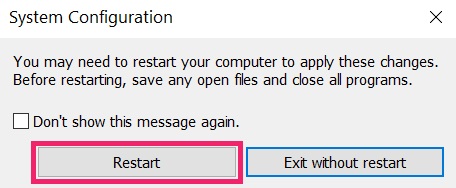
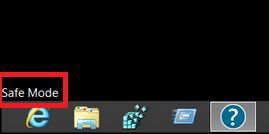
Step 3: Uninstall Letsdraw.tv and related software from Windows
Uninstall Steps for Windows 11
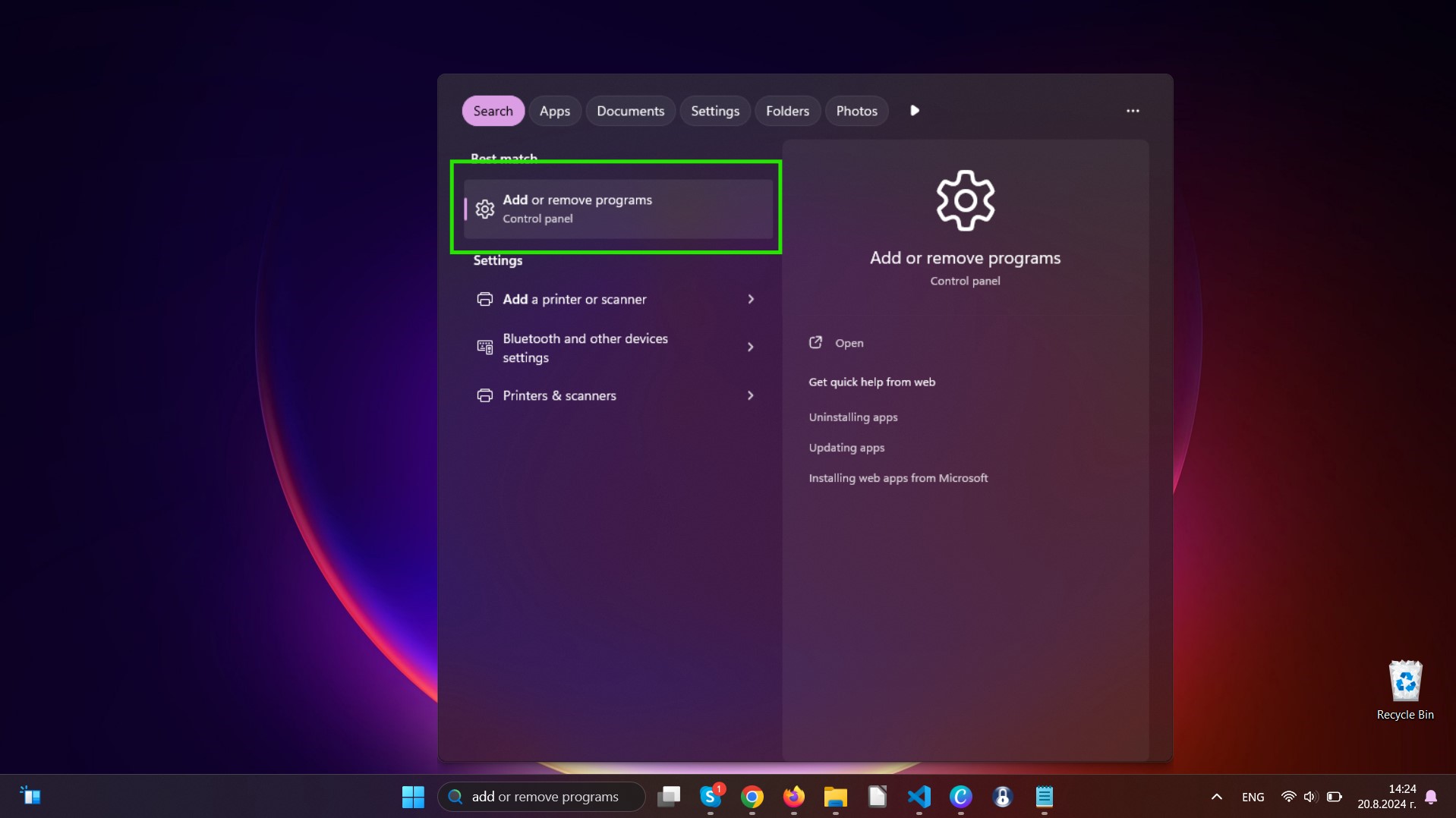
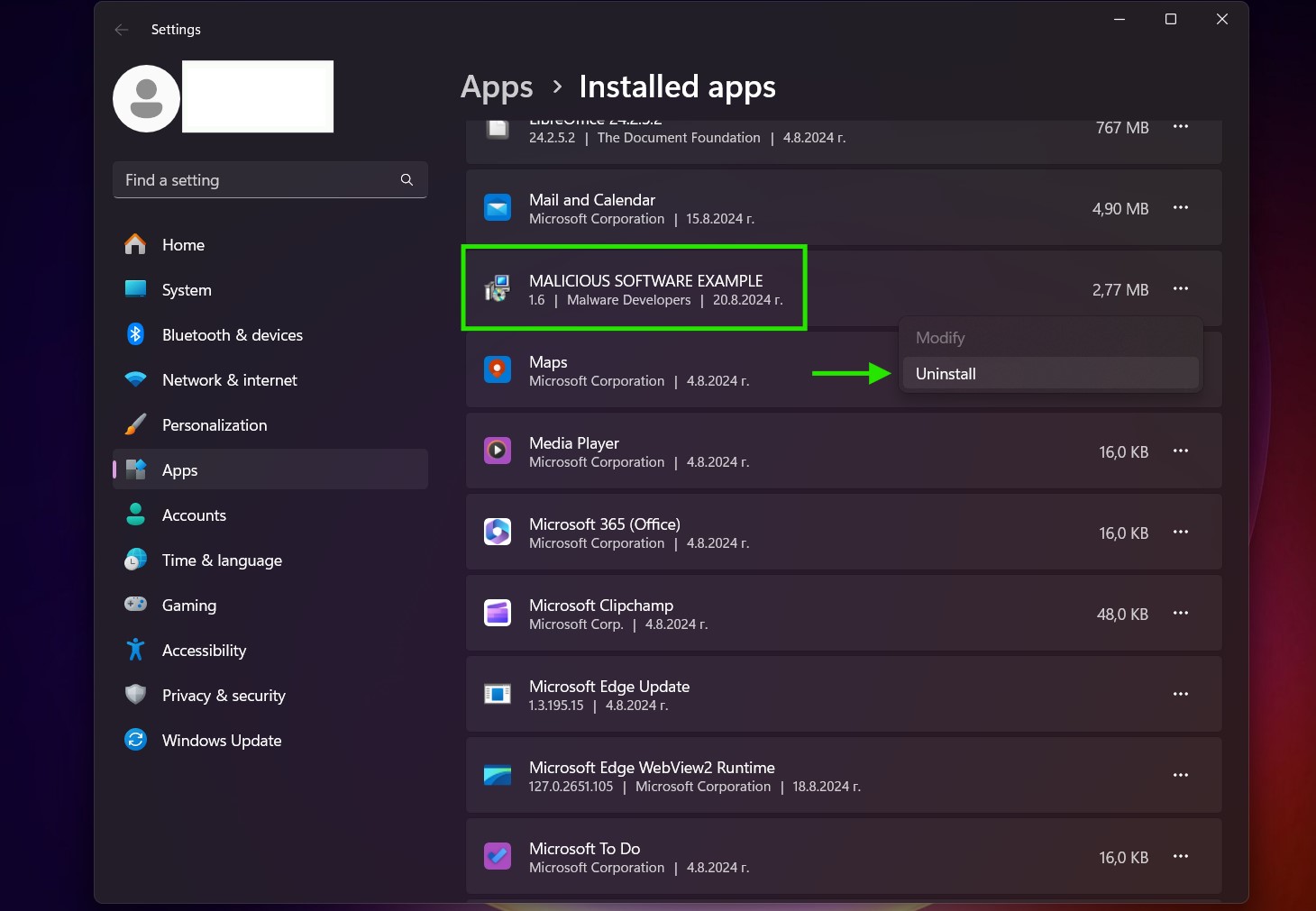
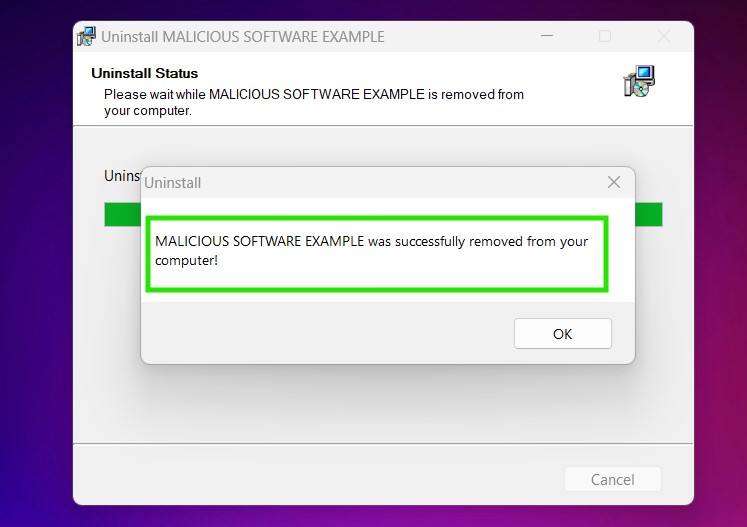
Uninstall Steps for Windows 10 and Older Versions
Here is a method in few easy steps that should be able to uninstall most programs. No matter if you are using Windows 10, 8, 7, Vista or XP, those steps will get the job done. Dragging the program or its folder to the recycle bin can be a very bad decision. If you do that, bits and pieces of the program are left behind, and that can lead to unstable work of your PC, errors with the file type associations and other unpleasant activities. The proper way to get a program off your computer is to Uninstall it. To do that:
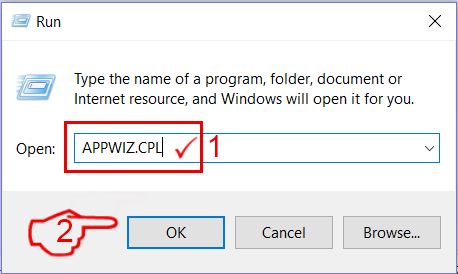
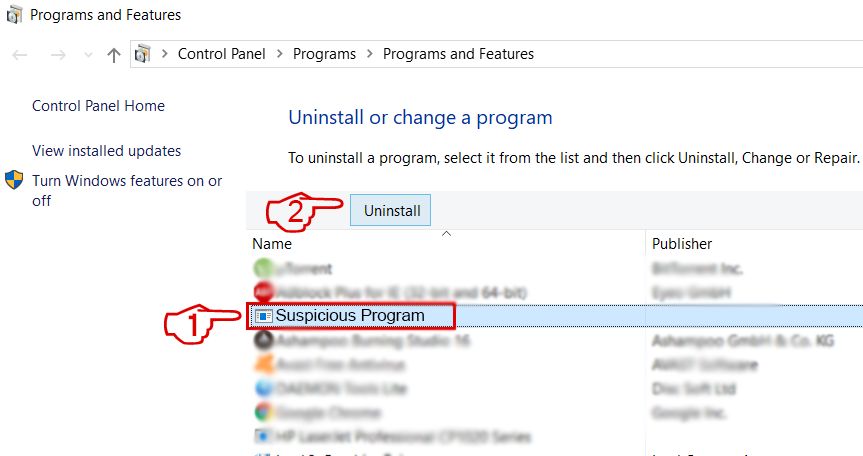 Follow the instructions above and you will successfully uninstall most programs.
Step 4: Clean Any registries, Created by Letsdraw.tv on Your PC.
The usually targeted registries of Windows machines are the following:
- HKEY_LOCAL_MACHINE\Software\Microsoft\Windows\CurrentVersion\Run
- HKEY_CURRENT_USER\Software\Microsoft\Windows\CurrentVersion\Run
- HKEY_LOCAL_MACHINE\Software\Microsoft\Windows\CurrentVersion\RunOnce
- HKEY_CURRENT_USER\Software\Microsoft\Windows\CurrentVersion\RunOnce
You can access them by opening the Windows registry editor and deleting any values, created by Letsdraw.tv there. This can happen by following the steps underneath:
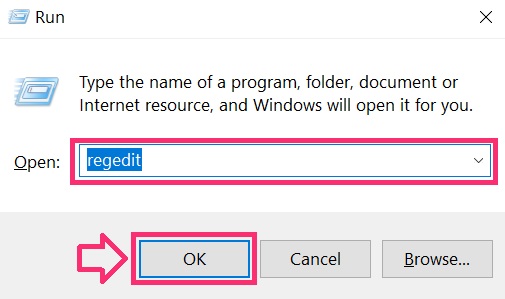
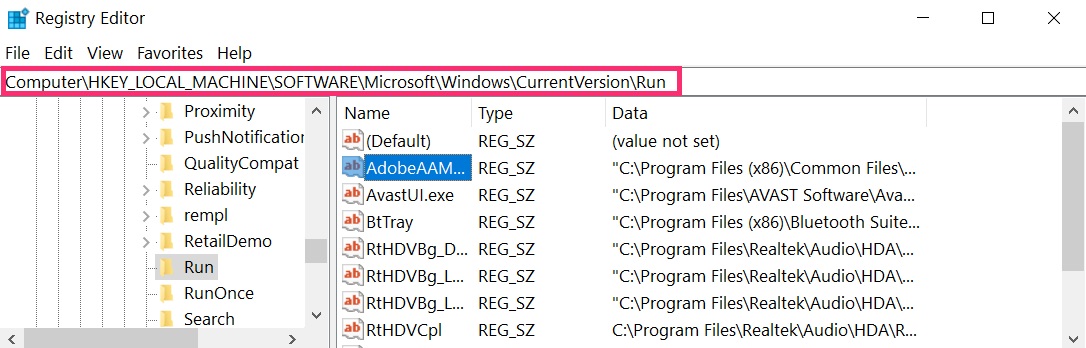
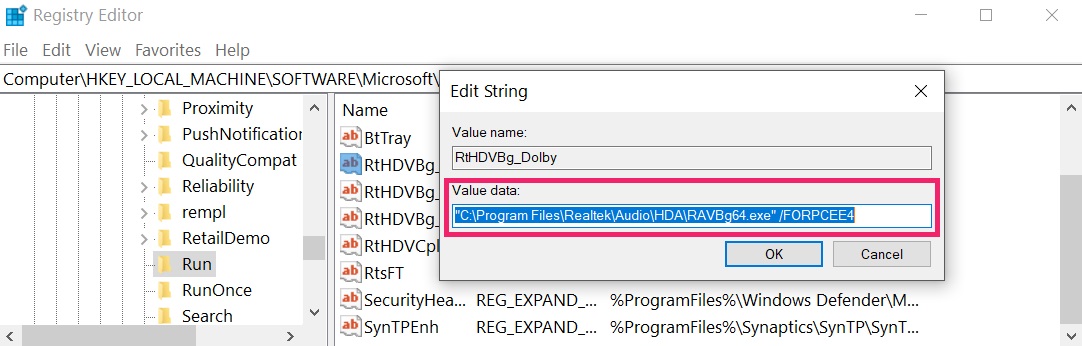 Tip: To find a virus-created value, you can right-click on it and click "Modify" to see which file it is set to run. If this is the virus file location, remove the value.
Video Removal Guide for Letsdraw.tv (Windows).
Get rid of Letsdraw.tv from Mac OS X.
Step 1: Uninstall Letsdraw.tv and remove related files and objects
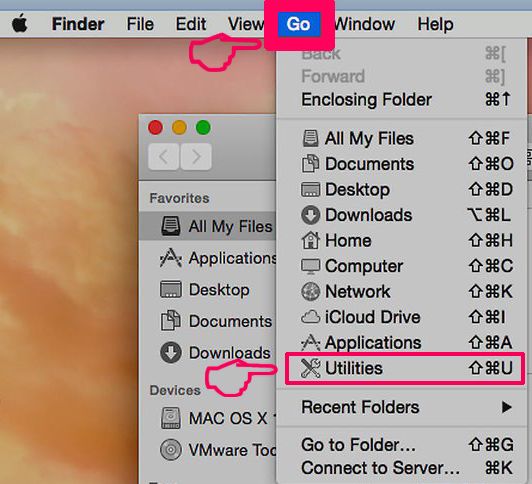
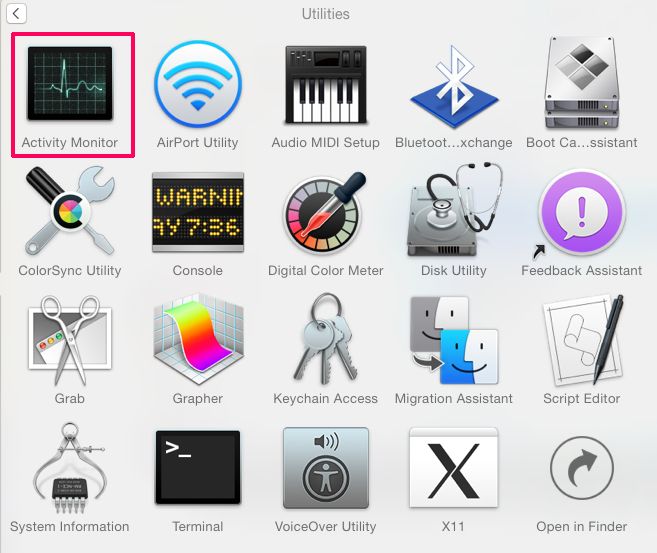
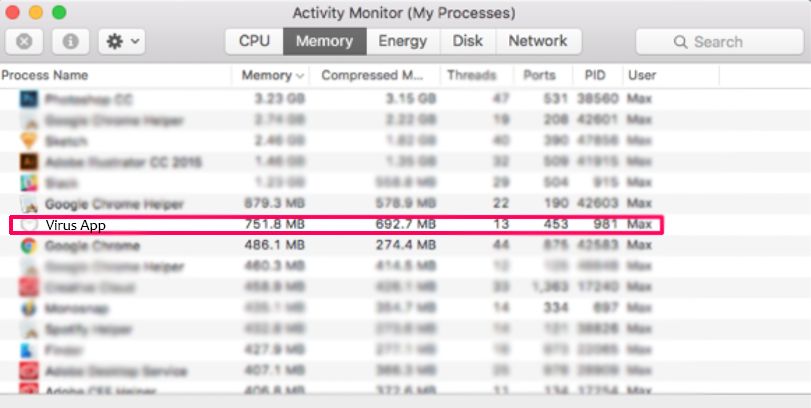
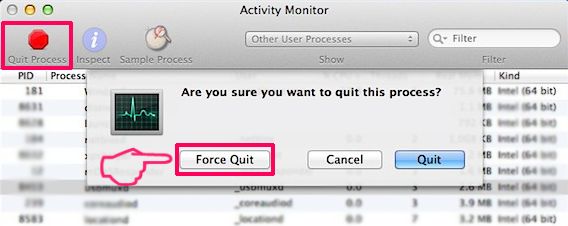
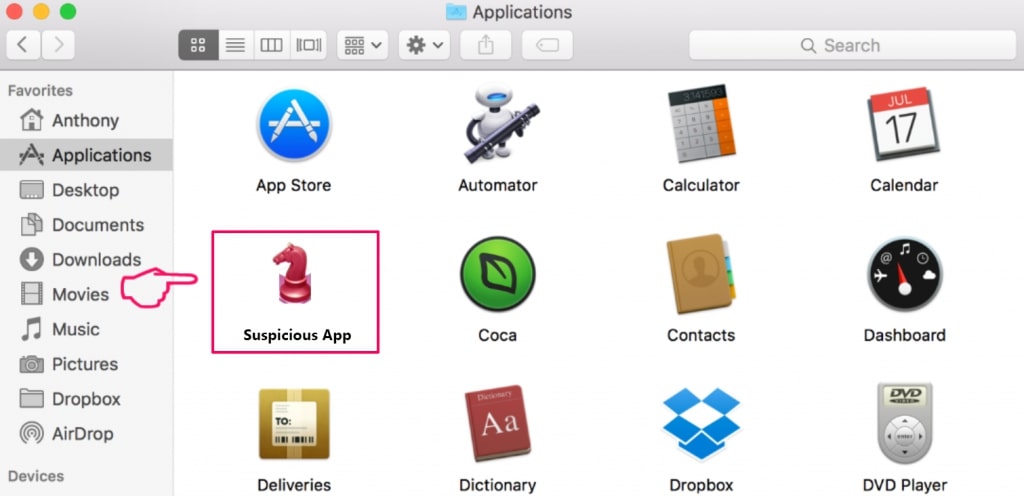
Your Mac will then show you a list of items that start automatically when you log in. Look for any suspicious apps identical or similar to Letsdraw.tv. Check the app you want to stop from running automatically and then select on the Minus (“-“) icon to hide it.
- Go to Finder.
- In the search bar type the name of the app that you want to remove.
- Above the search bar change the two drop down menus to “System Files” and “Are Included” so that you can see all of the files associated with the application you want to remove. Bear in mind that some of the files may not be related to the app so be very careful which files you delete.
- If all of the files are related, hold the ⌘+A buttons to select them and then drive them to “Trash”.
In case you cannot remove Letsdraw.tv via Step 1 above:
In case you cannot find the virus files and objects in your Applications or other places we have shown above, you can manually look for them in the Libraries of your Mac. But before doing this, please read the disclaimer below:
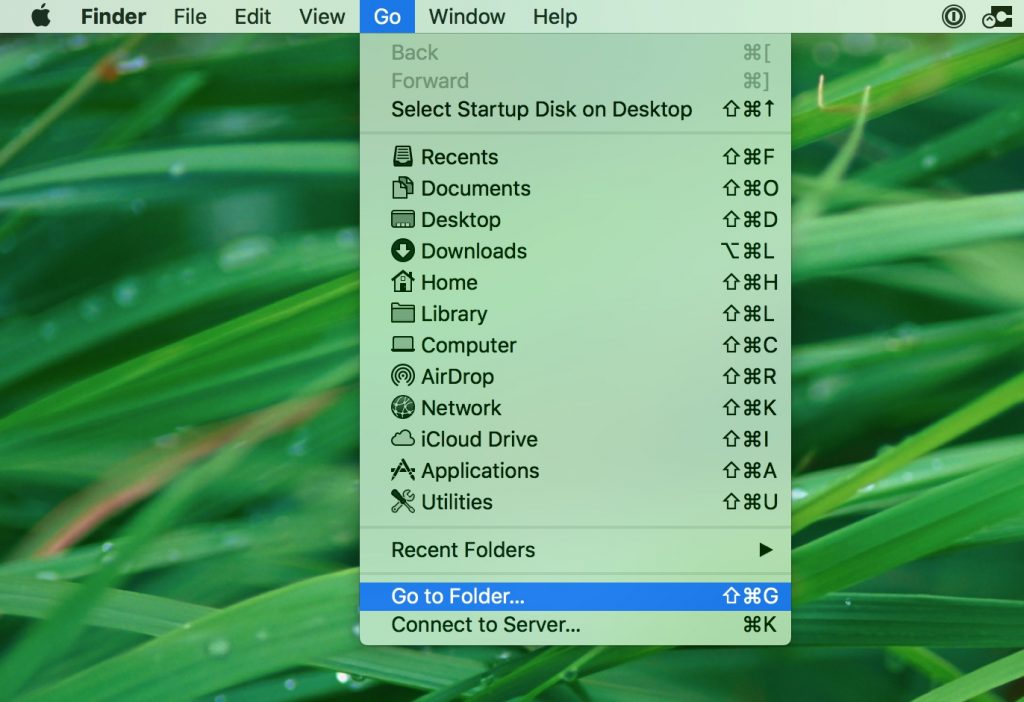
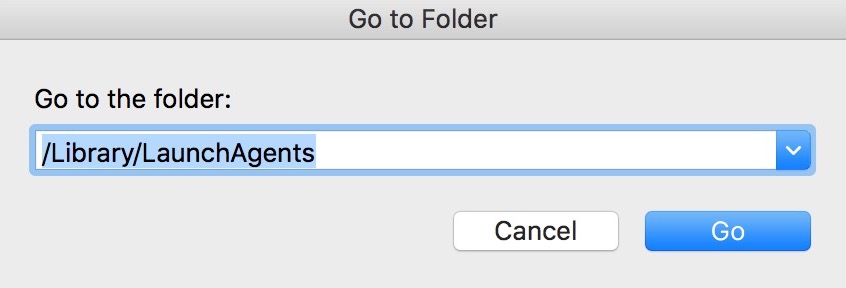
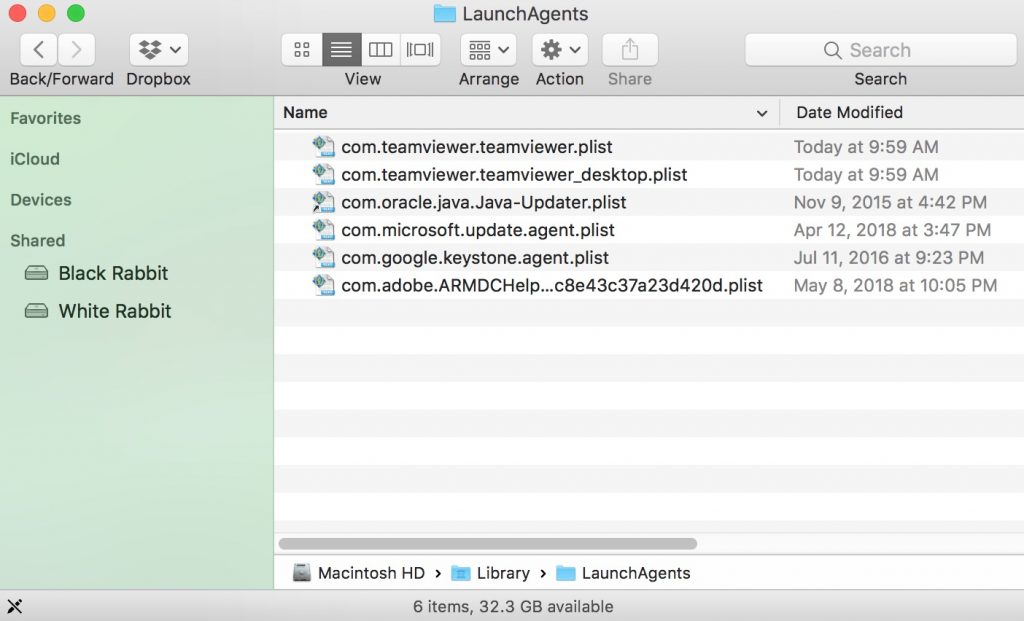
You can repeat the same procedure with the following other Library directories:
→ ~/Library/LaunchAgents
/Library/LaunchDaemons
Tip: ~ is there on purpose, because it leads to more LaunchAgents.
Step 2: Scan for and remove Letsdraw.tv files from your Mac
When you are facing problems on your Mac as a result of unwanted scripts and programs such as Letsdraw.tv, the recommended way of eliminating the threat is by using an anti-malware program. SpyHunter for Mac offers advanced security features along with other modules that will improve your Mac’s security and protect it in the future.
Video Removal Guide for Letsdraw.tv (Mac)
Remove Letsdraw.tv from Google Chrome.
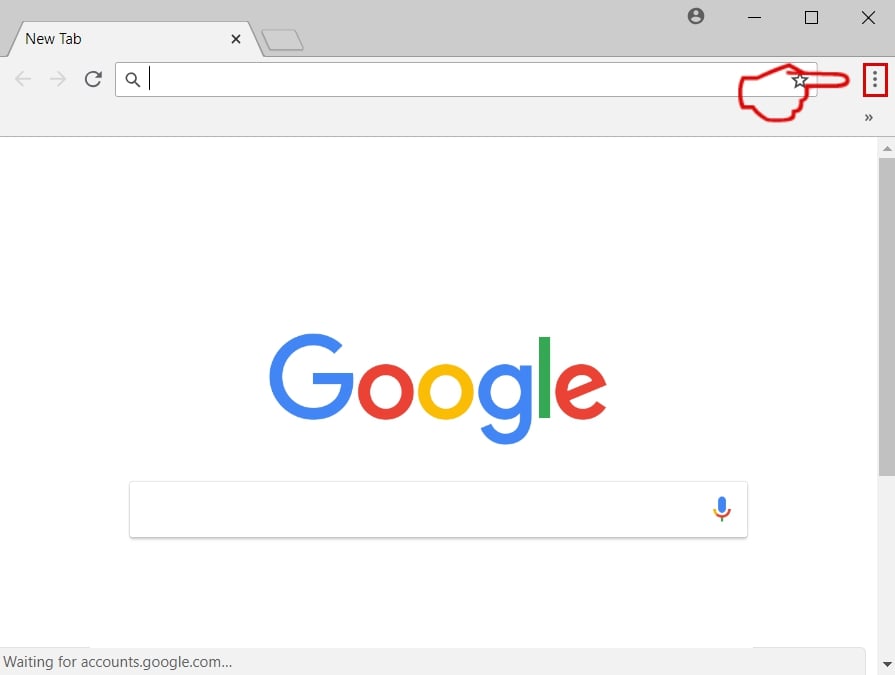
Step 1: Start Google Chrome and open the drop menu
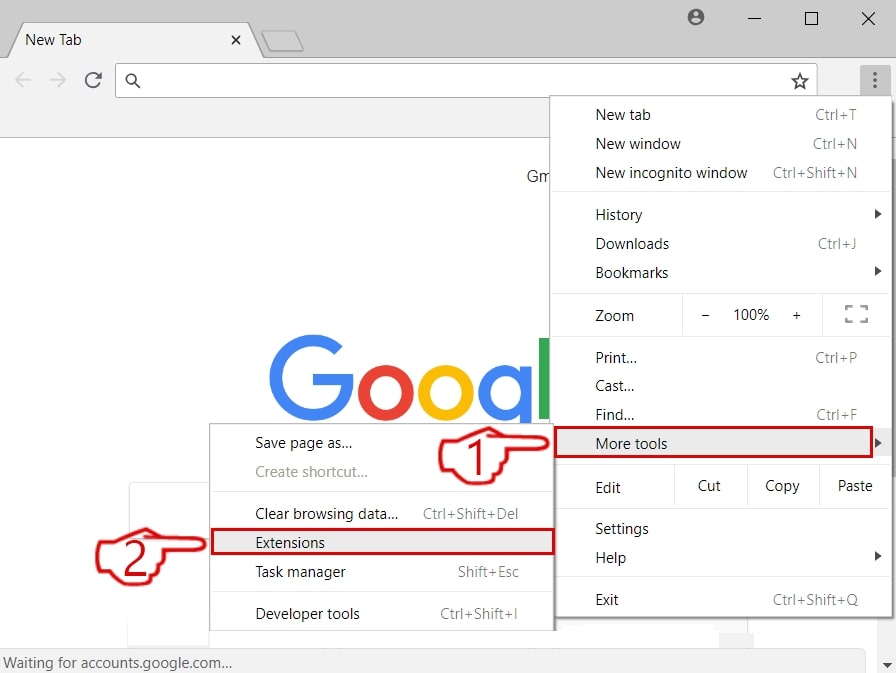
Step 2: Move the cursor over "Tools" and then from the extended menu choose "Extensions"
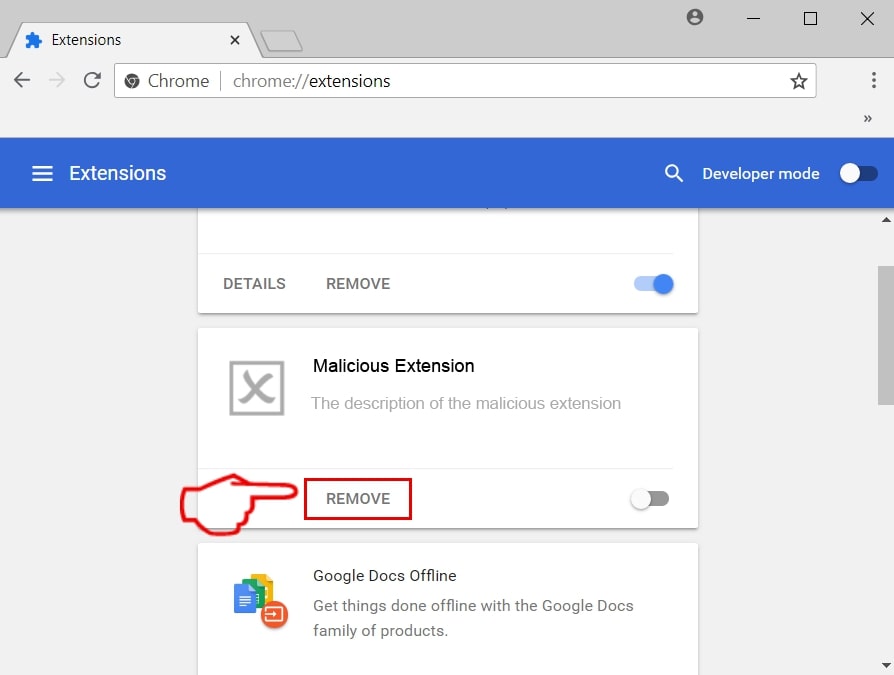
Step 3: From the opened "Extensions" menu locate the unwanted extension and click on its "Remove" button.
Step 4: After the extension is removed, restart Google Chrome by closing it from the red "X" button at the top right corner and start it again.
Erase Letsdraw.tv from Mozilla Firefox.
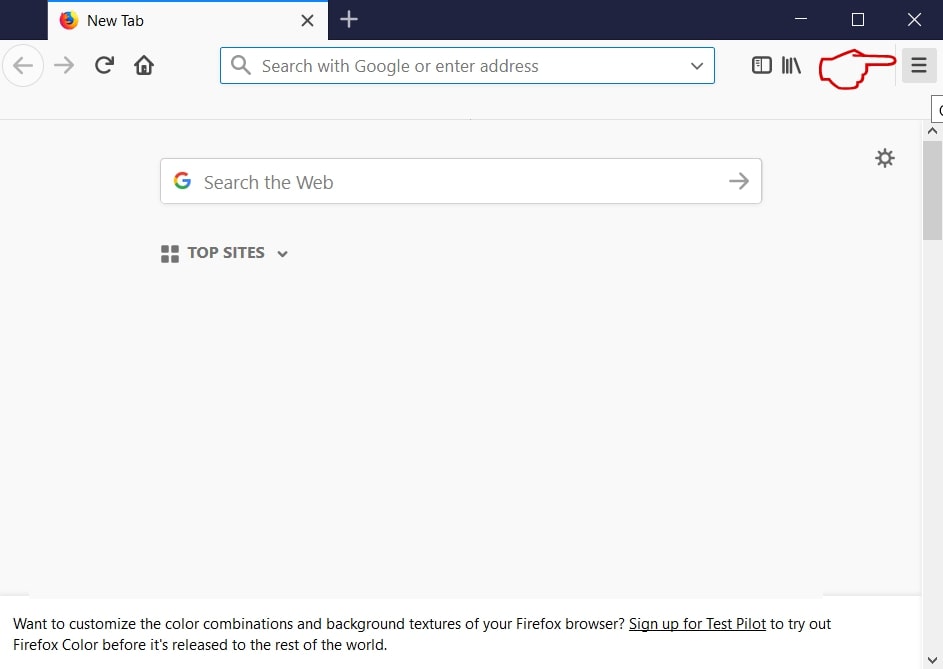
Step 1: Start Mozilla Firefox. Open the menu window:
Step 2: Select the "Add-ons" icon from the menu.
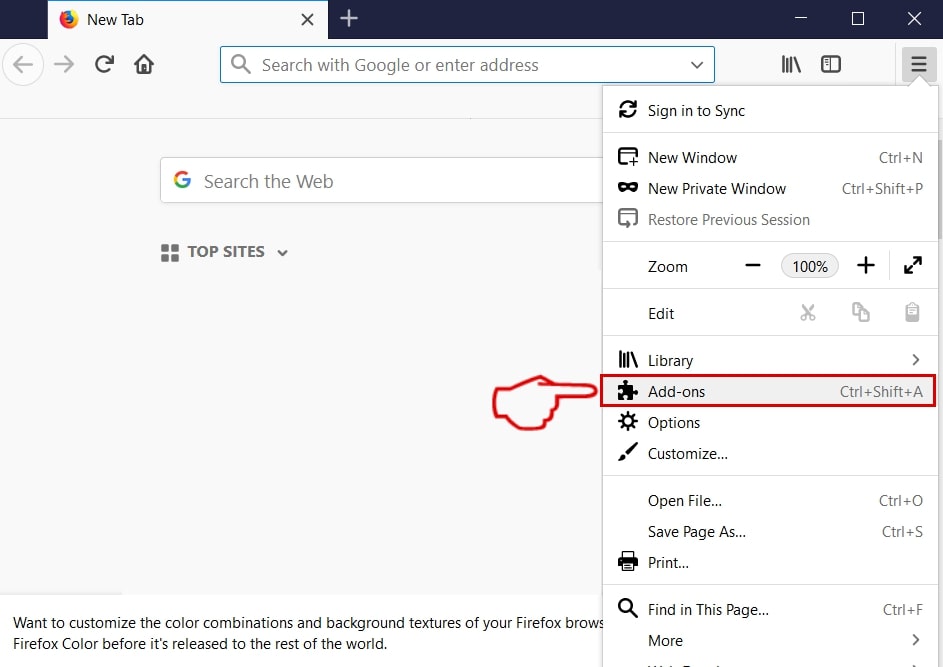
Step 3: Select the unwanted extension and click "Remove"

Step 4: After the extension is removed, restart Mozilla Firefox by closing it from the red "X" button at the top right corner and start it again.
Uninstall Letsdraw.tv from Microsoft Edge.
Step 1: Start Edge browser.
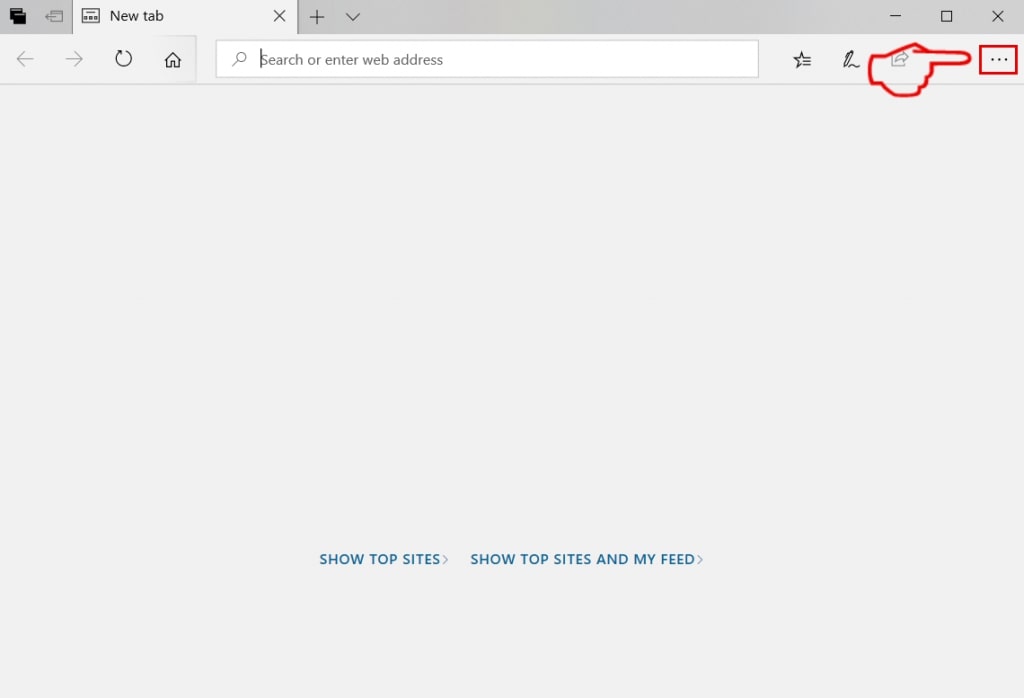
Step 2: Open the drop menu by clicking on the icon at the top right corner.
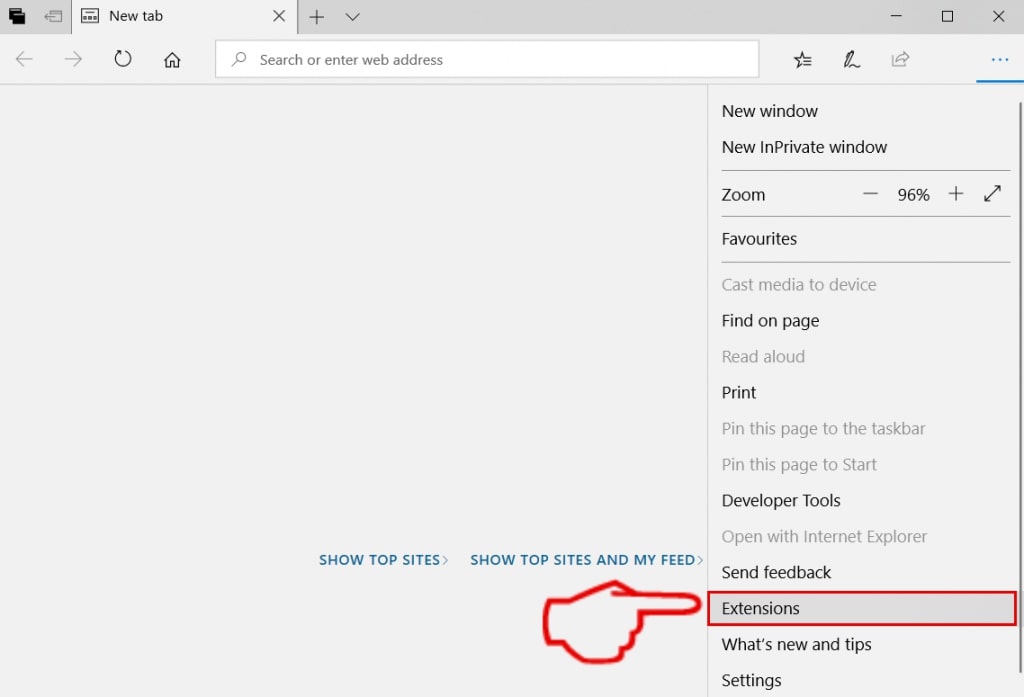
Step 3: From the drop menu select "Extensions".
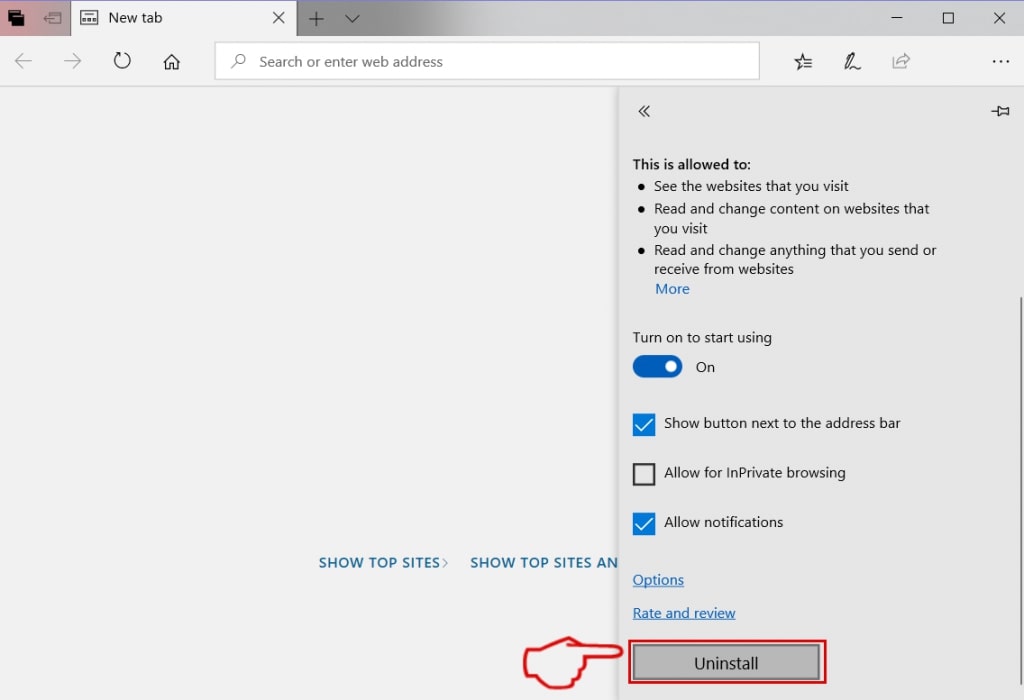
Step 4: Choose the suspected malicious extension you want to remove and then click on the gear icon.
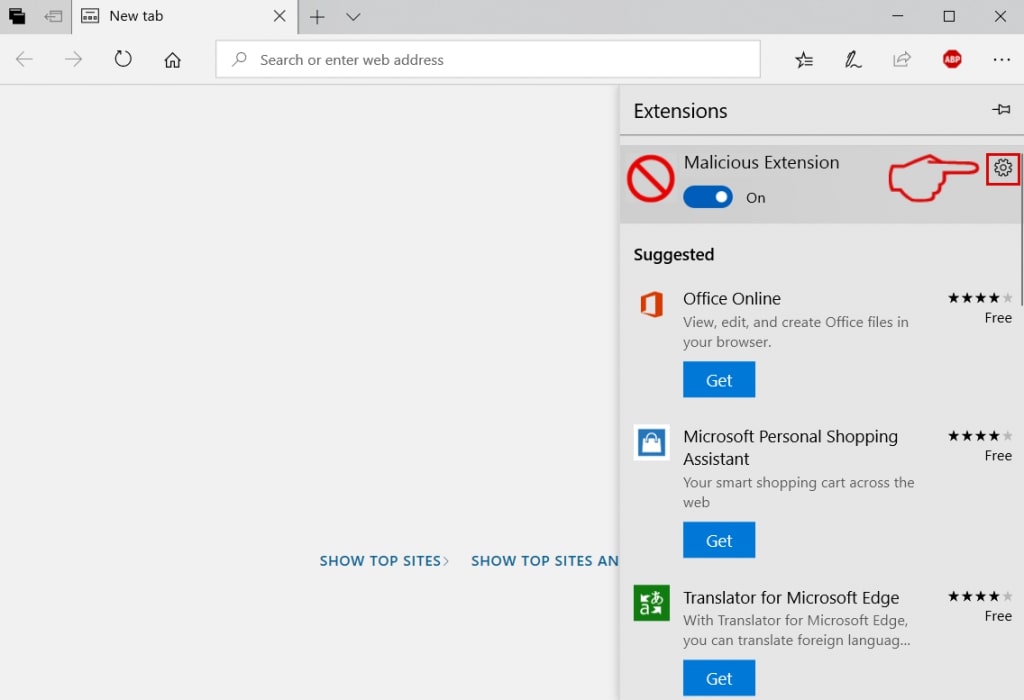
Step 5: Remove the malicious extension by scrolling down and then clicking on Uninstall.
Remove Letsdraw.tv from Safari
Step 1: Start the Safari app.
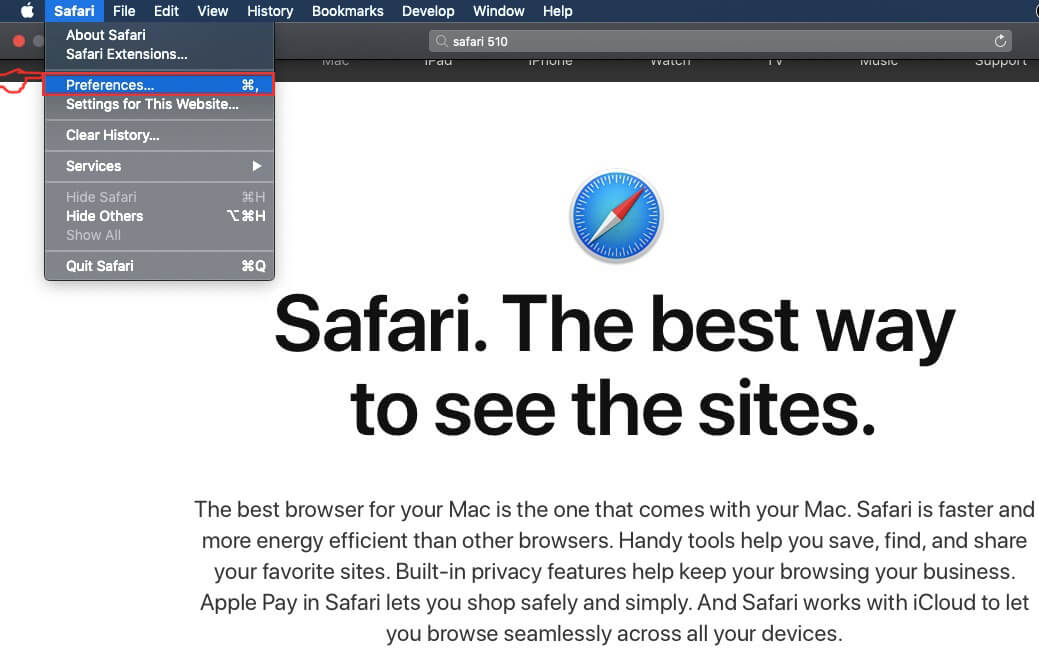
Step 2: After hovering your mouse cursor to the top of the screen, click on the Safari text to open its drop down menu.
Step 3: From the menu, click on "Preferences".
Step 4: After that, select the 'Extensions' Tab.

Step 5: Click once on the extension you want to remove.
Step 6: Click 'Uninstall'.
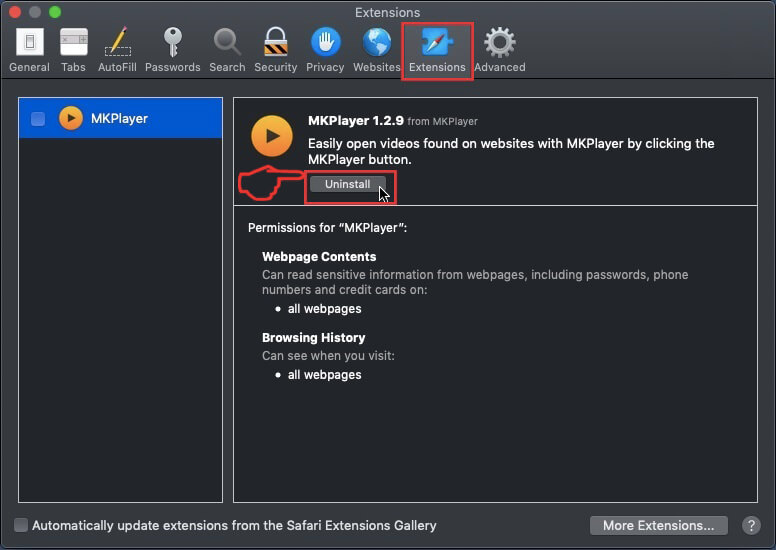
A pop-up window will appear asking for confirmation to uninstall the extension. Select 'Uninstall' again, and the Letsdraw.tv will be removed.
Eliminate Letsdraw.tv from Internet Explorer.
Step 1: Start Internet Explorer.
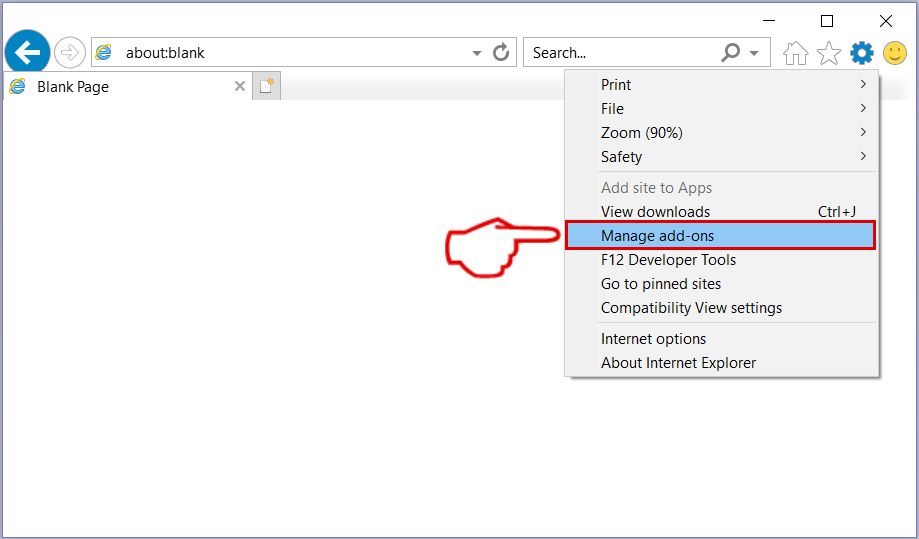
Step 2: Click on the gear icon labeled 'Tools' to open the drop menu and select 'Manage Add-ons'
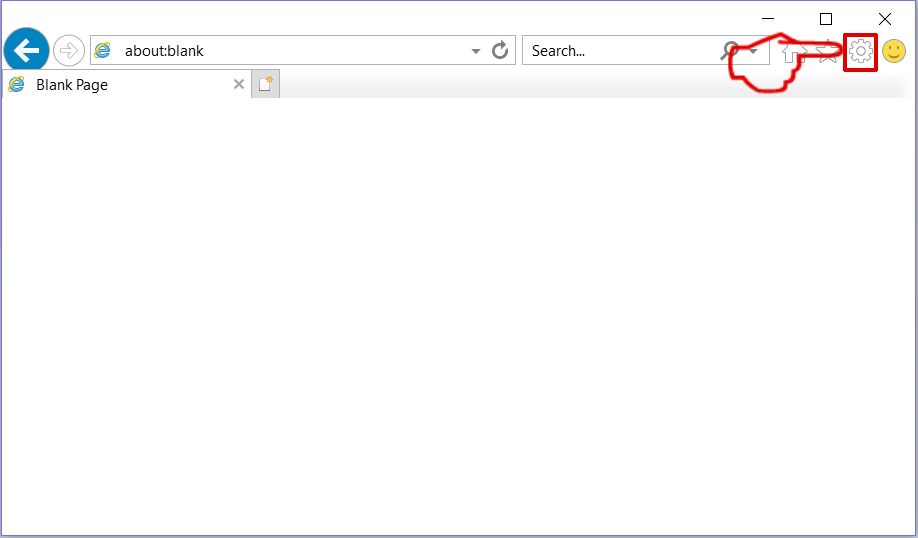
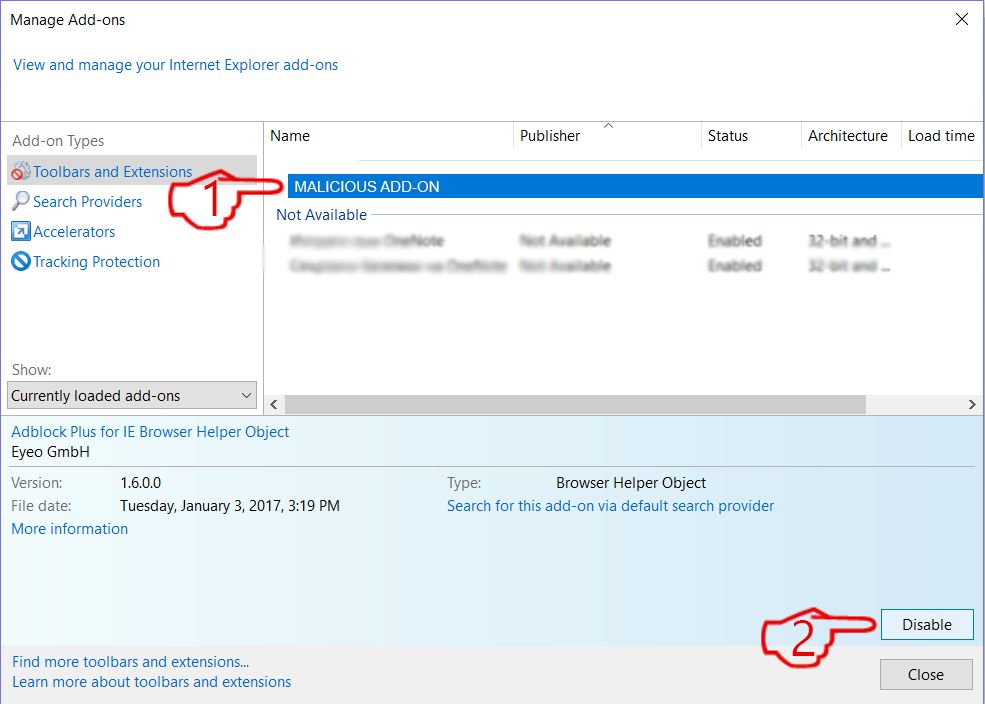
Step 3: In the 'Manage Add-ons' window.
Step 4: Select the extension you want to remove and then click 'Disable'. A pop-up window will appear to inform you that you are about to disable the selected extension, and some more add-ons might be disabled as well. Leave all the boxes checked, and click 'Disable'.
Step 5: After the unwanted extension has been removed, restart Internet Explorer by closing it from the red 'X' button located at the top right corner and start it again.
Remove Push Notifications from Your Browsers
Turn Off Push Notifications from Google Chrome
To disable any Push Notices from Google Chrome browser, please follow the steps below:
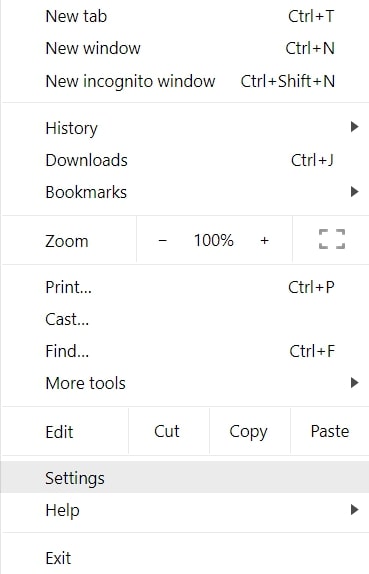
Step 1: Go to Settings in Chrome.
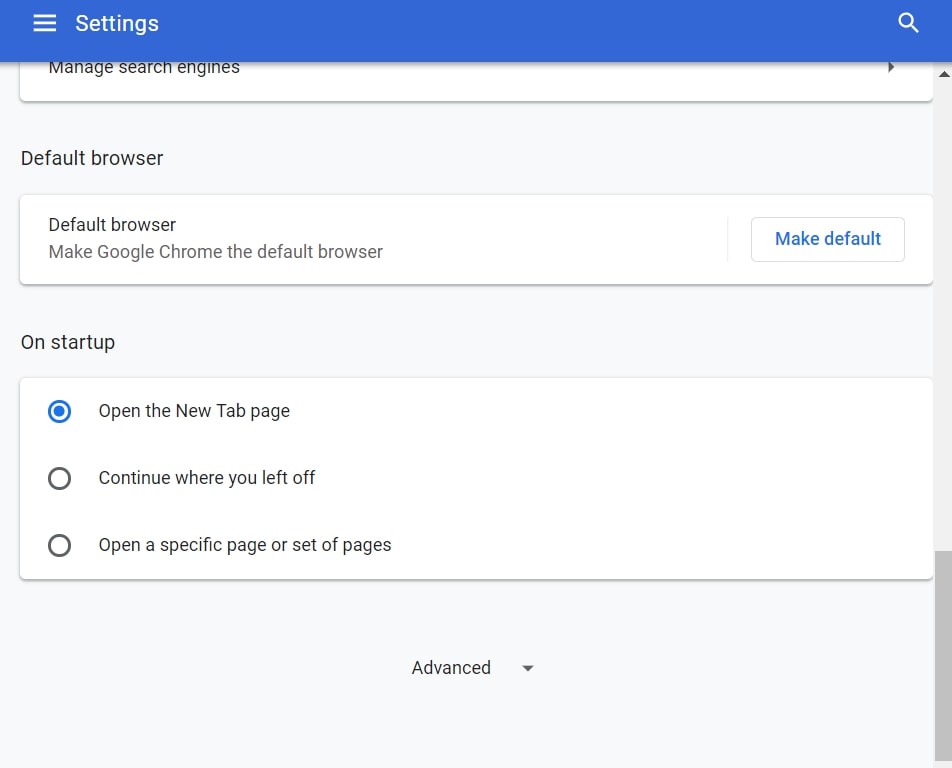
Step 2: In Settings, select “Advanced Settings”:
Step 3: Click “Content Settings”:
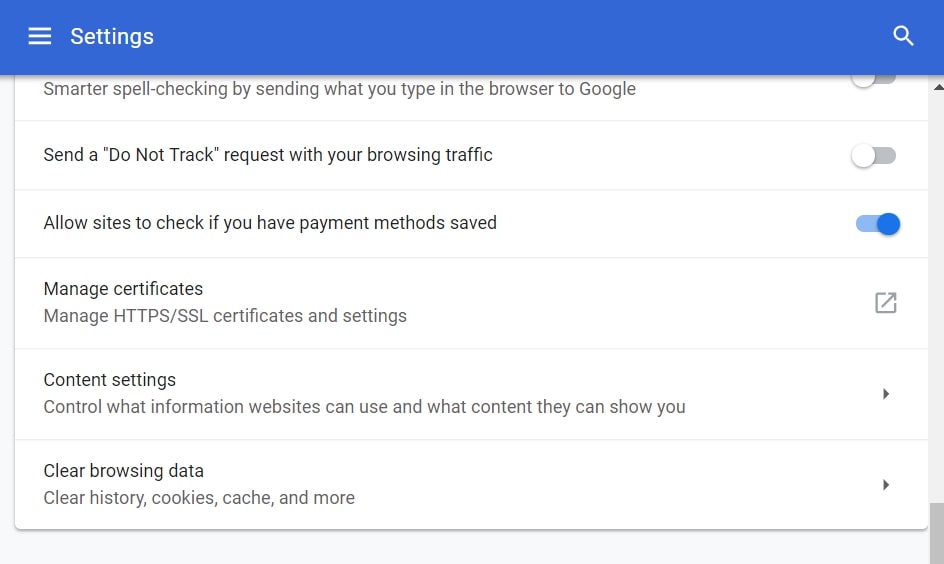
Step 4: Open “Notifications”:
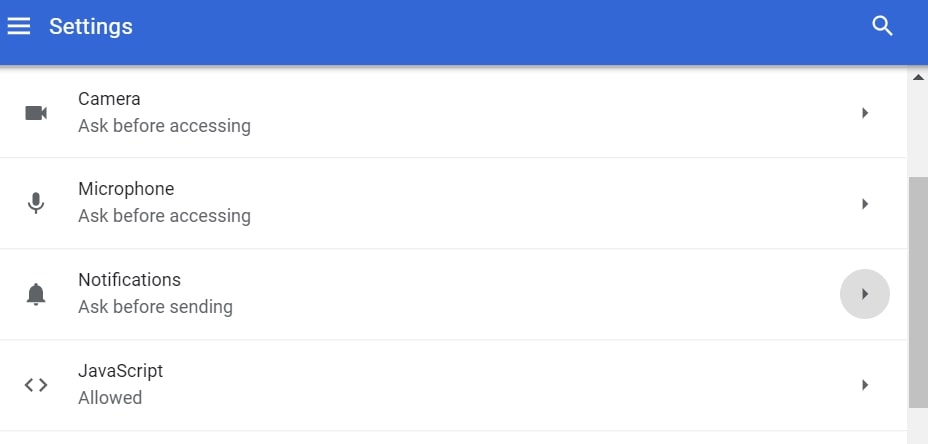
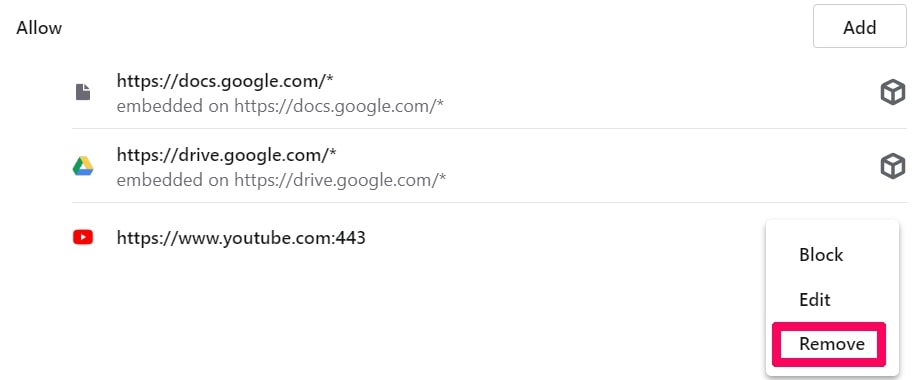
Step 5: Click the three dots and choose Block, Edit or Remove options:

Remove Push Notifications on Firefox
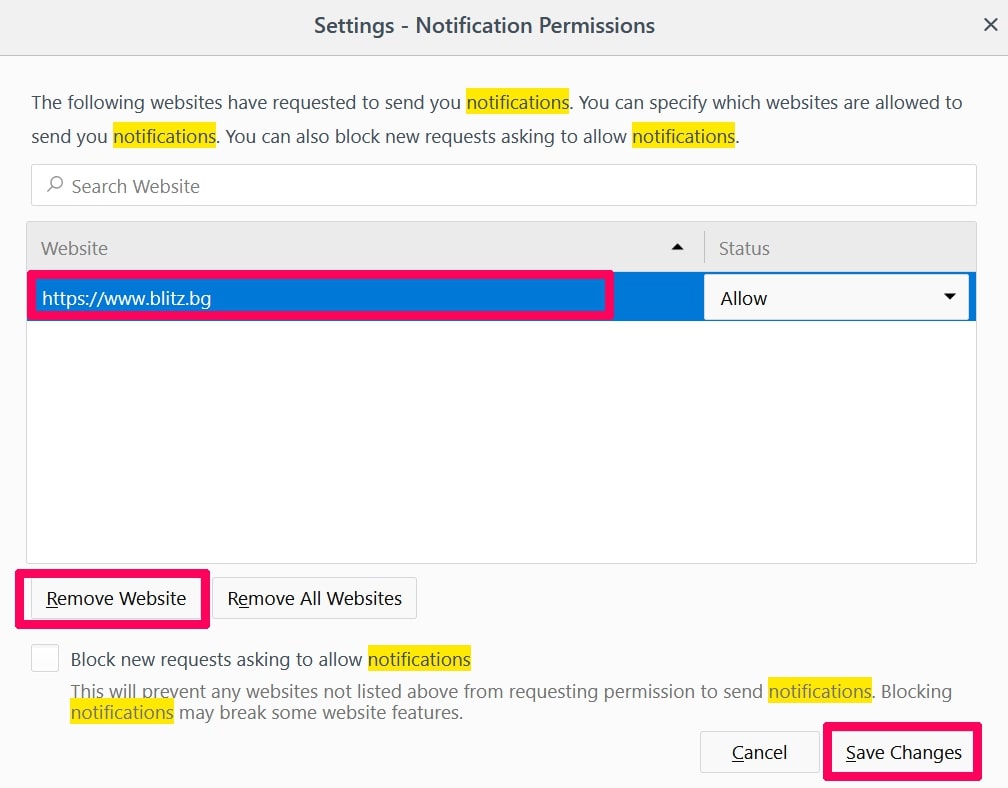
Step 1: Go to Firefox Options.
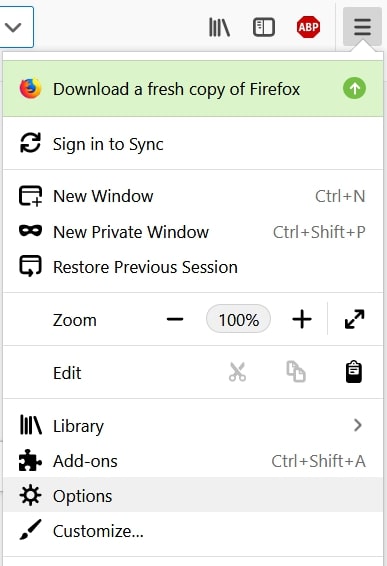
Step 2: Go to “Settings”, type “notifications” in the search bar and click "Settings":
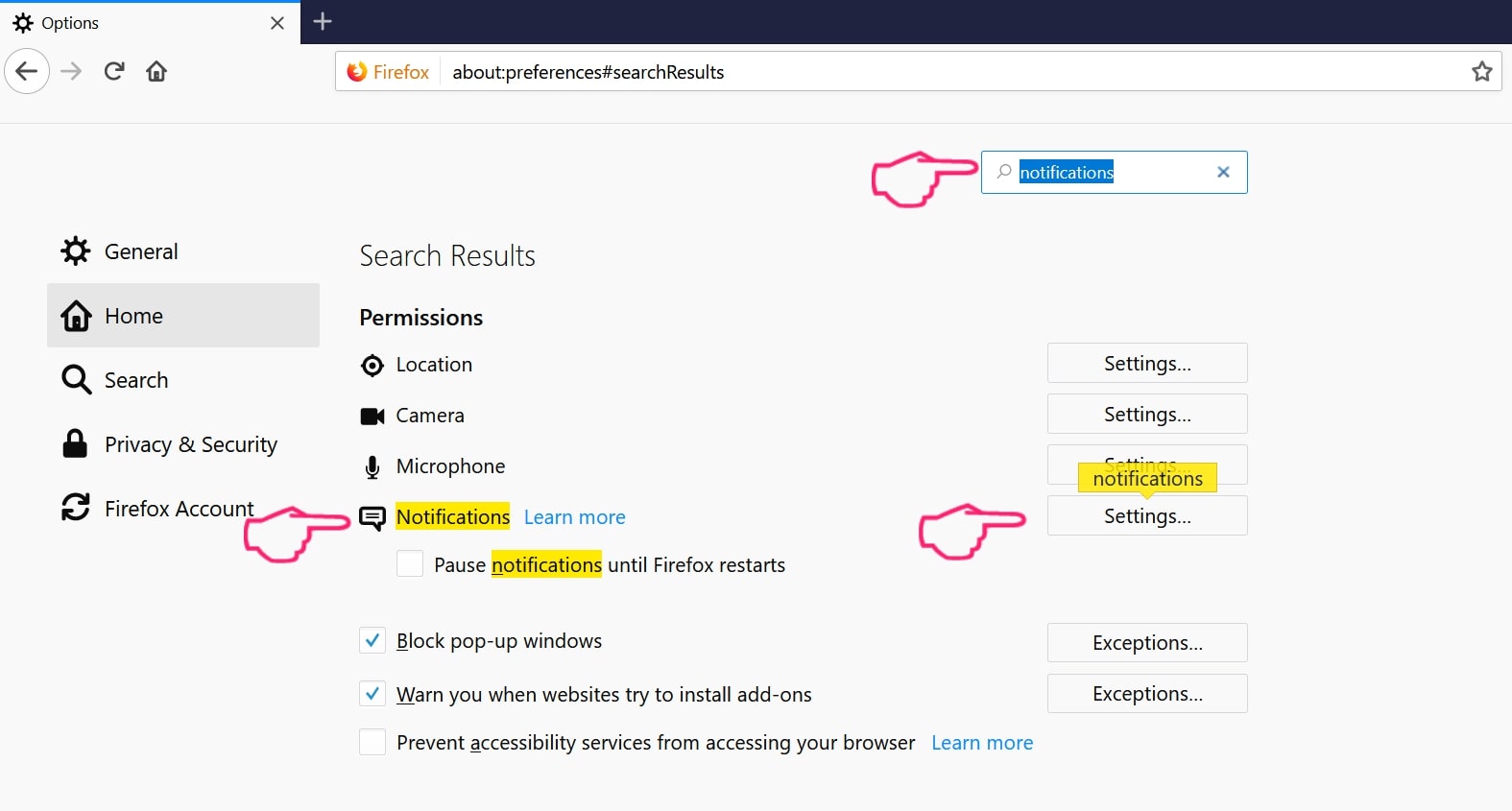
Step 3: Click “Remove” on any site you wish notifications gone and click “Save Changes”
Stop Push Notifications on Opera
Step 1: In Opera, press ALT+P to go to Settings.
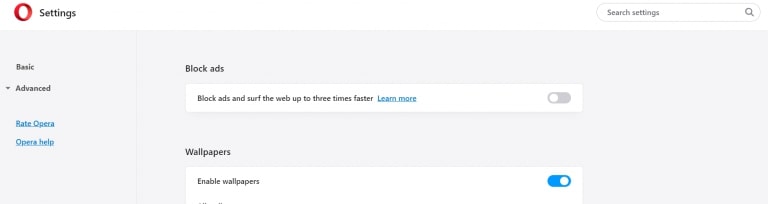
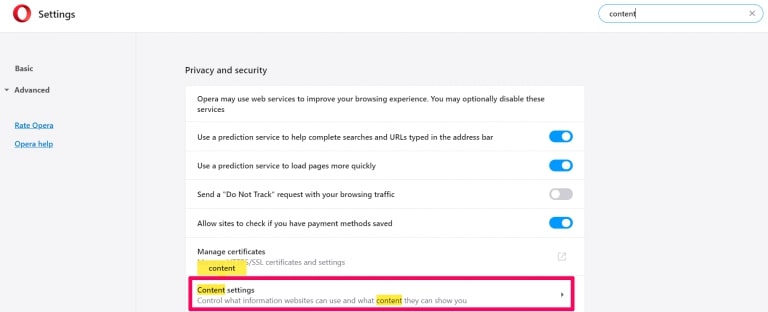
Step 2: In Setting search, type “Content” to go to Content Settings.
Step 3: Open Notifications:
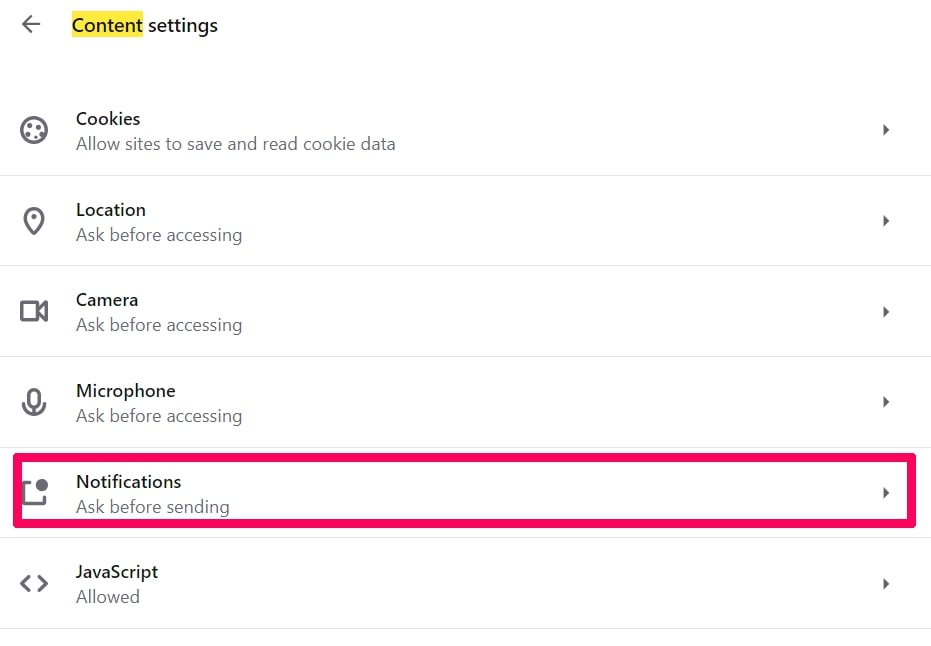
Step 4: Do the same as you did with Google Chrome (explained below):
Eliminate Push Notifications on Safari
Step 1: Open Safari Preferences.
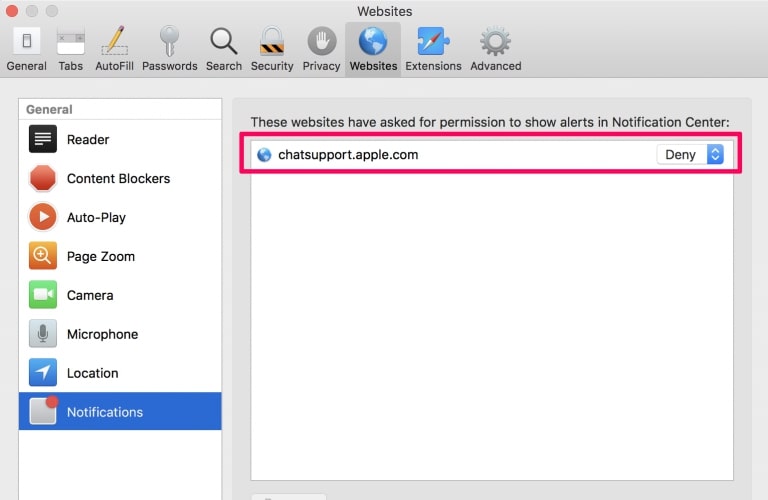
Step 2: Choose the domain from where you like push pop-ups gone and change to "Deny" from "Allow".
Letsdraw.tv-FAQ
What Is Letsdraw.tv?
The Letsdraw.tv threat is adware or browser redirect virus.
It may slow your computer down significantly and display advertisements. The main idea is for your information to likely get stolen or more ads to appear on your device.
The creators of such unwanted apps work with pay-per-click schemes to get your computer to visit risky or different types of websites that may generate them funds. This is why they do not even care what types of websites show up on the ads. This makes their unwanted software indirectly risky for your OS.
What Are the Symptoms of Letsdraw.tv?
There are several symptoms to look for when this particular threat and also unwanted apps in general are active:
Symptom #1: Your computer may become slow and have poor performance in general.
Symptom #2: You have toolbars, add-ons or extensions on your web browsers that you don't remember adding.
Symptom #3: You see all types of ads, like ad-supported search results, pop-ups and redirects to randomly appear.
Symptom #4: You see installed apps on your Mac running automatically and you do not remember installing them.
Symptom #5: You see suspicious processes running in your Task Manager.
If you see one or more of those symptoms, then security experts recommend that you check your computer for viruses.
What Types of Unwanted Programs Are There?
According to most malware researchers and cyber-security experts, the threats that can currently affect your device can be rogue antivirus software, adware, browser hijackers, clickers, fake optimizers and any forms of PUPs.
What to Do If I Have a "virus" like Letsdraw.tv?
With few simple actions. First and foremost, it is imperative that you follow these steps:
Step 1: Find a safe computer and connect it to another network, not the one that your Mac was infected in.
Step 2: Change all of your passwords, starting from your email passwords.
Step 3: Enable two-factor authentication for protection of your important accounts.
Step 4: Call your bank to change your credit card details (secret code, etc.) if you have saved your credit card for online shopping or have done online activities with your card.
Step 5: Make sure to call your ISP (Internet provider or carrier) and ask them to change your IP address.
Step 6: Change your Wi-Fi password.
Step 7: (Optional): Make sure to scan all of the devices connected to your network for viruses and repeat these steps for them if they are affected.
Step 8: Install anti-malware software with real-time protection on every device you have.
Step 9: Try not to download software from sites you know nothing about and stay away from low-reputation websites in general.
If you follow these recommendations, your network and all devices will become significantly more secure against any threats or information invasive software and be virus free and protected in the future too.
How Does Letsdraw.tv Work?
Once installed, Letsdraw.tv can collect data using trackers. This data is about your web browsing habits, such as the websites you visit and the search terms you use. It is then used to target you with ads or to sell your information to third parties.
Letsdraw.tv can also download other malicious software onto your computer, such as viruses and spyware, which can be used to steal your personal information and show risky ads, that may redirect to virus sites or scams.
Is Letsdraw.tv Malware?
The truth is that PUPs (adware, browser hijackers) are not viruses, but may be just as dangerous since they may show you and redirect you to malware websites and scam pages.
Many security experts classify potentially unwanted programs as malware. This is because of the unwanted effects that PUPs can cause, such as displaying intrusive ads and collecting user data without the user’s knowledge or consent.
About the Letsdraw.tv Research
The content we publish on SensorsTechForum.com, this Letsdraw.tv how-to removal guide included, is the outcome of extensive research, hard work and our team’s devotion to help you remove the specific, adware-related problem, and restore your browser and computer system.
How did we conduct the research on Letsdraw.tv?
Please note that our research is based on independent investigation. We are in contact with independent security researchers, thanks to which we receive daily updates on the latest malware, adware, and browser hijacker definitions.
Furthermore, the research behind the Letsdraw.tv threat is backed with VirusTotal.
To better understand this online threat, please refer to the following articles which provide knowledgeable details.