

If you have discovered a blank, nameless process inside the Windows Task Manager, you are right to suspect something is wrong. Malware creators increasingly use stealth techniques to hide malware executables from casual inspection, and one of the most deceptive among them is the “Blank Name Task Manager Process Virus.” This threat uses an empty or invisible process name to mask itself, making users believe it is a harmless system glitch. Read this article to find out what this threat is, how it gets inside a system, what it does, and why you should follow the removal guide placed below this article to eliminate it completely.
In this in-depth analysis, we will break down how this blank-process Trojan horse operates, how it manipulates Windows APIs to hide its identity, and how it abuses persistence mechanisms to remain active even after reboots. Understanding these behaviors is essential for safely removing the threat and preventing further compromise of your machine.
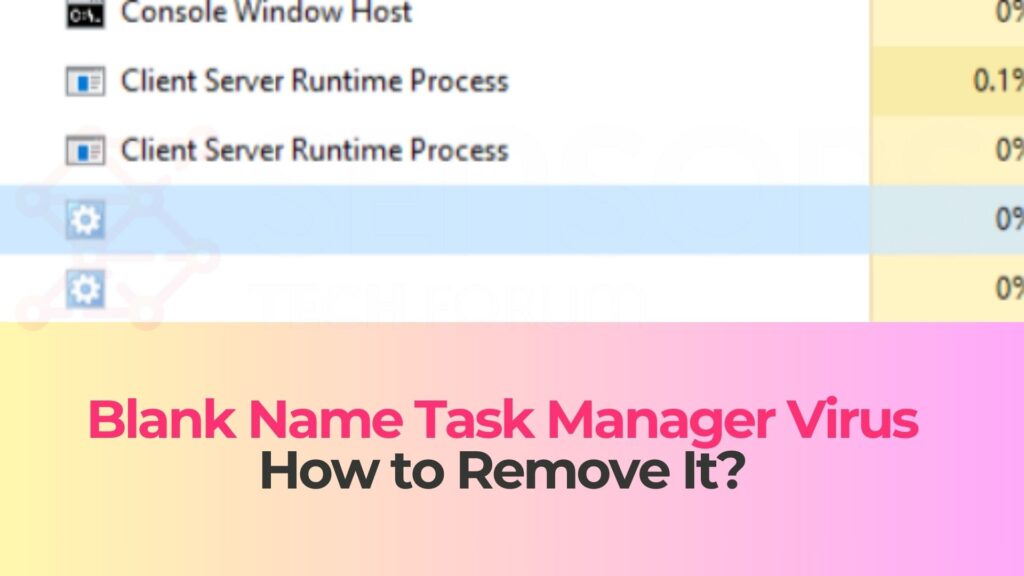
Blank Name Task Manager Details
| Type | Trojan, Malware, Backdoor |
| Removal Time | Around 5 Minutes |
| Removal Tool |
See If Your System Has Been Affected by malware
Download
Malware Removal Tool
|
What Is the Blank Name Task Manager Process Virus?
The Blank Name Task Manager Process Virus is a Trojan horse that uses advanced obfuscation to hide its running process from the user by rendering its name blank within Task Manager. Instead of displaying a recognizable executable name, the process slot appears empty, making it extremely difficult for non-technical users to identify what is running on their system. This technique is specifically designed to avoid suspicion and evade manual removal attempts.
Cybercriminals use API manipulation and malformed process descriptors to achieve this effect. While legitimate system processes always contain identifiable strings such as “svchost.exe” or “explorer.exe,” this malware intentionally corrupts or masks the name field while maintaining full execution privileges. This enables it to operate stealthily while conducting malicious activities in the background.
The blank process is not a harmless glitch—it is a sign of an active Trojan presence capable of stealing data, downloading additional payloads, altering system configurations, or providing remote control access to attackers. In most infections, the malware also installs persistence mechanisms that make it reappear even after system restarts or attempts to terminate the blank process.
Key Technical Characteristics
The threat uses multiple stealth and persistence strategies that make detection difficult, especially for users relying solely on Task Manager:
- Hidden process descriptor: The malware manipulates structures responsible for displaying process metadata, causing the process name field to appear empty or invisible.
- Injected threads: It may inject malicious code into legitimate processes, allowing it to run under another executable’s memory space to avoid stand-alone detection.
- Rootkit-like behavior: Some variants hook Windows APIs to hide registry key entries, startup tasks, or file system objects associated with the Trojan.
- Network communication: The Trojan often establishes encrypted connections to command-and-control servers, enabling remote commands, data exfiltration, or payload delivery.
Because this malware operates without a visible identifier, many infected users only notice indirect symptoms such as unexplained CPU usage, unusual startup behavior, or suspicious network activity.
How Did I Get the Blank Name Task Manager Process Virus?
Trojan infections that use blank or hidden process names are typically distributed through multiple attack vectors designed to reach a wide user base. These distribution channels often rely on social engineering, software bundling, or exploitation of unsafe browsing habits. Even users with security software installed can become infected if the Trojan is packaged in a way that bypasses traditional detection signatures.
If you are seeing a blank entry in Task Manager, you likely encountered one of the common infection methods described below.
Common Infection Vectors
The Trojan is known to spread through several well-documented distribution mechanisms:
- Bundled installers: Software downloaded from third-party sites, cracked programs, or repackaged freeware often contain hidden components that silently install the Trojan alongside legitimate applications.
- Malicious email attachments: Attackers send phishing emails containing infected attachments disguised as invoices, delivery notices, resumes, or system documents.
- Drive-by downloads: Compromised websites or malvertising networks may deploy scripts that automatically download the malware when the user visits an unsafe page.
- Fake system updates: Pop-ups claiming your browser or system requires an urgent update may actually deliver the Trojan upon execution.
- Remote exploitation: Systems with outdated software or open remote-access ports may be infected through automated vulnerability scanning tools.
Because the Trojan can hide itself with extreme effectiveness, many users do not initially realize that the infection source was unsafe. The blank Task Manager entry often appears days—or even weeks—after the initial compromise.
Signs of Infection
While the most obvious symptom is the blank entity in Task Manager, users may also observe:
- Unexpected CPU or RAM consumption caused by concealed malicious processes.
- Suspicious outbound network traffic, even when no applications are running.
- New startup entries or scheduled tasks reappearing after manual deletion.
- Disabled antivirus or altered firewall configurations.
- Browser redirect behavior, pop-ups, or installation of unknown extensions.
Any combination of these symptoms alongside a blank Task Manager entry strongly indicates the presence of this Trojan.
What Does the Blank Name Task Manager Process Virus Do?
This Trojan is not a simple cosmetic trick. The blank process name is just one layer of a multi-stage malicious operation designed to persist quietly and perform unauthorized actions on the infected machine. Because the malware attempts to conceal its identity, its actual payload can vary depending on the attacker’s objective.
Most variants fall into one of several functional categories described below.
Stealing Information and Credentials
One of the primary purposes of this Trojan family is credential harvesting. Using keylogging, clipboard monitoring, and browser extraction techniques, it can collect:
- Passwords stored in browsers or credential managers.
- Online banking and cryptocurrency wallet login details.
- Session cookies and authentication tokens.
- Clipboard-copied data such as payment information or private keys.
The data is often exfiltrated to a remote server, where attackers analyze and use it for identity theft, account takeover, or financial fraud.
Downloading Additional Malware
Many blank-process Trojans function as downloaders. Once installed, they silently retrieve additional malicious modules, which may include:
- Ransomware payloads belonging to a larger ransomware family that encrypt local files.
- Crypto-mining software using your CPU or GPU resources for attacker profit.
- spyware designed to monitor system activity or capture screenshots.
- botnet agents enabling remote control participation in coordinated attacks.
This modular behavior makes the Trojan extremely dangerous, since attackers can dynamically change what the malware does after it has infected your system.
Maintaining Persistence and Avoiding Removal
The blank process Trojan commonly uses one or more of the following persistence mechanisms to survive removal attempts:
- Insertion of startup registry entries in Run, RunOnce, or Winlogon keys.
- Creation of scheduled tasks that reload the malware at timed intervals.
- Installation of hidden services that restart the process if terminated.
- Injection into trusted processes such as explorer.exe or svchost.exe.
- Self-replication or redundancy module behavior ensuring there is always a fallback copy.
Some variants also monitor active antivirus processes and attempt to disable or bypass them through API hooking or privilege escalation exploits.
How to Remove It
Removing a Trojan that hides under a blank Task Manager name requires more than simply killing the process entry. Because the malware uses stealth, persistence mechanisms, and injected threads, proper removal requires a layered approach. The removal guide located beneath this article provides a complete set of actions to eliminate the infection safely.
The three core components of removal include:
Restoring System Visibility
Before removal, it is important to regain full visibility by checking for hidden services, registry modifications, and corrupted process descriptors. Only then can you identify all associated components and safely terminate them once guided by the removal instructions.
Eliminating Persistence Mechanisms
Even if the blank process is terminated, the Trojan will restart itself unless its startup points are removed. Registry entries, scheduled tasks, hidden services, and injected DLLs must be identified and cleaned. This is why following the structured steps in the removal guide is essential.
Scanning for Residual Malware Components
A full system scan using reputable anti-malware tools is necessary to detect hidden modules, secondary payloads, or leftover files. Modern scanners can identify obfuscated executables, malicious scripts, and trojanized libraries associated with the infection.
Once these steps are completed, your system should stop exhibiting symptoms such as the blank Task Manager entry, unusual resource usage, or suspicious network connections.
What Should You Do?
If you have found a blank, nameless entry in your Task Manager, treat the situation as a confirmed Trojan infection. Do not ignore the issue, and do not attempt to remove the malware manually without proper guidance. The Trojan’s stealth mechanisms make it easy to miss critical components if you do not follow a structured removal procedure.
To eliminate this threat completely, follow the detailed removal instructions located directly beneath this article. These steps will help you terminate the hidden process, remove its persistence mechanisms, and clean all associated files from your system. After completing the removal, consider enabling multi-factor authentication on sensitive accounts, updating your system and software, and performing regular security scans to prevent future infections.

Ventsislav Krastev
Ventsislav is a cybersecurity expert at SensorsTechForum since 2015. He has been researching, covering, helping victims with the latest malware infections plus testing and reviewing software and the newest tech developments. Having graduated Marketing as well, Ventsislav also has passion for learning new shifts and innovations in cybersecurity that become game changers. After studying Value Chain Management, Network Administration and Computer Administration of System Applications, he found his true calling within the cybersecrurity industry and is a strong believer in the education of every user towards online safety and security.
Follow Me:
Preparation before removing Blank Name Task Manager.
Before starting the actual removal process, we recommend that you do the following preparation steps.
- Make sure you have these instructions always open and in front of your eyes.
- Do a backup of all of your files, even if they could be damaged. You should back up your data with a cloud backup solution and insure your files against any type of loss, even from the most severe threats.
- Be patient as this could take a while.
- Scan for Malware
- Fix Registries
- Remove Virus Files
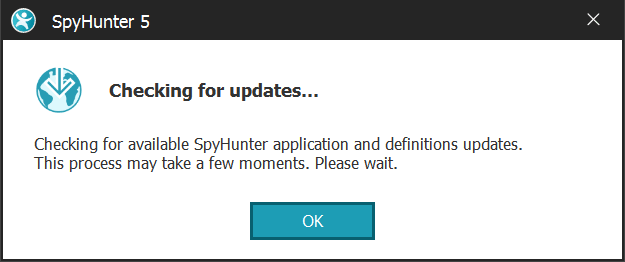
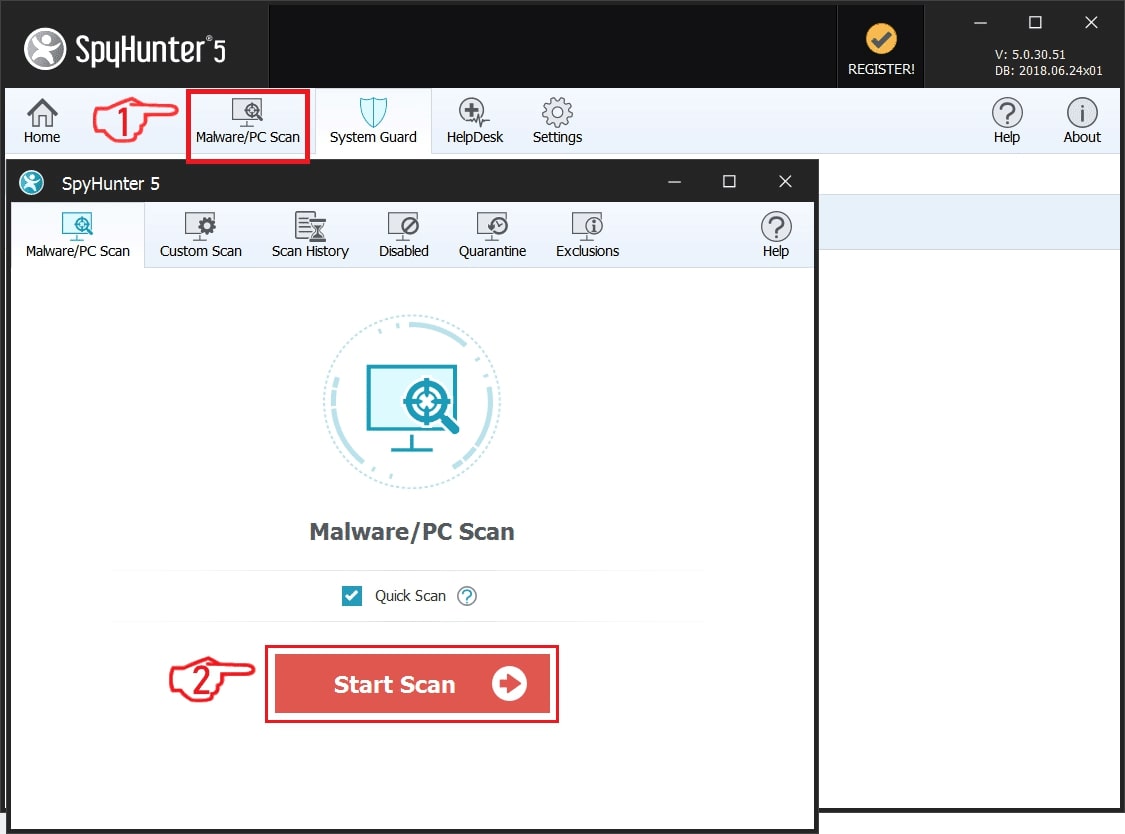
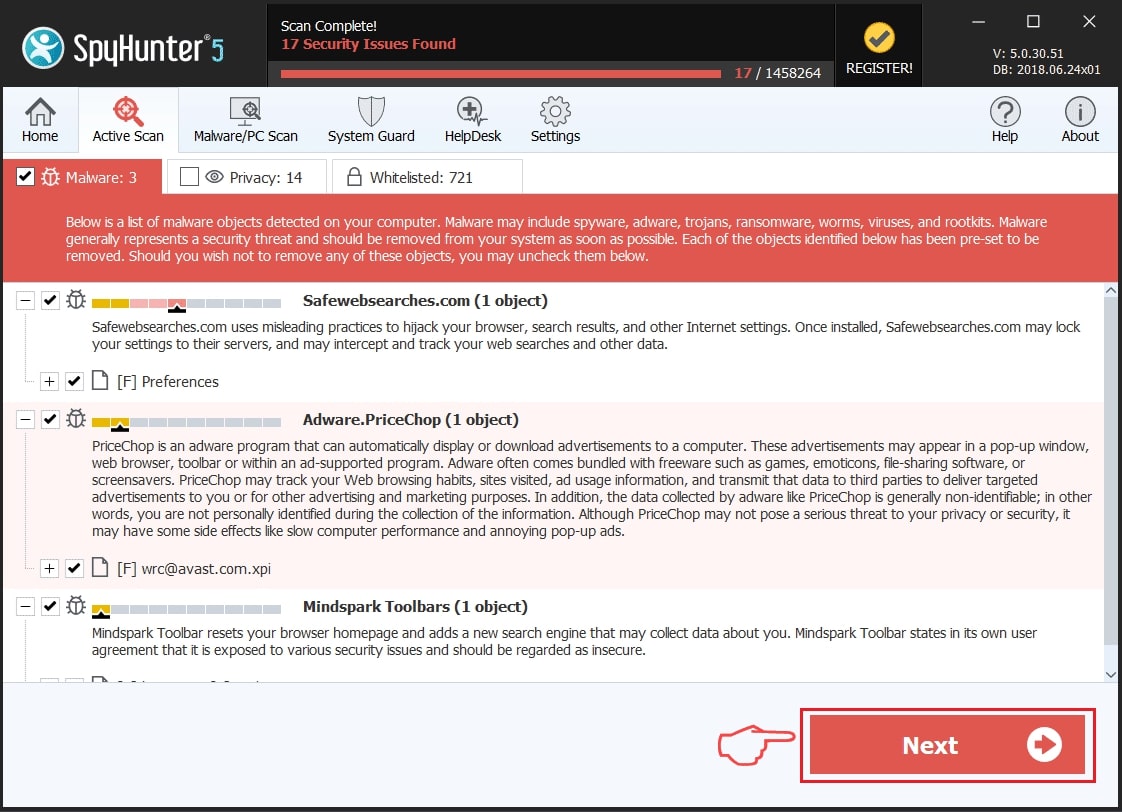
Step 1: Scan for Blank Name Task Manager with SpyHunter Anti-Malware Tool
Step 2: Clean any registries, created by Blank Name Task Manager on your computer.
The usually targeted registries of Windows machines are the following:
- HKEY_LOCAL_MACHINE\Software\Microsoft\Windows\CurrentVersion\Run
- HKEY_CURRENT_USER\Software\Microsoft\Windows\CurrentVersion\Run
- HKEY_LOCAL_MACHINE\Software\Microsoft\Windows\CurrentVersion\RunOnce
- HKEY_CURRENT_USER\Software\Microsoft\Windows\CurrentVersion\RunOnce
You can access them by opening the Windows registry editor and deleting any values, created by Blank Name Task Manager there. This can happen by following the steps underneath:
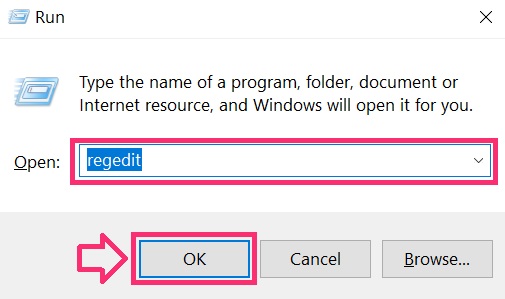
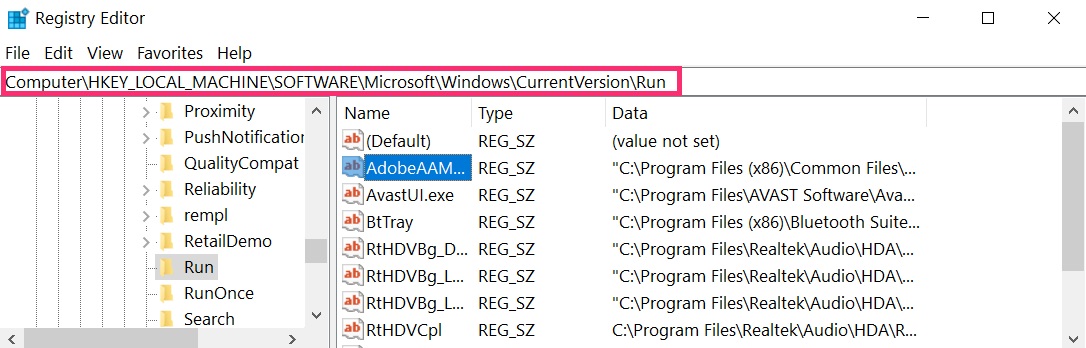
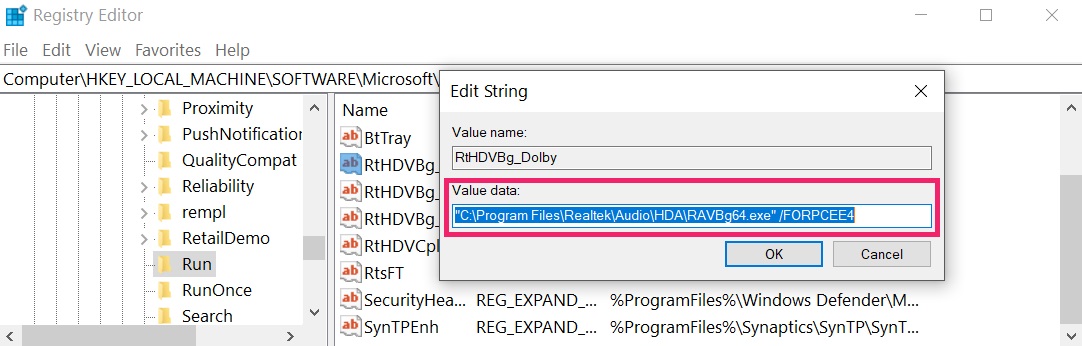 Tip: To find a virus-created value, you can right-click on it and click "Modify" to see which file it is set to run. If this is the virus file location, remove the value.
Step 3: Find virus files created by Blank Name Task Manager on your PC.
1.For Windows 8, 8.1 and 10.
For Newer Windows Operating Systems
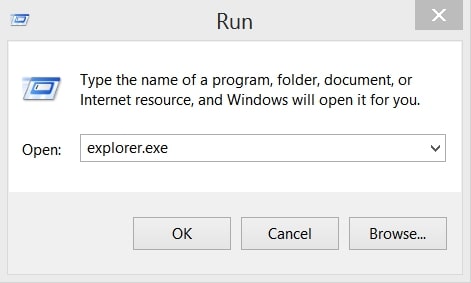
1: On your keyboard press + R and write explorer.exe in the Run text box and then click on the Ok button.
2: Click on your PC from the quick access bar. This is usually an icon with a monitor and its name is either “My Computer”, “My PC” or “This PC” or whatever you have named it.
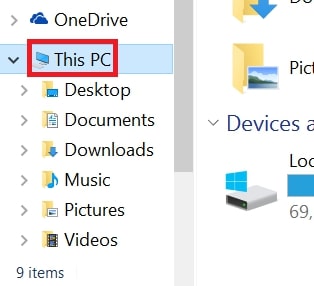
3: Navigate to the search box in the top-right of your PC's screen and type “fileextension:” and after which type the file extension. If you are looking for malicious executables, an example may be "fileextension:exe". After doing that, leave a space and type the file name you believe the malware has created. Here is how it may appear if your file has been found:
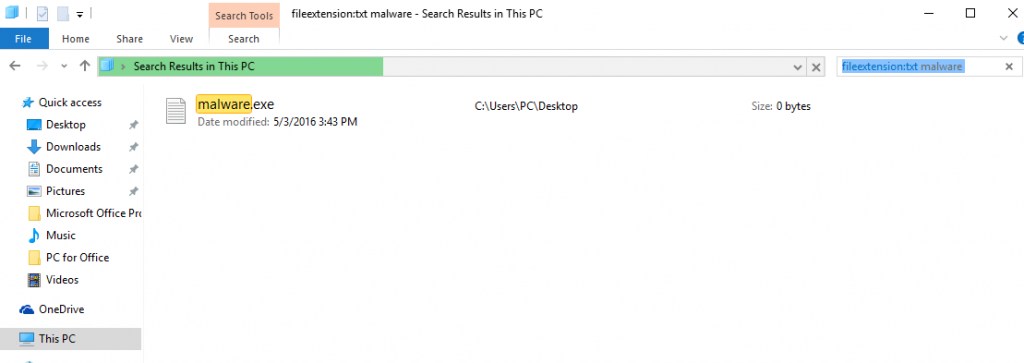
N.B. We recommend to wait for the green loading bar in the navigation box to fill up in case the PC is looking for the file and hasn't found it yet.
2.For Windows XP, Vista, and 7.
For Older Windows Operating Systems
In older Windows OS's the conventional approach should be the effective one:
1: Click on the Start Menu icon (usually on your bottom-left) and then choose the Search preference.
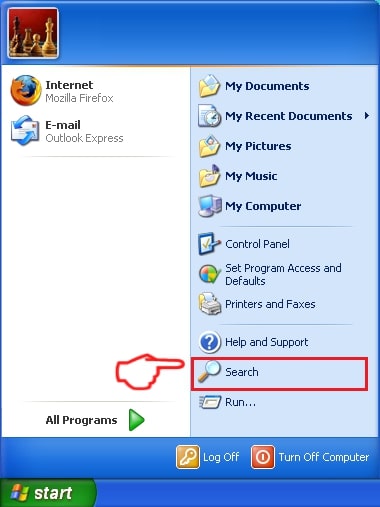
2: After the search window appears, choose More Advanced Options from the search assistant box. Another way is by clicking on All Files and Folders.
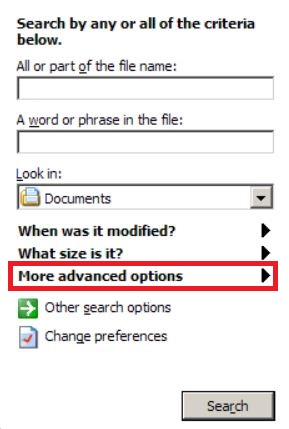
3: After that type the name of the file you are looking for and click on the Search button. This might take some time after which results will appear. If you have found the malicious file, you may copy or open its location by right-clicking on it.
Now you should be able to discover any file on Windows as long as it is on your hard drive and is not concealed via special software.
Blank Name Task Manager FAQ
What Does Blank Name Task Manager Trojan Do?
The Blank Name Task Manager Trojan is a malicious computer program designed to disrupt, damage, or gain unauthorized access to a computer system. It can be used to steal sensitive data, gain control over a system, or launch other malicious activities.
Can Trojans Steal Passwords?
Yes, Trojans, like Blank Name Task Manager, can steal passwords. These malicious programs are designed to gain access to a user's computer, spy on victims and steal sensitive information such as banking details and passwords.
Can Blank Name Task Manager Trojan Hide Itself?
Yes, it can. A Trojan can use various techniques to mask itself, including rootkits, encryption, and obfuscation, to hide from security scanners and evade detection.
Can a Trojan be Removed by Factory Reset?
Yes, a Trojan can be removed by factory resetting your device. This is because it will restore the device to its original state, eliminating any malicious software that may have been installed. Bear in mind that there are more sophisticated Trojans that leave backdoors and reinfect even after a factory reset.
Can Blank Name Task Manager Trojan Infect WiFi?
Yes, it is possible for a Trojan to infect WiFi networks. When a user connects to the infected network, the Trojan can spread to other connected devices and can access sensitive information on the network.
Can Trojans Be Deleted?
Yes, Trojans can be deleted. This is typically done by running a powerful anti-virus or anti-malware program that is designed to detect and remove malicious files. In some cases, manual deletion of the Trojan may also be necessary.
Can Trojans Steal Files?
Yes, Trojans can steal files if they are installed on a computer. This is done by allowing the malware author or user to gain access to the computer and then steal the files stored on it.
Which Anti-Malware Can Remove Trojans?
Anti-malware programs such as SpyHunter are capable of scanning for and removing Trojans from your computer. It is important to keep your anti-malware up to date and regularly scan your system for any malicious software.
Can Trojans Infect USB?
Yes, Trojans can infect USB devices. USB Trojans typically spread through malicious files downloaded from the internet or shared via email, allowing the hacker to gain access to a user's confidential data.
About the Blank Name Task Manager Research
The content we publish on SensorsTechForum.com, this Blank Name Task Manager how-to removal guide included, is the outcome of extensive research, hard work and our team’s devotion to help you remove the specific trojan problem.
How did we conduct the research on Blank Name Task Manager?
Please note that our research is based on an independent investigation. We are in contact with independent security researchers, thanks to which we receive daily updates on the latest malware definitions, including the various types of trojans (backdoor, downloader, infostealer, ransom, etc.)
Furthermore, the research behind the Blank Name Task Manager threat is backed with VirusTotal.
To better understand the threat posed by trojans, please refer to the following articles which provide knowledgeable details.