

A TrojanDownloader:Win64/Penguish.PO!MT alert from Microsoft Defender should be treated with urgency. Trojan downloader threats are not standalone threats in the traditional sense – their primary function is to silently connect to attacker-controlled infrastructure and pull additional malware onto the infected machine. The initial detection is therefore not the full picture of what is on your system; the real concern is what the downloader has already installed or is in the process of installing when Defender catches it.
TrojanDownloader:Win64/Penguish.PO!MT is a detection issued by Microsoft Defender Antivirus for a 64-bit (Win64) trojan downloader threat belonging to the Penguish family. As documented in Microsoft Security Intelligence, the “PO!MT” suffix identifies a specific variant with characteristics that triggered a manual threat assessment in addition to automated detection. Trojan downloaders in this family are engineered to operate stealthily after initial execution, establishing persistence on the infected machine while communicating with remote servers to retrieve and execute additional malware payloads chosen by the operators.
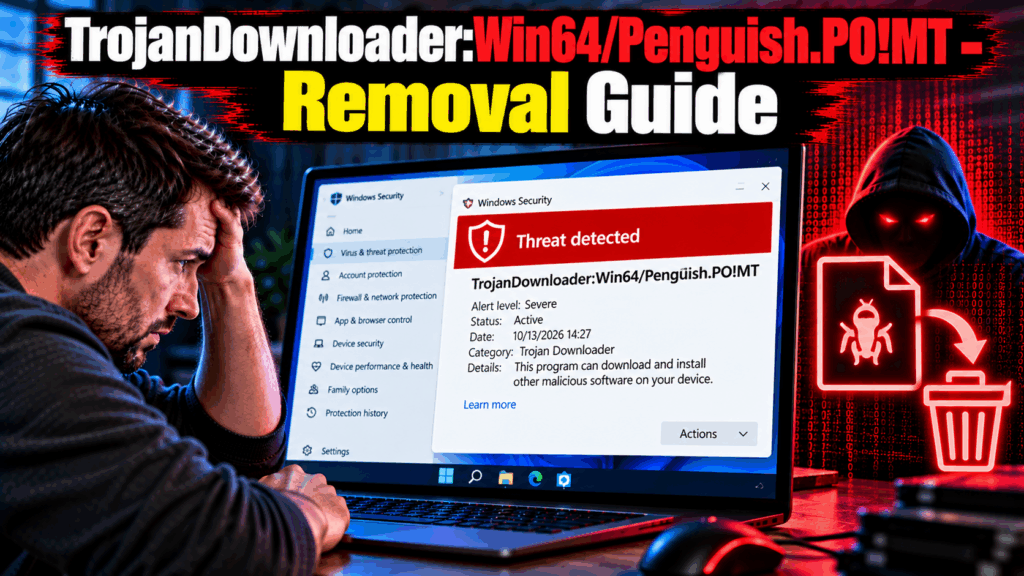
| Name | TrojanDownloader:Win64/Penguish.PO!MT |
| Threat Type | Trojan Downloader (Microsoft Defender Detection / Win64) |
| Symptoms | Microsoft Defender alert for TrojanDownloader:Win64/Penguish.PO!MT; unexpected executable files appearing in system directories; secondary malware infections detected following the initial alert; unexplained outbound network activity; slow system performance; suspicious processes running without a corresponding installed application |
| Removal Time | Around 15 Minutes |
| Removal Tool | See If Your System Has Been Affected by Malware
* Free Remover allows you, subject to a 48-hour waiting period, one remediation and removal for results found. SpyHunter’s EULA, Privacy Policy, and more details about Free Remover. |
How Did I Get TrojanDownloader:Win64/Penguish.PO!MT?
Trojan downloader threats of the Penguish family reach systems through distribution methods consistent with the broader Win64 trojan category:
- Cracked software and serial key generators from piracy sites and torrent platforms remain the primary delivery mechanism for Win64 trojan downloaders – the illegal download context discourages security-conscious behavior from the user.
- Malicious email campaigns distributing document attachments with embedded macros that, when enabled by the recipient, download and execute the Penguish payload onto the system.
- Exploit-based drive-by downloads from compromised websites or malicious advertisements that silently push the downloader onto vulnerable machines without requiring any user interaction beyond visiting the page.
- Fake software update pages presented by malicious websites claiming that a browser extension, media plugin, or other common component requires an urgent update, delivering the downloader in place of any legitimate update.
- Compromised software distribution channels – download mirrors and third-party software sites where legitimate application packages have been silently replaced or supplemented with versions containing the Penguish payload.
- Gaming community file sharing – game cheats, mods, and trainers shared through Discord servers, game forums, or torrent sites that carry the downloader inside the distributed archive.
What Does TrojanDownloader:Win64/Penguish.PO!MT Do?
Once executed on a 64-bit Windows system, the Penguish trojan downloader carries out a structured sequence of operations:
- Establishes persistence on the infected machine through registry startup entries, scheduled tasks, or Windows service installation to ensure it survives system reboots and remains available to download additional payloads over time.
- Contacts command-and-control servers to register the newly compromised machine and receive a list of payloads to download – these can include infostealers, ransomware, remote access trojans, coin miners, or further downloader components.
- Downloads and silently executes additional malware in the background, potentially deploying multiple distinct threats in a single infection session without any visible indication to the user.
- May attempt to disable or evade Windows Defender by adding exclusion rules, modifying security settings, or using process injection techniques to operate within the memory space of legitimate processes.
- Collects basic system profiling information – hardware identifiers, operating system version, installed security software, and geographic data – to determine which payloads are most appropriate and valuable for the specific machine.
- Can receive updated payload instructions over time, meaning the infection may evolve and deploy entirely new threat categories weeks after the initial compromise.
- Secondary payload impact varies widely depending on what the downloader has already installed – credential theft, file encryption, remote access, and resource hijacking are all possible outcomes of a successful Penguish deployment.
How to Remove TrojanDownloader:Win64/Penguish.PO!MT?
Because this is a downloader that may have already installed additional malware, removal must address both the primary threat and any secondary payloads:
- Disconnect from the internet immediately to prevent the downloader from retrieving additional payloads or communicating further with command-and-control servers while you prepare for removal.
- Accept Microsoft Defender’s recommended quarantine or removal action for the detected file if the alert is still active – do not dismiss or ignore the Defender notification.
- Boot into Safe Mode with Networking – restart, hold Shift and click Restart, navigate to Troubleshoot – Advanced Options – Startup Settings, and press 5. Safe Mode prevents most downloader components from loading at startup.
- Run a full system scan with SpyHunter in Safe Mode. A comprehensive scan is essential given the downloader’s function – it identifies both the primary Penguish components and any secondary malware already installed on the system.
- Review recently downloaded files in your Downloads folder and any locations where files from external sources have been saved – delete anything downloaded from unofficial or untrusted sources around the time of the infection.
- Check Task Scheduler for suspicious scheduled tasks and Task Manager for unfamiliar processes created by the downloader or its payloads, ending processes and deleting tasks associated with unfamiliar file paths.
- Inspect registry startup keys using regedit at HKEY_CURRENT_USERSoftwareMicrosoftWindowsCurrentVersionRun and the HKEY_LOCAL_MACHINE equivalent, removing any entries referencing files from unusual locations.
- Review installed programs sorted by install date and uninstall anything unfamiliar that appeared around the time of the alert.
- Run a second full scan after restarting normally to confirm that both the Penguish downloader and any of its installed payloads have been fully removed.
- Change all account passwords from a clean device following confirmed removal – if an infostealer was deployed as a secondary payload, all credentials entered on the infected machine since the infection should be considered compromised.

Ventsislav Krastev
Ventsislav is a cybersecurity expert at SensorsTechForum since 2015. He has been researching, covering, helping victims with the latest malware infections plus testing and reviewing software and the newest tech developments. Having graduated Marketing as well, Ventsislav also has passion for learning new shifts and innovations in cybersecurity that become game changers. After studying Value Chain Management, Network Administration and Computer Administration of System Applications, he found his true calling within the cybersecrurity industry and is a strong believer in the education of every user towards online safety and security.
Follow Me:
Preparation before removing TrojanDownloader:Win64/Penguish.PO!MT.
Before starting the actual removal process, we recommend that you do the following preparation steps.
- Make sure you have these instructions always open and in front of your eyes.
- Do a backup of all of your files, even if they could be damaged. You should back up your data with a cloud backup solution and insure your files against any type of loss, even from the most severe threats.
- Be patient as this could take a while.
- Scan for Malware
- Fix Registries
- Remove Virus Files
Step 1: Scan for TrojanDownloader:Win64/Penguish.PO!MT with SpyHunter Anti-Malware Tool
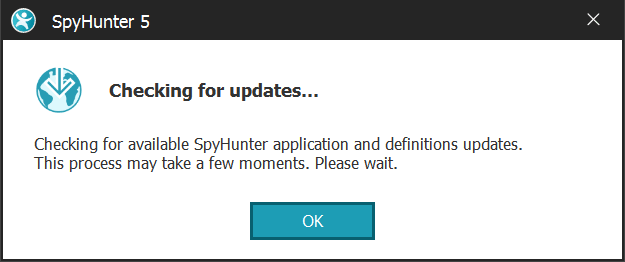
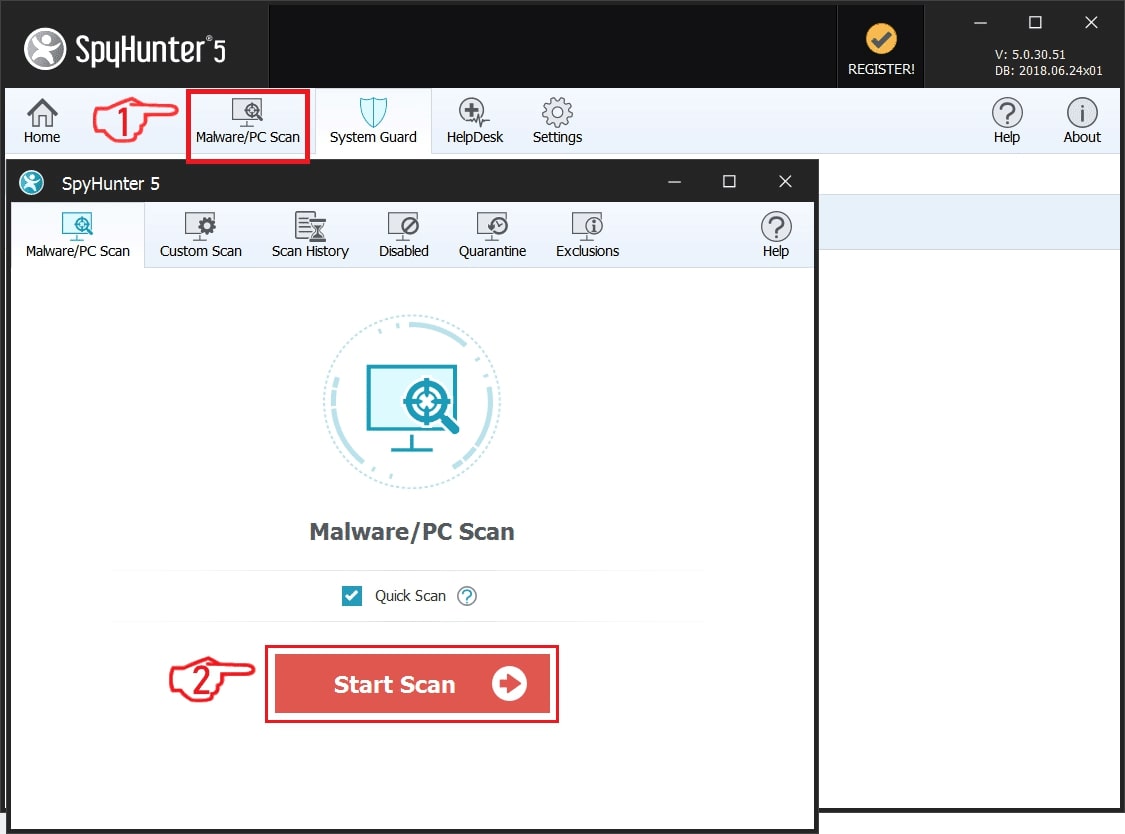
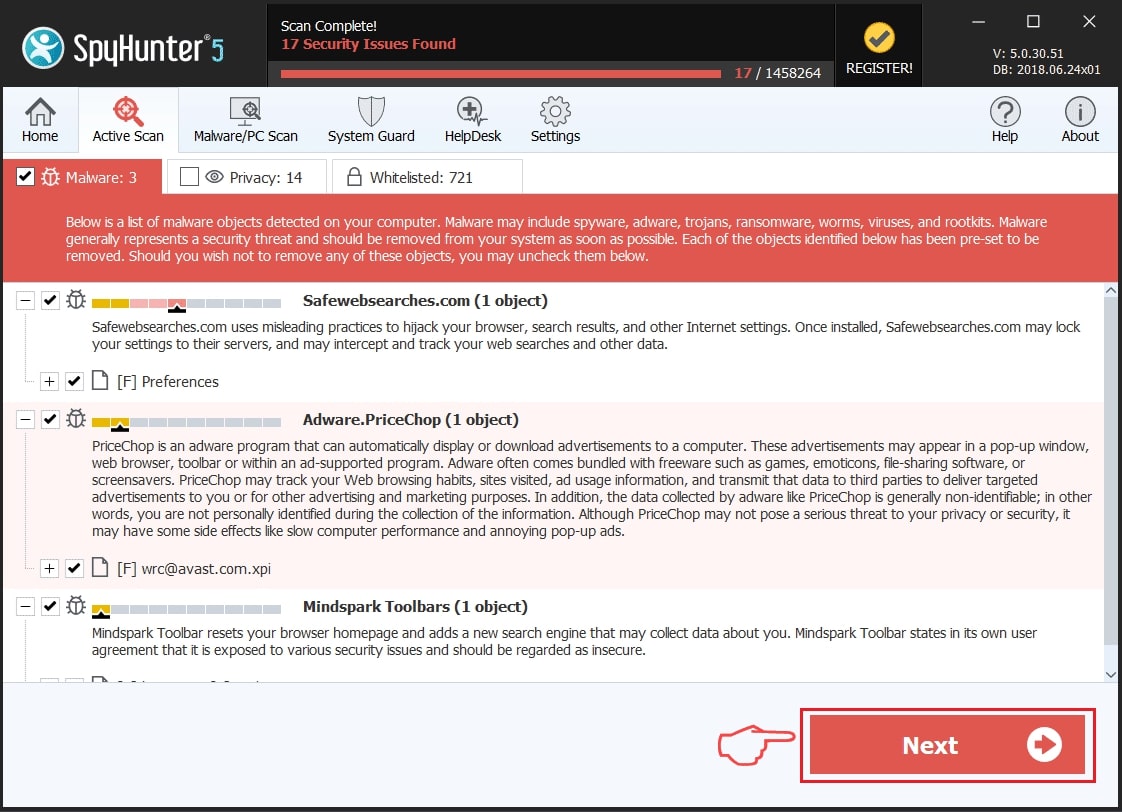
Step 2: Clean any registries, created by TrojanDownloader:Win64/Penguish.PO!MT on your computer.
The usually targeted registries of Windows machines are the following:
- HKEY_LOCAL_MACHINE\Software\Microsoft\Windows\CurrentVersion\Run
- HKEY_CURRENT_USER\Software\Microsoft\Windows\CurrentVersion\Run
- HKEY_LOCAL_MACHINE\Software\Microsoft\Windows\CurrentVersion\RunOnce
- HKEY_CURRENT_USER\Software\Microsoft\Windows\CurrentVersion\RunOnce
You can access them by opening the Windows registry editor and deleting any values, created by TrojanDownloader:Win64/Penguish.PO!MT there. This can happen by following the steps underneath:
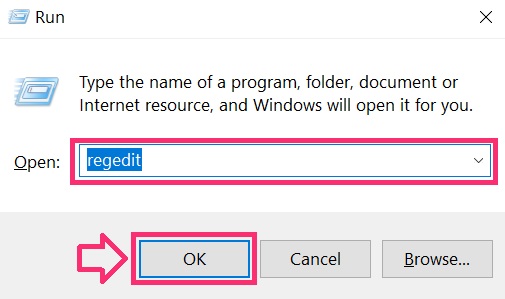
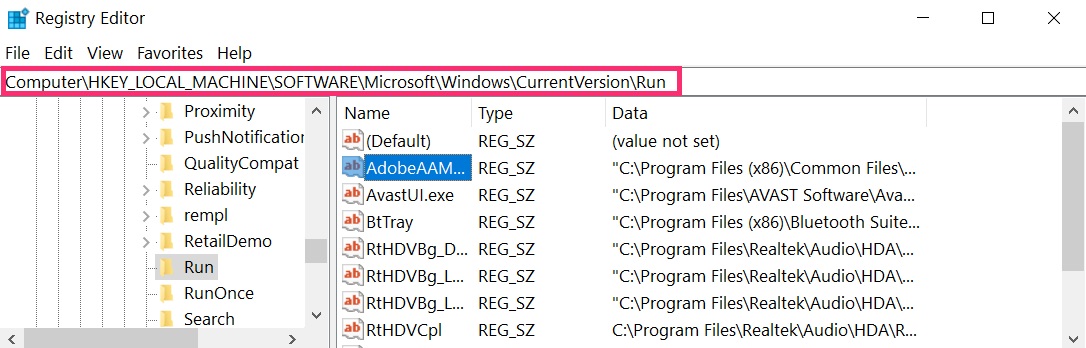
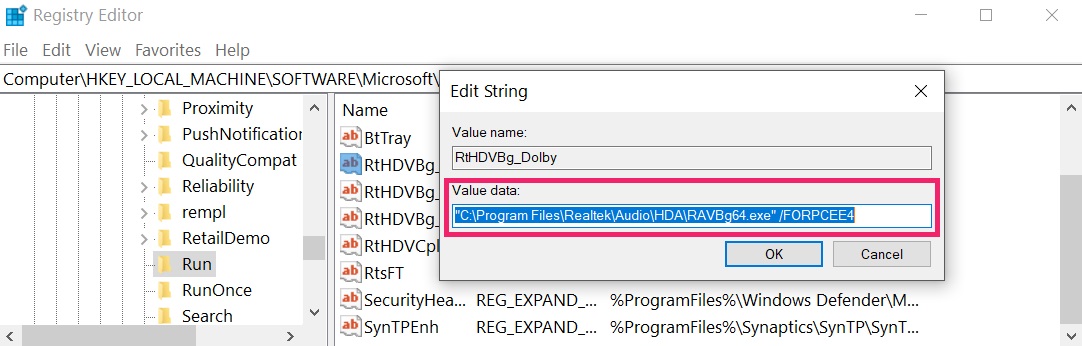 Tip: To find a virus-created value, you can right-click on it and click "Modify" to see which file it is set to run. If this is the virus file location, remove the value.
Step 3: Find virus files created by TrojanDownloader:Win64/Penguish.PO!MT on your PC.
1.For Windows 8, 8.1 and 10.
For Newer Windows Operating Systems
1: On your keyboard press + R and write explorer.exe in the Run text box and then click on the Ok button.
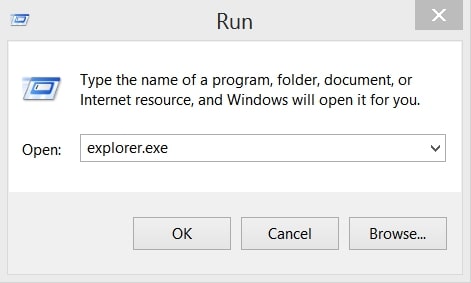
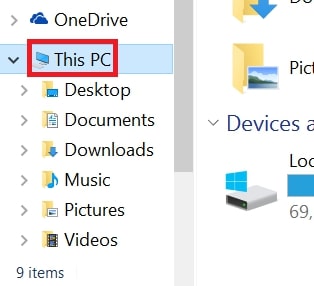
2: Click on your PC from the quick access bar. This is usually an icon with a monitor and its name is either “My Computer”, “My PC” or “This PC” or whatever you have named it.
3: Navigate to the search box in the top-right of your PC's screen and type “fileextension:” and after which type the file extension. If you are looking for malicious executables, an example may be "fileextension:exe". After doing that, leave a space and type the file name you believe the malware has created. Here is how it may appear if your file has been found:
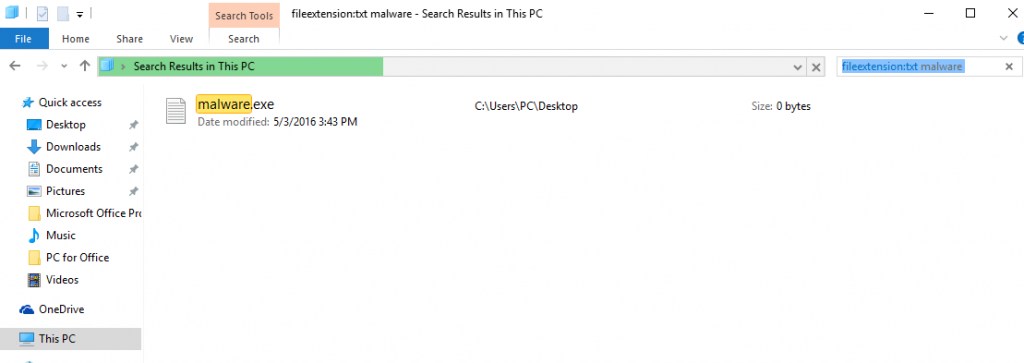
N.B. We recommend to wait for the green loading bar in the navigation box to fill up in case the PC is looking for the file and hasn't found it yet.
2.For Windows XP, Vista, and 7.
For Older Windows Operating Systems
In older Windows OS's the conventional approach should be the effective one:
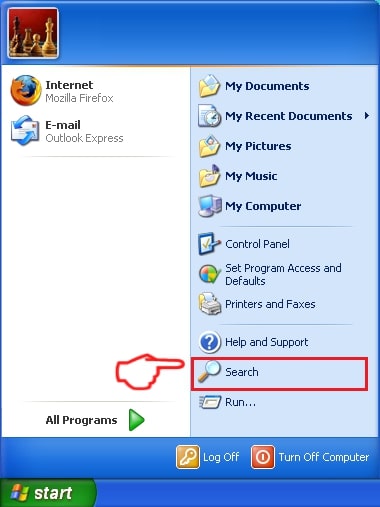
1: Click on the Start Menu icon (usually on your bottom-left) and then choose the Search preference.
2: After the search window appears, choose More Advanced Options from the search assistant box. Another way is by clicking on All Files and Folders.
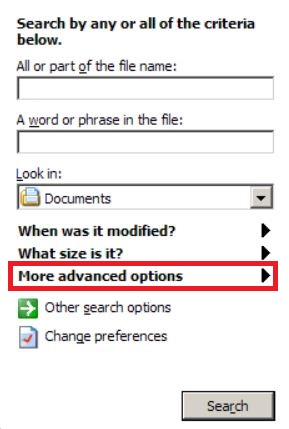
3: After that type the name of the file you are looking for and click on the Search button. This might take some time after which results will appear. If you have found the malicious file, you may copy or open its location by right-clicking on it.
Now you should be able to discover any file on Windows as long as it is on your hard drive and is not concealed via special software.
TrojanDownloader:Win64/Penguish.PO!MT FAQ
What Does TrojanDownloader:Win64/Penguish.PO!MT Trojan Do?
The TrojanDownloader:Win64/Penguish.PO!MT Trojan is a malicious computer program designed to disrupt, damage, or gain unauthorized access to a computer system. It can be used to steal sensitive data, gain control over a system, or launch other malicious activities.
Can Trojans Steal Passwords?
Yes, Trojans, like TrojanDownloader:Win64/Penguish.PO!MT, can steal passwords. These malicious programs are designed to gain access to a user's computer, spy on victims and steal sensitive information such as banking details and passwords.
Can TrojanDownloader:Win64/Penguish.PO!MT Trojan Hide Itself?
Yes, it can. A Trojan can use various techniques to mask itself, including rootkits, encryption, and obfuscation, to hide from security scanners and evade detection.
Can a Trojan be Removed by Factory Reset?
Yes, a Trojan can be removed by factory resetting your device. This is because it will restore the device to its original state, eliminating any malicious software that may have been installed. Bear in mind that there are more sophisticated Trojans that leave backdoors and reinfect even after a factory reset.
Can TrojanDownloader:Win64/Penguish.PO!MT Trojan Infect WiFi?
Yes, it is possible for a Trojan to infect WiFi networks. When a user connects to the infected network, the Trojan can spread to other connected devices and can access sensitive information on the network.
Can Trojans Be Deleted?
Yes, Trojans can be deleted. This is typically done by running a powerful anti-virus or anti-malware program that is designed to detect and remove malicious files. In some cases, manual deletion of the Trojan may also be necessary.
Can Trojans Steal Files?
Yes, Trojans can steal files if they are installed on a computer. This is done by allowing the malware author or user to gain access to the computer and then steal the files stored on it.
Which Anti-Malware Can Remove Trojans?
Anti-malware programs such as SpyHunter are capable of scanning for and removing Trojans from your computer. It is important to keep your anti-malware up to date and regularly scan your system for any malicious software.
Can Trojans Infect USB?
Yes, Trojans can infect USB devices. USB Trojans typically spread through malicious files downloaded from the internet or shared via email, allowing the hacker to gain access to a user's confidential data.
About the TrojanDownloader:Win64/Penguish.PO!MT Research
The content we publish on SensorsTechForum.com, this TrojanDownloader:Win64/Penguish.PO!MT how-to removal guide included, is the outcome of extensive research, hard work and our team’s devotion to help you remove the specific trojan problem.
How did we conduct the research on TrojanDownloader:Win64/Penguish.PO!MT?
Please note that our research is based on an independent investigation. We are in contact with independent security researchers, thanks to which we receive daily updates on the latest malware definitions, including the various types of trojans (backdoor, downloader, infostealer, ransom, etc.)
Furthermore, the research behind the TrojanDownloader:Win64/Penguish.PO!MT threat is backed with VirusTotal.
To better understand the threat posed by trojans, please refer to the following articles which provide knowledgeable details.