

What is Fnaf Ransomware?
You downloaded what looked like a free or pirated version of Five Nights at Freddy’s — or something claiming to be — and now your files are encrypted, your device is acting strange, and there may be a ransom demand on your screen. Read this article right now to understand exactly what happened and what your options are, then follow the removal and recovery guide below immediately.
“Fnaf Ransomware” refers to a category of malware that disguises itself as pirated or unofficial versions of the Five Nights at Freddy’s game franchise to trick victims into installing malicious software. The most documented real-world example is the Stingray APK — a genuine Android ransomware that circulated between 2014 and 2016 under the guise of a fake FNAF 2 mobile port, identified by security researchers under the malware name Android.Elite.1.origin. This same deceptive delivery model — hiding ransomware inside fake game downloads — remains one of the most reliably effective infection vectors across all platforms, and variants targeting FNAF fans specifically continue to surface on unofficial APK sites, piracy forums, and shady download platforms. If you downloaded anything claiming to be a “free,” “cracked,” or “unofficial” version of any FNAF game and are now experiencing system issues, you’ve almost certainly been infected.
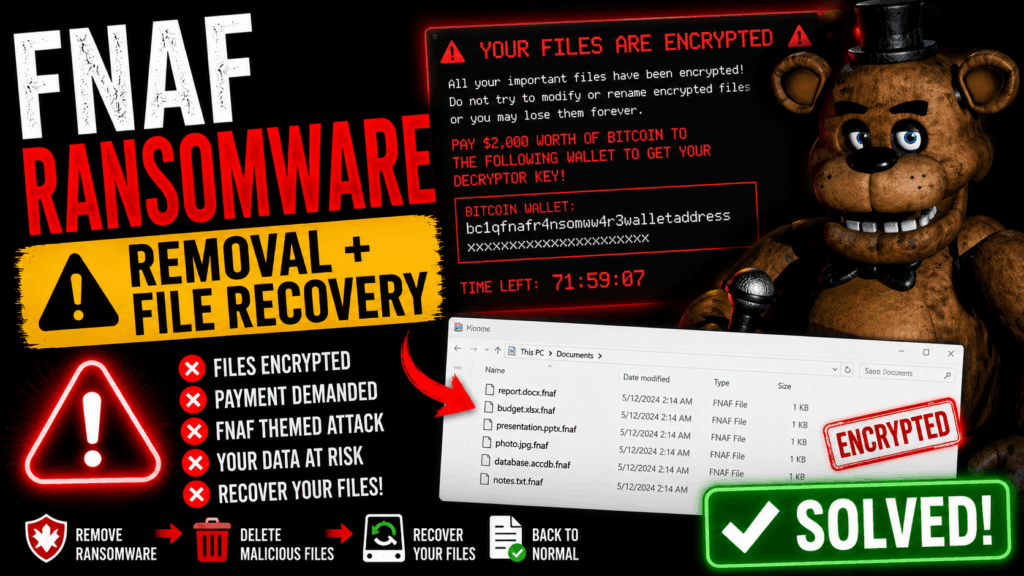
Fnaf Ransomware Short Overview
| Type | Ransomware / Trojan delivered via fake pirated game downloads disguised as Five Nights at Freddy’s content. |
| Symptoms | Files encrypted or inaccessible after running a fake FNAF game file. Ransom note appearing on screen or desktop demanding Bitcoin or other cryptocurrency payment. Device locked or overlaid with a ransom screen. Stolen credentials, contacts, or personal data. On Android: device administrator privileges hijacked, factory reset demanded as the only way out. |
| Removal Time | Approximately 15 minutes for a full-system scan |
| Removal Tool |
See If Your System Has Been Affected by malware
Download
Malware Removal Tool
|
How Did I Get Fnaf Ransomware?
FNAF ransomware doesn’t find you through any legitimate channel — it specifically targets people looking for free or pirated game content. Here’s exactly how victims get infected:
- Fake free game downloads from unofficial APK sites — The classic delivery vector. You searched for a free version of FNAF, landed on a third-party APK site like Aptoide or a similar platform, and downloaded what appeared to be the real game. The file contained hidden ransomware that activated once installed. This is software bundling weaponized as a trap.
- Piracy forums and file-sharing sites — P2P networks, torrent sites, and game-cracking forums frequently host trojanized FNAF installers that embed ransomware or RAT components inside what appears to be a working game file. Downloading freeware or cracked games from these sources is one of the most reliable ways to end up infected.
- Discord and social media DMs — As with the Discord “Try My Game” scam, fake FNAF game links are sometimes distributed through Discord servers or DMs by compromised or fake accounts claiming to share exclusive content. Clicking the download link delivers a malicious payload instead of a game.
- Phishing sites mimicking official FNAF pages — Fake FNAF download pages designed to look like official or fan-game sites are used in phishing-style campaigns to deliver trojanized installers to fans looking for free downloads.
What Does Fnaf Ransomware Do?
Once the fake game file executes, the ransomware component activates silently and gets to work. Here’s what victims typically experience:
- File encryption — On Windows and PC systems, the ransomware encrypts your personal files — documents, photos, videos — and appends a custom extension, making them inaccessible. A ransom note is left on the desktop demanding Bitcoin payment in exchange for the decryption key. The encryption used varies by variant but typically employs AES encryption or similar strong ciphers.
- Android device lockout — On Android devices, the malware requests device administrator privileges, then uses them to lock the screen with a ransom overlay that prevents normal device use. It requests suspicious permissions including contacts and personal data — enabling data collection on everything stored on the device.
- Credential and data theft — More sophisticated variants act as spyware, stealing saved passwords, browser cookies, and personal files before the encryption phase — enabling the attacker to threaten data publication as a secondary extortion lever via a remote C&C server.
- Registry modification for persistence — On Windows systems, the ransomware modifies registry key and registry value entries to ensure it launches at every system startup, preventing removal through a simple reboot.
- Shadow copy deletion — Like most ransomware, FNAF-themed variants typically delete Windows Volume Shadow Copies to prevent easy file recovery without paying the ransom.
Do not pay the ransom — payment does not guarantee file recovery, and it funds further criminal activity. Always check the No More Ransom project at nomoreransom.org first — free decryption keys and tools are available for many ransomware families and may work on the specific variant you’re dealing with.
What Should You Do?
Disconnect from the internet immediately to stop any ongoing data exfiltration, do not pay the ransom, and do not restart your device until you’ve taken stock of what’s been encrypted. Visit nomoreransom.org to check whether a free decryptor exists for your specific variant. Then follow the full removal and recovery guide below this article — it covers the complete cleanup process for both Windows and Android infections from FNAF-themed ransomware.

Ventsislav Krastev
Ventsislav is a cybersecurity expert at SensorsTechForum since 2015. He has been researching, covering, helping victims with the latest malware infections plus testing and reviewing software and the newest tech developments. Having graduated Marketing as well, Ventsislav also has passion for learning new shifts and innovations in cybersecurity that become game changers. After studying Value Chain Management, Network Administration and Computer Administration of System Applications, he found his true calling within the cybersecrurity industry and is a strong believer in the education of every user towards online safety and security.
Follow Me:
- Step 1
- Step 2
- Step 3
- Step 4
- Step 5
Step 1: Scan for Fnaf Ransomware with SpyHunter Anti-Malware Tool
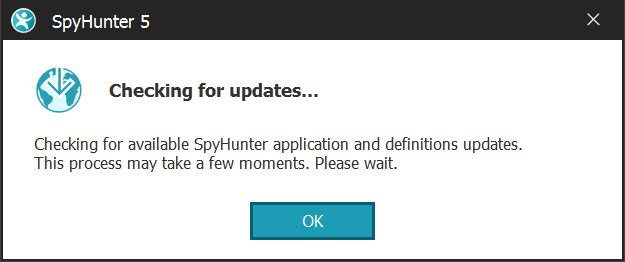
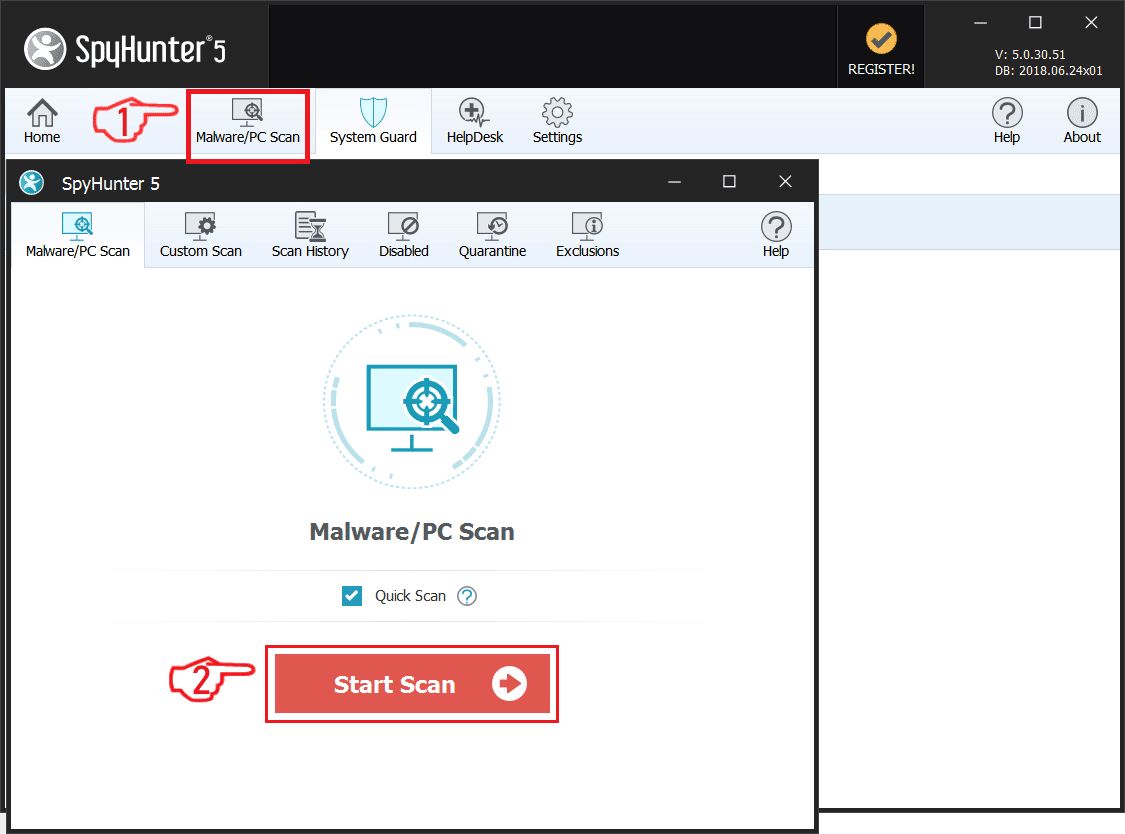
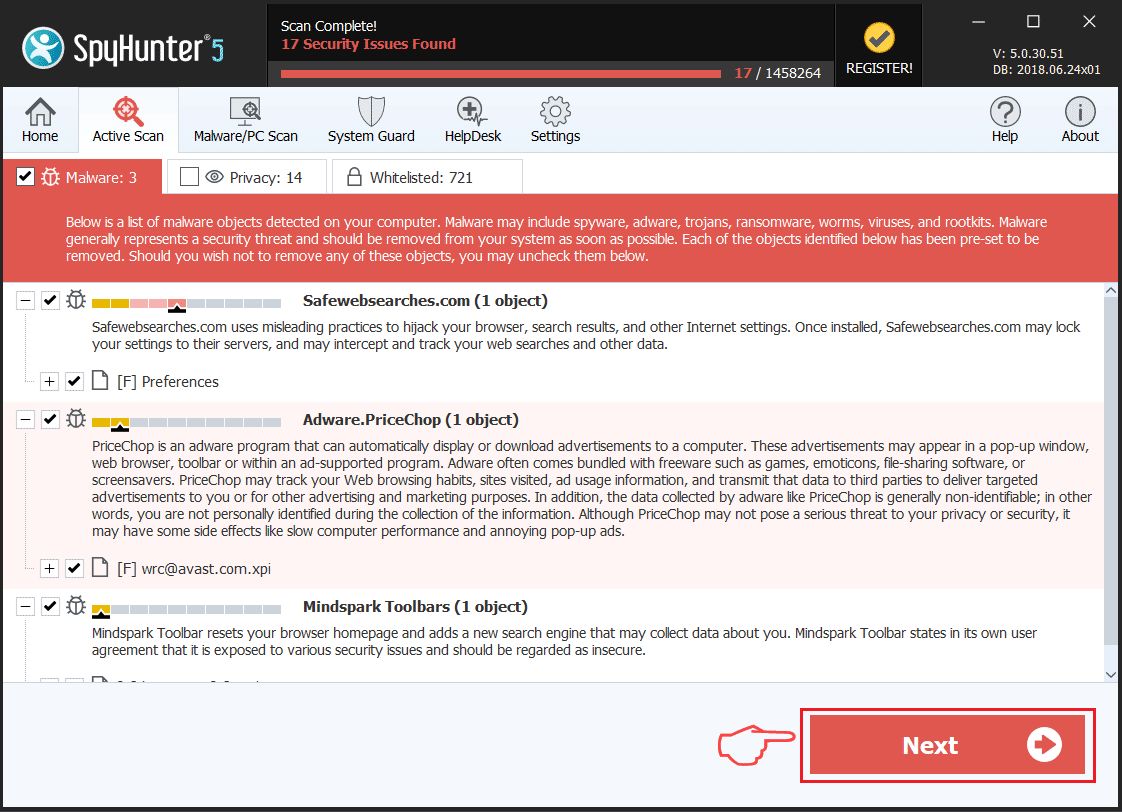
Ransomware Automatic Removal - Video Guide
Step 2: Uninstall Fnaf Ransomware and related malware from Windows
Here is a method in few easy steps that should be able to uninstall most programs. No matter if you are using Windows 10, 8, 7, Vista or XP, those steps will get the job done. Dragging the program or its folder to the recycle bin can be a very bad decision. If you do that, bits and pieces of the program are left behind, and that can lead to unstable work of your PC, errors with the file type associations and other unpleasant activities. The proper way to get a program off your computer is to Uninstall it. To do that:
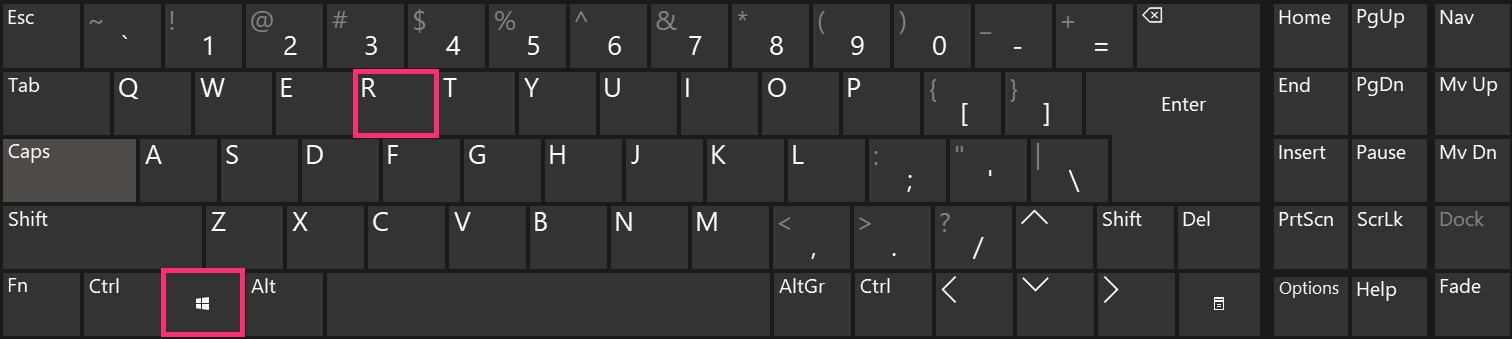
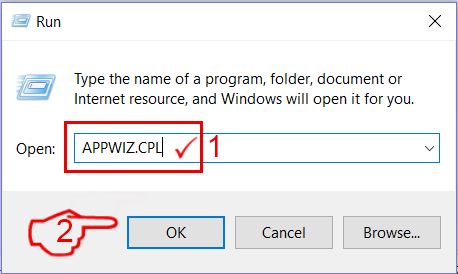
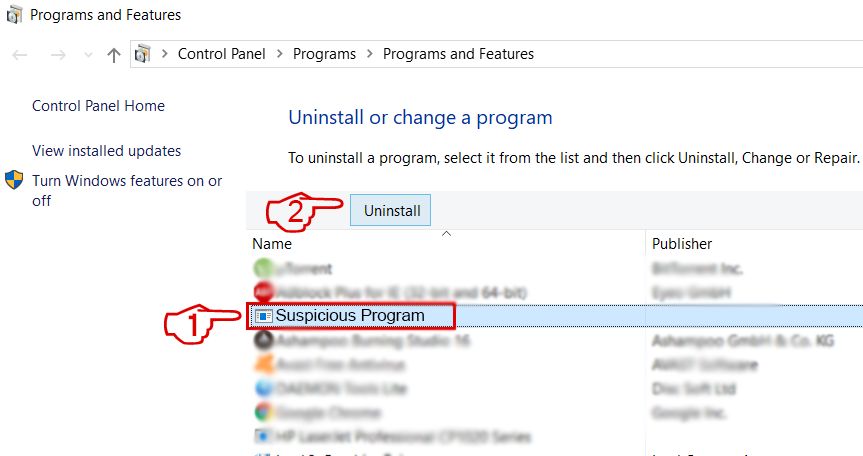 Follow the instructions above and you will successfully delete most unwanted and malicious programs.
Step 3: Clean any registries, created by Fnaf Ransomware on your computer.
The usually targeted registries of Windows machines are the following:
- HKEY_LOCAL_MACHINE\Software\Microsoft\Windows\CurrentVersion\Run
- HKEY_CURRENT_USER\Software\Microsoft\Windows\CurrentVersion\Run
- HKEY_LOCAL_MACHINE\Software\Microsoft\Windows\CurrentVersion\RunOnce
- HKEY_CURRENT_USER\Software\Microsoft\Windows\CurrentVersion\RunOnce
You can access them by opening the Windows registry editor and deleting any values, created by Fnaf Ransomware there. This can happen by following the steps underneath:
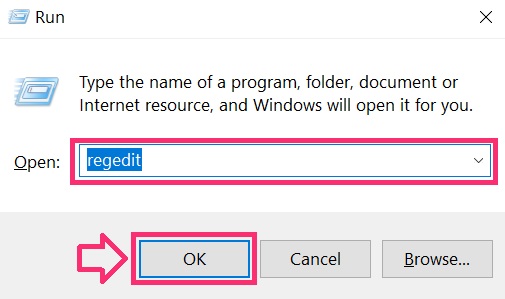
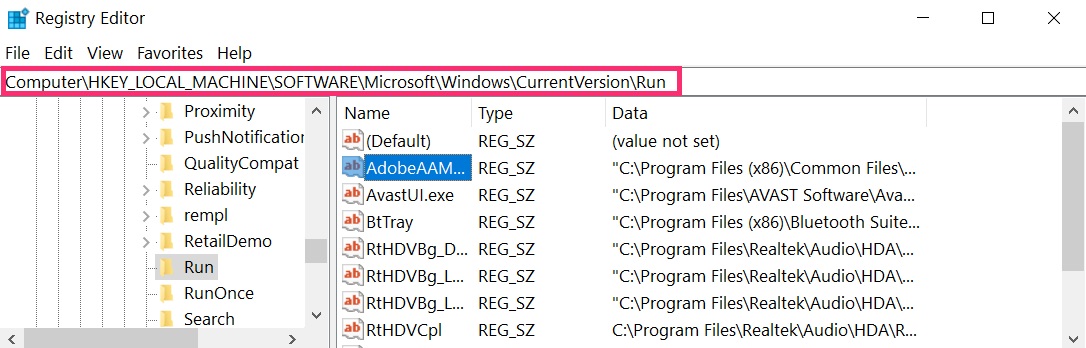
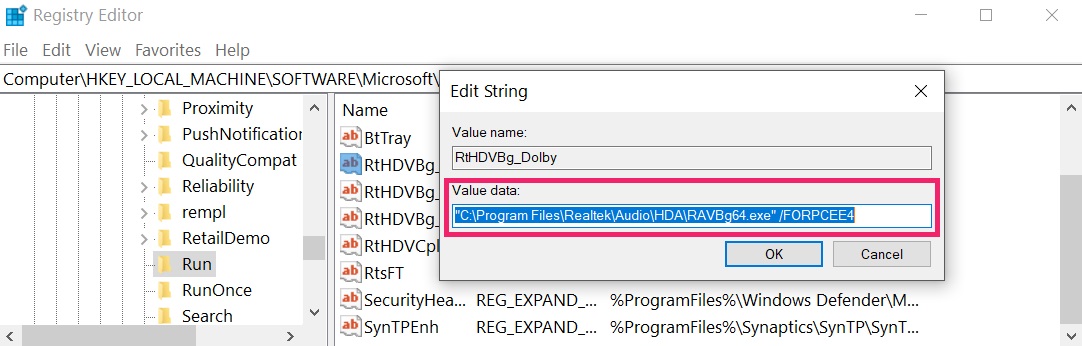 Tip: To find a virus-created value, you can right-click on it and click "Modify" to see which file it is set to run. If this is the virus file location, remove the value.
Before starting "Step 4", please boot back into Normal mode, in case you are currently in Safe Mode.
This will enable you to install and use SpyHunter 5 successfully.
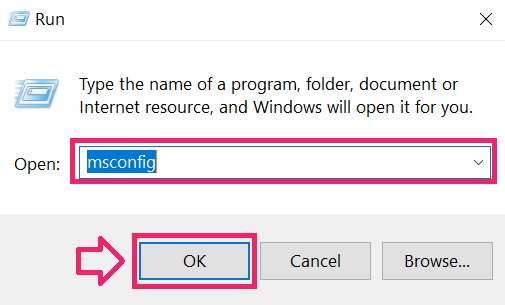
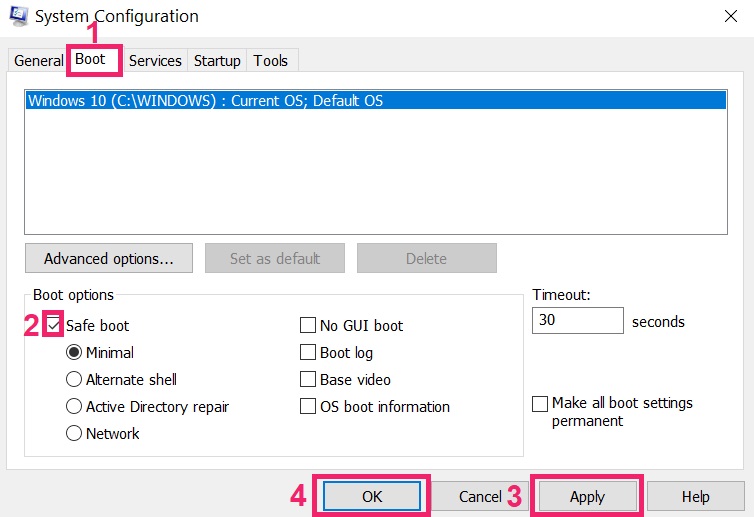
Step 4: Boot Your PC In Safe Mode to isolate and remove Fnaf Ransomware
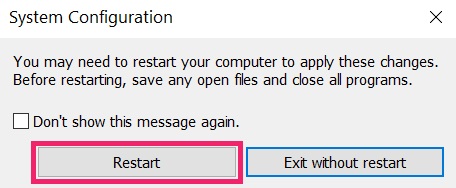
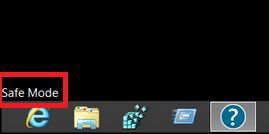
Step 5: Try to Restore Files Encrypted by Fnaf Ransomware.
Method 1: Use STOP Decrypter by Emsisoft.
Not all variants of this ransomware can be decrypted for free, but we have added the decryptor used by researchers that is often updated with the variants which become eventually decrypted. You can try and decrypt your files using the instructions below, but if they do not work, then unfortunately your variant of the ransomware virus is not decryptable.
Follow the instructions below to use the Emsisoft decrypter and decrypt your files for free. You can download the Emsisoft decryption tool linked here and then follow the steps provided below:
1 Right-click on the decrypter and click on Run as Administrator as shown below:
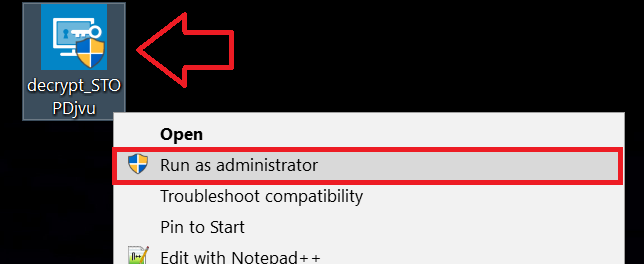
2. Agree with the license terms:
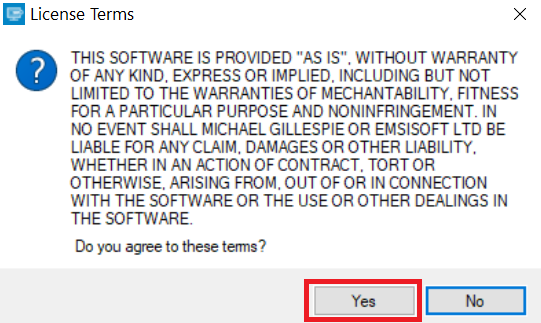
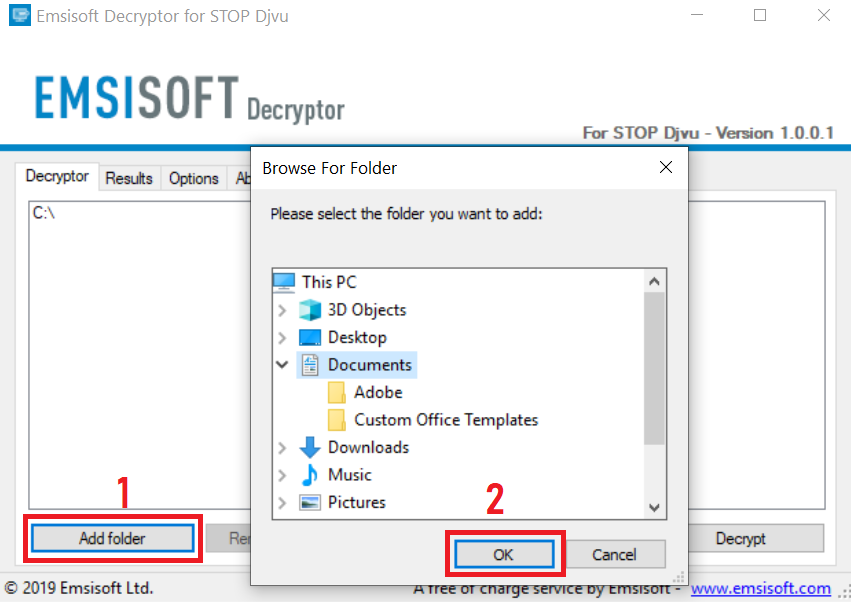
3. Click on "Add Folder" and then add the folders where you want files decrypted as shown underneath:
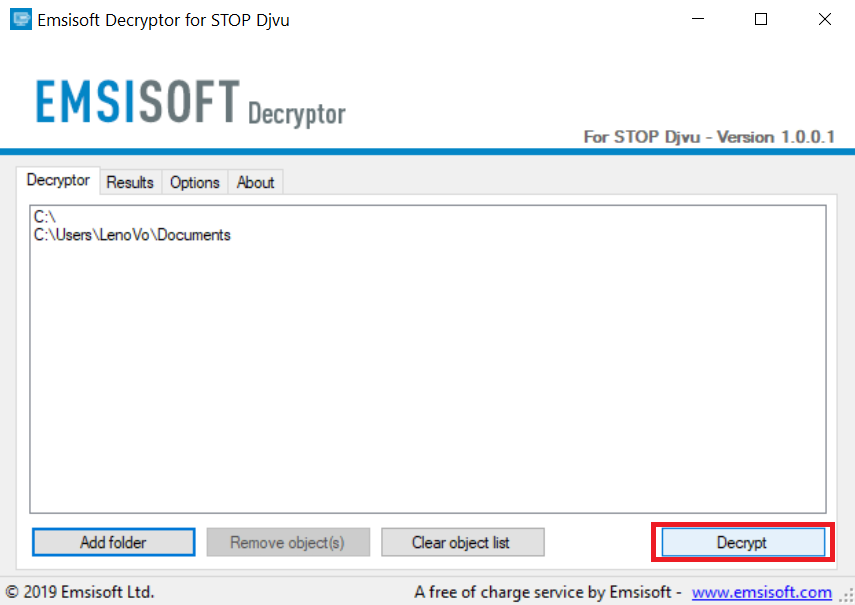
4. Click on "Decrypt" and wait for your files to be decoded.
Note: Credit for the decryptor goes to Emsisoft researchers who have made the breakthrough with this virus.
Method 2: Use data recovery software
Ransomware infections and Fnaf Ransomware aim to encrypt your files using an encryption algorithm which may be very difficult to decrypt. This is why we have suggested a data recovery method that may help you go around direct decryption and try to restore your files. Bear in mind that this method may not be 100% effective but may also help you a little or a lot in different situations.
Simply click on the link and on the website menus on the top, choose Data Recovery - Data Recovery Wizard for Windows or Mac (depending on your OS), and then download and run the tool.
Fnaf Ransomware-FAQ
What is Fnaf Ransomware Ransomware?
Fnaf Ransomware is a ransomware infection - the malicious software that enters your computer silently and blocks either access to the computer itself or encrypt your files.
Many ransomware viruses use sophisticated encryption algorithms to make your files inaccessible. The goal of ransomware infections is to demand that you pay a ransom payment to get access to your files back.
What Does Fnaf Ransomware Ransomware Do?
Ransomware in general is a malicious software that is designed to block access to your computer or files until a ransom is paid.
Ransomware viruses can also damage your system, corrupt data and delete files, resulting in the permanent loss of important files.
How Does Fnaf Ransomware Infect?
Via several ways.Fnaf Ransomware Ransomware infects computers by being sent via phishing emails, containing virus attachment. This attachment is usually masked as an important document, like an invoice, bank document or even a plane ticket and it looks very convincing to users.
Another way you may become a victim of Fnaf Ransomware is if you download a fake installer, crack or patch from a low reputation website or if you click on a virus link. Many users report getting a ransomware infection by downloading torrents.
How to Open .Fnaf Ransomware files?
You can't without a decryptor. At this point, the .Fnaf Ransomware files are encrypted. You can only open them once they are decrypted using a specific decryption key for the particular algorithm.
What to Do If a Decryptor Does Not Work?
Do not panic, and backup the files. If a decryptor did not decrypt your .Fnaf Ransomware files successfully, then do not despair, because this virus is still new.
Can I Restore ".Fnaf Ransomware" Files?
Yes, sometimes files can be restored. We have suggested several file recovery methods that could work if you want to restore .Fnaf Ransomware files.
These methods are in no way 100% guaranteed that you will be able to get your files back. But if you have a backup, your chances of success are much greater.
How To Get Rid of Fnaf Ransomware Virus?
The safest way and the most efficient one for the removal of this ransomware infection is the use a professional anti-malware program.
It will scan for and locate Fnaf Ransomware ransomware and then remove it without causing any additional harm to your important .Fnaf Ransomware files.
Can I Report Ransomware to Authorities?
In case your computer got infected with a ransomware infection, you can report it to the local Police departments. It can help authorities worldwide track and determine the perpetrators behind the virus that has infected your computer.
Below, we have prepared a list with government websites, where you can file a report in case you are a victim of a cybercrime:
Cyber-security authorities, responsible for handling ransomware attack reports in different regions all over the world:
Germany - Offizielles Portal der deutschen Polizei
United States - IC3 Internet Crime Complaint Centre
United Kingdom - Action Fraud Police
France - Ministère de l'Intérieur
Italy - Polizia Di Stato
Spain - Policía Nacional
Netherlands - Politie
Poland - Policja
Portugal - Polícia Judiciária
Greece - Cyber Crime Unit (Hellenic Police)
India - Mumbai Police - CyberCrime Investigation Cell
Australia - Australian High Tech Crime Center
Reports may be responded to in different timeframes, depending on your local authorities.
Can You Stop Ransomware from Encrypting Your Files?
Yes, you can prevent ransomware. The best way to do this is to ensure your computer system is updated with the latest security patches, use a reputable anti-malware program and firewall, backup your important files frequently, and avoid clicking on malicious links or downloading unknown files.
Can Fnaf Ransomware Ransomware Steal Your Data?
Yes, in most cases ransomware will steal your information. It is a form of malware that steals data from a user's computer, encrypts it, and then demands a ransom in order to decrypt it.
In many cases, the malware authors or attackers will threaten to delete the data or publish it online unless the ransom is paid.
Can Ransomware Infect WiFi?
Yes, ransomware can infect WiFi networks, as malicious actors can use it to gain control of the network, steal confidential data, and lock out users. If a ransomware attack is successful, it could lead to a loss of service and/or data, and in some cases, financial losses.
Should I Pay Ransomware?
No, you should not pay ransomware extortionists. Paying them only encourages criminals and does not guarantee that the files or data will be restored. The better approach is to have a secure backup of important data and be vigilant about security in the first place.
What Happens If I Don't Pay Ransom?
If you don't pay the ransom, the hackers may still have access to your computer, data, or files and may continue to threaten to expose or delete them, or even use them to commit cybercrimes. In some cases, they may even continue to demand additional ransom payments.
Can a Ransomware Attack Be Detected?
Yes, ransomware can be detected. Anti-malware software and other advanced security tools can detect ransomware and alert the user when it is present on a machine.
It is important to stay up-to-date on the latest security measures and to keep security software updated to ensure ransomware can be detected and prevented.
Do Ransomware Criminals Get Caught?
Yes, ransomware criminals do get caught. Law enforcement agencies, such as the FBI, Interpol and others have been successful in tracking down and prosecuting ransomware criminals in the US and other countries. As ransomware threats continue to increase, so does the enforcement activity.
About the Fnaf Ransomware Research
The content we publish on SensorsTechForum.com, this Fnaf Ransomware how-to removal guide included, is the outcome of extensive research, hard work and our team’s devotion to help you remove the specific malware and restore your encrypted files.
How did we conduct the research on this ransomware?
Our research is based on an independent investigation. We are in contact with independent security researchers, and as such, we receive daily updates on the latest malware and ransomware definitions.
Furthermore, the research behind the Fnaf Ransomware ransomware threat is backed with VirusTotal and the NoMoreRansom project.
To better understand the ransomware threat, please refer to the following articles which provide knowledgeable details.
As a site that has been dedicated to providing free removal instructions for ransomware and malware since 2014, SensorsTechForum’s recommendation is to only pay attention to trustworthy sources.
How to recognize trustworthy sources:
- Always check "About Us" web page.
- Profile of the content creator.
- Make sure that real people are behind the site and not fake names and profiles.
- Verify Facebook, LinkedIn and Twitter personal profiles.