

What is Shai Hulud Malware?
If you’re a developer and you’ve been hearing about Shai Hulud everywhere the last few months — or worse, you think your system might have been compromised through an npm or PyPI package — you need to read this right now. This is one of the most dangerous and rapidly evolving supply chain attacks active in 2025 and 2026, and it’s still spreading as you read this. Check the guide at the bottom for steps to assess and clean your environment.
Shai Hulud is a self-replicating credential-stealing malware worm attributed to the threat group TeamPCP that has compromised hundreds of packages across the npm and PyPI registries since its first appearance in September 2025. It is named after the fictional sandworm from Frank Herbert’s Dune. CISA has issued an official alert about it, calling it a widespread software supply chain compromise affecting the world’s largest JavaScript registry, npmjs.com. As of May 2026, TeamPCP has even open-sourced the malware’s code on GitHub under the MIT License, meaning independent threat actors are now freely forking and modifying it — dramatically widening its reach and making containment significantly harder. Affected packages have included widely used projects like TanStack, Mistral AI, Bitwarden CLI, SAP CAP packages, PostHog, and the @ctrl/tinycolor library, which receives millions of weekly downloads.
Shai Hulud Short Overview
| Type | Self-replicating credential-stealing worm / Software supply chain attack targeting npm and PyPI packages. |
| Symptoms | Compromised cloud credentials (AWS, GCP, Azure, GitHub). Stolen API keys and environment secrets exfiltrated to public GitHub repositories. Unexpected new public GitHub repos created under your account. Malicious code written into CI/CD pipeline hooks. Persistence through IDE integrations and developer tooling. Potential environment wipe if credential revocation is detected. |
| Removal Time | Approximately 15 minutes for a full-system scan |
| Removal Tool |
See If Your System Has Been Affected by malware
Download
Malware Removal Tool
|
How Did I Get Shai Hulud?
Shai Hulud is sneaky in a way that’s genuinely hard to guard against — it doesn’t need you to do anything obviously wrong. Here’s how developers and organizations get hit:
- Installing a compromised npm or PyPI package — The malware injects itself into widely used legitimate packages by hijacking the maintainer’s credentials. If you installed a package from an affected namespace in the last 24–48 hours of a campaign wave without verifying its integrity, your machine and credentials should be treated as fully compromised. The malicious code executes during the pre-install phase — meaning it runs before any tests or security checks in your CI/CD pipeline.
- CI/CD pipeline infection — Shai Hulud 2.0 specifically targets build servers and automated pipelines. It executes on virtually every build server processing an infected package, completely eliminating the need for human interaction. This is software bundling weaponized at industrial scale.
- Compromised maintainer accounts — The worm uses stolen GitHub and npm tokens to authenticate as legitimate package maintainers, injects malicious code into other packages those maintainers own, and republishes them — letting it spread exponentially without direct attacker involvement.
- Open-sourced forks — Since TeamPCP published the source code, independent threat actors are now deploying their own modified versions, meaning there is no single known variant to block against.
What Does Shai Hulud Do?
Once Shai Hulud executes on your machine or build server, it moves fast and hits hard. Here’s what it actually does:
- Credential theft at scale — Using Bun (a high-speed JavaScript runtime), the malware systematically steals GitHub Personal Access Tokens, AWS, GCP, Azure, and Kubernetes credentials, SSH keys, and any secrets found in environment variables or configuration files. All of this is exfiltrated to attacker-controlled endpoints via the Session P2P network — disguised as encrypted messenger traffic to evade detection and blocking through any connection port monitoring.
- Public exposure of stolen secrets — Harvested credentials are uploaded to newly created public GitHub repositories under the victim’s own account — meaning your secrets are exposed to the entire internet within minutes of infection. As of May 2026, researchers have found 359 such repositories with stolen credentials from the latest Shai Hulud campaign wave alone.
- Self-propagation — Using stolen tokens, the worm authenticates to npm as the compromised developer, modifies other packages they maintain, and publishes poisoned versions — spreading itself exponentially through the ecosystem through a module-level infection chain.
- Persistence and IDE hooks — Once infected, the malware writes itself into Claude Code hooks and VS Code auto-run tasks, meaning simply uninstalling the malicious package does NOT remove it. It also attempts to register the infected machine as a self-hosted GitHub Actions runner through a workflow named discussion.yaml.
- Destructive wipe capability — If the malware detects that you’ve attempted to revoke the compromised tokens it created, it triggers a recursive wipe command. Some variants also include a geofenced sabotage mechanism — systems with Israeli or Iranian locale settings have a 1-in-6 chance of having a full recursive wipe (rm -rf/) executed against them.
The C&C server infrastructure used by Shai Hulud is specifically designed to make detection, blocking, and takedown efforts as difficult as possible. Do not assume your environment is clean just because the malicious package version has been removed from the registry.
What Should You Do?
If you installed any npm or PyPI package from an affected namespace during an active campaign window, treat your entire environment as compromised immediately — rotate every secret, revoke all tokens, and audit your GitHub and cloud activity. Do not attempt to revoke compromised tokens before understanding the wipe trigger risk. Follow the guide below this article for a step-by-step response process and use the published lists of affected packages from Socket and Aikido to check your dependency tree.

Ventsislav Krastev
Ventsislav is a cybersecurity expert at SensorsTechForum since 2015. He has been researching, covering, helping victims with the latest malware infections plus testing and reviewing software and the newest tech developments. Having graduated Marketing as well, Ventsislav also has passion for learning new shifts and innovations in cybersecurity that become game changers. After studying Value Chain Management, Network Administration and Computer Administration of System Applications, he found his true calling within the cybersecrurity industry and is a strong believer in the education of every user towards online safety and security.
Follow Me:
Preparation before removing Shai Hulud.
Before starting the actual removal process, we recommend that you do the following preparation steps.
- Make sure you have these instructions always open and in front of your eyes.
- Do a backup of all of your files, even if they could be damaged. You should back up your data with a cloud backup solution and insure your files against any type of loss, even from the most severe threats.
- Be patient as this could take a while.
- Scan for Malware
- Fix Registries
- Remove Virus Files
Step 1: Scan for Shai Hulud with SpyHunter Anti-Malware Tool
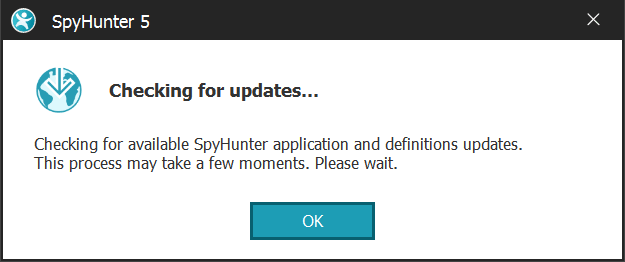
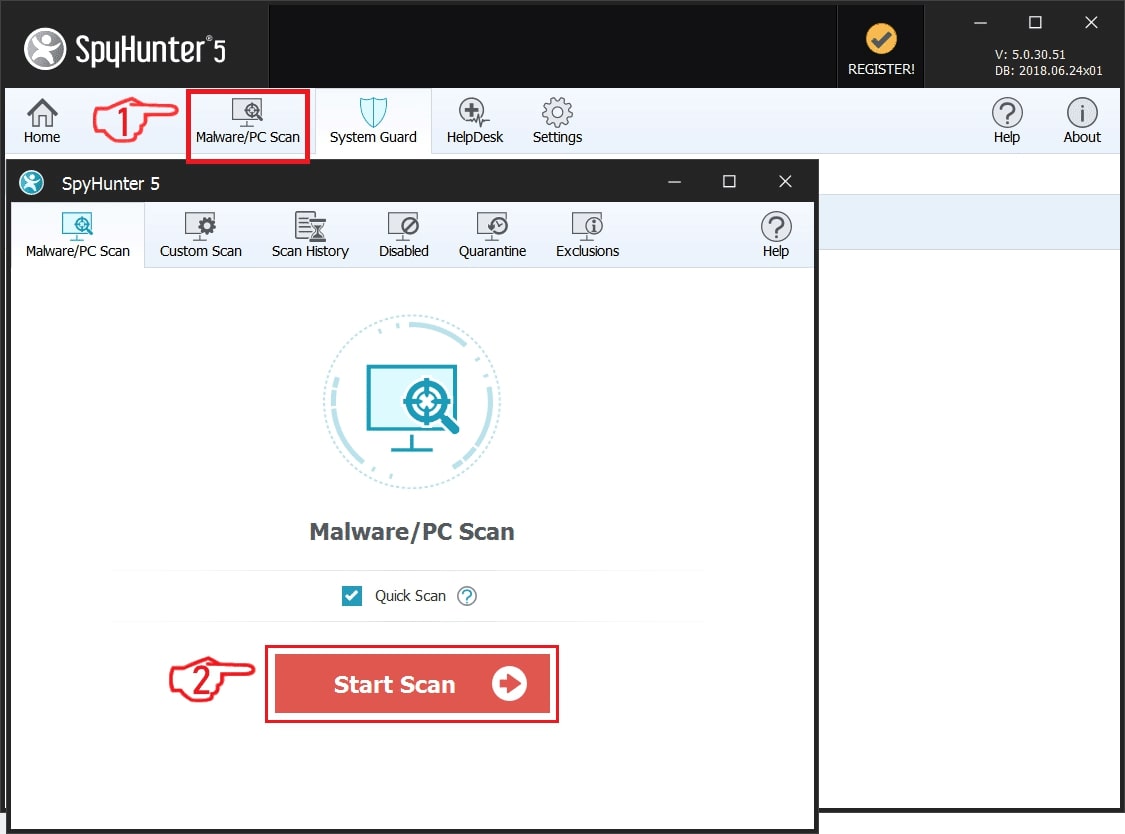
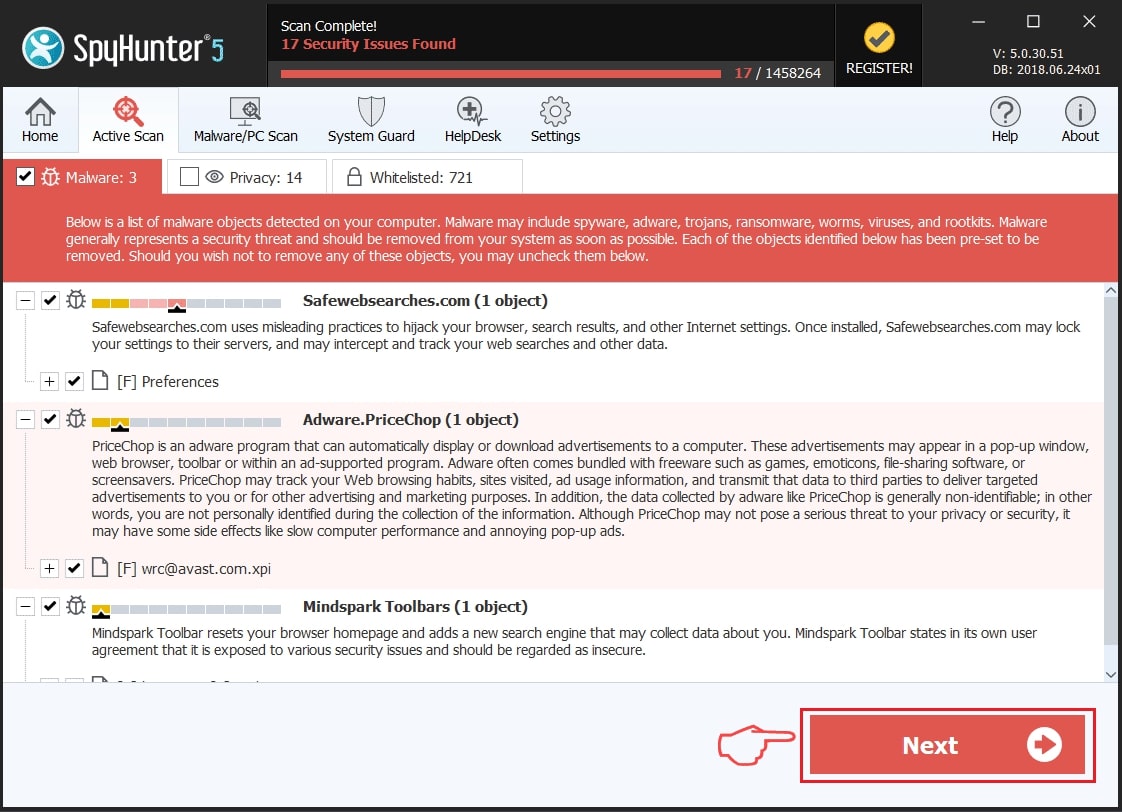
Step 2: Clean any registries, created by Shai Hulud on your computer.
The usually targeted registries of Windows machines are the following:
- HKEY_LOCAL_MACHINE\Software\Microsoft\Windows\CurrentVersion\Run
- HKEY_CURRENT_USER\Software\Microsoft\Windows\CurrentVersion\Run
- HKEY_LOCAL_MACHINE\Software\Microsoft\Windows\CurrentVersion\RunOnce
- HKEY_CURRENT_USER\Software\Microsoft\Windows\CurrentVersion\RunOnce
You can access them by opening the Windows registry editor and deleting any values, created by Shai Hulud there. This can happen by following the steps underneath:
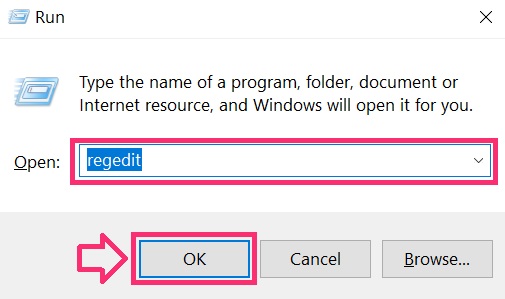
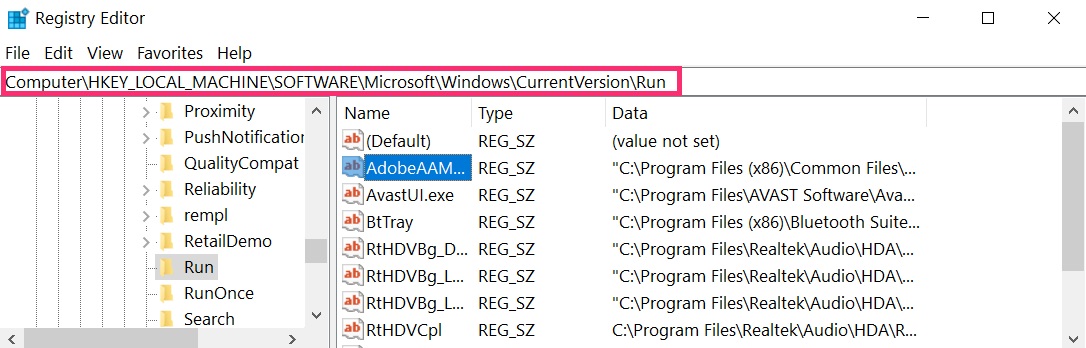
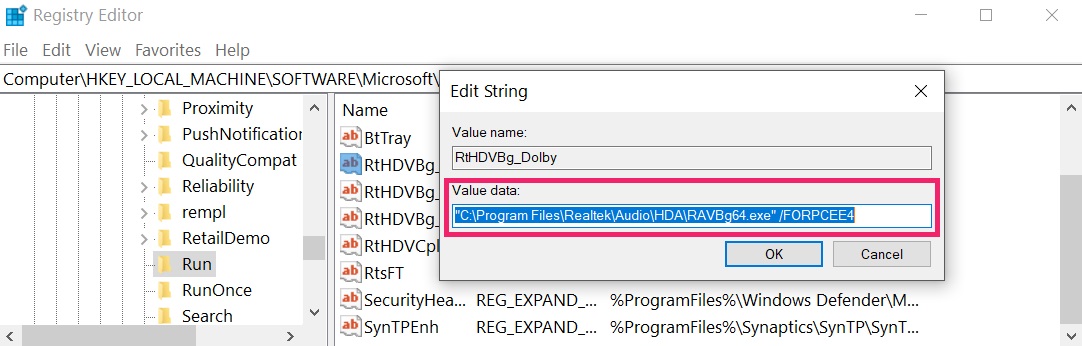 Tip: To find a virus-created value, you can right-click on it and click "Modify" to see which file it is set to run. If this is the virus file location, remove the value.
Step 3: Find virus files created by Shai Hulud on your PC.
1.For Windows 8, 8.1 and 10.
For Newer Windows Operating Systems
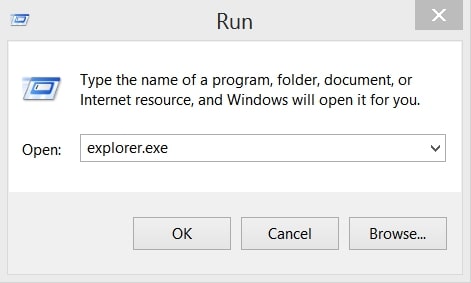
1: On your keyboard press + R and write explorer.exe in the Run text box and then click on the Ok button.
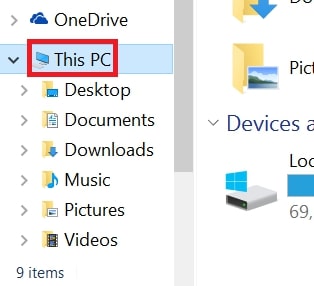
2: Click on your PC from the quick access bar. This is usually an icon with a monitor and its name is either “My Computer”, “My PC” or “This PC” or whatever you have named it.
3: Navigate to the search box in the top-right of your PC's screen and type “fileextension:” and after which type the file extension. If you are looking for malicious executables, an example may be "fileextension:exe". After doing that, leave a space and type the file name you believe the malware has created. Here is how it may appear if your file has been found:
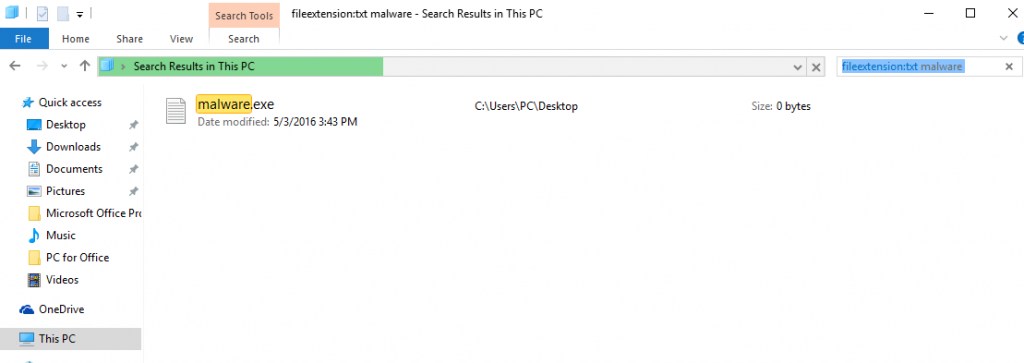
N.B. We recommend to wait for the green loading bar in the navigation box to fill up in case the PC is looking for the file and hasn't found it yet.
2.For Windows XP, Vista, and 7.
For Older Windows Operating Systems
In older Windows OS's the conventional approach should be the effective one:
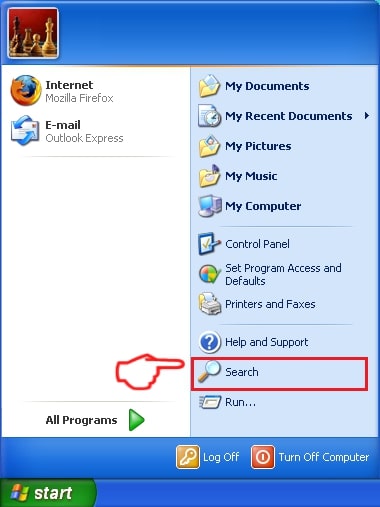
1: Click on the Start Menu icon (usually on your bottom-left) and then choose the Search preference.
2: After the search window appears, choose More Advanced Options from the search assistant box. Another way is by clicking on All Files and Folders.
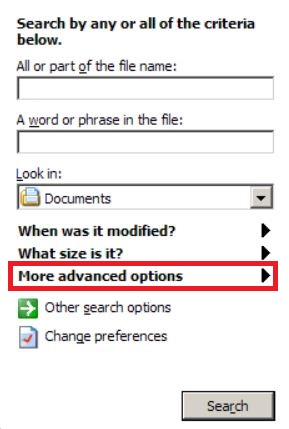
3: After that type the name of the file you are looking for and click on the Search button. This might take some time after which results will appear. If you have found the malicious file, you may copy or open its location by right-clicking on it.
Now you should be able to discover any file on Windows as long as it is on your hard drive and is not concealed via special software.
Shai Hulud FAQ
What Does Shai Hulud Trojan Do?
The Shai Hulud Trojan is a malicious computer program designed to disrupt, damage, or gain unauthorized access to a computer system. It can be used to steal sensitive data, gain control over a system, or launch other malicious activities.
Can Trojans Steal Passwords?
Yes, Trojans, like Shai Hulud, can steal passwords. These malicious programs are designed to gain access to a user's computer, spy on victims and steal sensitive information such as banking details and passwords.
Can Shai Hulud Trojan Hide Itself?
Yes, it can. A Trojan can use various techniques to mask itself, including rootkits, encryption, and obfuscation, to hide from security scanners and evade detection.
Can a Trojan be Removed by Factory Reset?
Yes, a Trojan can be removed by factory resetting your device. This is because it will restore the device to its original state, eliminating any malicious software that may have been installed. Bear in mind that there are more sophisticated Trojans that leave backdoors and reinfect even after a factory reset.
Can Shai Hulud Trojan Infect WiFi?
Yes, it is possible for a Trojan to infect WiFi networks. When a user connects to the infected network, the Trojan can spread to other connected devices and can access sensitive information on the network.
Can Trojans Be Deleted?
Yes, Trojans can be deleted. This is typically done by running a powerful anti-virus or anti-malware program that is designed to detect and remove malicious files. In some cases, manual deletion of the Trojan may also be necessary.
Can Trojans Steal Files?
Yes, Trojans can steal files if they are installed on a computer. This is done by allowing the malware author or user to gain access to the computer and then steal the files stored on it.
Which Anti-Malware Can Remove Trojans?
Anti-malware programs such as SpyHunter are capable of scanning for and removing Trojans from your computer. It is important to keep your anti-malware up to date and regularly scan your system for any malicious software.
Can Trojans Infect USB?
Yes, Trojans can infect USB devices. USB Trojans typically spread through malicious files downloaded from the internet or shared via email, allowing the hacker to gain access to a user's confidential data.
About the Shai Hulud Research
The content we publish on SensorsTechForum.com, this Shai Hulud how-to removal guide included, is the outcome of extensive research, hard work and our team’s devotion to help you remove the specific trojan problem.
How did we conduct the research on Shai Hulud?
Please note that our research is based on an independent investigation. We are in contact with independent security researchers, thanks to which we receive daily updates on the latest malware definitions, including the various types of trojans (backdoor, downloader, infostealer, ransom, etc.)
Furthermore, the research behind the Shai Hulud threat is backed with VirusTotal.
To better understand the threat posed by trojans, please refer to the following articles which provide knowledgeable details.